محصول پای ته ورسیدview
The Poly Sync 60 USB/Bluetooth smart speakerphone is designed to provide clear audio for small to medium conference rooms. It features powerful twin speakers and a six-microphone array that focuses on voices while reducing background noise. This allows for natural conversations, even when multiple participants speak simultaneously. The device offers versatile connectivity options, including USB-A, USB-C, and Bluetooth, enabling connection to PCs, Macs, and smartphones. It is powered by an AC adapter, eliminating the need for battery charging during use. For larger spaces, two units can be wirelessly paired to expand voice pickup coverage.
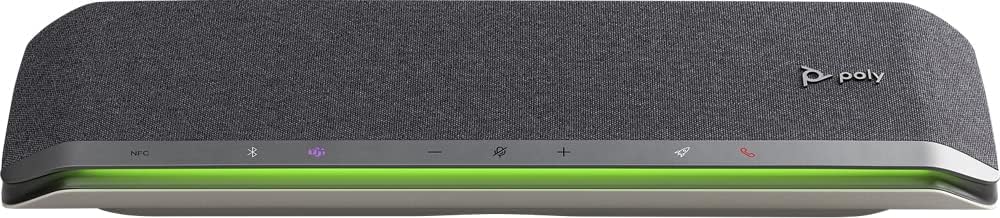
انځور: مخکینۍ برخه view of the Poly Sync 60 Smart Speakerphone, showing the speaker grille, control buttons, and an illuminated LED light bar.
د بسته محتويات
- Poly Sync 60 Speakerphone
- Main power supply with global pin adapters
- USB cable with USB-A and USB-C connectors
کلیدي ځانګړتیاوې
- پرمختللی آډیو: Six-microphone steerable array for echo and noise reduction, ensuring clear voice pickup.
- دوه ګوني سپیکرې: High-performance speakers deliver rich, clear audio for all participants.
- د AC واک: Operates continuously via AC power, eliminating battery concerns.
- د ډیزی سلسلې وړتیا: Wirelessly pair two units for extended coverage in larger meeting spaces.
- انعطاف وړ ارتباط: Connects to computers via combined USB-A/USB-C cable and to smartphones via Bluetooth.
- USB Video Camera Support: Connect a USB video camera to the speakerphone for combined audio and video with a single cable to the computer.
- د موبایل چارج کول: Two USB ports allow charging of up to two mobile phones simultaneously.
- د مایکروسافټ ټیمونو تصدیق شوی: Includes a dedicated Teams button for instant access to the Teams application.
د تنظیم کولو لارښود
1. د بریښنا پیوستون
Connect the provided main power supply to the Poly Sync 60 and plug it into a wall outlet. The device requires AC power for operation.
2. Connecting to a Computer (PC/Mac)
Use the integrated USB cable to connect the Poly Sync 60 to your computer. The cable supports both USB-A and USB-C ports. Once connected, the device should be recognized automatically by your operating system.
3. Connecting to a Smartphone (Bluetooth)
- فشار ورکړئ او ونیسئ د بلوتوث تڼۍ on the Poly Sync 60 until the LED indicator flashes blue.
- On your smartphone, navigate to the Bluetooth settings and select "Poly Sync 60" from the list of available devices.
- یوځل چې جوړه شي ، د LED شاخص به قوي نیلي شي.
4. Daisy Chain Two Units (Optional)
For expanded audio coverage, two Poly Sync 60 units can be wirelessly paired. Refer to the official Poly support documentation for detailed instructions on how to enable this feature.
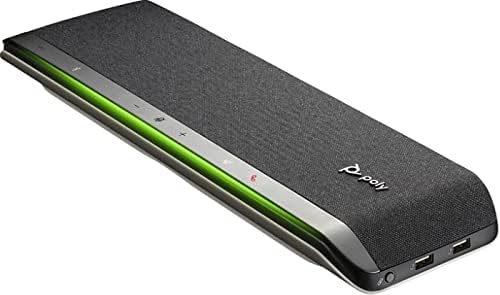
انځور: اړخ view of the Poly Sync 60 Smart Speakerphone, highlighting the USB ports for charging mobile devices and connecting a video camera.
عملیاتي لارښوونې
بنسټیز کنټرولونه
- حجم پورته / ښکته: د کارولو + او - د سپیکر حجم تنظیمولو لپاره تڼۍ.
- خاموش/غیر خاموشه: فشار ورکړئ microphone icon button to mute or unmute the microphone. The LED indicator will change color to show mute status.
- د زنګ وهلو ځواب/پای: فشار ورکړئ phone icon button زنګ وهل ځواب يا ختمول
- د مایکروسافټ ټیمونو تڼۍ: فشار ورکړئ Teams icon button to launch or interact with the Microsoft Teams application (if certified version).
د ګرځنده وسیلو چارج کول
Connect your mobile phone or other USB-powered device to one of the two USB ports on the Poly Sync 60 to charge it during a meeting.
ساتنه او پالنه
- Clean the Poly Sync 60 with a soft, dry, lint-free cloth.
- Do not use abrasive cleaners, solvents, or strong chemicals, as these may damage the device.
- د وسیلې د خورا تودوخې ، رطوبت یا مستقیم لمر وړانګو ته د افشا کولو څخه ډډه وکړئ.
- سپیکرفون په یخ او وچ ځای کې وساتئ کله چې نه کارول کیږي.
د ستونزو حل کول
- هیڅ آډیو/مایکروفون کار نه کوي:
- Ensure the device is powered on and the AC adapter is securely connected.
- Verify that the speakerphone is not muted (check the mute button LED).
- Check the volume levels on both the Poly Sync 60 and your connected computer/smartphone.
- Confirm that the Poly Sync 60 is selected as the audio input/output device in your computer's sound settings or conferencing application.
- Connection Issues (USB):
- هڅه وکړئ USB کیبل په خپل کمپیوټر کې بل پورټ ته وصل کړئ.
- خپل کمپیوټر بیا پیل کړئ.
- Connection Issues (Bluetooth):
- Ensure Bluetooth is enabled on your smartphone and the Poly Sync 60 is in pairing mode.
- وسیله د خپل سمارټ فون د بلوتوث ترتیباتو څخه جلا کړئ او بیا یې بیا جوړه کړئ.
- ډاډ ترلاسه کړئ چې نور بلوتوث وسایل مداخله نه کوي.
- Echo or Background Noise:
- Place the speakerphone centrally in the room, away from walls or highly reflective surfaces.
- Ensure the room is quiet and free from excessive background noise.
تخنیکي مشخصات
| فیچر | مشخصات |
|---|---|
| د ماډل نوم | همغږي 60 |
| د توکي ماډل شمیره | 216873-01 |
| د سپیکر ډول | ملټي میډیا |
| د ارتباط ټیکنالوژي | بلوتوث، USB |
| د بې سیمه مخابراتو ټیکنالوژي | بلوتوث |
| د بلوتوټ رینج | 3 متره |
| د بریښنا سرچینه | د بریښنا تار شوی |
| د سپیکر اعظمي تولید ځواک | 60 واټ |
| د آډیو وتلې حالت | سټیریو |
| شاوخوا د غږ چینل ترتیب کول | 2.0 |
| د کنټرول طریقه | تڼۍ فشار کړئ |
| د محصول ابعاد | ۱۶"د x ۲۶"وچ x ۴۷"ح |
| د توکي وزن | 2.2 پونډه (1000 ګرامه) |
| وړاندیز شوي استعمالونه | Office work, remote work, conference calls, personal entertainment, charging mobile devices |
| د نصب کولو ډول | د میز ټاپ غر |
| جوړونکی | پولی |
| UPC | 017229172517، 197029590572 |
د تضمین معلومات
The Poly Sync 60 Smart Speakerphone comes with a full manufacturer's warranty. For detailed information regarding warranty terms, duration, and claim procedures, please refer to the official Poly webسایټ یا د تضمین اسناد چې ستاسو د پیرود سره شامل دي.
ملاتړ
For further assistance, product updates, software downloads, or detailed guides, please visit the official Poly support website. You can also contact Poly customer service for technical support or service inquiries.
رسمي پولي Webسایټ: www.poly.com