1. پیژندنه
Thank you for choosing the Soundmaster DAB60WE DAB+/FM Radio. This manual provides essential information for the safe and efficient operation of your device. Please read it thoroughly before use and keep it for future reference.
The Soundmaster DAB60WE is a versatile portable radio featuring DAB+ and FM reception, Bluetooth connectivity for hands-free calls, an integrated rechargeable battery, and a motion detector for automatic power management. Its splash-proof design makes it suitable for various environments.
2. د خوندیتوب مهمې لارښوونې
- د اوبو مقاومت: This device is splash-proof (IPX4 rated). Do not immerse it in water or expose it to direct jets of water. Ensure the USB port cover is securely closed when not in use to maintain splash protection.
- د بیټرۍ پاملرنه: The radio contains an integrated lithium battery. Do not expose it to excessive heat, direct sunlight, or fire. Do not attempt to replace the battery yourself.
- چارج کول: Use only the provided removable 5V/1A AC adapter/charger or a compatible USB power source. Do not use damaged cables or chargers.
- ځای په ځای کول: Avoid placing the radio near heat sources, in direct sunlight, or in extremely humid or dusty environments. Ensure adequate ventilation.
- پاکول: د پاکولو دمخه بریښنا قطع کړئ. نرم او وچ ټوکر وکاروئ. مایع پاکوونکي یا ایروسول مه کاروئ.
- خدمت کول: د وسیلې د ترمیم هڅه مه کوئ. ټولې خدمتونه وړ پرسونل ته راجع کړئ.
3. د بسته محتويات
مهرباني وکړئ وګورئ چې ټول توکي په بسته بندۍ کې شتون لري:
- Soundmaster DAB60WE Radio Unit
- Removable 5V/1A AC Adapter/Charger
- د لارښود لارښود (دا سند)
4. محصول ختم شوview
Familiarize yourself with the various parts and controls of your Soundmaster DAB60WE radio.
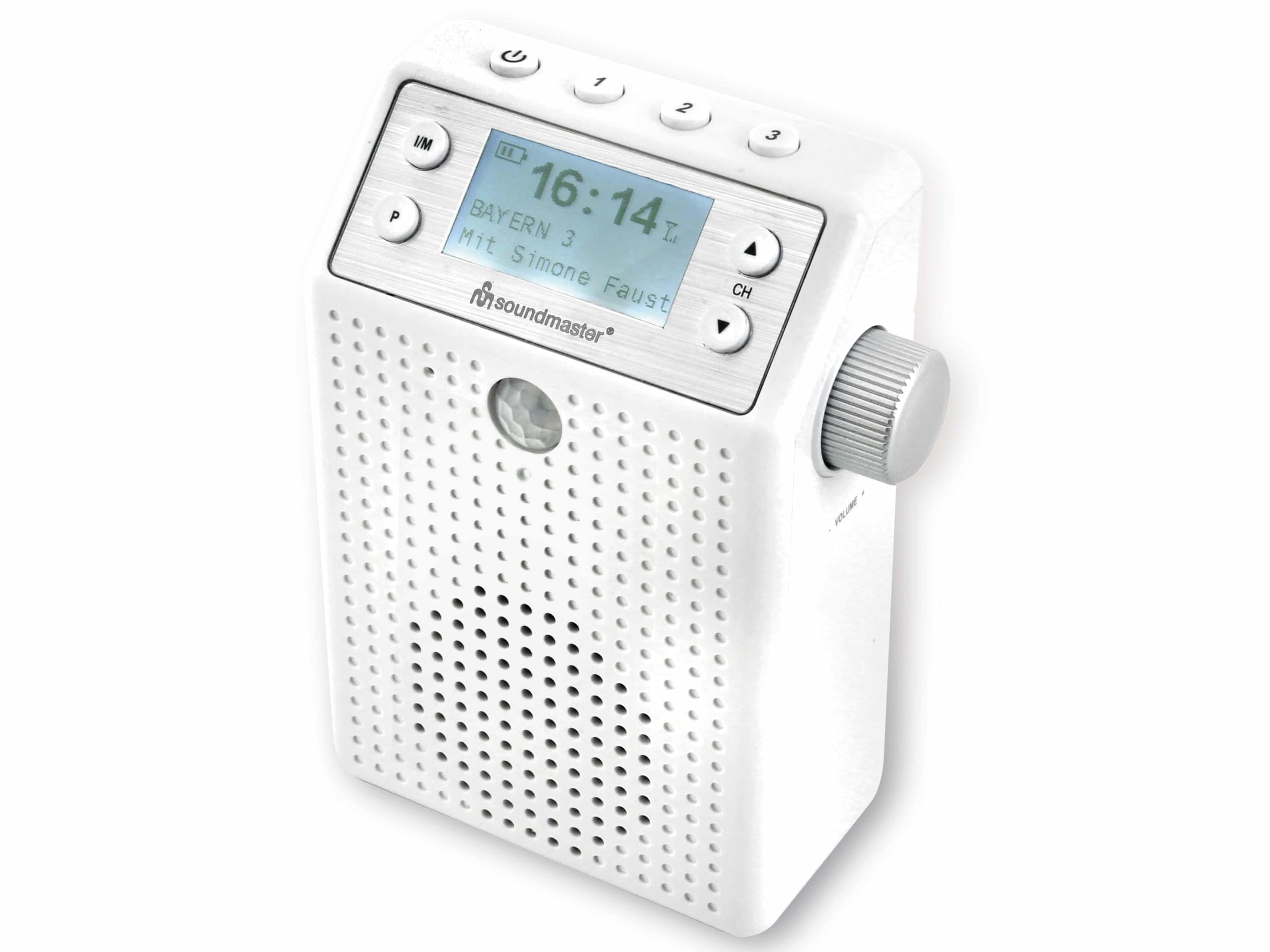
انځور 4.1: مخکی View of the DAB60WE Radio. This image displays the front of the Soundmaster DAB60WE radio, highlighting the central LCD display, control buttons (Power, FM/DAB, Presets, Channel Up/Down), the speaker grille, and the motion sensor located below the display. The volume knob is visible on the right side.
کنټرولونه او ځانګړتیاوې:
- د پاور تڼۍ (⏻): Located at the top left. Press and hold to turn the radio on or off.
- Mode Button (I/M): د DAB+ او FM راډیو حالتونو ترمنځ بدلیږي.
- Preset Buttons (1, 2, 3, P): Allows quick access to stored radio stations. 'P' button is for additional fixed memory presets.
- Channel/Navigation Buttons (▲ / ▼): Used to navigate menus or change radio stations.
- Volume Knob (CH): Located on the right side. Rotate to adjust the volume. Press to confirm selections in menu mode.
- د LCD نندارې: Shows station information, time, battery status, and menu options.
- د حرکت کشف کونکی: Located below the display, this sensor detects movement to automatically turn the radio on or off based on settings.
- Integrated USB Plug: Located on the back, this allows the radio to be directly plugged into a wall socket for power and charging.
- د USB چارج بندر: Located on the back, under a protective cover, for charging external devices like smartphones.

انځور 4.2: شاته View with Integrated Plug. This image shows the back of the Soundmaster DAB60WE radio, featuring the integrated European-style plug for direct connection to a wall outlet. The protective cover for the USB charging port is also visible at the bottom.

انځور ۵.۱: اړخ View with Volume Control. دا انځور یو اړخ وړاندې کوي view of the radio, clearly showing the rotary volume knob and the integrated plug extending from the back of the unit.
5. ابتدايي ترتیب
5.1 د بیټرۍ چارج کول
Before first use, it is recommended to fully charge the integrated lithium battery. The radio can operate for approximately 2 to 3 hours on a full charge.
- Extend the integrated plug from the back of the radio.
- Plug the radio directly into a standard wall power socket. Alternatively, use the provided 5V/1A AC adapter/charger and a USB cable (not always included, but implied by "removable adapter") to connect the radio to a power outlet.
- The battery charging indicator on the display will show the charging status. The radio can be used while charging.
- Once fully charged, the indicator will show a full battery icon.
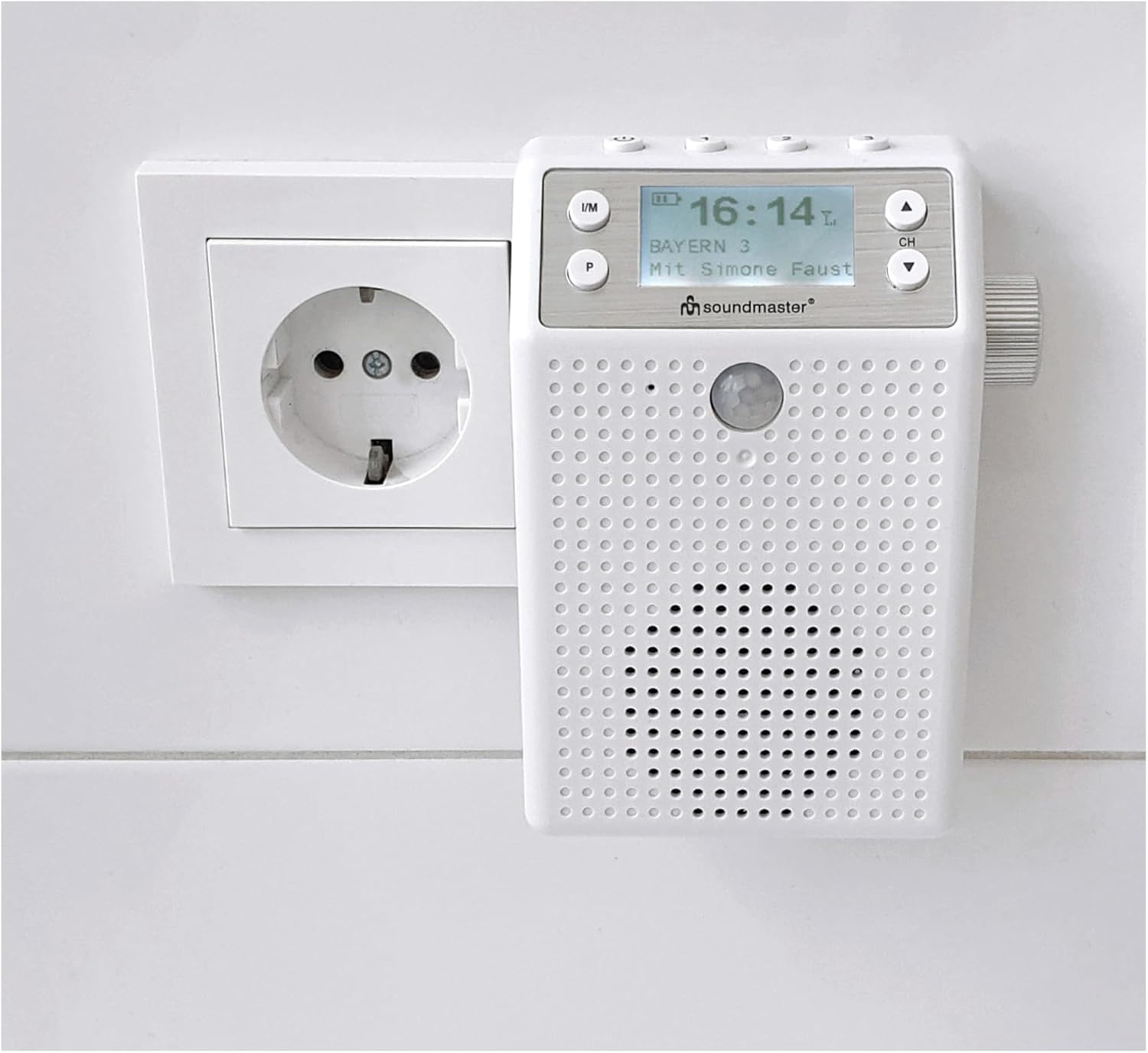
Image 5.1: Radio Plugged into Wall Socket. This image demonstrates the Soundmaster DAB60WE radio plugged directly into a wall power outlet for charging or continuous operation.
5.2 First Power On and DAB+ Scan
- Press and hold the Power button (⏻) for a few seconds to turn on the radio.
- Upon first power-on, the radio will typically initiate an automatic scan for DAB+ stations. This may take a few minutes.
- Once the scan is complete, the radio will tune to the first available DAB+ station.
۴. ستاسو د راډیو چلول
۸ پاور آن/بند
- د فعالولو لپاره: Press and hold the Power button (⏻) until the display lights up.
- بندول: Press and hold the Power button (⏻) until the display turns off.
6.2 Selecting Radio Mode (DAB+/FM)
فشار ورکړئ I/M button repeatedly to switch between DAB+ and FM radio modes.
۶.۲ د DAB+ راډیو عملیات
- Ensure the radio is in DAB+ mode (display shows "DAB+").
- د سټیشنونو لپاره سکین کول: If no stations are found or you wish to rescan, navigate to the "Scan" option in the menu (usually by pressing the CH knob or a dedicated menu button, then using ▲ / ▼ to select and CH knob to confirm).
- د سټیشنونو غوره کول: Use the ▲ / ▼ buttons to browse through available DAB+ stations. The display will show the station name.
- د زېرمو ذخیره کول: To store a station, tune to the desired station, then press and hold one of the preset buttons (1, 2, 3, or P) until the display confirms the station has been saved. To recall a preset, simply press the corresponding preset button.
د ۶.۵ ایف ایم راډیو عملیات
- Ensure the radio is in FM mode (display shows "FM").
- د سټیشنونو لپاره سکین کول: Press and hold the ▲ or ▼ button to automatically scan for the next available FM station. Short presses will fine-tune the frequency.
- د زېرمو ذخیره کول: Similar to DAB+, tune to the desired FM station, then press and hold one of the preset buttons (1, 2, 3, or P) until the display confirms the station has been saved. To recall a preset, simply press the corresponding preset button.
6.5 Bluetooth Connectivity and Hands-Free Function
The radio features Bluetooth for wireless audio streaming and hands-free calling.
- بلوتوث فعال کړئ: Switch the radio to Bluetooth mode (usually by pressing the I/M button until "Bluetooth" or a Bluetooth icon appears on the display). The radio will enter pairing mode, indicated by a flashing Bluetooth icon.
- جوړه کول: On your smartphone or tablet, go to Bluetooth settings and search for available devices. Select "Soundmaster DAB60WE" (or similar name) from the list.
- پیوستون: Once paired, the Bluetooth icon on the radio's display will become solid. You can now play audio from your device through the radio.
- د لاسونو څخه وړیا تلیفونونه: When a call comes in, the radio will pause audio playback. You can answer/end calls using the radio's controls (specific button may vary, often the CH knob or a dedicated call button).

Image 6.1: Charging External Devices. This image illustrates the Soundmaster DAB60WE radio, while plugged into a wall socket, being used to charge a smartphone via its integrated USB charging port. This highlights its dual functionality as a power source.
6.6 Motion Detector Function
The integrated motion detector can automatically turn the radio on or off, saving battery life and providing convenience.
- فعالول: Refer to the radio's menu settings to enable or disable the motion detector function.
- د تنظیم وړ ځنډ: The motion detector features an adjustable delay for automatic shutdown. This allows you to set how long the radio remains on after no motion is detected before it automatically turns off. Consult the menu for specific delay settings.
- کارول: When enabled, the radio will turn on when motion is detected and turn off after the set delay if no further motion is sensed.

Image 6.2: Splash-Proof Design in Use. This image illustrates the Soundmaster DAB60WE radio hanging from a shower head, showcasing its splash-proof capabilities and suitability for bathroom environments. The motion sensor is visible on the front.
7. پاملرنه او ساتنه
- پاکول: Always unplug the radio from the power source before cleaning. Use a soft, slightly damp cloth to wipe the exterior. Do not use abrasive cleaners, solvents, or strong detergents.
- ذخیره کول: If storing the radio for an extended period, ensure the battery is partially charged (around 50%) and store it in a cool, dry place. Recharge the battery every few months to prevent deep discharge.
- د څاڅکو څخه ساتنه: Regularly check that the USB port cover on the back is clean and securely closed to maintain the device's splash-proof rating.
8. ستونزه حل کول
If you encounter issues with your Soundmaster DAB60WE radio, please consult the following table before seeking professional service.
| ستونزه | احتمالي لامل | د حل لاره |
|---|---|---|
| راډیو نه چالانېږي. | بیټرۍ ختمه شوې. د بریښنا تڼۍ په سمه توګه نه ده فشار شوې. | Connect the radio to a power source and charge the battery. د څو ثانیو لپاره د بریښنا تڼۍ فشار او ونیسئ. |
| د DAB+ یا FM خراب استقبال. | ستاسو په ځای کې کمزوری سیګنال. د نورو برقیاتو څخه مداخله. Radio placed in a shielded area (e.g., inside a cabinet, certain bathrooms). | راډیو داسې سیمې ته انتقال کړئ چې ښه سیګنال ولري. راډیو له نورو برېښنايي وسایلو څخه لرې کړئ. Perform a full station scan in DAB+ mode. |
| د بلوتوث وسیله نشي جوړه کیدی. | Radio not in Bluetooth pairing mode. وسیله ډېره لرې ده. د سرچینې وسیلې بلوتوټ بند دی. | Ensure the radio is in Bluetooth mode and the icon is flashing. Move the source device closer to the radio (within 10 meters). په خپل سمارټ فون/ټابلیټ کې بلوتوث فعال کړئ. |
| د بیټرۍ لنډ ژوند. | بیټرۍ په بشپړه توګه چارج شوې نه ده. د لوړ حجم کارول. د وخت په تیریدو سره د بیټرۍ تخریب. | ډاډ ترلاسه کړئ چې بیټرۍ د کارولو دمخه په بشپړ ډول چارج شوې ده. Reduce volume to extend battery life. Battery life naturally decreases over many charge cycles. |
| د حرکت کشف کونکی کار نه کوي. | Motion detector is disabled in settings. Obstruction in front of the sensor. | Check the radio's menu settings to ensure the motion detector is enabled. Ensure the sensor area is clear. |
9. تخنیکي مشخصات
- نښه: د غږ ماسټر
- د ماډل شمیره: DAB60WE
- رنګ: سپین
- د ارتباط ټیکنالوژي: بلوتوث
- ځانګړي ځانګړتیاوې: Rechargeable, Motion Detector with adjustable delay, Hands-free function
- مطابقت لرونکي وسایل: سمارټ فون، ټابلیټ
- ابعاد (L x W x H): 8.5 cm x 4 cm x 12.2 cm
- د ټون کولو ټیکنالوژي: DAB+, FM (RDS)
- ملاتړ شوي راډیوګانې: DAB+، FM
- د بریښنا سرچینه: Rechargeable Lithium Battery (1200 mAh) / AC Power
- د بیټرۍ ژوند: Approximately 2-3 hours (mobile operation)
- د تولید ځواک: 1 x 3 W RMS
- د څاڅکو څخه ساتنه: هو (IPX4 درجه بندي)
10. تضمین او ملاتړ
د پرزو شتون: د دې محصول اضافي پرزې د پیرود نیټې څخه د 1 کال لپاره شتون لري.
For technical support, warranty claims, or further assistance, please contact your retailer or the Soundmaster customer service department. Please have your model number (DAB60WE) and proof of purchase ready.


