پیژندنه
This manual provides comprehensive instructions for the safe and efficient use of your Tronsmart Apollo Air TWS Bluetooth Earphones. Please read this manual thoroughly before using the product and retain it for future reference.
د خوندیتوب معلومات:
- Do not expose the earphones or charging case to extreme temperatures, humidity, or corrosive environments.
- د وسیلې له غورځولو، ټکولو یا جلا کولو څخه ډډه وکړئ.
- د ماشومانو او څارویو څخه لرې وساتئ.
- یوازې چمتو شوي یا تصدیق شوي چارجینګ کیبلونه وکاروئ.
- Prolonged exposure to high volume levels may cause hearing damage.
محصول پای ته ورسیدview
د بسته محتويات
- Tronsmart Apollo Air TWS Bluetooth Earphones (Left and Right)
- د چارج کولو قضیه
- د USB چارج کیبل
- د غوږ لارښوونې (مختلف اندازې)
- د کارونکي لارښود (دا لاسوند)
د اجزاوو پیژندنه
Familiarize yourself with the main components of your Tronsmart Apollo Air earphones and charging case.
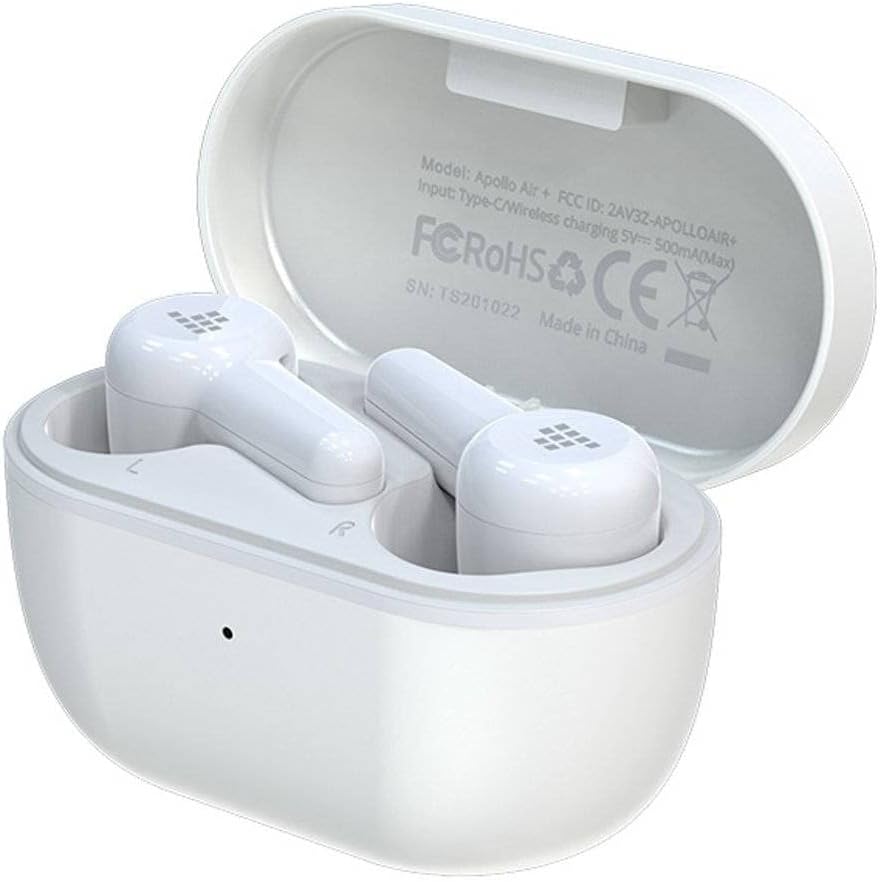
Image: Tronsmart Apollo Air TWS Earphones placed inside their open charging case. The case lid displays model information and certifications.

Image: Tronsmart Apollo Air TWS Earphones. One earbud is shown outside the charging case, highlighting its design and the charging contacts within the case.

انځور: نږدې انځور view of the two Tronsmart Apollo Air TWS Earbuds, showcasing their ergonomic shape, ear tips, and touch control areas.
چمتو کول
د اییرفون او کیس چارج کول
- د قضیې چارج کول: Connect the provided USB charging cable to the charging port on the case and to a USB power adapter (not included) or a computer's USB port. The indicator light on the case will show charging status.
- د غوږونو چارجول: Place the earphones into the charging case. Ensure they are correctly seated in their respective slots (L for left, R for right). The earphones will automatically begin charging. The indicator lights on the earphones will show charging status.
- Fully charge the earphones and case before first use.
د بلوتوث جوړې کول
- لومړنۍ جوړه: Open the charging case. The earphones will automatically enter pairing mode, indicated by flashing lights (refer to product for specific light patterns).
- په خپل وسیله (سمارټ فون، ټابلیټ، او نور) کې، بلوتوټ فعال کړئ او د شته وسایلو لټون وکړئ.
- Select "Tronsmart Apollo Air" from the list of found devices.
- یوځل چې وصل شي، د غږ پرامپټ یا شاخص څراغ به د بریالي جوړه کولو تصدیق وکړي.
- بیا جوړه کول: If the earphones do not connect automatically, ensure Bluetooth is enabled on your device and the earphones are charged. You may need to manually select "Tronsmart Apollo Air" from your device's Bluetooth menu.
Operating the Earphones
پاور آن/بند
- پاور آن: د چارج کولو کیس خلاص کړئ، یا د اییرفونونه له کیس څخه وباسئ. دوی به په اتوماتيک ډول چالان شي.
- بندول: اییرفونونه بیرته د چارج کولو په قضیه کې کیږدئ او پوښ یې وتړئ. دوی به په اتوماتيک ډول بریښنا بنده کړي.
- لاسي بریښنا بند: (If supported) Long press the touch control area on both earbuds for approximately 5 seconds until the indicator light turns off.
Touch Controls (General)
The Tronsmart Apollo Air earphones feature touch-sensitive controls. Specific functions may vary slightly, but common operations include:
- پلی کول / ودرول: په دواړو غوږونو کې یو ځل کلیک وکړئ.
- بله لار: په ښي غوږۍ کې دوه ځله ټایپ کړئ.
- مخکینی لار په چپ غوږۍ کې دوه ځله ټایپ کړئ.
- ځواب / پای کال: په دواړو غوږونو کې یو ځل کلیک وکړئ.
- زنګ رد کړئ: په دواړو غوږونو کې د ۲ ثانیو لپاره اوږد فشار ورکړئ.
- د غږ همکار فعاله کړئ: په دواړو غوږونو درې ځله ټایپ کړئ.
- د حجم کنټرول: (If supported) Long press on the right earbud to increase volume, long press on the left earbud to decrease volume.
Note: Refer to the quick start guide included in your package for precise touch control mappings if different from above.

Image: A smartphone screen showing an equalizer application with various sound presets (e.g., Default, Deep Bass, Hi-Fi, Rock, Vocal). The Tronsmart Apollo Air earphones and charging case are visible in the background, suggesting compatibility with audio customization apps.
ساتنه
پاکول
- په نرمۍ سره د غوږونو او چارج کولو کیس د نرم، وچ، لینټ پاک ټوکر سره پاک کړئ.
- د کثافاتو پاکوونکي، الکول، یا کیمیاوي محلولونه مه کاروئ.
- د غوږونو څوکې لرې کړئ او که اړتیا وي نو په نرم صابون او اوبو سره یې په جلا توګه پاک کړئ، ډاډ ترلاسه کړئ چې د بیا نښلولو دمخه په بشپړه توګه وچ دي.
- Ensure charging contacts on both the earphones and case are clean and free of debris.
ذخیره کول
- کله چې په کارولو کې نه وي، تل د غوږونو غوږۍ د چارج کولو په قضیه کې وساتئ ترڅو دوی خوندي او چارج شي.
- وسیله په یخ او وچ ځای کې وساتئ، د مستقیم لمر وړانګو او سختې تودوخې څخه لرې.
د ستونزو حل کول
If you encounter issues with your Tronsmart Apollo Air earphones, please refer to the following common solutions:
Earphones not pairing or connecting
- Ensure both earphones are charged and taken out of the charging case.
- په خپل وسیله کې بلوتوث بند او فعال کړئ.
- Delete "Tronsmart Apollo Air" from your device's Bluetooth list and attempt to re-pair.
- Try resetting the earphones (refer to product-specific reset instructions if available, otherwise, place them back in the case, close, then reopen).
نه غږ یا ټیټ حجم
- په خپل وصل شوي وسیله او اییرفون دواړو کې د حجم کچه وګورئ.
- ډاډ ترلاسه کړئ چې اییرفونونه ستاسو په غوږونو کې په سمه توګه ځای پر ځای شوي دي.
- Confirm the earphones are connected to the correct audio output on your device.
- د غوږۍ د سپیکرو ګریلونو څخه هر ډول کثافات پاک کړئ.
د چارج کولو مسلې
- ډاډ ترلاسه کړئ چې د چارج کولو کیبل په خوندي ډول د قضیې او بریښنا سرچینې دواړو سره وصل دی.
- ډاډ ترلاسه کړئ چې د بریښنا سرچینه فعاله ده.
- د اییرفونونو او د قضیې دننه د چارج کولو تماسونه پاک کړئ.
- د USB چارج کولو بل کیبل یا د بریښنا اډاپټر هڅه وکړئ.
مشخصات
| فیچر | تفصیل |
|---|---|
| برانډ | ټرانسمارټ |
| د ماډل نوم | اپولو هوا |
| د توکي ماډل شمیره | 372452 |
| ارتباط | بلوتوث، بېسیم |
| رنګ | سپین |
| د فارم فکتور | In-Ear, Basic Case |
| مواد | ربړ |
| د توکي وزن | 100 ګرامه |
| د محصول ابعاد | 10 x 5 x 3 سانتي متره |
| د اوبو د مقاومت کچه | د اوبو مقاومت نلري |
| د مناسب تلیفون ماډلونه | Please check description (Generally compatible with most Bluetooth-enabled devices) |

Image: Technical diagram illustrating the precise dimensions of the Tronsmart Apollo Air charging case and individual earbuds in millimeters and inches.
تضمین او ملاتړ
Tronsmart products are designed and manufactured to the highest quality standards. For detailed warranty information, please refer to the warranty card included with your purchase or visit the official Tronsmart webسایټ
For technical support, troubleshooting assistance, or to inquire about replacement parts, please contact Tronsmart customer service through their official channels. Contact information can typically be found on the product packaging or the official Tronsmart webسایټ


