1. پیژندنه
This manual provides instructions for the installation, operation, and troubleshooting of your ARRIS Touchstone TM804G DOCSIS 3.0 Telephone Modem. The TM804G is designed to provide high-speed data access and up to four lines of Voice over IP (VoIP) telephone service over your cable network. It features DOCSIS 3.0 technology for enhanced internet speeds and reliability.
2. کلیدي ځانګړتیاوې
- DOCSIS 3.0 compliant for high-speed internet.
- Four (4) dedicated VoIP telephone ports.
- Supports download speeds up to 343 Mbps.
- Two independent 96MHz RF tuners.
- Ethernet connectivity for network devices.
3. د بسته محتويات
ډاډ ترلاسه کړئ چې ستاسو کڅوړه لاندې توکي لري:
- ARRIS Touchstone TM804G Telephone Modem
- د بریښنا اډاپټر
- ایترنیټ کیبل
- اسناد (د چټک پیل لارښود، د خوندیتوب معلومات)
Note: A backup battery is sold separately and is not included in the standard package.
۲.۲. فزیکي ځانګړتیاوې
4.1 د مخکینۍ پینل شاخصونه
The front panel of the TM804G modem features several LED indicators that provide status information.

شکل 1: مخکی view of the ARRIS Touchstone TM804G Telephone Modem. This image shows the modem's black casing with ventilation holes on top and a row of green LED indicator lights on the right side of the front panel.
| شاخص | حالت | تفصیل |
|---|---|---|
| پاور | جامد شنه | موډیم چلیږي. |
| DS (ښکته) | جامد شنه | د ښکته جریان چینل وصل دی. |
| امریکا (پورته) | جامد شنه | د اپ سټریم چینل وصل دی. |
| آنلاین | جامد شنه | The modem is registered and online. |
| LINK | جامد شنه | An Ethernet device is connected. |
| TEL1-4 | جامد شنه | د ټیلیفون لاین فعال دی. |
۳.۲ د شا پینل بندرونه
The rear panel provides all necessary connection ports for the modem.
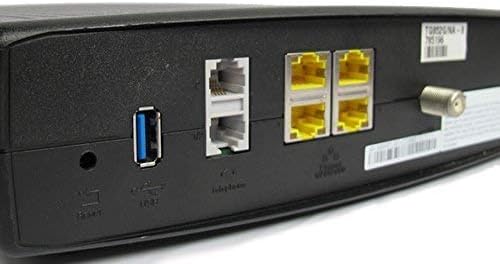
شکل 2: شاته view of the ARRIS Touchstone TM804G Telephone Modem. This image displays the back of the modem, featuring a coaxial cable connector, four yellow Ethernet ports, two grey telephone ports (RJ-11), a USB port, a reset button, and the power input.
- محوري: د کیبل دیوال آوټ لیټ سره وصل کیږي.
- ETHERNET (LAN): Four (4) RJ-45 ports for connecting to a computer or router.
- TEL1-4 (RJ-11): Four (4) telephone ports for connecting to telephones or a home telephone wiring system.
- USB: (Functionality may vary or be disabled by your service provider).
- بیا تنظیم کړئ: Recessed button to reset the modem to factory defaults (use with caution).
- ځواک: د بریښنا اډاپټر سره نښلوي.
5. ترتیب او نصب کول
Follow these steps to install your ARRIS Touchstone TM804G modem.
- کواکسیل کیبل سره وصل کړئ: Connect one end of a coaxial cable to the COAXIAL port on the modem and the other end to a cable wall outlet. Ensure the connection is finger-tight.
- د ایترنیټ کیبل سره وصل کړئ: Connect one end of the Ethernet cable to one of the ETHERNET ports on the modem and the other end to your computer's network port or your wireless router's WAN/Internet port.
- Connect Telephone Lines: If using telephone service, connect your telephone(s) or home telephone wiring to the TEL1, TEL2, TEL3, or TEL4 ports on the modem using standard RJ-11 telephone cables.
- د بریښنا اډاپټر سره وصل کړئ: د بریښنا اډاپټر په موډیم کې د بریښنا پورټ سره وصل کړئ او بیا اډاپټر په بریښنایی آوټ لیټ کې ولګوئ.
- پاور آن: The modem will automatically power on. Observe the front panel indicator lights. The POWER, DS, US, and ONLINE lights should eventually turn solid green, indicating a successful connection to the cable network and internet. The TEL lights will illuminate when telephone lines are active.
- خدمت فعال کړئ: Contact your Internet Service Provider (ISP) to activate the modem. You will need to provide them with the MAC address and serial number, typically found on a label on the bottom or back of the modem.
Important: Do not connect the modem to a power outlet until all other connections are made.
6. عملیاتي لارښوونې
Once the modem is successfully installed and activated, it operates automatically.
- انټرنیټ لاسرسی: Any device connected via Ethernet to the modem (or through a connected router) should have internet access once the ONLINE light is solid green.
- د تلیفون خدمت: If your service plan includes VoIP, connected telephones will have dial tone and function once the corresponding TEL lights are solid green.
- د څارنې حالت: Refer to the front panel LED indicators (Section 4.1) to monitor the modem's operational status.
7. ساتنه
- پاکول: Keep the modem clean and free of dust. Use a soft, dry cloth to wipe the exterior. Do not use liquid cleaners or aerosols.
- وینټیلیشن: ډاډ ترلاسه کړئ چې موډیم په ښه هوا لرونکي ځای کې ځای پر ځای شوی ترڅو د ډیر تودوخې مخه ونیول شي. د هوا د تودوخې سوري مه بندوئ.
- د فرم ویئر تازه معلومات: د فرم ویئر تازه معلومات معمولا ستاسو د انټرنیټ خدماتو چمتو کونکي لخوا په اتوماتيک ډول اداره کیږي. هڅه مه کوئ چې فرم ویئر په لاسي ډول تازه کړئ پرته لدې چې ستاسو د ISP لخوا لارښوونه وشي.
- Restarting the Modem: If you experience connectivity issues, try restarting the modem by unplugging the power adapter for 10-15 seconds and then plugging it back in.
- د فابریکې رییس: The recessed RESET button on the rear panel can be used to restore factory default settings. This should only be done if instructed by your ISP, as it will erase all custom configurations. To perform a factory reset, use a paperclip to press and hold the RESET button for at least 10 seconds.
8. ستونزه حل کول
If you encounter problems with your modem, refer to the following common issues and solutions.
| ستونزه | احتمالي لامل | د حل لاره |
|---|---|---|
| هیڅ ځواک نشته | د بریښنا اډاپټر وصل شوی نه دی یا خراب آوټ لیټ دی. | Ensure power adapter is securely connected to the modem and a working electrical outlet. Check the POWER LED. |
| انټرنیټ ته لاسرسی نشته | Coaxial cable loose, modem not activated, or ISP outage. |
|
| No Dial Tone on Phone | Telephone cable loose, TEL light off, or service issue. |
|
| د انټرنیټ سرعت ورو | د شبکې ګڼه ګوڼه، زوړ روټر، یا د ISP ستونزه. |
|
For further assistance, contact your Internet Service Provider's technical support.
9. مشخصات
| د ماډل شمیره | TM804G |
| د DOCSIS معیار | DOCSIS 3.0 |
| Internet Download Speed | تر ۳۴۳ Mbps پورې (ISP پورې اړه لري) |
| د VoIP بندرونه | 4 (RJ-11) |
| ایترنیټ بندرونه | 4 (RJ-45) |
| د ارتباط ټیکنالوژي | ایترنیټ |
| ابعاد (L x W x H) | نږدې 11.81 x 9.13 x 2.56 انچه |
| وزن | تقریبا 2.16 پونډه |
| مطابقت لرونکي ISPs | Optimum, Mediacom (and others, check with your provider) |
10. تضمین او ملاتړ
دا محصول د ایمیزون نوي شوي توکي په توګه وړاندې کیږي. د ایمیزون نوي شوي محصولات په مسلکي توګه معاینه شوي او ازمول شوي ترڅو کار وکړي او د نوي په څیر ښکاري. دوی د ایمیزون نوي شوي تضمین لاندې د بدیل یا بیرته ورکولو وړ دي که تاسو له خپلې پیرود څخه راضي نه یاست.
For technical support, troubleshooting, or service-related inquiries, please contact your Internet Service Provider (ISP) directly. Your ISP is responsible for the activation, configuration, and ongoing support of the modem on their network.


