1. پیژندنه
This manual provides essential information for the safe and efficient operation of your GIGABYTE AORUS FO48U 48" 4K OLED Gaming Monitor. Please read this manual thoroughly before using the product and retain it for future reference. The AORUS FO48U is designed to deliver a high-performance visual experience with its 4K OLED display, fast refresh rate, and advanced features.
2. د خوندیتوب معلومات
د مانیټر د زیان مخنیوي او د کارونکي خوندیتوب ډاډمن کولو لپاره لاندې خوندیتوب احتیاطي تدابیر په پام کې ونیسئ:
- د اور یا شاک خطرونو څخه د مخنیوي لپاره مانیټر باران یا رطوبت ته مه ښکاره کوئ.
- مانیټر مه خلاصوئ casinج. دننه د کارونکي لپاره د خدمت وړ برخې نشته. ټولې خدمتونه وړ پرسونل ته راجع کړئ.
- مانیټر په یوه مستحکم او فلیټ سطحه کېږدئ ترڅو د رالویدو مخه یې ونیول شي.
- د مانیټر شاوخوا مناسب هوا ورکول ډاډمن کړئ. د هوا د بهیدو لارې مه بندوئ.
- یوازې د بریښنا اډاپټر او کیبلونو څخه کار واخلئ چې د جوړونکي لخوا چمتو شوي یا مشخص شوي دي.
- د بریښنا د طوفانونو په وخت کې یا کله چې د اوږدې مودې لپاره نه کارول کیږي، مانیټر د بریښنا له ساکټ څخه خلاص کړئ.
- د زیان مخه نیولو لپاره د تیزو شیانو سره سکرین ته لمس کولو څخه ډډه وکړئ.
3. د بسته محتويات
ډاډ ترلاسه کړئ چې لاندې ټول توکي ستاسو په بسته کې شامل دي:
- GIGABYTE AORUS FO48U 48" 4K OLED Gaming Monitor
- د بریښنا کیبل
- HDMI 2.1 کیبل
- DP 1.4 کیبل
- USB 3.0 B to A cable
- د چټک پیل لارښود (QSG)
- د تضمین کارت
- AORUS Remote Control
4. ترتیب کول
۵.۱ فزیکي ترتیب
The monitor can be set up using its included stand or a VESA-compatible wall mount.
ولسي جرګه:
Follow the instructions in the Quick Start Guide to securely attach the stand to the monitor base. Ensure all screws are tightened.
د VESA دیوال ماونټ نصب کول:
The AORUS FO48U supports VESA wall mounts with a 300 x 300mm pattern. Remove the stand if already attached. Use appropriate screws and a VESA-compatible bracket (not included) to mount the monitor. Refer to your wall mount's instructions for specific installation steps.

انځور: شاته view of the AORUS FO48U monitor, highlighting the VESA 300x300mm mounting points for wall installation.
4.2 د کیبلونو نښلول
Connect the necessary cables to the monitor's I/O ports. Ensure the monitor is powered off before connecting or disconnecting cables.

انځور: تفصيلي اړخ view of the monitor's I/O ports, including USB 3.0, USB Upstream, USB Type-C (KVM), DisplayPort 1.4, HDMI 2.1, Headphone Jack, and Audio Line-Out.
- د بریښنا پیوستون: د بریښنا کیبل د مانیټر د بریښنا ان پټ سره وصل کړئ او بیا د بریښنا آوټ لیټ سره.
- د ویډیو انټرنېټ Connect your PC or gaming console using either the provided HDMI 2.1 cable or DisplayPort 1.4 cable. The monitor features two HDMI 2.1 ports and one DisplayPort 1.4.
- د USB اتصال: Connect the USB 3.0 B to A cable from your PC to the monitor's USB Upstream port to enable the monitor's USB 3.0 ports and KVM functionality.
- USB Type-C (KVM): For KVM functionality, connect a USB Type-C cable (10Gbps Type-C cable required, not always included) from your device to the monitor's USB Type-C port. This allows control of multiple devices with a single keyboard and mouse connected to the monitor.
- آډیو تولید: Use the Headphone Jack or Audio Line-Out for external audio devices.
4.3 ابتدايي پاور آن
After connecting all necessary cables, press the power button on the monitor to turn it on. The monitor will automatically detect the active input source. If no signal is detected, ensure your source device is powered on and correctly connected.
5. عملیاتي لارښوونې
۴.۱ د پردې پرده ښودنه (OSD) نیویګیشن
The monitor's settings can be adjusted using the OSD menu, typically accessed via a joystick or buttons on the monitor's rear or bottom edge, or with the included AORUS Remote Control.
- Use the joystick/buttons or remote to navigate through menu options.
- Press to select an option or enter a sub-menu.
- Move left/right or up/down to adjust values or select different settings.
- Press the back button or move the joystick in a specific direction (as indicated on-screen) to exit menus.
5.2 کلیدي ځانګړتیاوې
The AORUS FO48U offers several features for an enhanced viewد لوبې کولو او لوبې کولو تجربه:
- د ۴K UHD ریزولوشن (۳۸۴۰x۲۱۶۰): Provides crisp, detailed visuals.
- 120Hz ریفریش نرخ: Ensures smooth motion for gaming and fast-paced content.
- 1ms (GTG) Response Time: د غوسټینګ او حرکت بلر کموي.
- FreeSync Premium Support: Synchronizes the monitor's refresh rate with your GPU for tear-free gaming.
- 10-bit Color / 98% DCI-P3 / 130% sRGB: Delivers accurate and vibrant color reproduction.

Image: Visual comparison demonstrating the difference between 1ms response time at 120Hz refresh rate and 5ms response time at 60Hz, illustrating smoother motion with higher specifications.
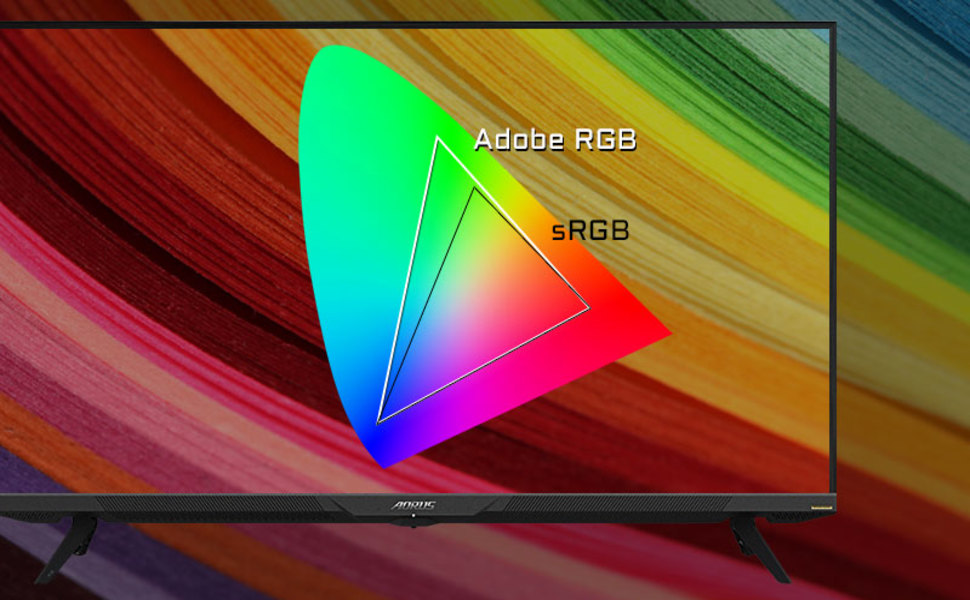
Image: A visual representation of color gamut, comparing Adobe RGB and sRGB color spaces, indicating the monitor's wide color coverage.
5.3 ځانګړي ځانګړتیاوې
The monitor includes several advanced features accessible via the OSD or OSD Sidekick software:
- د OSD ملګری: A software utility that allows you to control OSD settings directly from your desktop.
- په انځور کې انځور (PiP) / په انځور کې انځور (PbP): Display content from multiple sources simultaneously on the screen.
- ډشبورډ: Real-time hardware information display (e.g., CPU/GPU temperature, fan speed).
- تور برابرونکی: Enhances visibility in dark areas without overexposing bright areas.
- د لوبې مرسته: Provides in-game enhancements like crosshairs, timers, and refresh rate counters.
- Space Audio: Offers 5 modes of audio experiences for immersive sound.
- KVM Feature: Allows you to control multiple devices (e.g., two PCs) connected to the monitor using a single keyboard and mouse. Connect devices via USB Type-C and USB 3.0 Upstream ports.

Image: A diagram showing how the Type-C KVM feature allows switching between a desktop PC and a laptop connected to the monitor using one keyboard and mouse.
6. ساتنه
6.1 د مانیټر پاکول
To clean the monitor, first unplug the power cord. Use a soft, lint-free cloth lightly dampened with water or a mild, non-abrasive screen cleaner. Do not spray cleaner directly onto the screen. Avoid using alcohol, ammonia, or abrasive cleaners, as they can damage the screen surface.
۴.۳ د OLED پاملرنه او د سوځېدو مخنیوی
OLED displays are susceptible to image retention (burn-in) if static images are displayed for extended periods. To prolong the life of your OLED panel:
- Avoid displaying static images (e.g., desktop icons, taskbars, logos) for long durations.
- Utilize screen savers or dynamic wallpapers.
- Enable the monitor's built-in OLED care features (e.g., pixel shift, pixel refresh, logo luminance adjustment) through the OSD menu.
- کله چې اړتیا نه وي د سکرین روښانتیا کمه کړئ.
- Power off the monitor when not in use.
7. ستونزه حل کول
که تاسو د خپل مانیټر سره ستونزې سره مخ شئ، لاندې عامې ستونزې او حل لارې وګورئ:
| ستونزه | احتمالي لامل | د حل لاره |
|---|---|---|
| په پرده هیڅ عکس نشته | Power cable disconnected; Video cable disconnected or loose; Incorrect input source selected; Source device off. | Check power and video cable connections; Ensure source device is on; Select correct input source via OSD. |
| انځور تیاره یا تحریف شوی دی | Incorrect resolution; Video cable quality; Graphics card driver issues. | Set display resolution to 3840x2160; Use high-quality HDMI 2.1 or DP 1.4 cables; Update graphics drivers. |
| Screen randomly turns off/on | Loose video cable; Power supply issue; Monitor firmware issue; Source device instability. | Ensure video cables are securely connected; Try a different power outlet; Check for and install the latest monitor firmware updates from GIGABYTE's website; Test with a different source device. |
| غږ نشته | Volume too low or muted; Incorrect audio output selected; Audio cable disconnected. | Adjust monitor volume; Select correct audio output in PC settings; Ensure external speakers/headphones are connected. |
| KVM feature not working | Incorrect USB cable; USB Upstream cable not connected; Devices not properly configured. | Ensure a 10Gbps USB Type-C cable is used for Type-C connection; Connect the USB 3.0 B to A cable to your primary PC; Refer to the OSD Sidekick software for KVM setup. |
8. مشخصات
Key technical specifications for the GIGABYTE AORUS FO48U monitor:
| فیچر | تفصیل |
|---|---|
| د سکرین اندازه | ۷۸۷ انچه |
| د پینل ډول | OLED |
| قرارداد | 3840 x 2160 (4K UHD) |
| د تازه کولو نرخ | 120Hz |
| د غبرګون وخت | 1ms (GTG) |
| رنګ Gamut | 98٪ DCI-P3 / 130٪ sRGB |
| د رنګ ژوروالی | 10-بټ |
| Viewزاویه | 178°(H)/178°(V) |
| ارتباط | 2x HDMI 2.1, 1x DisplayPort 1.4, 1x USB Type-C (KVM), 2x USB 3.0, 1x USB 3.0 Upstream, Earphone Jack, Audio Line-Out |
| ويناوالو | 2x 15W, 1x 20W (Space Audio) |
| VESA ماونټ | 300 x 300mm |
| ابعاد (WxHxD) | ۳۲.۴ x ۶.۳ x ۱۶.۳ انچه (د سټینډ سره) |
| وزن | ۱۶.۵ پونډه (د سټینډ سره) |
9. تضمین او ملاتړ
For detailed warranty information, please refer to the warranty card included in your product package or visit the official GIGABYTE website. For technical support, driver downloads, and further assistance, please visit the GIGABYTE support page or contact their customer service.
د ګیګابایټ رسمي Webسایټ: www.gigabyte.com


