1.1. د بسته محتويات
مهرباني وکړئ تصدیق کړئ چې ستاسو کڅوړه لاندې توکي لري:
- د بیفون SL720 ګرځنده تلیفون
- بیټرۍ
- د چارج کیبل
- Charging Cradle (optional, may vary by region)
- د کارن لارښود
This manual provides detailed instructions for setting up, operating, maintaining, and troubleshooting your Beafon SL720 Silver Line mobile phone.
مهرباني وکړئ تصدیق کړئ چې ستاسو کڅوړه لاندې توکي لري:
Before first use, fully charge your Beafon SL720. Connect the charging cable to the phone or place the phone in the charging cradle. The battery indicator on the screen will show charging status.

Image: Beafon SL720 flip phone placed in its charging cradle, showing an incoming call with a photo contact on the external display.
The Beafon SL720 features a large XXL 2.8-inch color display and large, illuminated keys for easy navigation. Use the directional keys to move through menu options and the central OK د انتخابونو تایید لپاره تڼۍ.
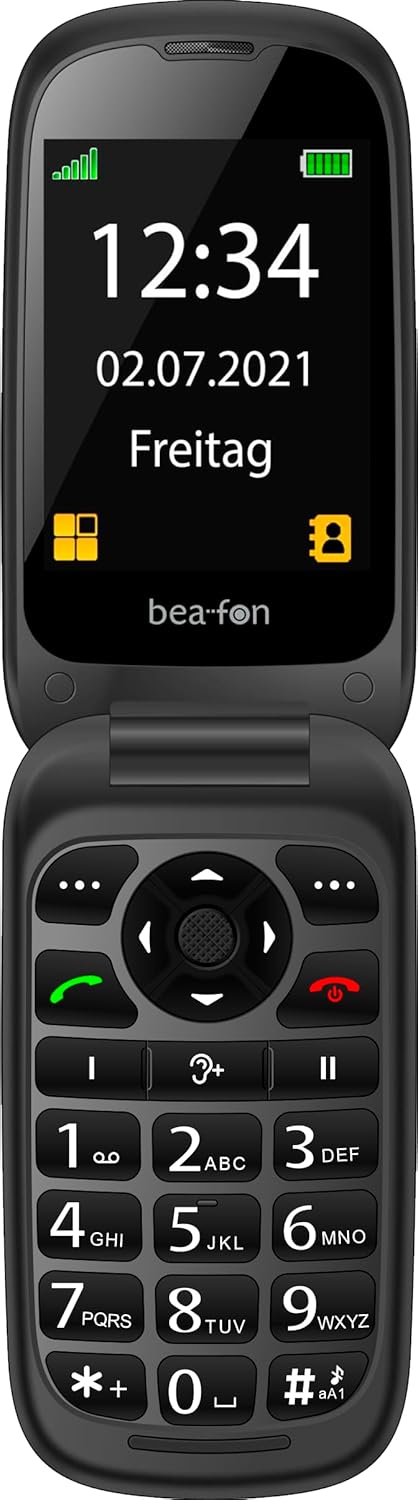
Image: The Beafon SL720 flip phone open, showing the main display with time and date.
You can store frequently used numbers in your phone's contact list. The Beafon SL720 supports photo contacts, allowing you to assign a picture to a contact for easier identification during incoming calls on both the internal and external screens.

Image: The Beafon SL720 flip phone displaying a photo contact on its main screen.

Image: The Beafon SL720 flip phone closed, showing an incoming call with a photo contact on the external 1.44-inch display.
The Beafon SL720 is equipped with a programmable SOS emergency call button located on the back of the device. In an emergency, pressing this button will initiate a call to pre-programmed emergency contacts or send an SOS message with location information (if GPS is active).
This phone offers enhanced accessibility features:

Image: Visual representation of key features including hearing aid compatibility, sound amplification, loud ringtone, SOS button, and display sizes.
Use a soft, dry cloth to clean the phone's exterior. Avoid using liquid cleaners or abrasive materials, as they may damage the device.
To prolong battery life, avoid exposing the phone to extreme temperatures. Do not leave the phone fully charged or fully discharged for extended periods.
When storing the phone for an extended period, ensure it is partially charged (around 50%) and kept in a cool, dry place.
| فیچر | تفصیل |
|---|---|
| برانډ | بیفون |
| د ماډل نوم | SL720 |
| رنګ | تور |
| د محصول ډول | تلیفون فلیپ کړئ |
| عملیاتي سیسټم | Android (Simplified OS) |
| د اصلي سکرین اندازه | 2.8 انچونه (7.11 سانتي متره) |
| د بهرنۍ سکرین اندازه | 1.44 انچونه (4.49 سانتي متره) |
| سیلولر ټیکنالوژي | 2G |
| د ارتباط ټیکنالوژي | GPS |
| ځانګړي ځانګړتیاوې | Hearing Aid Compatible (M4/T4), SOS Emergency Button, +25 dB Sound Amplification, 95 dB Ringtone |
| بیټرۍ | ۱ لیتیم آیون (شامل دی) |

Image: Physical dimensions of the Beafon SL720 phone.
Your Beafon SL720 mobile phone comes with a standard manufacturer's warranty. Please refer to the warranty card included in your package or contact your retailer for specific details regarding warranty coverage and duration.
If you encounter any issues not covered in this manual or require further assistance, please contact your point of purchase or the official Beafon customer support. Contact details can usually be found on the manufacturer's webسایټ یا ستاسو د محصول اسنادو کې.
 |
د بیفون SL495 سلور لاین موبایل تلیفون - ځانګړتیاوې او ځانګړتیاوې په تفصیل سرهview د Beafon SL495 سلور لاین موبایل تلیفون، د هغې مشخصات، دندې، د خوندیتوب ځانګړتیاوې، او د بسته بندۍ محتوا په شمول. دا سند د احتمالي کاروونکو لپاره جامع معلومات چمتو کوي. |
 |
د beafon SL605 فیچر تلیفون - مشخصات او ځانګړتیاوې د بیفون SL605 فیچر تلیفون په اړه مفصل معلومات، په شمول د هغې ځانګړتیاوې، دندې، د خوندیتوب ځانګړتیاوې، او د بسته بندۍ مینځپانګې. د هغې لوی نندارتون، د SOS تڼۍ، او د کارولو اسانتیا ومومئ. |
 |
د بیفون SL860 سلور لاین موبایل تلیفون - ځانګړتیاوې او مشخصات د Beafon SL860 سلور لاین موبایل تلیفون لپاره تفصيلي مشخصات، په شمول د 4G LTE، WhatsApp، SOS افعال، د کیمرې توضیحات، او ملټي میډیا وړتیاوې. د دې د کارونکي انٹرفیس، ښودنې، او ارتباطي انتخابونو په اړه زده کړه وکړئ. |
 |
Bea-fon SL720 Guía del Usuario: Funciones y Operación Manual de usuario detallado para el teléfono móvil Bea-fon SL720, cubriendo configuración inicial, funciones de llamada, mensajes, contactos, multimedia, seguridad y solución de problemas. |
 |
د هاما SL720 سلم لاین کیبورډ - د کارونکي لارښود او د پیوستون لارښوونې د هاما SL720 سلم لاین کیبورډ لپاره د کارونکي لارښود، د USB اتصال، ځانګړي کلیدي دندو، او د تضمین ردولو توضیحات. زده کړئ چې څنګه خپل کیبورډ وصل کړئ او وکاروئ. |
 |
د زینیک طوطي مطابقت میټریکس FC6000TS دا سند د ZENEC وسیلو سره د ګرځنده تلیفونونو د مختلفو ماډلونو مطابقت توضیح کوي چې د پیرټ بلوتوث ټیکنالوژۍ سره لري. دا د کلیدي دندو لکه د زنګ وهلو اداره کول، د تلیفون کتاب ته لاسرسی، او د رسنیو سټریمینګ (A2DP/AVRCP) فعالیت د پراخه وسیلو لپاره په ګوته کوي، چې کاروونکو سره د بې ساري ادغام ډاډمن کولو کې مرسته کوي. |