1. پیژندنه
The D-Link DGS-105GL is a 5-Port Gigabit Unmanaged Desktop Switch designed to provide a simple and efficient solution for expanding network connectivity in small office/home office (SOHO) and small to medium-sized business (SMB) environments. This device offers plug-and-play functionality, requiring no complex configuration. Its fanless design ensures silent operation, and the metal housing provides durability. The DGS-105GL incorporates energy-efficient features, including IEEE 802.3az Energy-Efficient Ethernet, to reduce power consumption without compromising performance.
2. د بسته محتويات
ډاډ ترلاسه کړئ چې ستاسو کڅوړه لاندې توکي لري:
- D-Link DGS-105GL 5-Port Gigabit Unmanaged Desktop Switch
- د بریښنا اډاپټر
که کوم توکي ورک یا زیانمن شوي وي، مهرباني وکړئ د خپل محلي D-Link پلورونکي سره اړیکه ونیسئ.
3. محصول ختم شوview
The DGS-105GL switch features a compact, low-profile design with a durable metal housing. It is equipped with five Gigabit Ethernet ports for high-speed network connections.
3.1 مخکښ پینل

انځور: مخکینۍ برخه view of the D-Link DGS-105GL switch, showing the D-Link logo, model number DGS-105GL, a power LED, five port status LEDs (1-5), and five RJ45 Gigabit Ethernet ports (1-5).
The front panel includes the following indicators and ports:
- د بریښنا LED: د سویچ د بریښنا حالت په ګوته کوي.
- د پورټ LEDs (۱-۸): Each port has an LED that indicates link status and activity. A solid light indicates a successful connection, and a blinking light indicates data transmission.
- RJ45 Gigabit Ethernet Ports (1-5): These ports are used to connect network devices such as computers, servers, and other switches.
3.2 شاته پینل

انځور: شاته view of the D-Link DGS-105GL switch, showing the power input port labeled '5V --- 1A'.
The rear panel contains the power input port, where the included power adapter is connected.
4. ترتیب کول
The DGS-105GL is a plug-and-play device, making installation straightforward. Follow these steps to set up your switch:
- د بریښنا اډاپټر سره وصل کړئ: Plug the included power adapter into the power input port on the rear panel of the DGS-105GL switch. Then, plug the other end of the adapter into a standard electrical outlet. The Power LED on the front panel should illuminate.
- د شبکې وسایل وصل کړئ: Connect your network devices (e.g., computers, network-attached storage, routers) to any of the five RJ45 Gigabit Ethernet ports on the front panel using standard Ethernet cables.
- اړیکې تایید کړئ: Once a device is connected and powered on, the corresponding Port LED on the switch's front panel should light up, indicating a successful link. If there is network activity, the LED will blink.

Image: The D-Link DGS-105GL switch placed on a desk in an office setting, connected to a laptop and other peripherals, demonstrating a typical setup.
۵. د سویچ چلول
The DGS-105GL operates automatically once connected. It supports auto-negotiation for speed and duplex mode, and auto-MDI/MDIX, eliminating the need for crossover cables. The switch automatically detects the speed of the connected device (10/100/1000 Mbps) and adjusts accordingly.
5.1 د LED شاخصونه
The LEDs provide visual feedback on the switch's status:
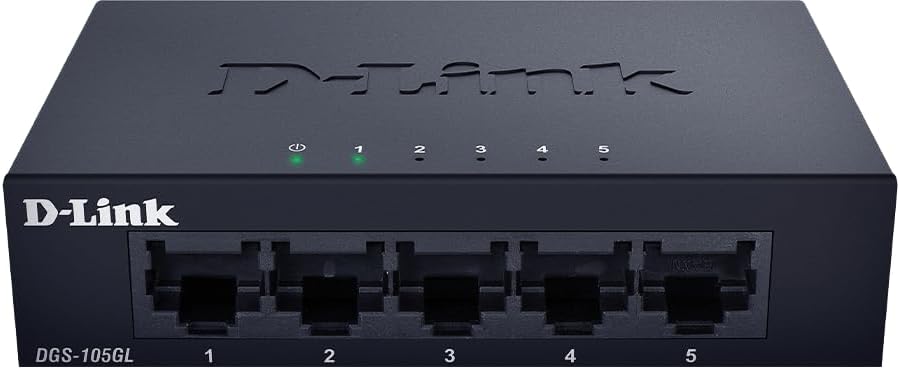
انځور: مخکینۍ برخه view of the D-Link DGS-105GL switch with the green power LED and green port LEDs 1-5 illuminated, indicating active connections.
| LED | حالت | تفصیل |
|---|---|---|
| ځواک | جامد شنه | سویچ چلول شوی دی. |
| ځواک | بند | سویچ بریښنا نه ترلاسه کوي. |
| بندر (1-5) | جامد شنه | یو وسیله په بریالیتوب سره له پورټ سره وصل شوې ده. |
| بندر (1-5) | شین څاڅکي | معلومات د بندر له لارې لیږدول کیږي یا ترلاسه کیږي. |
| بندر (1-5) | بند | هیڅ وسیله له پورټ سره نه ده تړلې، یا وصل شوی وسیله بنده ده. |
6. ساتنه
To ensure optimal performance and longevity of your DGS-105GL switch, consider the following maintenance guidelines:
- پاکول: Periodically clean the exterior of the switch with a soft, dry cloth. Avoid using liquid or aerosol cleaners directly on the device.
- د چاپیریال شرایط: Ensure the switch is placed in a well-ventilated area, away from direct sunlight, heat sources, and excessive moisture. Maintain operating temperatures within the specified range (refer to specifications).
- د کیبل مدیریت: Keep network cables neatly organized to prevent strain on ports and improve airflow around the device.
- د بریښنا سایکل چلول: If you experience network issues, a simple power cycle (unplugging the power adapter, waiting 10 seconds, and plugging it back in) can often resolve minor problems.
7. ستونزه حل کول
If you encounter issues with your DGS-105GL switch, refer to the following common troubleshooting steps:
- د بریښنا LED نشته:
- ډاډ ترلاسه کړئ چې د بریښنا اډاپټر په خوندي ډول د سویچ او کار کونکي بریښنایی آوټ لیټ دواړو سره وصل دی.
- د بل وسیلې په لګولو سره تایید کړئ چې بریښنایی آوټ لیټ فعال دی.
- No Link LED for a Connected Device:
- وګورئ چې د ایترنیټ کیبل په خوندي ډول د سویچ پورټ او شبکې وسیلې دواړو سره وصل دی.
- ډاډ ترلاسه کړئ چې وصل شوی شبکې وسیله فعاله ده او په سمه توګه کار کوي.
- د غلط کیبل د ردولو لپاره یو بل ایترنیټ کیبل هڅه وکړئ.
- هڅه وکړئ وسیله په سویچ کې مختلف بندر سره وصل کړئ.
- د شبکې ورو سرعت:
- ډاډ ترلاسه کړئ چې ټول وصل شوي وسایل او کیبلونه د ګیګابایټ ایترنیټ (Cat5e یا لوړ) ملاتړ کوي.
- د ډیر شبکې ترافیک یا د بینډ ویت-شدت لرونکي غوښتنلیکونو لپاره وګورئ چې په وصل شوي وسیلو کې روان دي.
- Perform a power cycle on the switch and connected devices.
8. مشخصات
Key technical specifications for the D-Link DGS-105GL switch:
| فیچر | مشخصات |
|---|---|
| د ماډل شمیره | DGS-105GL |
| د بندرونو شمیر | ۱ x ګیګابایټ ایترنیټ (RJ45) |
| د معلوماتو د لیږد کچه | 1 Gbps per port |
| د انٹرفیس ډول | RJ45 |
| د قضیې مواد | فلزي |
| بې مینه ډیزاین | هو |
| د انرژي موثریت | IEEE 802.3az د انرژي موثر ایترنیټ (EEE) |
| د بریښنا انډول | 5 Volts (DC), 1 Amps |
| د توکي وزن | 160 ګرامه (5.6 اونس) |
| د محصول ابعاد | ۱"L x ۱"W x ۱"H (تقریبا) |
| UPC | 790069458606 |
9. تضمین او تخنیکي ملاتړ
د ډي-لینک محصولات د محدود تضمین لخوا ملاتړ کیږي. د ځانګړو تضمین شرایطو او مقرراتو لپاره، مهرباني وکړئ د تضمین معلوماتو ته مراجعه وکړئ چې ستاسو د محصول سره شامل دي یا رسمي ډي-لینک ته مراجعه وکړئ. webسایټ
For technical assistance, product documentation, or to download the latest software and firmware updates, please visit the D-Link support portal or contact D-Link technical support directly. Contact information can typically be found on the D-Link webستاسو د سیمې لپاره سایټ.


