پیژندنه
This manual provides detailed instructions for the safe and efficient use of your iHome XT-45 True Wireless Earbuds. Please read this manual thoroughly before operating the device and retain it for future reference.
The iHome XT-45 True Wireless Earbuds offer a seamless audio experience with Bluetooth 5.0 connectivity, intuitive touch controls, and a portable charging case. Designed for comfort and convenience, these earbuds are suitable for various activities, including travel.

Figure 1: iHome XT-45 True Wireless Earbuds and Charging Case
The image displays the iHome XT-45 True Wireless Earbuds, black in color, resting within their open charging case. The case features a digital display indicating battery levels. The earbuds themselves are compact with a rounded tip design, ready for use.
په بکس کې څه دي
ډاډ ترلاسه کړئ چې ټول توکي د بکس خلاصولو پر مهال شتون لري:
- د XT-45 ریښتیني بې سیم غوږۍ
- Charging Travel Case with Display
- 8 Ear Cushions in 3 Sizes (2 small, 2 large, 4 medium)
- د USB چارج کولو کیبل (USB-C)
- د لارښود لارښود (دا سند)
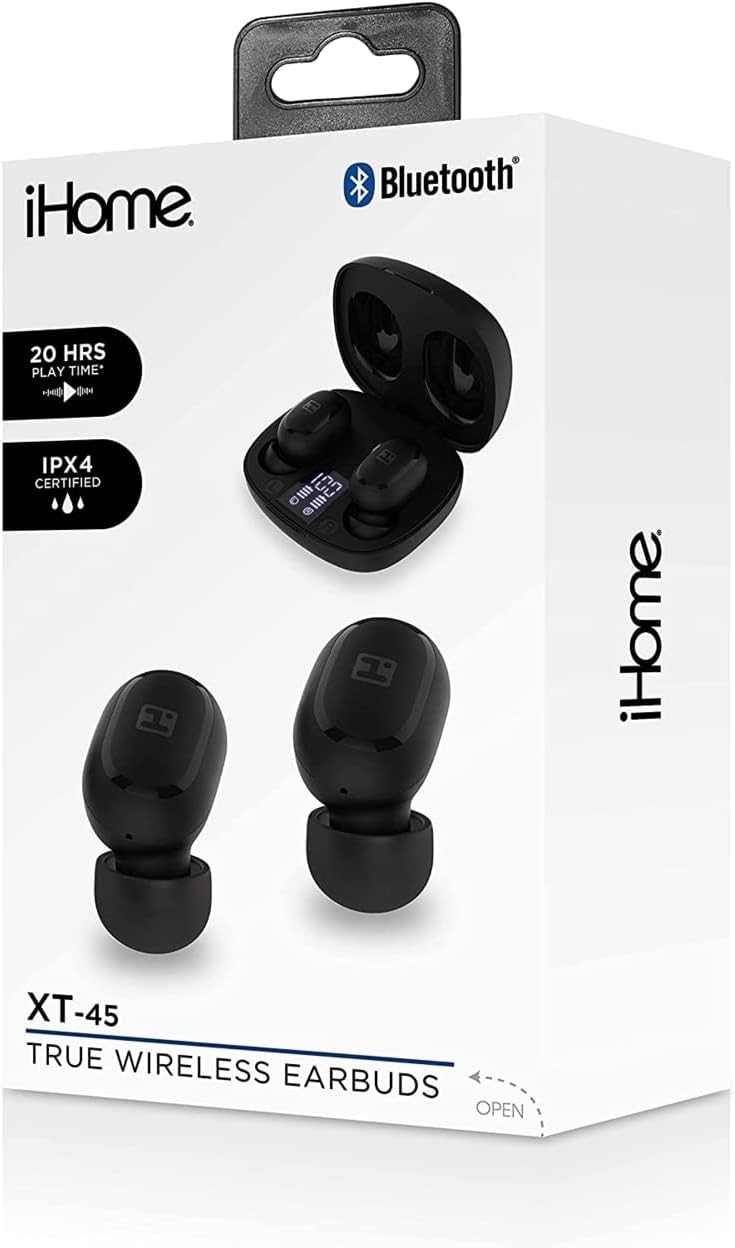
Figure 2: iHome XT-45 Product Packaging
This image shows the retail box for the iHome XT-45 True Wireless Earbuds. The box highlights features such as "20 HRS PLAY TIME" and "IPX4 CERTIFIED", along with a visual of the earbuds and charging case.
چمتو کول
۴.۱. د غوږۍ او کیس چارج کول
د لومړي ځل کارولو دمخه، د غوږ بډونه او د چارج کولو قضیه په بشپړه توګه چارج کړئ.
- Place the earbuds into the charging case. Ensure they are correctly seated; magnetic contacts will hold them in place.
- Connect the provided USB-C charging cable to the charging port on the case and plug the other end into a USB power source (e.g., computer, wall adapter).
- The case display will show the charging status. A full charge for both the case and earbuds takes approximately 1.5 hours.
- The case battery capacity is 300mAh, and each earbud has a 40mAh battery.
2. د بلوتوت وسیلې سره جوړه کول
The iHome XT-45 earbuds use Bluetooth 5.0 for stable connectivity up to 33 feet.
- د چارج کولو قضیه پرانیزئ. د غوږ بډونه به په اتوماتيک ډول د جوړې کولو حالت ته ننوځي.
- ستاسو په وسیله (سمارټ فون، ټابلیټ، لیپ ټاپ) کې، د بلوتوټ ترتیباتو ته لاړ شئ.
- لټون شته وسایل او له لیست څخه "iHome XT-45" غوره کړئ.
- یوځل چې وصل شي، ستاسو وسیله به د بریالۍ جوړې نښه کړي.
- که چیرې په وسیله کې بلوتوټ فعال وي، نو د غوږ بډونه به په اتوماتيک ډول د وروستي جوړه شوي وسیلې سره وصل شي کله چې له قضیې څخه لرې شي.
۴. د غوږونو اییربډونه لګول
Proper fit is crucial for sound quality and comfort. The package includes 8 ear cushions in 3 sizes (small, medium, large).
- Select the ear cushion size that provides a snug and comfortable seal in your ear canal.
- په نرمۍ سره هر اییربډ خپل غوږ ته دننه کړئ، یو څه یې تاو کړئ تر هغه چې خوندي احساس شي.
- Adjust as needed to ensure the best audio experience and to prevent them from falling out during movement.

Figure 3: Earbud Placement
This close-up image illustrates an iHome XT-45 earbud, black in color, properly seated within the ear canal. The earbud's design is shown to fit snugly, ensuring optimal sound delivery and comfort.
عملیاتي لارښوونې
The iHome XT-45 earbuds feature intuitive touch controls for various functions.
ټچ کنټرولونه
- پلی کول / ودرول: په دواړو غوږونو کې یو ځل کلیک وکړئ.
- بله لار: په ښي غوږۍ کې دوه ځله ټایپ کړئ.
- مخکینی لار په چپ غوږۍ کې دوه ځله ټایپ کړئ.
- حجم پورته کول: په ښي غوږۍ درې ځله ټایپ کړئ.
- کموالی: په چپ غوږۍ کې درې ځله ټایپ کړئ.
- ځواب / پای کال: د راتلوونکي زنګ یا فعال زنګ په جریان کې په هر ایربډ باندې یو ځل کلیک وکړئ.
- زنګ رد کړئ: د راتلوونکي زنګ په جریان کې د 2 ثانیو لپاره د هر غوږ بډ فشار ورکړئ او ونیسئ.
- د غږ همکار فعاله کړئ: د 3 ثانیو لپاره هر یو ایربډ فشار ورکړئ او ونیسئ.
پاور آن/بند
- پاور آن: کله چې د چارج کولو له قضیې څخه لرې شي، اییربډونه په اتوماتيک ډول فعال کیږي.
- بندول: کله چې د چارج کولو په قضیه کې بیرته کیښودل شي او پوښ یې وتړل شي، نو اییربډونه په اتوماتيک ډول بندیږي.

شکل ۲: مهمې ځانګړتیاوېview
This graphic provides a summary of the iHome XT-45 True Wireless Earbuds' main features. It highlights "EXTENDED PLAY TIME" (20 hours), "DEEP RICH SOUND", "BLUETOOTH MIC+CONTROLS", a "RECHARGEABLE CASE" with LED display, and a "STREAMLINED DESIGN" for portability. Package contents and contact information are also listed.
ساتنه
To ensure the longevity and optimal performance of your iHome XT-45 earbuds, follow these maintenance guidelines:
- پاکول: د غوږونو غوږوالۍ او د چارج کولو قضیه په منظم ډول د نرم، وچ، لینټ څخه پاک ټوکر سره پاک کړئ. د کثافاتو پاکوونکي، الکول، یا کیمیاوي محلولونه مه کاروئ.
- د غوږ تکیه: Remove and clean the ear cushions periodically. They can be gently washed with mild soap and water, then thoroughly dried before reattaching.
- د اړیکو چارج کول: ډاډ ترلاسه کړئ چې د غوږونو او د قضیې دننه د چارج کولو تماسونه پاک او له کثافاتو څخه پاک دي ترڅو مناسب چارج وساتل شي.
- ذخیره کول: کله چې په کارولو کې نه وي، د غوږ غوږوالۍ د چارج کولو په قضیه کې وساتئ ترڅو دوی د دوړو او زیان څخه خوندي کړي. په یخ او وچ ځای کې د سخت تودوخې څخه لرې وساتئ.
- د اوبو مقاومت: The product is not water resistant. Avoid exposure to water or excessive moisture.
د ستونزو حل کول
If you encounter issues with your iHome XT-45 earbuds, refer to the following common solutions:
- د غوږونو نه جوړېږي:
- ډاډ ترلاسه کړئ چې دواړه غوږونه په بشپړ ډول چارج شوي دي.
- په خپل وسیله کې بلوتوث بند کړئ، بیا یې بیرته فعال کړئ.
- Forget "iHome XT-45" from your device's Bluetooth list and attempt to pair again.
- د غوږ بډونه بیرته په کیس کې ځای په ځای کړئ، پوښ وتړئ، څو ثانیې انتظار وکړئ، بیا د جوړه کولو حالت بیا پیلولو لپاره خلاص کړئ.
- یوازې یو غوږۍ کار کوي:
- ډاډ ترلاسه کړئ چې دواړه غوږونه چارج شوي دي.
- Place both earbuds back in the charging case, close the lid, and then remove them simultaneously. This often re-syncs them.
- Try resetting the earbuds (refer to the full manual if a specific reset procedure is available, otherwise, the above steps usually suffice).
- د غوږۍ نه چارج کېدل:
- د زیان لپاره د USB-C کیبل او بریښنا اډاپټر وګورئ.
- Ensure the charging contacts on the earbuds and case are clean and free of obstructions.
- Verify the charging case itself has power (check its display).
- د غږ خراب کیفیت یا ټیټ غږ:
- په خپل وسیله او د ایربډ ټچ کنټرولونو په کارولو سره حجم تنظیم کړئ.
- ډاډ ترلاسه کړئ چې د غوږ بالښتونه ستاسو په غوږ کې ښه مهر چمتو کوي. مختلف اندازې هڅه وکړئ.
- Clean the earbud speaker grilles.
- Move closer to your paired device to avoid interference or exceeding the 33-foot range.
مشخصات
| د ماډل نوم | HM-AU-BE-206-BK |
| بلوتوث نسخه | 5.0 |
| کاري واټن | تر 33 فوټو پورې (10 متره) |
| د سپیکر اندازه | 6mm |
| د تعدد ځواب | ۲۰ هرټز - ۴۰ کلو هرټز |
| حساسیت | -90dB |
| د ایربډ بیټرۍ | 2 X 40mA |
| د قضیې بیټرۍ | 300mAh |
| د ایربډونو د چارج وخت | ۸ ساعته |
| د قضیې چارج وخت | ۸ ساعته |
| د ایربډ پلی کولو وخت | تر 4 ساعتونو پورې (په متوسط حجم کې) |
| د چارج کولو نښلونکی | USB-C |
| د کنټرول ډول | د لمس کنټرول، د حجم کنټرول |
| مایکروفون | Built-in Microphone Included |
| د اوبو د مقاومت کچه | د اوبو مقاومت نلري |
| ابعاد (پکیج) | 7.17 x 3.74 x 2.05 انچه |
| د توکي وزن | 7 اونس (0.2 کیلوګرامه) |
محصول پای ته ورسیدview ویډیو
Video 1: iHome XT-45 True Wireless Earbuds Overview
دا ویډیو یو بصري کتنه وړاندې کويview of the iHome XT-45 True Wireless Earbuds. It showcases the earbuds and their charging case, highlighting key features such as Bluetooth 5.0, touch controls, USB-C charging, and the included ear cushions. The video demonstrates the product's design, functionality, and portability, emphasizing its suitability for daily use and travel. It also mentions the working distance, frequency response, speaker size, and sensitivity for clear audio reproduction.
تضمین او ملاتړ
For warranty information and customer support, please refer to the official iHome webسایټ ته مراجعه وکړئ یا د دوی د پیرودونکو خدماتو څانګې سره اړیکه ونیسئ. د هر ډول تضمین ادعا لپاره د پیرود ثبوت وساتئ.
جوړونکی: iHome
د نورو مرستو لپاره، لیدنه وکړئ په ایمیزون کې د آی هوم پلورنځی.


