پیژندنه
This manual provides essential information for setting up, operating, maintaining, and troubleshooting your HP M27fw 27-inch Full HD (FHD) monitor. Please read these instructions carefully before using your monitor to ensure optimal performance and safety.
د بسته محتويات
ډاډ ترلاسه کړئ چې ټولې برخې په بسته کې شتون لري:
- HP M27fw 27-inch FHD Monitor
- د څارنې موقف (بنسټ او غاړه)
- د بریښنا اډاپټر او بریښنا تار
- 1 HDMI 1.4 Cable (with HDCP support)
- 1 VGA Cable
- اسناد (د چټک تنظیم لارښود، د تضمین معلومات)
چمتو کول
۱. د مانیټر سټینډ راټولول
- د مانیټر او سټینډ اجزا په احتیاط سره له بسته بندۍ څخه لرې کړئ.
- د سټینډ غاړه د مانیټر پینل سره وصل کړئ. ډاډ ترلاسه کړئ چې دا په خوندي ډول په خپل ځای کې کلیک کوي.
- Attach the stand base to the stand neck. Tighten any screws if provided, ensuring a stable connection.
2. د مانیټور سره نښلول
د نښلولو دمخه، ډاډ ترلاسه کړئ چې ستاسو کمپیوټر او مانیټر بند دي.
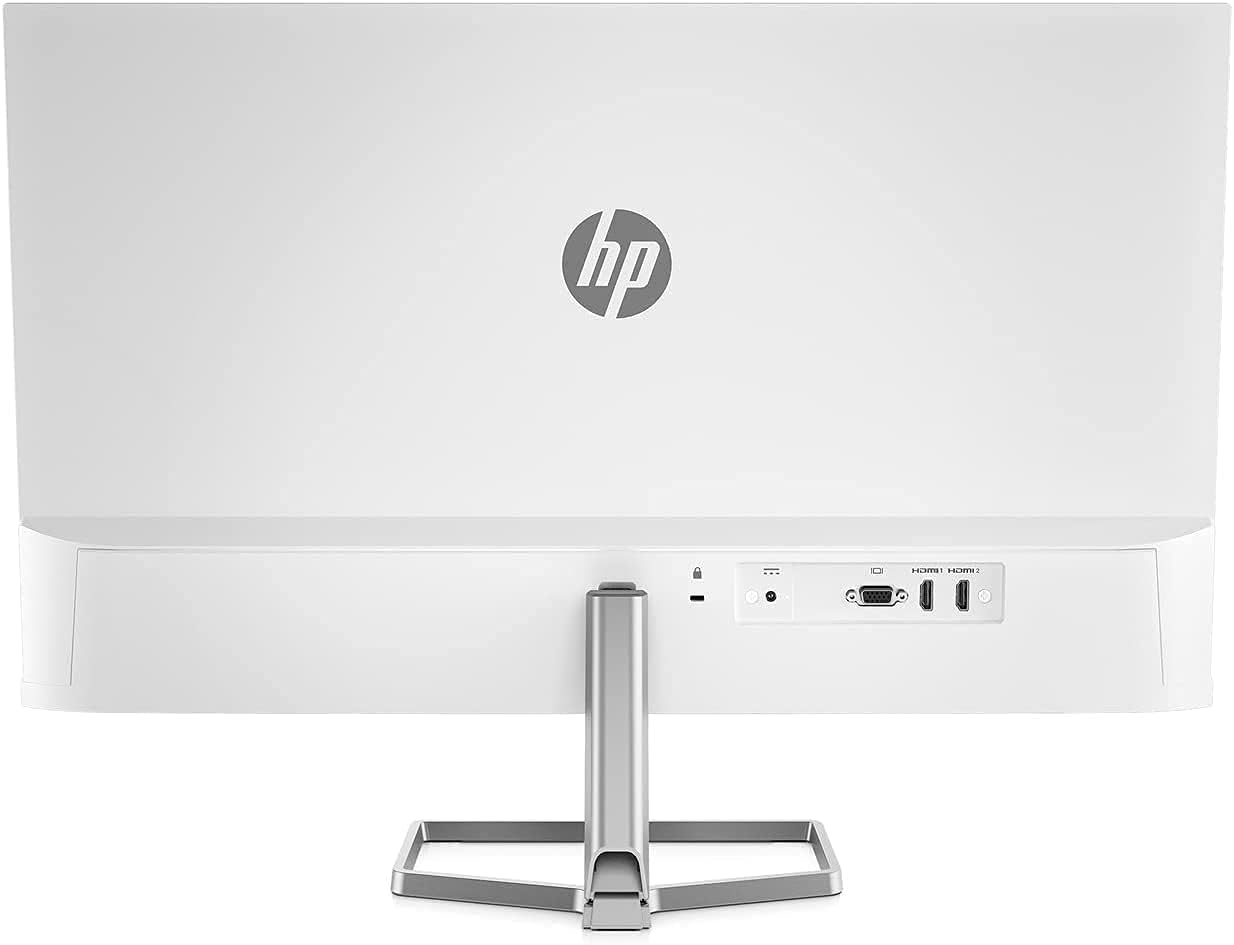
- د ویډیو کیبل سره وصل کړئ: Connect one end of the HDMI or VGA cable to the corresponding port on your computer's graphics card. Connect the other end to the HDMI or VGA input port on the back of the HP M27fw monitor.
- د بریښنا کیبل وصل کړئ: Connect the power adapter to the monitor's power input port, then plug the power cord into a grounded electrical outlet.
- پاور آن: Power on your computer, then press the power button on the monitor.
د نظارت عمل کول
پاور آن/بند
د مانیټر د ښکته ښیې بیزل کې موقعیت لرونکي د بریښنا تڼۍ فشار ورکړئ ترڅو دا فعال یا بند کړئ.
د پردې پر مخ ښودنه (OSD) کنټرولونه
The OSD menu allows you to adjust various display settings. Buttons for OSD navigation are typically located on the bottom right bezel.
- روښانتیا: Adjusts the display's luminance.
- وتل: د OSD مینو بندوي.
- معلومات: Displays monitor information such as resolution and refresh rate.
- مدیریت: Accesses power-saving options and other system settings.
- د بریښنا کنټرول: Manages power-related functions.
- د ننوت کنټرول: Selects the active video input source (HDMI or VGA).
- د مینو کنټرول: Navigates through OSD options.
- انځور: Adjusts image-specific settings like sharpness and aspect ratio.
- رنګ: Modifies color temperature, contrast, and other color-related settings.
Key Display Features
- بشپړ HD (FHD) ریزولوشن: Enjoy crisp visuals at 1920 x 1080 pixels.
- 75Hz ریفریش نرخ: Provides smoother motion compared to standard 60Hz displays.
- AMD FreeSync: Synchronizes the monitor's refresh rate with your graphics card's frame rate to reduce screen tearing and stuttering. Ensure your graphics card supports AMD FreeSync for this feature to function.
- د ټیټ نیلي رڼا حالت: Reduces blue light emissions to minimize eye strain during extended use without significantly affecting color quality.
- د ځلا ضد سکرین: Minimizes reflections for better viewد روښنايي په مختلفو شرایطو کې.

د مانیټور تنظیم کول
د خښتو سمون
The HP M27fw monitor allows for tilt adjustment to optimize your viewing angle. Gently hold both sides of the monitor panel and tilt it forwards or backwards to your desired position.

ساتنه
د نظارت پاکول
- تل د مانیټر بریښنا بند کړئ او د پاکولو دمخه د بریښنا تار خلاص کړئ.
- د نرم، لینټ پاک ټوکر څخه په روښانه توګه کار واخلئampened with water or a non-abrasive screen cleaner to wipe the display surface.
- د مانیټر لپاره casing, use a soft, dry cloth. Avoid using harsh chemicals or abrasive materials.
عمومي پاملرنه
- په مانیټر یا د هغې په کیبلونو کې د درنو شیانو له ایښودلو څخه ډډه وکړئ.
- Do not expose the monitor to direct sunlight, excessive heat, or moisture.
- د مانیټر شاوخوا مناسب هوا ورکول ډاډمن کړئ.
د ستونزو حل کول
که تاسو د خپل مانیټر سره ستونزې سره مخ شئ، لاندې عام حلونو ته مراجعه وکړئ:
- ځواک نشته:
- Ensure the power cord is securely connected to both the monitor and a working electrical outlet.
- Verify the power adapter is correctly connected to the monitor.
- د مانیټر د بریښنا تڼۍ فشار ورکړئ ترڅو ډاډ ترلاسه کړئ چې دا فعال دی.
- سیګنال نشته / خالي سکرین:
- Check that the video cable (HDMI or VGA) is firmly connected to both the monitor and your computer.
- ډاډ ترلاسه کړئ چې ستاسو کمپیوټر چالان دی او د خوب حالت کې نه دی.
- Use the monitor's OSD menu (Input Control) to select the correct input source.
- که شتون ولري، په خپل کمپیوټر/مانیټر کې یو بل ویډیو کیبل یا پورټ هڅه وکړئ.
- Image Issues (e.g., Vertical Line, Flickering, Distortion):
- د کیبل ټولې اړیکې د نرموالي یا زیان لپاره وګورئ.
- Ensure your computer's display resolution and refresh rate are set correctly (e.g., 1920x1080 at 75Hz).
- If using AMD FreeSync, ensure it is enabled in both the monitor's OSD and your graphics card settings.
- If a persistent line or distortion appears, try connecting the monitor to a different computer or using a different video cable to rule out external factors. If the issue persists, the monitor may require service.
- رنګونه غلط دي:
- Adjust color settings (Color, Contrast, Brightness) through the OSD menu.
- ډاډ ترلاسه کړئ چې ستاسو د ګرافیک کارت چلوونکي تازه دي.
مشخصات
| فیچر | مشخصات |
|---|---|
| برانډ | HP |
| د ماډل شمیره | M27fw |
| د سکرین اندازه | ۷۸۷ انچه |
| قرارداد | FHD ۱۹۲۰ x ۱۰۸۰ پکسلز |
| د اړخ نسبت | 16:9 |
| د تازه کولو نرخ | 75 Hz |
| د غبرګون وخت | 5 ملی ثانیه |
| د ښودلو ډول | LED |
| د سکرین سطحې توضیحات | Glossy (Anti-Glare) |
| روښانتیا | 300 cd/m² |
| د تناسب تناسب | 1000:1 |
| Viewزاویه | 170 درجې |
| د پکسل پچ | 0.311 ملي متره |
| د ارتباط ټیکنالوژي | HDMI ، VGA |
| د HDMI پورټونو ټولټال شمېر | 1 |
| د تطبیق وړ همغږي | AMD FreeSync |
| اضافي ځانګړتیاوې | Anti Glare Screen, Low Blue Light Mode, On-Screen Controls |
| رنګ | سپین |
| د توکي ابعاد (D x W x H) | ۳"D x ۷۴.۸"W x ۴۳.۱"H (پرته له سټینډ) |
| وزن | 7.05 lb (without stand) |
| د VESA چوکۍ | Not VESA mount compatible |
تضمین او ملاتړ
Your HP M27fw monitor is covered by a limited warranty. For detailed warranty information, please refer to the documentation included in your package or visit the official HP support website. For technical assistance, troubleshooting, or service inquiries, contact HP customer support.
د HP ملاتړ Webسایټ: www.hp.com/support