پیژندنه
Thank you for choosing the CASIO Baby-G BGA-280 Series watch. This manual provides detailed instructions on how to use and maintain your watch. Please read this manual carefully to ensure proper operation and to get the most out of its features.

شکل 1: مخکی view of the BGA-280-6ADR watch. This image displays the watch's translucent pink case and strap, with a clear view of its analog hands and digital display, indicating the current time and day.
د خوندیتوب احتیاطونه
To ensure safe and proper use of your watch, please observe the following precautions:
- Do not attempt to open the watch case or remove its back cover.
- Avoid exposing the watch to extreme temperatures (above 60°C or below -10°C) or direct sunlight for prolonged periods.
- Do not expose the watch to strong magnetic fields or static electricity.
- ساعت د نرم او وچ ټوکر سره پاک کړئ. کیمیاوي پاکوونکي مه کاروئ.
- The watch is water resistant up to 10 BAR. Avoid operating buttons underwater.
د اجزاوو پیژندنه
Familiarize yourself with the various components and buttons of your BGA-280 watch:

شکل 2: اړخ view of the BGA-280-6ADR watch, showing the button layout. This image clearly displays the four buttons located on the sides of the watch case, which are used for various functions and mode navigation.
| اجزا | فعالیت |
|---|---|
| A Button (Adjust) | د تنظیم کولو حالتونو ته د ننوتلو او وتلو لپاره، او د ترتیباتو تایید لپاره کارول کیږي. |
| B Button (Light) | د LED بیک لایټ فعالوي. |
| C Button (Mode) | Cycles through the different watch modes (Timekeeping, World Time, Stopwatch, Timer, Alarm). |
| D Button (Search/Forward) | Used to change settings (increase values) and for search functions in certain modes. |
| ډیجیټل نندارې | Shows time, date, and other mode-specific information. |
| Analog Hands | Indicate the current hour and minute. |
چمتو کول
د کور ښار او وخت ټاکل
- د وخت ساتلو حالت کې، لاندې ونیسئ A button for about two seconds until the city code starts to flash on the digital display. This indicates the setting mode.
- فشار ورکړئ D button to scroll through the city codes until your desired Home City is displayed. Refer to the World Time City Code List (not provided in this manual, refer to full Casio manual if needed).
- فشار ورکړئ C button to cycle through the settings: City Code → DST (Daylight Saving Time) → 12/24-hour format → Seconds → Hour → Minute → Year → Month → Day → Illumination Duration → Button Tone.
- پداسې حال کې چې یو ترتیب ځلیږي، وکاروئ D button to change it. For DST, press D د فعال او بند ترمنځ بدلولو لپاره.
- د ټولو ترتیباتو تنظیم کولو وروسته، فشار ورکړئ A د تنظیم کولو حالت څخه د وتلو لپاره تڼۍ. ساعت به په اتوماتيک ډول د ډیجیټل وخت سره سمون لپاره انلاګ لاسونه تنظیم کړي.
عملیاتي لارښوونې
د نیویګیټ کولو طریقې
فشار ورکړئ C button to cycle through the watch's modes in the following order:
Timekeeping Mode → World Time Mode → Stopwatch Mode → Timer Mode → Alarm Mode
د وخت ساتلو طریقه
This is the default mode, displaying the current time and date for your Home City.
- ته view the current date, press the D تڼۍ
- To return to the time display, press the D بیا تڼۍ.
د وخت وخت حالت
دا موډل تاسو ته اجازه درکوي view په ټوله نړۍ کې د ۴۸ ښارونو (۲۹ وخت زونونو) اوسنی وخت.
- د وخت ساتلو حالت څخه، فشار ورکړئ C to enter World Time Mode. The city code of the currently selected World Time City will be displayed.
- فشار ورکړئ D button to scroll through the city codes.
- To swap your Home City and World Time City, hold down the A د شاوخوا دریو ثانیو لپاره تڼۍ.
د تمځیو حالت
The stopwatch measures elapsed time in 1/100-second units for the first 60 minutes, and 1-second units thereafter, up to 24 hours.
- From World Time Mode, press C to enter Stopwatch Mode. The display will show "0'00"00".
- مطبوعاتي D د سټاپ واچ پیل/بندولو لپاره.
- پداسې حال کې چې سټاپ واچ ودرول شي، فشار ورکړئ A to reset it to "0'00"00".
د وخت وخت
The countdown timer can be set from 1 minute to 24 hours in 1-minute increments.
- From Stopwatch Mode, press C to enter Timer Mode.
- لاندې ونیسئ A button for about two seconds until the hour setting starts to flash.
- د کارولو D button to change the hour, then press C د دقیقې ترتیب ته لاړ شئ.
- د کارولو D د دقیقې بدلولو لپاره تڼۍ.
- مطبوعاتي A د تنظیم کولو حالت څخه وتلو لپاره.
- مطبوعاتي D to start/stop the countdown timer. An alarm will sound when the countdown reaches zero.
د الارم حالت
The watch has five daily alarms and an hourlد وخت سیګنال.
- From Timer Mode, press C to enter Alarm Mode. The alarm number (AL1, AL2, etc.) will be displayed.
- مطبوعاتي D to cycle through the alarms (AL1 to AL5, SNZ, SIG).
- To set an alarm, select the desired alarm (e.g., AL1) and hold down the A button for about two seconds until the hour setting flashes.
- د کارولو D button to change the hour, then press C د دقیقې ترتیب ته لاړ شئ.
- د کارولو D د دقیقې بدلولو لپاره تڼۍ.
- مطبوعاتي A د تنظیم کولو حالت څخه وتلو لپاره.
- د الارم د فعالولو/بندولو لپاره، الارم غوره کړئ او فشار ورکړئ D. "ON" or "OFF" will appear.
- د هو بدلولو لپارهurly Time Signal (SIG) ON/OFF, select SIG and press D.
روښانه کول
The watch is equipped with an LED backlight for easy reading in the dark.
- فشار ورکړئ B د نندارې روښانه کولو لپاره تڼۍ.
- The illumination duration can be set in the Timekeeping Mode settings (refer to "Setting the Home City and Time").
ساتنه
د ساعت پاکول
منظم پاکول ستاسو د ساعت بڼه او اوږد عمر ساتلو کې مرسته کوي.
- Wipe the watch case and band with a soft, dry cloth to remove dirt and moisture.
- د سختې خاورې لپاره، نرم ټوکر وکاروئampened with water and a mild neutral detergent, then wipe dry.
- Do not use volatile agents like thinner, benzine, alcohol, or abrasive cleaners, as they may damage the resin components.
د اوبو مقاومت
Your BGA-280 watch is water resistant to 10 BAR (100 meters). This means it is suitable for everyday use, showering, swimming, and snorkeling. However, it is not suitable for scuba diving.
- د ساعت تڼۍ مه چلوئ کله چې دا لوند وي یا په اوبو کې ډوب وي.
- د مالګې اوبو سره د تماس وروسته، ساعت په تازه اوبو سره ومینځئ او وچ یې کړئ.
- Avoid exposing the watch to strong water pressure, such as from a high-pressure car wash.
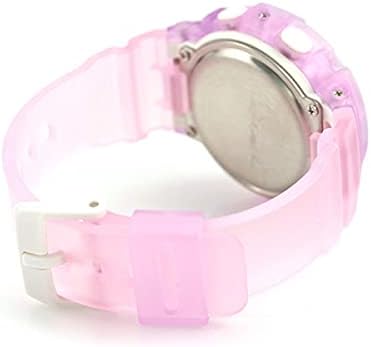
شکل 3: شاته view of the BGA-280-6ADR watch. This image shows the stainless steel case back, where important information such as the model number and water resistance rating (10 BAR) are engraved.
د ستونزو حل کول
که تاسو په خپل ساعت کې کومې ستونزې سره مخ شئ، مهرباني وکړئ لاندې عامې ستونزې او حل لارې وګورئ:
| ستونزه | د حل لاره |
|---|---|
| انلاګ لاسونه د ډیجیټل وخت سره سمون نه خوري. | This can happen after setting the Home City. The hands should automatically adjust. If not, refer to the full manual for manual hand alignment. |
| هیڅ ښودنه یا تیاره ښودنه نشته. | The battery may be low. Contact a CASIO service center for battery replacement. |
| تڼۍ بې ځوابه دي. | Ensure the watch is not wet. If the issue persists, a reset may be needed (refer to full manual) or contact support. |
| وخت غلط دی. | Check your Home City and DST settings. Re-adjust if necessary. |
مشخصات
| فیچر | تفصیل |
|---|---|
| د ماډل شمیره | BGA-280-6ADR |
| برانډ | CASIO |
| حرکت | کوارټز |
| د اوبو مقاومت | 10 BAR (100 متره) |
| د نړۍ وخت | 31 time zones (48 cities + UTC), daylight saving on/off, Home city/World time city swapping |
| سټاپ واچ | 1/100-second stopwatch, Measuring capacity: 23:59'59.99'', Measuring modes: Elapsed time, split time, 1st-2nd place times |
| ټایمر | Countdown timer, Measuring unit: 1 second, Countdown range: 1 minute to 24 hours (1-minute increments and 1-hour increments) |
| الارمونه | ۳ ورځني الارمونه، هوurlد وخت سیګنال |
| روښانه کول | LED light (Super Illuminator), selectable illumination duration (1.5 seconds or 3 seconds), afterglow |
| جنتري | بشپړ اتوماتیک کیلنڈر (تر ۲۰۹۹ کال پورې) |
| دقت | په میاشت کې ± 30 ثانیې |
| د بیټرۍ ژوند | په CR1220 کې شاوخوا 3 کاله |
تضمین او ملاتړ
Your CASIO Baby-G watch is covered by a manufacturer's warranty. Please refer to the warranty card included with your purchase for specific terms and conditions, including warranty period and coverage details.
For technical support, repairs, or further inquiries, please contact your local authorized CASIO service center or visit the official CASIO webد اړیکو معلوماتو لپاره سایټ.
- Official CASIO Webسایټ: www.casio.com
- د پیرودونکو خدمت: Refer to your regional CASIO webد سیمه ییزو اړیکو د جزیاتو لپاره سایټ.


