1. پیژندنه
The Sonel CMM 30 is an advanced industrial multimeter engineered for versatility, modern functionality, and exceptional durability. This device integrates 11 fundamental measurement functions along with additional features, providing a broad spectrum of applications for professionals. Its robust design includes drop protection and an IP67 rated casing, ensuring reliable performance even in challenging environments.
Key features include a smartphone application for remote reading and data saving via wireless communication, an automatically adjusting backlight for optimal screen visibility, and a built-in flashlight for illumination in dark conditions. This manual provides essential information for the safe and effective use of your CMM 30 multimeter.
2. د خوندیتوب معلومات
Always adhere to the following safety precautions to prevent electric shock, injury, or damage to the meter or equipment under test.
- Read and understand all instructions and safety information in this manual before operating the meter.
- که چیرې میټر خراب ښکاري یا د ازموینې لیډونو موصلیت خراب شوی وي نو مه یې کاروئ.
- تل د سرکټ سره بریښنا قطع کړئ او ټول لوړ ولټ خارج کړئtage capacitors before making resistance, continuity, diode, or capacitance measurements.
- د حجم سره کار کولو پر مهال له احتیاط څخه کار واخلئtagد 30V AC RMS، 42V چوکۍ، یا 60V DC څخه پورته. دا حجمونهtagد شاک خطر رامنځته کوي.
- د هر فعالیت لپاره د اعظمي ان پټ حد څخه تجاوز مه کوئ.
- ډاډ ترلاسه کړئ چې د فعالیت سویچ د مطلوب اندازه کولو لپاره په سم موقعیت کې دی مخکې لدې چې د ازموینې لیډونه سرکټ ته وصل کړئ.
- Replace batteries as soon as the low battery indicator appears to ensure accurate readings.
- میټر په چاودیدونکو ګازو، بخاراتو یا دوړو چاپیریال کې مه چلوئ.
3. د بسته محتويات
Verify that all items listed below are present and undamaged upon opening the package:
- Sonel CMM 30 Industrial Multimeter
- د ازموینې لیډونه (سور او تور)
- د تودوخې پلټنه (د K ډوله ترموکوپل)
- ۲ x AAA بیټرۍ (مخکې نصب شوي یا جلا)
- د کارونکي لارښود (دا لاسوند)
که کوم توکي ورک یا زیانمن شوي وي، مهرباني وکړئ سمدلاسه خپل عرضه کوونکي سره اړیکه ونیسئ.
4. محصول ختم شوview
Familiarize yourself with the components of your Sonel CMM 30 multimeter:
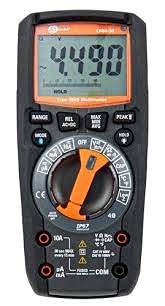
شکل 4.1: مخکی view of the Sonel CMM 30 Industrial Multimeter. This image displays the device's main components, including the digital display, the central rotary function switch, and the various input terminals for test leads.
4.1. ښکاره کول
The large LCD shows measurement readings, units, function indicators, and battery status. It features an automatic backlight that adjusts to ambient light conditions for optimal visibility.
4.2. د روټری فعالیت سویچ
This central switch is used to select the desired measurement function (e.g., Voltage, Current, Resistance, Capacitance, Temperature, Frequency).
4.3. د فعالیت تtۍ
Various buttons provide additional controls and features:
- رینج: د لاسي او اتوماتیک رینج ترمنځ بدلیږي.
- لارښوونه: Selects sub-functions within a main rotary switch position (e.g., AC/DC voltage, Diode/Continuity).
- هولډ: د اوسني ښودنې لوستل کنګل کوي.
- اعظمي/منټ/اوسط: Records maximum, minimum, and average readings.
- REL: Relative mode, subtracts a stored value from subsequent measurements.
- Bluetooth/Light: Activates Bluetooth connectivity for the smartphone app and controls the built-in flashlight.
4.4. Input Jacks
These are the connection points for the test leads:
- COM: Common terminal for the black test lead.
- VΩHzCAP°C: د حجم لپاره داخلولtage, resistance, frequency, capacitance, and temperature measurements (red test lead).
- mAµA: د ملی لپاره ان پټampمخکې او کوچنيampere current measurements (red test lead).
- 10A: Input for up to 10 Ampere current measurements (red test lead).
5. ترتیب کول
5.1. د بیټرۍ نصب کول
The Sonel CMM 30 requires 4 AAA batteries. These may be pre-installed or included separately.
- ډاډ ترلاسه کړئ چې ملټي میټر بند دی.
- د میټر په شا کې د بیټرۍ کڅوړه ومومئ.
- د بیټرۍ پوښ خوندي کولو لپاره د سکرو ډرایور څخه کار واخلئ.
- د بیټرۍ پوښ لرې کړئ.
- Insert the 4 AAA batteries, observing the correct polarity (+ and -) as indicated inside the compartment.
- د بیټرۍ پوښ بدل کړئ او پیچونه په خوندي ډول ټینګ کړئ.
یادونه: Always use fresh batteries of the same type. Remove batteries if the meter is not used for an extended period to prevent leakage.
6. عملیاتي لارښوونې
6.1. بریښنا کول/بندول
Turn the rotary function switch from the OFF position to any desired measurement function to power on the meter. To power off, turn the switch back to the OFF position.
6.2. Basic Measurement Procedures
Before any measurement, ensure the test leads are correctly inserted into the appropriate input jacks for the selected function.
6.2.1. والtagد e اندازه کول (AC/DC)
- Insert the black test lead into the COM jack and the red test lead into the VΩHzCAP°C jack.
- Turn the rotary switch to the V~ (AC Voltage) یا V- (DC Voltage) position. If both are combined, use the MODE button to select AC or DC.
- د ازموینې لیډونه د سرکټ یا برخې په اوږدو کې په موازي ډول وصل کړئ ترڅو اندازه شي.
- ټوک ولولئtage ارزښت په نندارتون کې.
۶.۲. د اوسني اندازه کول (AC/DC)
احتیاط: Never connect the meter in parallel for current measurement. Always connect in series with the circuit.
- Insert the black test lead into the COM jack. For currents up to 10A, insert the red test lead into the 10A jack. For smaller currents (mA/µA), insert the red test lead into the mAµA jack.
- Turn the rotary switch to the A~ (AC Current) or A- (DC Current) position, or the mA/µA position as appropriate. Use the MODE button to select AC or DC if needed.
- هغه سرکټ پرانیزئ چیرې چې جریان اندازه کیږي او میټر په لړۍ سره وصل کړئ.
- په ښودنه کې اوسنی ارزښت ولولئ.
6.2.3. د مقاومت اندازه کول
- Insert the black test lead into the COM jack and the red test lead into the VΩHzCAP°C jack.
- د روټري سویچ Ω (مقاومت) موقعیت ته واړوئ.
- ډاډ ترلاسه کړئ چې سرکټ یا برخه د ازموینې لیډونو سره د نښلولو دمخه غیر انرژي شوې ده.
- په ښودنه کې د مقاومت ارزښت ولولئ.
6.2.4. د وړتیا اندازه کول
- Insert the black test lead into the COM jack and the red test lead into the VΩHzCAP°C jack.
- Turn the rotary switch to the CAP (Capacitance) position.
- Ensure the capacitor is fully discharged before connecting the test leads across it.
- په ښودنه کې د ظرفیت ارزښت ولولئ.
6.2.5. د حرارت درجه اندازه کول
- Insert the temperature probe into the VΩHzCAP°C and COM jacks, observing polarity if applicable.
- د روټري سویچ د °C/°F (تودوخې) موقعیت ته واړوئ.
- د تودوخې د معاینې څوکه په هغه شی یا هغه ته نږدې کېږدئ چې تودوخه یې اندازه کیږي.
- په نندارتون کې د تودوخې ارزښت ولولئ.
6.3. پرمختللي ځانګړتیاوې
6.3.1. True RMS Measurement
The CMM 30 features True RMS for AC voltage and current measurements, providing accurate readings for non-sinusoidal waveforms.
6.3.2. Wireless Communication and Smartphone App
The CMM 30 can connect wirelessly to a smartphone application, allowing for remote reading and saving of measurements. This is particularly useful in hard-to-reach or hazardous locations.
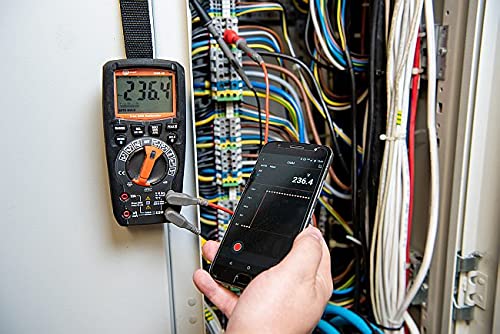
Figure 6.1: The Sonel CMM 30 Multimeter connected to an electrical panel, demonstrating its wireless communication feature. A smartphone displays the measurement reading remotely, highlighting the convenience for inaccessible areas.
د دې خصوصیت کارولو لپاره:
- Download the official Sonel CMM app from your smartphone's app store.
- په خپل سمارټ فون کې بلوتوټ فعال کړئ.
- Press the Bluetooth button on the multimeter to activate its wireless communication.
- Follow the app's instructions to pair with your CMM 30 and begin remote monitoring.
6.3.3. جوړ شوی فلش لائټ
The integrated flashlight assists in illuminating measurement areas, especially in low-light conditions. Activate it by pressing the dedicated light button.
6.4. Durability and IP67 Rating
The CMM 30 is designed with an IP67 rating, signifying its protection against dust ingress and immersion in water up to 1 meter for 30 minutes. This makes it suitable for demanding industrial environments.
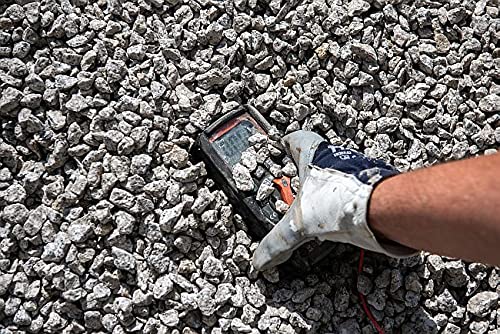
Figure 6.2: The Sonel CMM 30 Multimeter partially submerged in gravel, illustrating its robust construction and resistance to dust and debris, a testament to its IP67 rating.

Figure 6.3: The Sonel CMM 30 Multimeter creating a splash as it impacts a muddy puddle, demonstrating its exceptional water resistance and ability to withstand harsh, wet conditions.
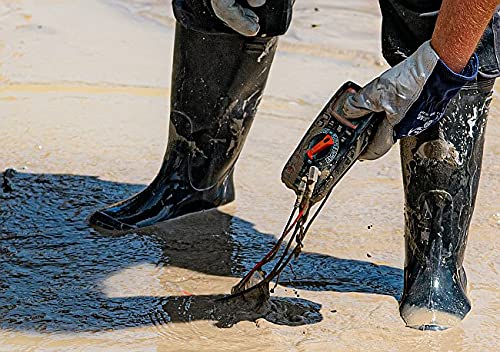
Figure 6.4: A person, wearing protective boots and gloves, retrieves the Sonel CMM 30 Multimeter from a muddy environment. This image emphasizes the device's resilience and ease of handling even after exposure to challenging conditions.
7. ساتنه
7.1. پاکول
د میټر سی پاک کړئasinد اعلان سره gamp ټوکر او یو معتدل صابون. د کثافاتو یا محلولونو څخه کار مه اخلئ. ډاډ ترلاسه کړئ چې میټر د کارولو دمخه په بشپړه توګه وچ دی.
7.2. د بیټرۍ بدلول
Refer to Section 5.1 for battery replacement instructions. Replace batteries promptly when the low battery indicator appears on the display.
7.3. ذخیره کول
When not in use for extended periods, store the multimeter in a dry, cool place, away from direct sunlight and extreme temperatures. Remove the batteries to prevent leakage.
8. ستونزه حل کول
| ستونزه | احتمالي لامل | د حل لاره |
|---|---|---|
| میټر نه چالانېږي. | مړه یا په غلط ډول نصب شوي بیټرۍ. | د بیټرۍ قطبیت وګورئ یا بیټرۍ بدل کړئ. |
| هیڅ لوستل یا "OL" (اوورلوډ) نه ښودل کیږي. | ناسم فعالیت غوره شوی؛ خلاص سرکټ؛ اندازه کول له حد څخه تیریږي. | Select correct function; check circuit continuity; switch to a higher range or auto-range. |
| ناسم لوستل. | Low battery; dirty test leads/jacks; external interference. | Replace batteries; clean leads/jacks; move away from strong electromagnetic fields. |
| د بلوتوث اتصال ستونزې. | Bluetooth not enabled on meter/phone; app issues; distance. | Ensure Bluetooth is on; restart app/phone; reduce distance between devices. |
9. مشخصات
| فیچر | مشخصات |
|---|---|
| برانډ | سونیل |
| د ماډل شمیره | SON001 |
| رنګ | تور |
| د توکي وزن | 418 ګرامه |
| د کڅوړې ابعاد | 30 x 15 x 10 سانتي متره |
| بیټرۍ | 4 AAA بیټرۍ اړین دي (شامل دي) |
| د اندازه کولو دندې | AC/DC حجمtage, AC/DC Current, Resistance, Capacity, Temperature, Duty Cycle, Frequency |
| رنګارنګ | لاسي او اتوماتیک |
| ریښتیا RMS | Yes (for AC voltage او اوسنی) |
| د ننوتلو محافظت (IP) درجه بندي | IP67 |
| ارتباط | Wireless (Smartphone App) |
| اضافي ځانګړتیاوې | HOLD function, Built-in flashlight, Backlight auto-adjustment |
10. تضمین او ملاتړ
10.1. د تضمین معلومات
Sonel products are manufactured to high standards and are warranted against defects in materials and workmanship for a period specified by your regional distributor from the date of purchase. This warranty does not cover damage caused by misuse, unauthorized modification, accident, or neglect. Please retain your proof of purchase for warranty claims.
10.2. تخنیکي ملاتړ
For technical assistance, troubleshooting beyond this manual, or warranty inquiries, please contact your local Sonel distributor or the authorized service center. Contact information can typically be found on the Sonel official webسایټ یا ستاسو د پیرود ځای له لارې.
When contacting support, please have your product model number (SON001) and purchase date readily available.


