1. د خوندیتوب مهمې لارښوونې
Please read these instructions carefully before using the product and retain them for future reference. Failure to follow these instructions may result in electric shock, fire, or other hazards.
- دا وسیله باران یا رطوبت ته مه رسوئ.
- د هوا د بهېدو لارې مه بندوئ. د جوړونکي د لارښوونو سره سم نصب کړئ.
- د تودوخې کومې سرچینې ته نږدې مه نصب کړئ لکه ریډیټرونه، د تودوخې راجسترونه، بخارۍ، یا نور وسایل (په شمول ampلایفیر) چې تودوخه تولیدوي.
- د بریښنا مزی د حرکت یا چپه کیدو څخه خوندي کړئ ، په ځانګړي توګه په پلګونو ، د اسانتیاو چمتو کولو ، او په هغه ځای کې چې دوی له وسیله وځي.
- یوازې د جوړونکي لخوا مشخص شوي ضمیمې / لوازم وکاروئ.
- دا وسیله د بریښنایی طوفانونو په جریان کې یا کله چې د اوږدې مودې لپاره نه کارول کیږي خلاص کړئ.
- ټول خدمتونه وړ خدمت پرسونل ته راجع کړئ. خدمت کول اړین دي کله چې وسایل په هر ډول زیانمن شوي وي، لکه د بریښنا رسولو تار یا پلګ زیانمن شوی وي، مایع توی شوي وي یا توکي په وسایلو کې راوتلي وي، وسیله د باران یا رطوبت سره مخ شوې وي، په نورمال ډول کار نه کوي. ، یا غورځول شوی دی.
- The stylus is delicate; handle with care to avoid damage.
2. محصول ختم شوview
The Udreamer UD001 is a belt-driven vinyl record player featuring built-in speakers, Bluetooth connectivity, USB playback, AUX-IN, and RCA line-out. It supports 3 speeds for various record types.

انځور: مخکینۍ برخه view of the Udreamer UD001 Vinyl Record Player with a record on the platter and the dust cover open.
2.1 اجزا او کنټرول
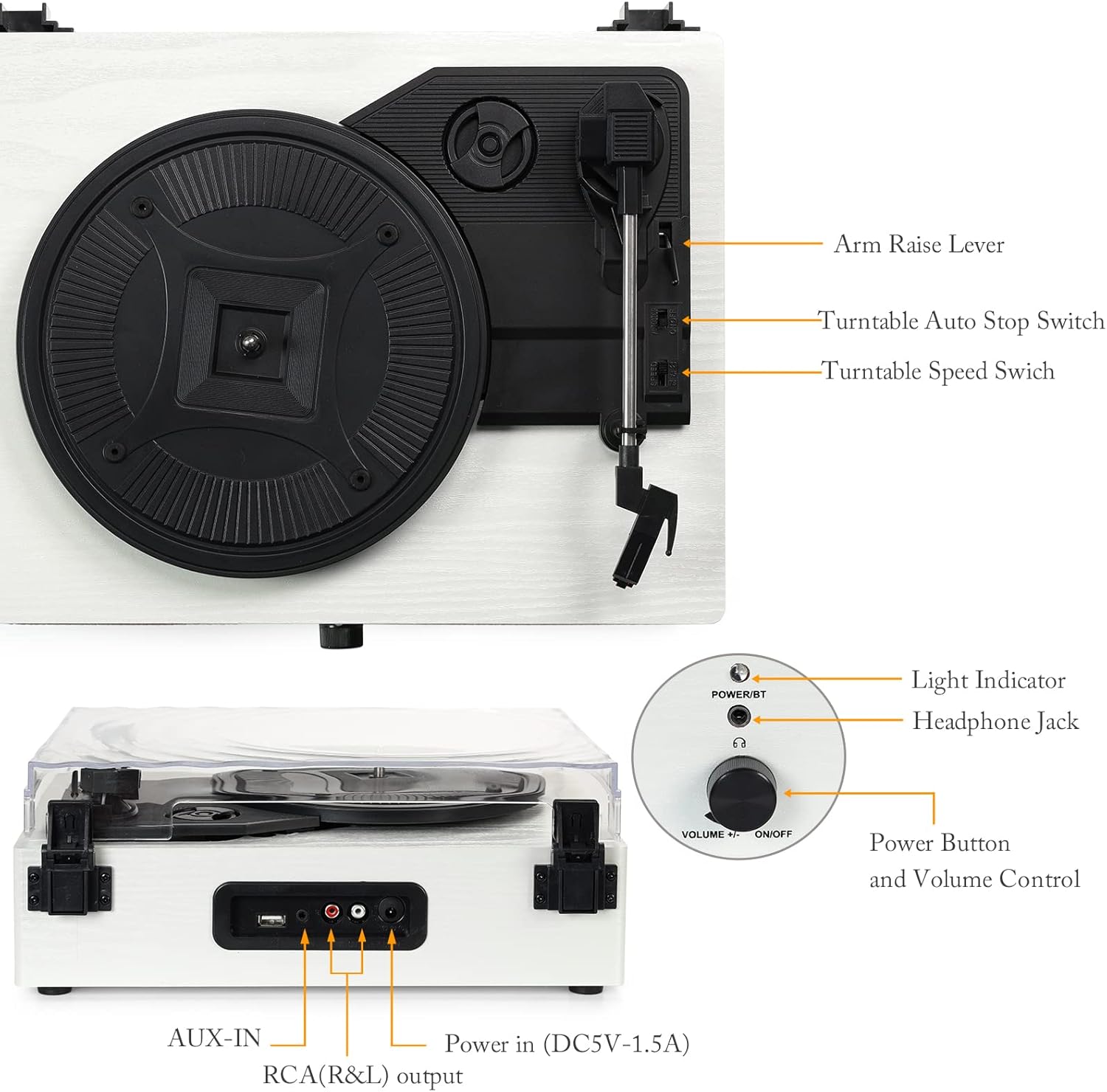
انځور: تفصیلي view of the turntable with labels pointing to key components including the arm raise lever, auto stop switch, speed switch, light indicator, headphone jack, power button, volume control, AUX-IN, RCA(R&L) output, and power input.
- تخته: Supports the record during playback.
- د دوړو پوښ: د ټرنټبل د دوړو څخه ساتي.
- ټونارم: Holds the stylus and cartridge.
- ستولیس: هغه ستنه چې د ریکارډ سوري لولي.
- د لاس پورته کولو لیور: د لاس ټون پورته کوي او ښکته کوي.
- Turntable Auto Stop Switch: د ریکارډ په پای کې د پلیټ اتوماتیک بندول فعال یا غیر فعالوي.
- Turntable Speed Switch: د پلې بیک سرعت غوره کوي (۳۳، ۴۵، یا ۷۸ RPM).
- Power Button/Volume Control: واحد چالان/بندوي او حجم تنظیموي.
- د رڼا شاخص: د بریښنا او بلوتوث حالت ښیې.
- د سر غوږ جیک: د شخصي اوریدلو لپاره.
- USB پورټ: د USB فلش ډرایو څخه د آډیو غږولو لپاره.
- اکس-ان: د بهرنیو آډیو وسیلو د نښلولو لپاره.
- RCA (R&L) Output: د بهرني سره د نښلولو لپاره ampلیفیرز یا ځواک لرونکي سپیکرې.
- Power In (DC5V-1.5A): د بریښنا اډاپټر سره نښلوي.

انځور: نږدې انځور views illustrating the stylus, the belt-driven platter mechanism, and the three supported record speeds (33, 45, 78 RPM) for 7-inch, 10-inch, and 12-inch records.
3. ترتیب کول
3.1 پیک کول
Carefully remove the turntable from its packaging. Ensure all components are present and undamaged. The package should include the UD001 turntable unit and an operation manual.

Image: The Udreamer UD001 turntable, its packaging box, power adapter, and instruction manual.
3.2 د بریښنا نښلول
- Connect the power adapter to the 'Power In (DC5V-1.5A)' port on the rear of the turntable.
- د بریښنا اډاپټر په مناسب دیوال آوټ لیټ کې ولګوئ.
3.3 Initial Platter and Belt Setup
The turntable platter and drive belt may require minor setup. Ensure the drive belt is correctly positioned around the motor pulley and the inner rim of the platter. Refer to the diagram in the 'Product Overview' section for visual guidance.
4. عملیاتي لارښوونې
4.1 د وینیل ریکارډ غږول
- د ټرنټیبل پلیټ کې ریکارډ ځای په ځای کړئ.
- Select the appropriate speed (33, 45, or 78 RPM) using the Turntable Speed Switch, matching the record's speed.
- If playing a 45 RPM single, place the included 45 RPM adapter on the center spindle.
- Turn the Power Button/Volume Control knob clockwise to power on the unit. The light indicator will illuminate.
- Lift the tonearm using the Arm Raise Lever.
- ټونرمام په احتیاط سره د ریکارډ د مطلوب پیل شوي نالی په سر کې حرکت وکړئ.
- Gently lower the tonearm onto the record using the Arm Raise Lever. The record will begin to play.
- Adjust the volume using the Power Button/Volume Control knob.
- To stop playback, lift the tonearm using the Arm Raise Lever and return it to its rest. Turn the Power Button/Volume Control knob counter-clockwise to power off.

Image: Close-up of the Turntable Auto Stop Switch and Turntable Speed Switch, located near the tonearm base.
د اتوماتیک بندولو فعالیت: The Turntable Auto Stop Switch controls whether the platter stops automatically at the end of a record. Set to 'ON' for automatic stop, 'OFF' for continuous rotation.
4.2 د بلوتوټ جوړه کول
The UD001 can connect wirelessly to Bluetooth-enabled devices for audio playback through its built-in speakers.
- Turn on the turntable by rotating the Power Button/Volume Control knob clockwise. The light indicator will flash blue, indicating Bluetooth pairing mode.
- په خپل بهرني وسیله (د بیلګې په توګه، سمارټ فون، ټابلیټ) کې بلوتوټ فعال کړئ.
- لټون 'Turntable' in your device's Bluetooth settings and select it to pair.
- Once paired, the light indicator will turn solid blue. You can now play audio from your device through the turntable's speakers.
- Adjust volume using the turntable's volume knob or your external device.

Image: A smartphone displaying a Bluetooth pairing menu with 'Turntable' selected, next to the Udreamer UD001 turntable, indicating a successful wireless connection.
۱۴ USB پلے بیک
The USB port allows playback of digital audio fileد USB فلش ډرایو څخه.
- Insert a USB flash drive into the USB port on the rear of the turntable.
- The unit will automatically switch to USB mode and begin playing compatible audio files.
- Use the turntable's volume control to adjust the audio output.

Image: Close-up of the rear panel connections, clearly labeling the USB port, AUX-IN port, RCA (R&L) output ports, and DC power input.
۵.۴ د اکس-ان اتصال
Connect external audio sources (e.g., MP3 players, CD players) using the AUX-IN port.
- Connect a 3.5mm audio cable (not included) from your external audio device's headphone or line-out jack to the AUX-IN port on the rear of the turntable.
- The turntable will automatically switch to AUX-IN mode.
- Play audio from your external device. Adjust volume using both the external device and the turntable's volume control.
۶.۸.۲ د RCA لاین آوټ
For enhanced audio, connect the turntable to external powered speakers or an amplifier using the RCA output ports.
- Connect an RCA cable (not included) from the RCA (R&L) output ports on the rear of the turntable to the corresponding input jacks on your external ampلایفیر یا ځواک لرونکي سپیکرې.
- ډاډ ترلاسه کړئ چې بهرنۍ آډیو سیسټم فعال دی او سم ان پټ ته تنظیم شوی دی.
- Audio will now play through your external system. Adjust volume using the external system's controls.
۶.۳ د هیډفون کارول
For private listening, connect headphones to the headphone jack on the front panel.
- Plug your headphones into the 3.5mm Headphone Jack on the front of the turntable.
- Audio will automatically be routed to the headphones, muting the built-in speakers.
- Adjust volume using the turntable's volume control.

Image: A woman wearing red headphones, holding a vinyl record, and listening to music, illustrating the use of the headphone jack for private listening.
5. ساتنه
5.1 د واحد پاکول
- Wipe the exterior of the turntable with a soft, dry cloth. Do not use abrasive cleaners or solvents.
- د دوړو د راټولیدو مخنیوي لپاره د کارولو پرمهال د دوړو پوښ وتړئ.
۶.۲ د سټایلس پاملرنه
- Gently clean the stylus periodically using a soft brush, brushing from back to front.
- د خپلو ګوتو سره د سټایلس لمس کولو څخه ډډه وکړئ.
- Replace the stylus when sound quality deteriorates or if the stylus is visibly damaged. Consult the manufacturer for compatible replacement styli.
6. ستونزه حل کول
- ځواک نشته:
- Ensure the power adapter is securely connected to the turntable and a working power outlet.
- Confirm the Power Button/Volume Control knob is turned clockwise to the 'ON' position.
- غږ نشته:
- Adjust the volume control on the turntable and any connected external devices.
- If using headphones, ensure they are fully plugged in.
- If using RCA output, verify the external amplifier/speakers are on and set to the correct input.
- Check that the stylus is properly seated and not damaged.
- Record Skipping:
- ډاډ ترلاسه کړئ چې ریکارډ پاک او له دوړو یا کثافاتو څخه پاک دی.
- Place the turntable on a stable, level surface to minimize vibrations.
- Check the stylus for damage or excessive wear.
- د بلوتوټ اتصال مسلې:
- Ensure the turntable is in Bluetooth pairing mode (flashing blue light).
- ډاډ ترلاسه کړئ چې ستاسو د بهرني وسیلې بلوتوټ فعال دی او په حد کې دی.
- د وسیلې د جلا کولو او بیا جوړولو هڅه وکړئ.
7. مشخصات
| فیچر | تفصیل |
|---|---|
| د ماډل شمیره | UD001 |
| د محصول ابعاد | 12.8 x 9.8 x 4.7 انچه |
| د توکي وزن | ۲.۴۵ پونډه |
| د پلی بیک سرعت | 33 1/3، 45، 78 RPM |
| د ډرایو ډول | بیلټ چلول |
| ارتباط | Bluetooth, USB, AUX-IN, RCA Line Out, Headphone Jack |
| جوړ شوي سپیکرونه | هو |
| د بریښنا سرچینه | د بریښنا تار شوی |
| والیtage | ۲.۳E+۲ ولټه (۲۳۰ ولټه) |
| مطابقت لرونکې وسیلې | هیډفون ، سپیکر |
8. تضمین او ملاتړ
For warranty information or technical support, please refer to the contact details provided with your purchase documentation or visit the official Udreamer webسایټ. د تضمین ادعاوو لپاره د پیرود ثبوت وساتئ.


