1. پیژندنه
The Hama MW-650 is a versatile 6-button optical wireless mouse designed for multi-device use. It offers flexible connectivity options via a 2.4 GHz USB-A receiver and Bluetooth, allowing seamless switching between up to three devices. The optical sensor provides precise cursor control, and adjustable DPI settings cater to various user preferences. This manual provides detailed instructions for setup, operation, maintenance, and troubleshooting to ensure optimal performance of your device.
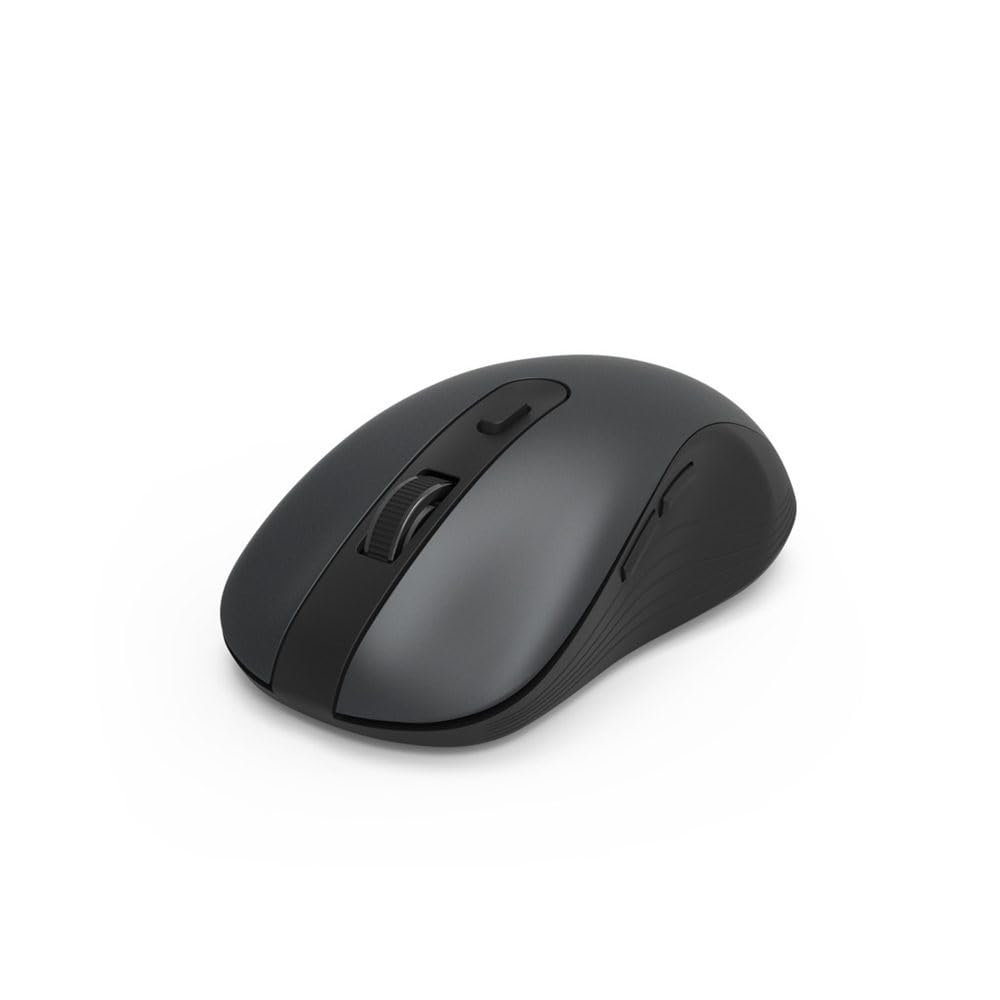
Image 1.1: Hama MW-650 Wireless Mouse (Top View)
2. د بسته محتويات
مهرباني وکړئ د لاندې توکو لپاره په بسته کې وګورئ:
- 1 x Hama MW-650 6-Button Optical Wireless Mouse
- 1 x USB-A رسیدونکی
- ۲ x AA میګنون بیټرۍ
- ۱ x لارښود لارښود (دا سند)

Image 2.1: Hama MW-650 Product Packaging
3. ترتیب کول
3.1. د بیټرۍ نصب کول
- د موږک لاندې برخه کې د بیټرۍ کڅوړه ومومئ.
- د بیټرۍ کمپارټ پوښ خلاص کړئ.
- Insert the two AA Mignon batteries, ensuring correct polarity (+/-).
- د بیټرۍ کمپارټ پوښ په خوندي ډول وتړئ.
3.2. بریښنا فعال/بند
On the underside of the mouse, slide the ON/OFF switch to the 'ON' position to power on the mouse. Slide it to 'OFF' when not in use to conserve battery life.

Image 3.1: Underside of Hama MW-650 Mouse with ON/OFF Switch and Receiver
3.3. د ارتباط اختیارونه
The Hama MW-650 mouse supports two wireless connection methods: 2.4 GHz via USB-A receiver and Bluetooth.
3.3.1. 2.4 GHz USB-A Receiver Connection
- Remove the USB-A receiver from its storage slot on the underside of the mouse.
- Plug the USB-A receiver into an available USB-A port on your computer or laptop.
- عملیاتي سیسټم باید په اتوماتيک ډول اړین چلوونکي کشف او نصب کړي.
- The mouse will connect automatically. The LED indicator for BT1/BT2 will not be lit when using the USB receiver.
3.3.2. د بلوتوث پیوستون
The mouse can connect to two separate Bluetooth devices (BT1 and BT2).
- ډاډ ترلاسه کړئ چې موږک فعال دی.
- Press the 'BT1' or 'BT2' button on the underside of the mouse to select the desired Bluetooth channel. The corresponding LED will flash slowly.
- To enter pairing mode, press and hold the selected 'BT1' or 'BT2' button for approximately 3 seconds until the LED flashes rapidly.
- په خپل وسیله (کمپیوټر، لیپ ټاپ، ټابلیټ، سمارټ فون) کې، بلوتوث فعال کړئ او د نویو وسایلو لټون وکړئ.
- Select "Hama MW-650" from the list of available devices to pair.
- Once successfully paired, the LED will stop flashing and remain steadily lit for a few seconds before turning off.
4. عملیاتي لارښوونې
۱. د موږک اساسي دندې
The Hama MW-650 features 6 buttons and a scroll wheel:
- د کیڼ کلیک تڼۍ: Primary function, typically for selecting items or opening links.
- د ښي کلیک تڼۍ: دوهم فعالیت، په ځانګړي ډول د شرایطو مینو لپاره.
- سکرول ویل: For scrolling up and down documents or web pages. Can also be pressed for a middle-click function.
- د DPI تڼۍ: Located behind the scroll wheel, used to adjust cursor sensitivity.
- مخکی / شاته تڼۍ: Located on the side of the mouse, typically used for navigating web پاڼې یا فولډرې.
۵.۳. د وسیلو ترمنځ بدلول
The MW-650 mouse allows you to switch between three connected devices (one via USB receiver, two via Bluetooth).
- To switch to a Bluetooth-connected device, press the 'BT1' or 'BT2' button on the underside of the mouse. The corresponding LED will light up briefly.
- To switch to the device connected via the USB receiver, press the 'USB' button (or the button without a BT label) on the underside of the mouse.

Image 4.1: Multi-Device Connectivity Example

Image 4.2: Multi-Device Setup with Monitor
4.3. DPI Sensitivity Adjustment
The mouse offers adjustable DPI (Dots Per Inch) settings to control cursor speed and sensitivity. Press the DPI button located behind the scroll wheel to cycle through the available sensitivities:
- 800 DPI
- 1200 DPI (ډیفالټ)
- 1600 DPI
- 2000 DPI
- 2400 DPI
Each press of the DPI button will change the sensitivity, allowing you to find the setting that best suits your task or preference.
5. د بریښنا مدیریت
The Hama MW-650 mouse is designed with intelligent power management features to conserve battery life:
- اتوماتیک سټینډ بای حالت: The mouse will automatically enter a standby mode after a period of inactivity. To wake it up, simply move the mouse or click any button.
- آن/بند سویچ: For extended periods of non-use, slide the ON/OFF switch on the underside of the mouse to the 'OFF' position to completely power down the device and maximize battery life.
6. پاملرنه او ساتنه
6.1. پاکول
د خپل موږک د فعالیت او ظاهري بڼې ساتلو لپاره:
- ډاډ ترلاسه کړئ چې موږک د پاکولو دمخه بند دی.
- د موږک سطحه د پاکولو لپاره نرم، وچ، لینټ نه پاک ټوکر وکاروئ.
- د سختې خاورې لپاره، لږ څهampټوکر د اوبو یا نرم پاکولو محلول سره ومینځئ. د سختو کیمیاوي موادو یا خړوبونکو موادو څخه ډډه وکړئ.
- Clean the optical sensor area on the underside of the mouse periodically with a cotton swab to ensure accurate tracking.
6.2. د بیټرۍ بدلول
When the mouse's performance degrades or it stops responding, it may be time to replace the batteries.
- Power off the mouse using the ON/OFF switch.
- په بیخ کې د بیټرۍ خلاص کړئ.
- Remove the old AA batteries and dispose of them according to local regulations.
- Insert new AA Mignon batteries, observing correct polarity.
- د بیټرۍ کڅوړه وتړئ.
7. ستونزه حل کول
If you encounter issues with your Hama MW-650 mouse, please refer to the following common solutions:
| ستونزه | احتمالي حل |
|---|---|
| Mouse does not respond. |
|
| د کرسر حرکت بې نظمه یا ورو دی. |
|
| د وسیلو ترمنځ نشي بدلیدلی. |
|
| د بلوتوث جوړه جوړه ناکامه کیږي. |
|
8. تخنیکي مشخصات
| د ماډل شمیره | 00182617 (MW-650) |
| د ارتباط ټیکنالوژي | 2.4GHz RF (USB-A Receiver), Bluetooth 5.0 |
| د حرکت کشف ټیکنالوژي | نظري |
| د DPI حساسیت | 800 / 1200 / 1600 / 2000 / 2400 DPI (adjustable) |
| د تڼیو شمیر | ۵ (د سکرول ویل په شمول) |
| د فارم فکتور | ښي لاس |
| د بریښنا سرچینه | 2 x AA Mignon Batteries (included) |
| د بیټرۍ ژوند | تر 288 ورځو پورې (د استعمال پورې اړه لري) |
| مطابقت لرونکي عملیاتي سیسټمونه | Windows 11/10/8/7, Android 4.3 or higher, macOS 10.10 or higher, iOS 13 or higher |
| د محصول ابعاد (L x W x H) | 11.3 x 6.3 x 4 سانتي متره (4.41 x 2.48 x 1.57 انچه) |
| د توکي وزن | 3.62 اونس |
| رنګ | تور |
9. تضمین او ملاتړ
د تضمین معلوماتو او تخنیکي ملاتړ لپاره، مهرباني وکړئ رسمي هاما ته مراجعه وکړئ webسایټ ته مراجعه وکړئ یا مستقیم د دوی د پیرودونکي خدماتو سره اړیکه ونیسئ. د هر ډول تضمین ادعا لپاره د پیرود ثبوت وساتئ.
- جوړونکی: هاما GmbH & Co KG
- Webسایټ: www.hama.com


