1. پیژندنه
د پیرودلو لپاره مننهasing the KEPLUG Sunrise Alarm Clock. This device is designed to enhance your waking and sleeping experience with its unique features, including sunrise and sunset simulations, dual alarms, FM radio, and various natural sounds. Please read this manual carefully to ensure proper use and optimal performance.
د بسته محتويات:
- 1 x KEPLUG Sunrise Alarm Clock
- 1 ایکس مایکرو USB کیبل
- ۱ x دیوال اډاپټر
- 1 x د کارونکي لارښود
2. محصول ختم شوview
Familiarize yourself with the main components and controls of your KEPLUG Sunrise Alarm Clock.

انځور 2.1: مخکی view of the KEPLUG Sunrise Alarm Clock, showing the digital time display and the illuminated light panel. The clock face is round with a white base.
د کنټرول تڼۍ او بندرونه:
Refer to the diagram below for button identification (exact button layout may vary slightly by model, but functions are consistent).
- د وخت تنظیم کولو تڼۍ: د وخت تنظیم کولو حالت ته د ننوتلو لپاره کارول کیږي.
- د الارم 1 بټن: د الارم ۱ تنظیم او فعالولو لپاره کارول کیږي.
- د الارم 2 بټن: د الارم ۱ تنظیم او فعالولو لپاره کارول کیږي.
- FM Radio Button: Activates and controls FM radio functions.
- د رڼا تڼۍ: Controls the light brightness and color modes.
- حجم +/- تڼۍ: د غږ حجم تنظیموي.
- پورته/ښکته تtۍ: مینو ته ننوځي او ارزښتونه تنظیموي.
- Snooze/Sleep Aid Button: Activates snooze during an alarm or sleep aid function.
- د USB چارج بندر: د بهرنیو وسایلو د چارجولو لپاره.
- د مایکرو USB بریښنا ان پټ: د بریښنا اډاپټر سره نښلوي.
3. ترتیب کول
3.1 د بریښنا نښلول
- Connect the micro USB cable to the power input port on the back of the alarm clock.
- د دیوال اډاپټر په معیاري بریښنایی آوټ لیټ کې ولګوئ.
- ښودنه به روښانه شي، چې دا په ګوته کوي چې وسیله فعاله ده.
The clock includes a built-in backup battery to retain settings during power outages or disconnections.
3.2 د وخت ټاکل
- فشار ورکړئ د وخت تنظیم کولو تڼۍ (often represented by a clock icon). The hour display will start flashing.
- د کارولو پورته / ښکته تtۍ د ساعت تنظیم کولو لپاره.
- فشار ورکړئ د وخت تنظیم کولو تڼۍ again to confirm the hour and move to minute setting. The minute display will flash.
- د کارولو پورته / ښکته تtۍ دقیقو سمولو لپاره.
- فشار ورکړئ د وخت تنظیم کولو تڼۍ a third time to confirm the minutes.
- د ۱۲ ساعته او ۲۴ ساعته بڼې ترمنځ د بدلولو لپاره، فشار ورکړئ پورته / ښکته تtۍ while the time is flashing during setup, or refer to the specific instructions in your manual for a dedicated time format button.
3.3 Time Display Brightness
The time display offers three brightness settings: High, Low, and Off. This can typically be adjusted by repeatedly pressing a dedicated display brightness button or by holding the Time Setting button. Refer to your specific model's instructions for exact control.
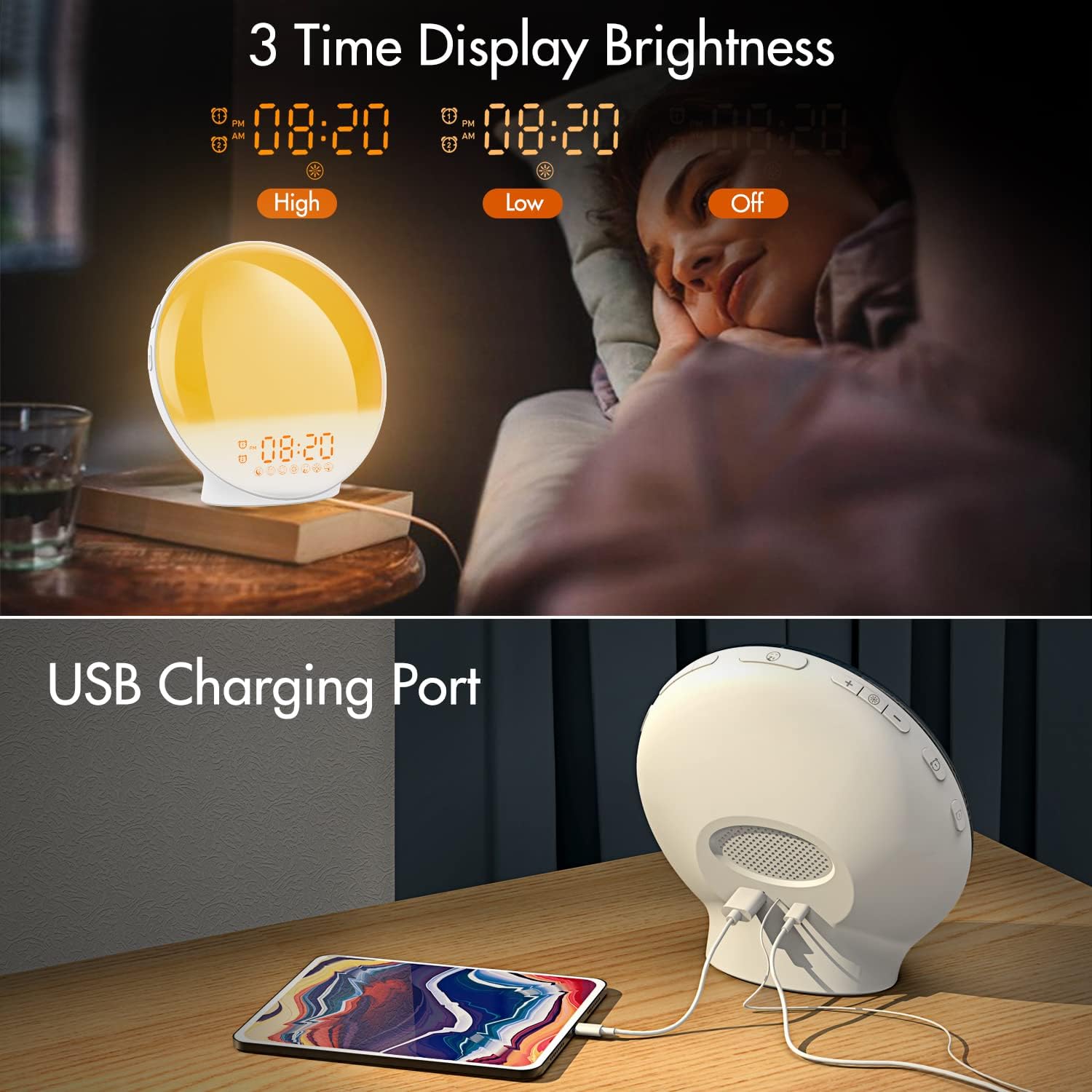
انځور 3.1: Illustration of the three time display brightness options: High, Low, and Off, allowing users to customize visibility for different times of day or night.
4. عملیاتي لارښوونې
۴.۴ د الارمونو تنظیم کول (الارم ۱ او الارم ۲)
The clock features two independent alarms, allowing for separate wake-up times (e.g., weekday and weekend).

انځور 4.1: Depiction of the dual alarm functionality, allowing users to set different alarms for weekdays and weekends, along with the snooze feature.
- فشار ورکړئ د الارم 1 تtonۍ (یا د الارم 2 تtonۍ) to activate and enter alarm setting mode. The alarm time will flash.
- د کارولو پورته / ښکته تtۍ د مطلوب الارم ساعت تنظیم کولو لپاره.
- فشار ورکړئ د الارم تtonۍ again to confirm the hour and set the minutes.
- د کارولو پورته / ښکته تtۍ د مطلوب الارم دقیقې تنظیم کولو لپاره.
- فشار ورکړئ د الارم تtonۍ again to select the wake-up sound. Use پورته / ښکته تtۍ to cycle through 7 nature sounds or FM radio.
- فشار ورکړئ د الارم تtonۍ again to set the volume level (1-16) for the alarm sound. Use پورته / ښکته تtۍ تنظیم کول
- فشار ورکړئ د الارم تtonۍ one last time to confirm all settings and activate the alarm. An alarm icon will appear on the display.
4.2 د سنوز فعالیت
When an alarm sounds, tap the سنوز تtonۍ (often the large button on top or front) to pause the alarm for 9 minutes. This can be repeated up to 5 times.
۳.۱ د لمر خاته سمولیشن
The sunrise simulation gradually brightens the light before your alarm time, mimicking a natural sunrise.

انځور 4.2: Visual representation of the sunrise simulation feature, where the light intensifies gradually over a set period before the alarm, designed for a gentle wake-up.
- When setting an alarm, after selecting the sound and volume, you will typically be prompted to set the sunrise duration.
- د کارولو پورته / ښکته تtۍ to choose a duration between 10 to 60 minutes. The light will gradually increase from 0% to the set brightness level (0-20) during this period.
- The light color will transition from deep red to bright yellow, simulating a natural sunrise.
4.4 Sunset Simulation / Sleep Aid
The sunset simulation gradually dims the light and can play soothing sounds to help you fall asleep.

انځور 4.3: Illustration of the sunset simulation, where the light gradually dims over a period of 10 to 120 minutes, accompanied by optional sleep sounds like rain, forest, river, or FM radio.
- فشار ورکړئ Snooze/Sleep Aid Button (or a dedicated Sleep Aid button) to activate the sleep aid function.
- د کارولو پورته / ښکته تtۍ to select a duration for the dimming process (10-120 minutes).
- You can also select a natural sound (Rain, Forest, River) or FM radio to play during this period.
- The light will gradually dim from 100% to 0% over the selected duration, and the sound will fade out.
4.5 ایف ایم راډیو
The built-in FM radio allows you to listen to your favorite stations or use them as an alarm sound.

انځور 4.4: اوورview of the 7 available alarm sounds and the FM radio option, providing diverse choices for waking up.
- فشار ورکړئ د ایف ایم راډیو تtonۍ د راډیو د چالانولو/بندولو لپاره.
- نیول د ایف ایم راډیو تtonۍ to automatically scan and save available stations.
- د کارولو پورته / ښکته تtۍ to manually tune to a specific frequency or cycle through saved stations.
- د. په کارولو حجم تنظیم کړئ حجم +/- تtۍ.
4.6 Night Light / Color Light
The clock can function as a night light with various color options and adjustable brightness.

انځور 4.5: Display of the 7 color atmosphere light options and 20 brightness levels, highlighting the clock's versatility as a mood light or reading lamp.
- فشار ورکړئ د رڼا تڼۍ څراغ فعالولو لپاره.
- فشار ورکړئ د رڼا تڼۍ repeatedly to cycle through 7 static colors (e.g., Red, Green, Blue, Yellow, Indigo, Purple, White) or an automatic color-changing mode.
- د کارولو پورته / ښکته تtۍ to adjust the brightness level (0-20) of the selected color or white light.
- نیول د رڼا تڼۍ د رڼا د بندولو لپاره.
4.7 د USB چارج کولو بندر
A 5V/2.4A USB port is located on the back of the device, allowing you to charge your smartphone or other small electronic devices.
انځور 4.6: شاته view of the alarm clock showing the USB charging port in use, connected to a tablet for charging.
5. ساتنه
- پاکول: وسیله په نرم، وچ ټوکر سره پاک کړئ. د کثافاتو پاکوونکي یا محلولونه مه کاروئ.
- ذخیره کول: کله چې د اوږدې مودې لپاره نه کارول کیږي، وسیله په یخ او وچ ځای کې وساتئ.
- ځواک: Always use the provided power adapter to prevent damage.
6. ستونزه حل کول
| ستونزه | احتمالي لامل | د حل لاره |
|---|---|---|
| ساعت نه چالانېږي. | د بریښنا اډاپټر نه دی وصل شوی یا خراب شوی دی. | Ensure the power adapter is securely connected to both the clock and a working power outlet. Try a different outlet. |
| الارم نه غږېږي. | الارم فعال شوی نه دی یا حجم ډیر ټیټ دی. | Check if the alarm icon is displayed. Re-set the alarm and ensure the volume is set to an audible level. |
| Sunrise simulation not working. | Sunrise duration not set during alarm setup. | Ensure you have set a sunrise duration (10-60 minutes) when configuring the alarm. |
| FM radio static or poor reception. | کمزوری سیګنال یا د انتن موقعیت. | Extend the antenna wire fully. Reposition the clock to improve reception. Perform an auto-scan for stations. |
| د USB چارج کول کار نه کوي. | وسیله مطابقت نلري یا کیبل خراب دی. | Ensure the device you are charging is compatible with 5V/2.4A USB charging. Try a different USB cable. |
7. مشخصات
- نښه: KEPLUG
- ماډل: B09FRY71NH
- د محصول ابعاد: 16 x 16 x 6.1 سانتي متره
- د توکي وزن: 481 ګرامه
- والیtage: 5 ولټه
- د بریښنا سرچینه: د بیټرۍ چلول (د AC اډاپټر سره)
- د ښودلو ډول: ډیجیټل
- ځانګړي ځانګړتیاوې: Charging Port, Dimmable Light, Sunrise/Sunset Simulation, Dual Alarm, FM Radio, Nature Sounds
- د لومړي شتون نیټه: د ۲۰۲۳ کال د نومبر ۳۰مه
8. تضمین او ملاتړ
For warranty information or technical support, please refer to the contact details provided with your purchase documentation or visit the official KEPLUG webسایټ. د پیرود ثبوت په توګه د پیرود رسید وساتئ.