د کاسیو پریویا PX-S1100 ډیجیټل پیانو لارښوونې لارښود
Model: PX-S1100BKC3
1. پیژندنه
The Casio Privia PX-S1100 is an 88-key touch-responsive weighted digital piano designed for a premium playing experience. Its ultra-portable and sleek design makes it suitable for various environments, from home practice to stage performances. This manual provides essential information for setting up, operating, and maintaining your digital piano.

شکل 1.1: مخکی view of the Casio Privia PX-S1100 Digital Piano.
2. کلیدي ځانګړتیاوې
The Casio Privia PX-S1100 offers a range of features designed to enhance your musical journey:
- Entry into Privia Excellence: Slim, stylish design with illuminated touch controls and gold accents, perfect for new players ready for a premium experience.
- Refined Piano Tone: Features a German grand piano with enhanced string/damper resonance, plus 17 other rich, expressive tones.
- Unmatched Portability & Size: 43% smaller than previous Privia models, the PX-S1100 redefines how portable a full-size piano can be. Weighs under 25 lbs and runs on batteries—play on a table, desk, or even your bed.
- بلوتوټ آډیو او MIDI: Includes WU-BT10 adapter to connect wirelessly with no extra power needed—play, learn, and stream.
- Designed for Learning & Creativity: Casio Music Space app, built-in MIDI/audio recorder, Duet Mode, and USB-MIDI for easy connection.

Figure 2.1: Real Piano Feel in a Slim, Elegant, Portable Digital Piano.
۲. په بکس کې څه دي؟
Upon unboxing your Casio Privia PX-S1100, you should find the following items:
- WU-BT10 Bluetooth Audio & MIDI Adapter
- AC اډاپټر
- پیډل
- د موسیقۍ موقف
4. ترتیب کول
4.1 د بریښنا نښلول
Connect the included AC adapter to the DC 12V port on the rear of the piano and plug it into a wall outlet. Alternatively, the piano can be powered by 6 AA batteries for portable use. Ensure batteries are inserted with correct polarity.
۳.۳ د پیډل اتصال
Connect the included pedal to the "DAMPER PEDAL" jack on the rear panel. For enhanced functionality, an optional triple pedal unit (sold separately) can be connected to the "PEDAL UNIT" port.
4.3 Music Stand Setup
Insert the music stand into the designated slots on the top panel of the piano. Ensure it is securely seated before placing sheet music.
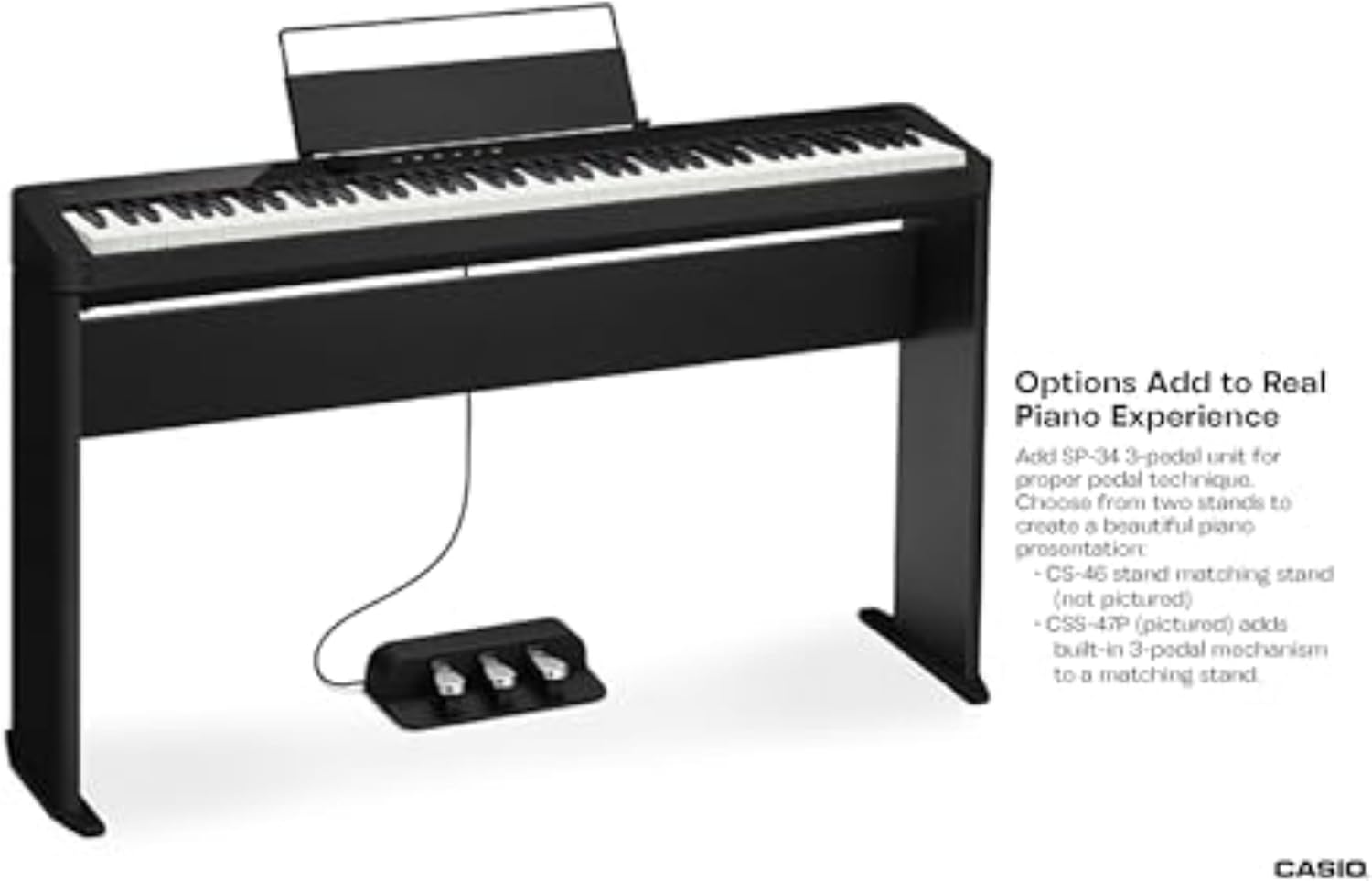
Figure 4.1: Modern Enhancements and setup options.
4.4 Bluetooth Connection (WU-BT10 Adapter)
Insert the WU-BT10 Bluetooth MIDI and audio adapter into the USB Type A port on the rear of the piano. This enables wireless connection to compatible devices for audio streaming and MIDI control.
4.5 Casio Music Space App Connection
Download the Casio Music Space app on your smartphone or tablet. Connect your device to the piano via Bluetooth (using the WU-BT10 adapter) or a USB cable. The app provides additional features for learning, practicing, and controlling piano functions.
5. عملیاتي لارښوونې
۵.۱ بریښنا فعاله/بنده او حجم
Press the power button to turn the piano on or off. Adjust the master volume using the rotary knob located on the left side of the control panel.
5.2 د غږ انتخاب
The PX-S1100 features 18 built-in tones. Use the dedicated buttons or the function menu to select different sounds such as Grand Piano, Electric Piano, Organ, Strings, and more. The illuminated touch controls make selection intuitive.

Figure 5.1: Stunningly Realistic Piano Sound and More, showing illuminated controls.
5.3 میترونوم
Activate the built-in metronome to assist with timing and rhythm practice. Adjust the tempo and beat using the control panel buttons.
5.4 ثبتول
The piano includes a built-in MIDI/audio recorder. Use the recording function to capture your performances for review یا شریکول.
5.5 Duet Mode
Engage Duet Mode to split the keyboard into two equal ranges, allowing two players to practice together on the same instrument. This is ideal for lessons or collaborative playing.
5.6 Connectivity (USB-MIDI)
Connect the piano to a computer or other MIDI devices via USB for advanced music production, notation software, or piano learning applications.

Figure 5.2: Powerful Sound Reproduction from the integrated speakers.
6. ساتنه
To ensure the longevity and optimal performance of your Casio Privia PX-S1100, follow these maintenance guidelines:
- پاکول: د پیانو سطحه د نرم، وچ ټوکر سره پاک کړئ. د سختې خاورې لپاره، یو څه ډډ وکاروئamp ټوکر ووهئ او بیا په ښه توګه وچ کړئ. د کثافاتو پاکوونکو یا محلولونو څخه ډډه وکړئ.
- ذخیره کول: پیانو په یخ او وچ ځای کې د مستقیم لمر وړانګو، سختې تودوخې او لوړې رطوبت څخه لرې وساتئ.
- سمبالول: Handle the piano with care, especially when transporting. Avoid dropping or subjecting it to strong impacts.
7. ستونزه حل کول
If you encounter any issues with your Casio Privia PX-S1100, refer to the following common troubleshooting tips:
| ستونزه | احتمالي لامل | د حل لاره |
|---|---|---|
| غږ نشته | Volume too low; AC adapter not connected; headphones connected. | Increase volume; ensure AC adapter is securely connected; disconnect headphones. |
| کلیدونه ځواب نه ورکوي | د برېښنا ستونزه؛ داخلي خرابوالی. | Check power connection; power cycle the unit. If issue persists, contact support. |
| د بلوتوث پیوستون مسلې | WU-BT10 adapter not properly inserted; device not in pairing mode. | Ensure adapter is fully inserted; put device in pairing mode and retry connection. |
8. مشخصات
| مشخصات | تفصیل |
|---|---|
| د ماډل نوم | PX-S1100BK |
| د توکي ماډل شمیره | PX-S1100BKC3 |
| د کلیدونو شمیر | 88 |
| کلیدي ډول | Weighted, Touch-Responsive (Smart Scaled Hammer Action Keyboard) |
| د توکي وزن | ۲.۴۵ پونډه |
| د محصول ابعاد | 9.13 x 52.05 x 9.13 انچه |
| د ارتباط ټیکنالوژي | Bluetooth, USB (MIDI USB) |
| د بریښنا سرچینه | Corded Electric (AC Adapter), 6 AA batteries |
| هیډفون جیک | 2.5mm جیک |
| ملاتړ شوی سافټویر | Chordana Play app, DAWs, Notation software, Piano learning apps |
9. تضمین او ملاتړ
د تضمین معلوماتو او پیرودونکو ملاتړ لپاره، مهرباني وکړئ رسمي کاسیو ته مراجعه وکړئ webسایټ ته مراجعه وکړئ یا مستقیم د دوی د پیرودونکو خدماتو سره اړیکه ونیسئ. د تضمین ادعاوو لپاره د پیرود ثبوت په توګه د پیرود رسید وساتئ.
د نورو مرستو لپاره، لیدنه وکړئ په ایمیزون کې د کاسیو پلورنځی.


