1. پیژندنه
The OREI UHDS-404VW is a versatile 4K 4x4 HDMI Matrix Switch and Video Wall Controller designed to manage and distribute HDMI signals. This device allows users to switch between four HDMI input sources and display them across four HDMI output displays. It also features advanced video wall capabilities, supporting various configurations such as 2x2, 1x4, and 4x1, enabling a single source to be spread across multiple screens or multiple sources to be displayed individually. This manual provides detailed instructions for the proper installation, operation, and maintenance of your UHDS-404VW unit.
2. د بسته محتويات
د کڅوړې د پرانیستلو پر مهال، مهرباني وکړئ تصدیق کړئ چې لاندې ټول توکي پکې شامل دي:
- 1x OREI UHDS-404VW HDMI Matrix Switch & Video Wall Controller
- 1x بریښنا اډاپټر
- 1x IR ریموٹ کنټرول
- ۱x RS-۲۳۲ فینکس نښلونکی
- 1x IR رسیدونکی کیبل
- 1x Mounting Ear Set
- 1x د کارونکي لارښود

Image: The OREI UHDS-404VW unit with its included accessories, such as the power adapter, remote control, and various cables.
3. محصول ختم شوview
3.1 مخکښ پینل

Image: The front panel of the UHDS-404VW unit, displaying LED indicators for power, input status (HD A, HD B), loop status (LP A, LP B), and output status (HD 1, HD 2, HD 3, HD 4).
The front panel features a series of LED indicators that provide real-time status of the device:
- PWR LED: روښانه کوي کله چې واحد فعال وي.
- INPUT LEDs (HD A, HD B): Indicate active HDMI input sources.
- LOOP LEDs (LP A, LP B): Indicate active local loop-out connections.
- OUTPUT LEDs (HD 1-4): Indicate active HDMI output displays.
3.2 شاته پینل
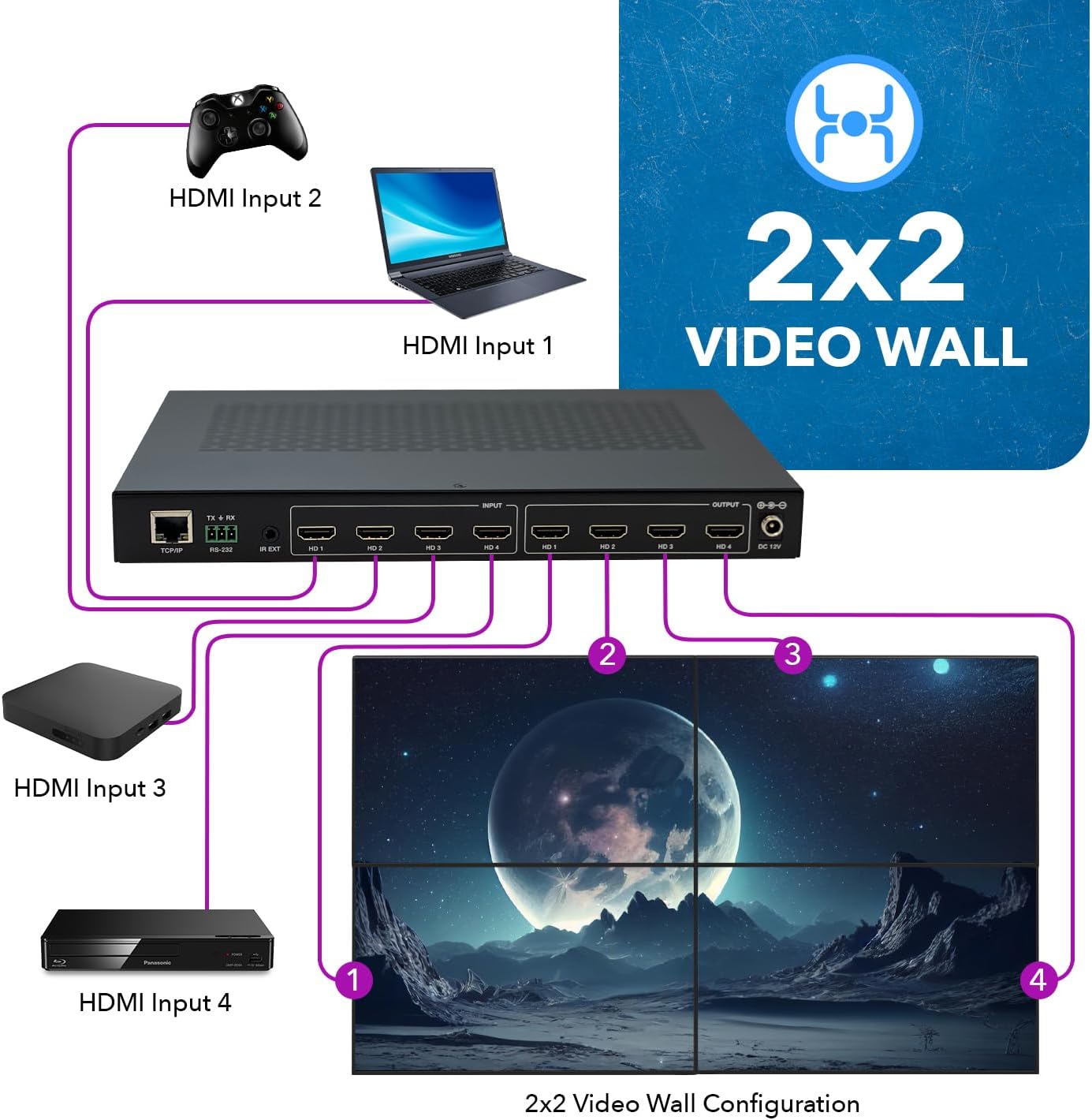
Image: The rear panel of the UHDS-404VW unit, showing ports for LAN, RS-232 control, service (Micro USB), audio outputs (analog 3.5mm, digital Toslink), HDMI inputs (HD A, HD B), loop outputs (LP A, LP B), HDMI outputs (HD 1-4), ground, and DC 12V power input.
The rear panel houses all the necessary connection ports:
- LAN پورټ: For network control via TCP/IP.
- RS-232 CTL Ports: For serial control via RS-232.
- SERVICE Port (Micro USB): د فرم ویئر تازه معلوماتو لپاره.
- د آډیو تولید: Includes analog (3.5mm) and digital (Toslink) options for external audio systems.
- HDMI INPUTS (HD A, HD B): خپل د HDMI سرچینې وسایل وصل کړئ.
- LOOP OUT Ports (LP A, LP B): For local monitoring of input signals.
- HDMI OUTPUTS (HD 1-4): Connect to your display monitors for video wall or matrix configurations.
- ځمکه: ځمکنی ټرمینل
- DC 12V: د شامل شوي بریښنا اډاپټر لپاره د بریښنا ان پټ.
۴. د تنظیم لارښوونې
د خپل OREI UHDS-404VW تنظیم کولو لپاره دا ګامونه تعقیب کړئ:
- Connect HDMI Output Displays: Connect your four display monitors to the HDMI OUTPUTS (HD 1-4) on the rear panel of the UHDS-404VW. Ensure correct sequencing for video wall functionality (e.g., top-left to HD1, top-right to HD2, bottom-left to HD3, bottom-right to HD4 for a 2x2 setup).
- د HDMI ان پټ سرچینې وصل کړئ: Connect your HDMI source devices (e.g., Blu-ray player, gaming console, laptop) to the HDMI INPUTS (HD A, HD B) on the rear panel.
- Connect Local Loop Out (Optional): If you wish to monitor the input signal locally, connect an additional monitor to one of the LOOP OUT ports (LP A or LP B).
- د آډیو آوټ پټ سره وصل کړئ (اختیاري): If using external audio, connect your amplifier or audio system to the desired AUDIO OUTPUT (analog or digital).
- Connect Control (Optional): For advanced control, connect an Ethernet cable to the LAN port for TCP/IP control, or use the provided RS-232 Phoenix connector for serial control.
- د ځواک کارول: Connect the included 12V DC power adapter to the DC 12V port on the rear panel and plug it into a standard wall outlet. The PWR LED on the front panel will illuminate, and the unit will perform a self-test.

انځور: Example of a 4x4 matrix configuration, where each of the four input sources is displayed on a different output screen.
انځور: Example of a 2x2 video wall configuration, where a single input source is seamlessly displayed across four screens.
5. عملیاتي طریقې
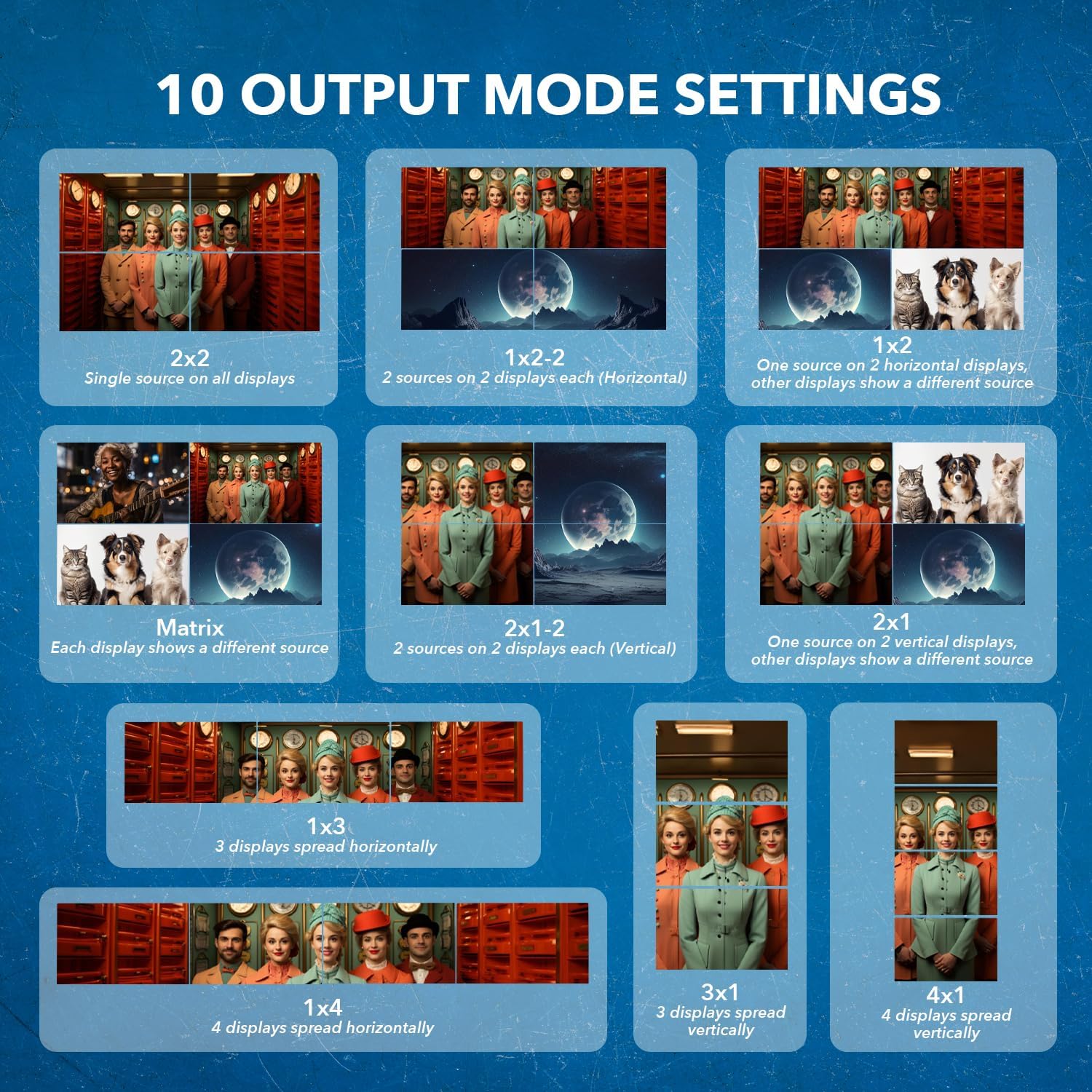
The UHDS-404VW supports multiple display modes, configurable via the IR remote, Web GUI, or RS-232 commands:
- ۲x۲ ویډیو دیوال: A single source is displayed across four screens, forming one large image.
- د میټرکس حالت: Each display shows a different source, allowing for independent viewing.
- 1x2 Horizontal: One source displayed on two horizontal screens, or two sources on two displays each.
- 2x1 Vertical: One source displayed on two vertical screens, or two sources on two displays each.
- 1x3 Horizontal: Three displays spread horizontally.
- 1x4 Horizontal: Four displays spread horizontally.
- 3x1 Vertical: Three displays spread vertically.
- 4x1 Vertical: Four displays spread vertically.

Image: Visual representation of the ten different output mode settings available for the UHDS-404VW, demonstrating various ways to arrange content across multiple screens.
5.1 Bezel Adjustment
The unit's software allows for horizontal and vertical bezel adjustment to minimize the visible lines where displays overlap in video wall configurations. This feature helps create a more seamless viewتجربه

Image: The UHDS-404VW unit with its remote control, illustrating the concept of horizontal and vertical bezel adjustment for optimizing video wall displays.
6. مشخصات
- معلومات: 4 HDMI
- پایلې: 4 HDMI
- د حل ملاتړ: Up to 4K@60Hz 4:4:4 (4096x2160), backward compatible with 1080p/720p.
- د HDMI معیار: HDMI 2.0
- د HDCP موافقت: HDCP 2.2
- د آډیو ملاتړ: Pass-through for PCM, Dolby Digital, Dolby TrueHD, DTS-HD Master.
- د کنټرول اختیارونه: IR Remote, Front Panel buttons, TCP/IP, RS-232.
- Local Loopback Function: Allows monitoring of input content.
- د EDID مدیریت: Advanced EDID settings for device compatibility.
- ابعاد: 14 x 1.25 x 3 انچه
- د توکي وزن: ۲.۴۵ پونډه
- احاطه: Full metal for durability.
7. ستونزه حل کول
If you encounter issues with your OREI UHDS-404VW, please refer to the following common troubleshooting steps:
- ویډیو/آډیو نشته: Ensure all HDMI cables are securely connected and are of high quality (HDMI 2.0 or higher for 4K content). Verify that the power adapter is correctly connected and the PWR LED is illuminated. Check the input and output status LEDs on the front panel.
- Incorrect Display/Resolution: Confirm that your source device and displays support the selected resolution. Utilize the EDID management features via the control software to optimize compatibility.
- Video Wall Alignment Issues: Use the bezel adjustment feature in the control software to fine-tune the alignment of your video wall displays. Ensure monitors are physically arranged correctly.
- د کنټرول مسلې: Verify network connectivity for TCP/IP control or serial cable connection for RS-232. Ensure the correct control software/commands are being used.
- د فرم ویئر تازه کول: If persistent issues occur, check the OREI website for the latest firmware updates and follow the provided instructions for updating via the SERVICE port.
8. ساتنه
To ensure the longevity and optimal performance of your UHDS-404VW, follow these maintenance guidelines:
- پاکول: Use a soft, dry cloth to clean the unit. Avoid using liquid or aerosol cleaners.
- وینټیلیشن: Ensure the unit has adequate ventilation. Do not block the ventilation slots on the sides to prevent overheating.
- ذخیره کول: دا واحد په یخ او وچ ځای کې د مستقیم لمر وړانګو او سختو تودوخې څخه لرې وساتئ کله چې د اوږدې مودې لپاره نه کارول کیږي.
- د کیبل مدیریت: کیبلونه منظم وساتئ او د زیانونو مخنیوي لپاره له کنکونو یا ډیر فشار څخه پاک وساتئ.
9. تضمین او ملاتړ
The OREI UHDS-404VW comes with a 1 کلن بشپړ تضمین. For technical assistance or warranty claims, please contact OREI Support. Refer to the included warranty card for detailed terms and conditions.
10. ویډیو څنګه
For a visual guide on setting up and using your OREI UHDS-404VW, please watch the official instructional video below:
Video: An instructional video demonstrating the unboxing, features, and setup of the OREI UHD-204VW (UHDS-404VW) Video Wall Processor.