پیژندنه
د پیرودلو لپاره مننهasing the Senicare Digital Alarm Clock. This alarm clock is designed to provide clear time display, customizable night lighting, and convenient charging options for your devices. Its large LED display ensures readability from a distance, making it suitable for all ages. This manual provides detailed instructions for setup, operation, and maintenance to ensure optimal performance and longevity of your device.

Figure 1: Senicare Digital Alarm Clock Overview
د بسته محتويات
مهرباني وکړئ د بکس خلاصولو پر مهال د کڅوړې محتويات وګورئ ترڅو ډاډ ترلاسه کړئ چې ټول توکي شتون لري:
- 1 x Senicare Digital Alarm Clock (Model: ZH027)
- 1 x د بریښنا اډاپټر
- 1 x USB Power Cable (approx. 59.06 inches / 1.5 meters)
- ۱ x د کارونکي لارښود (دا سند)

شکل ۲: د بسته محتويات شامل دي
چمتو کول
Follow these steps to set up your Senicare Digital Alarm Clock:
- د بریښنا پیوستون: Connect the provided USB power cable to the "INPUT 5V===2A" port on the back of the alarm clock. Plug the other end into the power adapter, and then plug the adapter into a standard electrical outlet (100-240V AC). The display will light up.
- د بیټرۍ بیک اپ (اختیاري): For power failure memory, insert 2 x AAA batteries (not included) into the battery compartment on the bottom of the clock. This feature ensures that time and alarm settings are retained during a power outage, though the screen will go blank.
- د لومړني وخت تنظیم:
- فشار ورکړئ د وخت وخت button on the back of the clock. The hour digits will start flashing.
- د کارولو ساعت او MIN buttons on the top of the clock to adjust the hour and minute respectively.
- مطبوعاتي د وخت وخت بیا د وخت تایید لپاره.
- د 12/24 ساعتونو بڼه: فشار ورکړئ 12/24H button on the back to switch between 12-hour (with AM/PM indicator) and 24-hour time formats.

Figure 3: Power Failure Memory Feature

شکل ۲: مهمې ځانګړتیاوېview
عملیاتي لارښوونې
د الارم تنظیم کول
- فشار ورکړئ AL SET button on the back of the clock. The alarm hour digits will flash.
- د کارولو ساعت او MIN buttons on the top to set your desired alarm time.
- مطبوعاتي AL SET بیا د الارم وخت تاییدولو لپاره.
- To activate or deactivate the alarm, use the په الارم روان / بند slider switch on the back of the clock. When the alarm is active, an alarm icon will appear on the display.
Snooze فعالیت
کله چې الارم غږ شي، لوی فشار ورکړئ د سنوز رڼا button on the top of the clock to activate the snooze function. The alarm will pause for 9 minutes and then sound again. You can repeat this process multiple times.

Figure 5: Snooze Function
د الارم حجم تنظیم کول
The alarm volume can be adjusted to High (HI), Medium (MI), or Low (LO) using the حجم slider switch located on the back of the clock.

Figure 6: Volume and Alarm Controls
د شپې ر Lightا فنکشن
The clock features a 7-color soft night light. Tap the large د سنوز رڼا button on the top of the clock to cycle through the different colors or turn the night light off. This provides a gentle illumination for your room.

Figure 7: 7-Color Soft Night Light

Figure 8: Night Light Color Options
اتومات Dimmer
The clock is equipped with a photosensitive sensor that automatically adjusts the display brightness (0-100%) to a comfortable level based on ambient light conditions, ensuring clear visibility day and night without being too bright in the dark.

Figure 9: Auto Dimmer Display Brightness

Figure 10: Automatic Brightness Adjustment
دوه ګونی USB چارج کولو بندرونه
The back of the alarm clock features two 5V 1A USB charging ports (USB1, USB2) and one Type-C output port (5V 1A). These ports allow you to conveniently charge your smartphone, tablet, or other USB-powered devices directly from the alarm clock, eliminating the need for extra wall adapters.
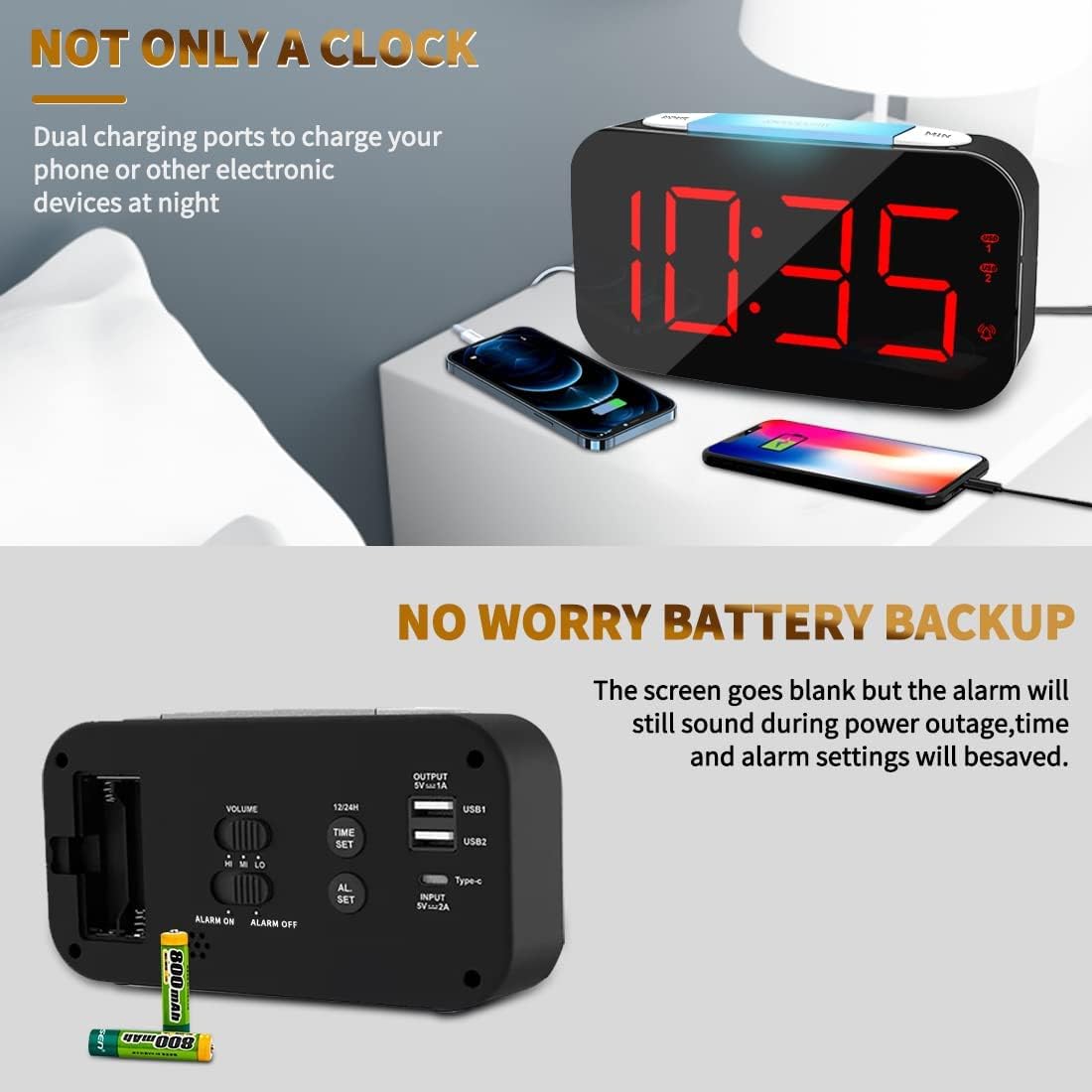
Figure 11: Dual USB Charging Ports in Use

Figure 12: USB and Type-C Output Ports
ساتنه
To ensure the longevity and proper functioning of your Senicare Digital Alarm Clock, please follow these simple maintenance guidelines:
- پاکول: Use a soft, dry cloth to wipe the surface of the clock. Do not use abrasive cleaners, waxes, or solvents as they may damage the finish.
- ځای په ځای کول: ساعت په یوه مستحکم، فلیټ سطحه کې کیږدئ چې د مستقیم لمر وړانګو، تودوخې سرچینو او ډیر رطوبت څخه لرې وي.
- ځواک: Always use the original power adapter and cable provided with the device.
- د بیټرۍ بدلول: If using the battery backup feature, replace the AAA batteries annually or when the power failure memory function becomes unreliable.
د ستونزو حل کول
که تاسو د خپل الارم ساعت سره کومې ستونزې سره مخ شئ، مهرباني وکړئ لاندې عامې ستونزې او حل لارې وګورئ:
| ستونزه | احتمالي لامل | د حل لاره |
|---|---|---|
| ښودنه خالي ده یا نه روښانه کیږي. | د برېښنا اتصال یا برېښنا نشتهtage. | Ensure the power adapter is securely plugged into both the clock and a working electrical outlet. Check if there's a power outage in your area. If using battery backup, the display will be blank during an outage, but settings are saved. |
| الارم نه غږېږي. | الارم فعال نه دی، حجم ډېر ټیټ دی، یا د الارم وخت ناسم ټاکل شوی دی. | وګورئ په الارم روان / بند switch on the back to ensure it's in the "ON" position. Adjust the حجم slider to a higher setting. Verify that the alarm time is set correctly. |
| Display digits flicker or go blank partially. | Internal component issue or power fluctuation. | Try unplugging the clock for a few minutes and then plugging it back in. If the issue persists, contact customer support for assistance. |
| د USB چارج کولو پورټونه کار نه کوي. | Device not properly connected or power issue. | Ensure your device's USB cable is fully inserted into the clock's USB port. Verify the clock is powered on. Try a different USB port or cable. |
مشخصات
| فیچر | تفصیل |
|---|---|
| برانډ | سینیکیر |
| د ماډل شمیره | ZH027 |
| رنګ | تور |
| د ښودلو ډول | ډیجیټل LED |
| ځانګړي ځانګړتیاوې | Adjustable Brightness, Charging Station, Large Display, Snooze, 7-Color Night Light |
| د محصول ابعاد | 6.65"W x 3.35"H (approx. 16.9cm W x 8.5cm H) |
| د بریښنا سرچینه | Corded Electric (100-240V AC) |
| د بیټرۍ بیک اپ | 2 x AAA Batteries (Not Included) for settings memory |
| د USB محصول | Dual USB-A (5V 1A), One Type-C (5V 1A) |
| مواد | پلاستیک |
| د توکي وزن | 0.63 Pounds / 10.1 ounces (approx. 286g) |
تضمین او ملاتړ
Senicare offers a hassle-free د 18 میاشتو تضمین for this Digital Alarm Clock. We are committed to providing high-quality products and excellent customer service.
For any questions, concerns, or warranty claims, please contact our friendly customer service team through the platform where you purchased the product. Please have your order number and product model (ZH027) ready for faster assistance.
We also offer an easy return policy. Refer to the retailer's return guidelines for more details.