1. پیژندنه
This manual provides detailed instructions for the setup, operation, and maintenance of your ITECH Fusion 2 S Smartwatch and accompanying Wireless Headphones. The ITECH Fusion 2 S is designed to help you monitor your health and fitness goals, offering features such as heart rate tracking, step counting, sleep monitoring, and multi-sport modes. The included wireless headphones provide an integrated audio experience.
2. د بسته محتويات
مهرباني وکړئ تصدیق کړئ چې ټول توکي ستاسو په کڅوړه کې شتون لري:
- ITECH Fusion 2 S Smartwatch
- بې سیم هیډفونونه
- USB Charging Cable (for smartwatch)
- USB Charging Cable (for headphones)
- د کارونکي لارښود (دا لاسوند)

Image: The ITECH Fusion 2 S Smartwatch and Wireless Headphones displayed within their retail packaging.
3. وسیله ختمه شوهview
3.1. ITECH Fusion 2 S Smartwatch

Image: The ITECH Fusion 2 S Smartwatch with a grey camouflage band shown alongside the matching wireless headphones.
The smartwatch features a touch screen display, a side button for navigation, and sensors on the rear for health monitoring. The display shows time, date, activity data, and notifications.

Image: A close-up of the ITECH Fusion 2 S Smartwatch display, highlighting features such as heart rate monitor, apps and notifications, multi-sports modes, water resistance, calorie tracker, music remote, pedometer, sleep monitor, hydration reminder, and extended 14-day battery life.
3.2. Wireless Headphones
The wireless headphones are over-ear style with cushioned earcups and an adjustable headband. Controls for audio playback and calls are located on the earcup.

انځور: یوه خوا view of the ITECH Wireless Headphones, illustrating features like powerful sound quality, convenient controls, comfort for hours, and a go-anywhere design.

انځور: یو مفصل view of the ITECH Wireless Headphones, emphasizing noise isolating fit, built-in microphone, Bluetooth wireless technology, and up to 8 hours of playback.

Image: A diagram of the ITECH Wireless Headphones highlighting the flexible headband, comfortable ear cushion, foldable design, and convenient controls, along with key technical specifications.
4. ترتیب کول
4.1. د خپل وسیلو چارج کول
Before first use, fully charge both your smartwatch and wireless headphones.
- سمارټ واچ: Connect the USB charging cable to the charging port on the back of the smartwatch and to a USB power source. The battery icon on the screen will indicate charging status.
- بې سیم هیډفونونه: Connect the USB charging cable to the charging port on the headphones and to a USB power source. An indicator light will show charging status and turn off when fully charged.
4.2. بریښنا فعال/بند
- سمارټ واچ: To power on, press and hold the side button until the screen illuminates. To power off, navigate to the 'Settings' menu on the smartwatch, then select 'Power Off'.
- بې سیم هیډفونونه: د بریښنا د فعالولو لپاره، د بریښنا تڼۍ فشار ورکړئ او ونیسئ تر هغه چې د شاخص څراغ روښانه شي. د بریښنا بندولو لپاره، د بریښنا تڼۍ بیا فشار ورکړئ او ونیسئ تر هغه چې د شاخص څراغ بند نشي.
4.3. Pairing the Smartwatch with Your Smartphone
The ITECH Fusion 2 S Smartwatch is compatible with both iPhone and Android devices.
- ډاونلوډ کړئ iTECH Wearables د ایپل اپل سټور یا ګوګل پلی سټور څخه اپلیکیشن.
- ډاډ ترلاسه کړئ چې ستاسو په سمارټ فون کې بلوتوټ فعال دی.
- Open the iTECH Wearables app and follow the on-screen instructions to create an account and pair your smartwatch.
- The app will guide you through connecting the smartwatch via Bluetooth. Confirm the pairing request on both your phone and smartwatch.
4.4. Pairing the Wireless Headphones
- ډاډ ترلاسه کړئ چې هیډفونونه بند دي.
- د بریښنا تڼۍ فشار ورکړئ او ونیسئ تر هغه چې د شاخص رڼا په چټکۍ سره روښانه شي، د جوړه کولو حالت په ګوته کوي.
- On your smartphone or other Bluetooth-enabled device, go to Bluetooth settings and search for available devices.
- Select "ITECH Headphones" (or similar name) from the list to connect. The indicator light will change to a steady blue when successfully paired.
۴. د سمارټ واچ چلول
5.1. نیویګیشن
- ټچ سکرین: د مینو او ځانګړتیاو له لارې د نیویګیټ کولو لپاره کیڼ/ښي، پورته/ښکته سوائپ کړئ. د غوره کولو لپاره ټایپ کړئ.
- د غاړې تڼۍ: د کور سکرین ته د بیرته راستنیدو یا وسیله راویښولو لپاره فشار ورکړئ.
۲. د لید مخونه
Customize your smartwatch display by changing watch faces. On the home screen, press and hold the display, then swipe left or right to browse available watch faces. Tap to select your preferred design.
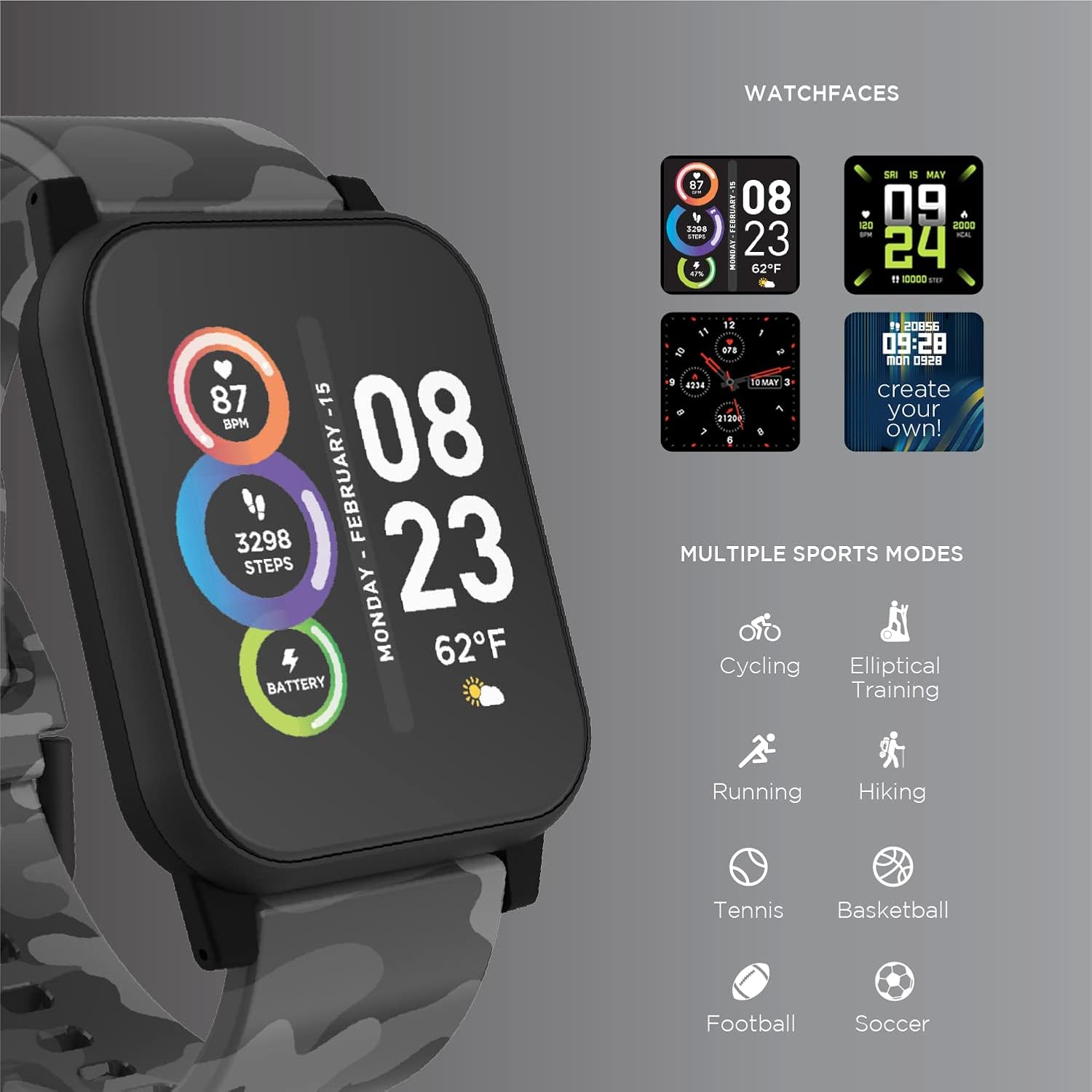
Image: The ITECH Fusion 2 S Smartwatch display showing various customizable watch faces and icons representing multiple sports modes including cycling, elliptical training, running, hiking, tennis, basketball, football, and soccer.
۶. اصلي ځانګړتیاوې
- د زړه ضربان څارونکی: Access the heart rate feature on your smartwatch to measure your heart rate using the built-in optical sensor. Ensure the watch is snug on your wrist for accurate readings.
- د ګام شمېرونکی (پیډومیټر): The smartwatch automatically tracks your daily steps, distance, and calories burned. View your progress on the device or in the iTECH Wearables app.
- د خوب څارنه: Wear your smartwatch to bed to track your sleep patterns, including light and deep sleep stages. Data is synchronized with the app for detailed analysis.
- څو سپورتي حالتونه: Select from various sports modes (e.g., running, cycling, hiking) to track specific workout data, including duration, distance, and calories.
- د پیغام خبرتیاوې: Receive notifications for calls, texts, and app alerts directly on your smartwatch when connected to your smartphone.
- د کالوري تعقیبونکی: Monitors calories burned throughout the day based on your activity level.
- د هایدریشن یادونه: Set reminders to drink water at regular intervals through the app.
- د موسیقۍ ریموټ: Control music playback on your smartphone directly from your smartwatch (play, pause, skip tracks).
5.4. د اپلیکیشن ادغام
د جامع لپاره view of your health and fitness data, regularly sync your smartwatch with the iTECH Wearables app. The app allows you to set goals, view historical data, customize settings, and manage notifications.
6. Operating the Wireless Headphones
6.1. کنټرولونه
The headphones feature intuitive controls for media playback and call management:
- د بریښنا تڼۍ: د بریښنا د فعالولو/بندولو لپاره فشار ورکړئ او ونیسئ. د لوبې/وقفې لپاره لنډ فشار ورکړئ.
- د حجم تڼۍ: Press '+' to increase volume, '-' to decrease volume.
- د تعقیب کنټرول: Press and hold '+' for next track, '-' for previous track.
- د تلیفون مدیریت: Short press power button to answer/end calls. Press and hold to reject calls.
۴. د آډیو ځانګړتیاوې
- د غږ ځواکمن کیفیت: Designed to deliver clear and rich audio.
- Noise Isolating Fit: The over-ear design helps to reduce external noise for an immersive listening experience.
- جوړ شوی مایکروفون: د لاسونو څخه پاک زنګ وهل فعالوي.
6.3. د بیټرۍ ژوند
The wireless headphones provide up to 8 hours of playback on a single charge, depending on usage and volume levels.

Image: A person wearing the ITECH Fusion 2 S Smartwatch on their wrist and the matching wireless headphones, demonstrating typical use.
7. ساتنه
7.1. پاکول
- سمارټ واچ: Wipe the screen and band with a soft, damp، له لینټ څخه پاک ټوکر. د سختو کیمیاوي موادو یا خړوبونکو موادو څخه ډډه وکړئ.
- هیډفونونه: Gently wipe earcups and headband with a soft, dry cloth. Do not immerse in water.
7.2. Water Resistance (Smartwatch)
The ITECH Fusion 2 S Smartwatch is IP67 water resistant. This means it is protected against dust and can withstand immersion in water up to 1 meter for up to 30 minutes. It is suitable for daily use and light splashes, but not recommended for swimming, showering, or prolonged water immersion.
7.3. ذخیره کول
Store your devices in a cool, dry place away from direct sunlight and extreme temperatures when not in use.
8. ستونزه حل کول
If you encounter issues with your ITECH Fusion 2 S devices, please refer to the following common solutions:
- وسیله نه چلیږي: Ensure the device is fully charged. Try connecting it to a different USB power source.
- Smartwatch not pairing with phone: Ensure Bluetooth is enabled on your phone and the smartwatch is within range. Restart both devices and try pairing again through the iTECH Wearables app.
- هیډفونونه نه جوړیږي: Ensure headphones are in pairing mode (rapidly flashing indicator light). Check your device's Bluetooth settings and try reconnecting.
- Inaccurate heart rate/step readings: ډاډ ترلاسه کړئ چې سمارټ واچ ستاسو په لاس کې په کلکه اغوستل شوی دی، نه ډیر تنګ او نه ډیر خلاص. د ساعت په شا سینسر پاک کړئ.
- خبرتیاوې نه ښکاري: Check app permissions on your smartphone to ensure the iTECH Wearables app has access to notifications. Verify notification settings within the app.
- Audio issues with headphones: Ensure headphones are fully charged and properly paired. Check volume levels on both the headphones and the connected device.
If problems persist, consider performing a factory reset (refer to the smartwatch settings menu or contact customer support for headphones). For further assistance, please contact Itech customer support.
9. مشخصات
| فیچر | تفصیل |
|---|---|
| د محصول ابعاد | 22.86 x 5.08 x 22.86 سانتي متره؛ 621 جی |
| د توکي ماډل شمیره | 900366B-40-G57 |
| عملیاتي سیسټم | Android (Compatible with iPhone and Android) |
| ځانګړي ځانګړتیاوې | Heart Rate Monitor, Step Counter, Sleep Monitor, Message Notifications, Multi-Sport Modes |
| د ارتباط ټیکنالوژي | USB |
| د بې سیمه مواصلاتو معیار | بلوتوث |
| د بیټرۍ حجرو جوړښت | لیتیم ایون |
| GPS | رښتیا |
| Smartwatch Shape | مربع |
| Smartwatch Screen Size | ۷۸۷ انچه |
| برانډ | Itech |
| د ماډل نوم | Fusion 2 Bundle |
| د اوبو مقاومت | IP67 |
| Headphones Playback Time | تر 8 ساعتونو پورې |
| Headphones Driver Diameter | 40mm |
| Headphones Connection Type | بلوتوث 5.0 |
| د هیډفون مخنیوی | 32 اوهم ± 15% |
| د هیډفون فریکونسي ځواب | ۲۰ هرټز - ۲۰ کلو هرټز |
10. تضمین او ملاتړ
Your ITECH Fusion 2 S Smartwatch and Wireless Headphones are covered by a manufacturer's warranty. Please refer to the warranty card included in your package or visit the official Itech webد تضمین د تفصيلي شرایطو او مقرراتو لپاره سایټ.
For technical support, troubleshooting assistance, or warranty claims, please contact Itech customer service through their official webسایټ یا ستاسو د محصول اسنادو کې چمتو شوي د اړیکو معلومات.


