1. پیژندنه
The Elitech ECS-06CX is a versatile temperature controller designed for refrigeration systems, offering precise control over cooling, defrosting, and fan operations. It features three output relays and includes both temperature and evaporator defrost sensors for comprehensive system management. This manual provides essential information for the safe installation, setup, operation, and maintenance of your ECS-06CX controller.
2. د خوندیتوب معلومات
WARNING: ELECTRIC SHOCK RISK!
- Always disconnect power to the unit before performing any wiring, installation, or maintenance procedures. Failure to do so can result in serious injury or death.
- Installation and wiring should only be performed by qualified personnel in accordance with all local and national electrical codes.
- د واحد مناسب ځمکني کول ډاډمن کړئ.
- Do not operate the controller if it is damaged or has been exposed to moisture.
- ډاډ ترلاسه کړئ چې د بریښنا رسولو حجمtage matches the controller's specifications (220VAC).
3. محصول ختم شوview
The Elitech ECS-06CX controller features a digital display and intuitive buttons for easy operation. It comes with necessary sensors for temperature and defrost control.
3.1. Front Panel and Buttons

Image 1: Elitech ECS-06CX front panel and sensor. The front panel features a digital display and four control buttons. A sensor cable is shown connected to the unit.
The front panel includes a digital display for temperature readings and status indicators. The four buttons provide control over various functions:
- Cycle/Power Button: Used to cycle through display modes or power the unit on/off (long press).
- د Defrost تtonۍ: د لاسي ډیفروسټ دوره پیل کوي.
- Light/Fan Button: Controls auxiliary functions, potentially light or fan operation depending on configuration.
- تڼۍ تنظیم کړئ: Enters parameter setting mode or confirms selections.
3.2. Rear Panel and Connections

Image 2: Elitech ECS-06CX rear panel. The rear panel shows multiple terminal blocks for electrical connections and ventilation slots.
The rear panel houses the terminal blocks for power input, sensor connections, and output relays. Refer to the wiring diagram in the Installation section for detailed connection instructions.
4. نصب کول
Proper installation is critical for the safe and reliable operation of the ECS-06CX controller. Ensure all safety precautions are followed.
4.1. پورته کول
The controller is designed for panel mounting. Cut an appropriate opening in the control panel and secure the unit using the provided clips or mounting hardware. Ensure adequate ventilation around the unit.
4.2. د بریښنا تار
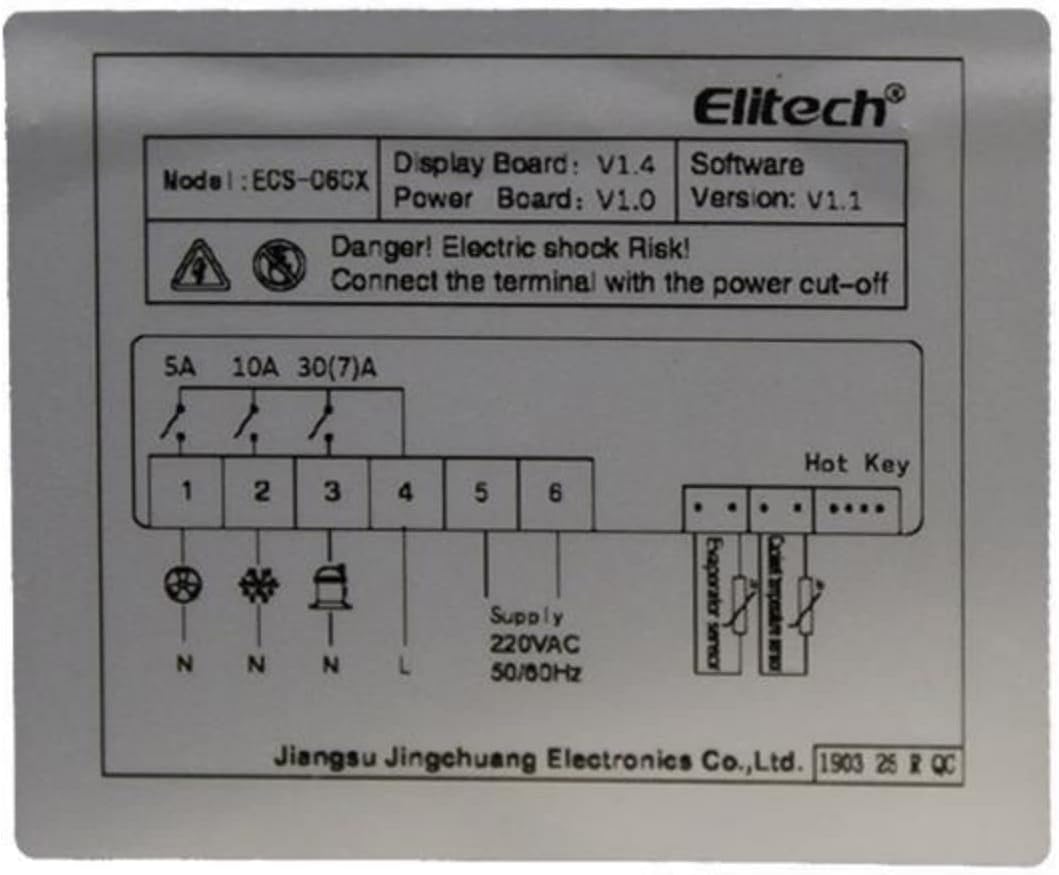
Image 3: Elitech ECS-06CX wiring diagram. This diagram illustrates the connections for power supply (220VAC, 50/60Hz), three relay outputs (5A, 10A, 30(7)A), and sensor inputs (Evaporator sensor, Cold storage sensor).
Connect the wires according to the diagram above. Pay close attention to the terminal labels:
- Supply (220VAC, 50/60Hz): Connect the main power supply to the designated terminals (L and N).
- د محصول ریلیز:
- Terminal 1 (N): Neutral for outputs.
- Terminal 2 (5A): Output for Fan.
- Terminal 3 (10A): Output for Defrost.
- Terminal 4 (30(7)A): Output for Cooling.
- سینسرونه: Connect the evaporator sensor and cold storage (temperature) sensor to their respective terminals.
- ګرم کیلي: Dedicated terminals for connecting a hot key for quick parameter copying (if applicable).
ډاډ ترلاسه کړئ چې ټولې اړیکې خوندي او موصل شوي دي ترڅو د لنډ سرکټ مخه ونیسي.
۴. تنظیم او ابتدايي ترتیب
After installation and power-up, the controller may require initial parameter settings to match your specific application.
- پاور آن: Apply power to the unit. The display should illuminate.
- Access Parameter Settings: فشار ورکړئ او ونیسئ ټاکل button for several seconds to enter the parameter setting menu.
- Navigate and Adjust: Use the arrow buttons (Cycle/Power and Defrost buttons may function as up/down arrows in setting mode) to navigate through parameters. Press ټاکل to select a parameter, adjust its value, and press ټاکل بیا د تایید لپاره.
- Key Parameters (Examples):
- د حرارت درجه ټاکل: The desired temperature for your application.
- Differential/Hysteresis: The temperature range around the setpoint before the cooling output activates/deactivates.
- Defrost Cycle Parameters: Frequency, duration, and termination temperature of defrost cycles.
- Fan Control Parameters: Settings for fan operation relative to cooling and defrost cycles.
- د سینسر اندازه کول: If necessary, adjust sensor readings for accuracy.
- د وتلو ترتیبات: After configuring all necessary parameters, exit the setting menu (often by pressing the Cycle/Power button or waiting for a timeout).
Refer to the full Elitech ECS-06CX programming manual (not provided here) for a complete list and detailed explanation of all parameters.
6. عملیاتي لارښوونې
Once configured, the ECS-06CX operates automatically based on the set parameters. Manual operations are also available.
- Viewد تودوخې درجه: The display typically shows the current temperature measured by the cold storage sensor.
- لارښود Defrost: فشار ورکړئ ډیفروسټ button to initiate a manual defrost cycle. The defrost indicator will illuminate.
- Auxiliary Control (Light/Fan): فشار ورکړئ رڼا / فین button to toggle the auxiliary output (e.g., cabinet light or manual fan override).
- پاور آن/بند: فشار ورکړئ او ونیسئ Cycle/Power button for several seconds to turn the unit on or off.
7. ساتنه
Regular maintenance ensures the longevity and accurate operation of your temperature controller.
- پاکول: Periodically clean the controller's front panel with a soft, damp ټوکر. د کثافاتو پاکوونکي یا محلولونه مه کاروئ. ډاډ ترلاسه کړئ چې هیڅ مایع واحد ته ننوځي.
- د سینسر معاینه: Regularly check the temperature and defrost sensors for physical damage or corrosion. Ensure they are securely mounted and positioned correctly for accurate readings.
- د تارونو چک کول: Annually, or as needed, inspect all wiring connections for tightness and signs of wear or damage. Ensure power is disconnected before inspection.
- وینټیلیشن: Ensure that the ventilation slots on the controller are not obstructed to prevent overheating.
8. ستونزه حل کول
If you encounter issues with your ECS-06CX controller, refer to the following common problems and solutions:
| ستونزه | احتمالي لامل | د حل لاره |
|---|---|---|
| کنټرولر بریښنا نه کوي. | د برېښنا نشتوالی؛ ناسم تارونه؛ فیوز چاودېدلی. | د بریښنا اتصالونه او حجم وګورئtage. Verify wiring according to diagram. Check for internal fuse (if accessible and replaceable by qualified personnel). |
| د تودوخې ناسمه لوستل. | Faulty sensor; sensor incorrectly placed; sensor wiring issue; calibration error. | Check sensor connections. Ensure sensor is in the correct location. Replace sensor if damaged. Check sensor calibration in settings. |
| Cooling/Defrost/Fan output not activating. | Incorrect setpoint/parameters; faulty relay; wiring issue; compressor/fan/heater fault. | Verify setpoint and differential settings. Check wiring to the load. Test the load directly if possible. Consult a qualified technician for relay issues. |
| ښودنه د خطا کوډ ښیې. | Sensor fault; internal error. | Refer to the full Elitech programming manual for specific error code meanings. Typically, sensor errors (e.g., E1, E2) indicate a disconnected or faulty sensor. |
For issues not listed here or if solutions do not resolve the problem, contact Elitech customer support or a qualified technician.
9. مشخصات
- ماډل: ECS-06CX
- نښه: ایلیټیک
- د بریښنا رسول: 220 VAC، 50/60 Hz
- د محصول ریلیز:
- Cooling: 30(7)A
- Defrost: 10A
- Fan: 5A
- د محصول ابعاد (L x W x H): 7.8 x 3.4 x 8.2 سانتي متره
- وزن: 252 ګرامه
- سینسرونه: Temperature sensor, Evaporator defrost sensor
- ښکاره کول: ډیجیټل LED
10. تضمین او ملاتړ
For warranty information, technical support, or service inquiries, please contact Elitech customer service or visit the official Elitech webسایټ. د پیرود ثبوت په توګه د پیرود رسید وساتئ.
ایلیټیک Webسایټ: www.elitech.com