پیژندنه
د پیرودلو لپاره مننهasing the Northpoint NP-TL LED Desk Lamp. This modern and versatile desk lamp is designed to provide optimal lighting for your workspace while offering convenient features such as QI wireless charging and an integrated display for time and temperature. Please read this manual carefully before use to ensure proper operation and to maximize the lifespan of your product.
د خوندیتوب لارښوونې
- Ensure the power adapter is compatible with your local power supply before connecting.
- د لرګیو جلا کول، ترمیم کول یا بدلول مه کوئamp yourself. Contact qualified service personnel for assistance.
- د ایښودلو څخه ډډه وکړئamp in high-temperature, humid, or dusty environments.
- l وساتئamp د اوبو او نورو مایعاتو څخه لرې.
- Do not look directly into the LED light source for extended periods to prevent eye strain.
- l خلاص کړئamp from the power outlet before cleaning or when not in use for a long time.
- دا محصول یوازې د داخلي کارونې لپاره ډیزاین شوی.
د بسته محتويات
مهرباني وکړئ د لاندې توکو لپاره په بسته کې وګورئ:
- Northpoint NP-TL LED Desk Lamp
- د 12V ځواک اډیپټر
- د کارن لارښود
محصول پای ته ورسیدview
Familiarize yourself with the components of your Northpoint NP-TL LED Desk Lamp.

انځور 1: مخکی view of the Northpoint NP-TL LED Desk Lamp, showing the adjustable light head, flexible arm, integrated display, and QI wireless charging base with mood lighting.

انځور ۵.۱: اړخ view of the Northpoint NP-TL LED Desk Lamp, highlighting the flexible arm design and the integrated display on the lampد بدن.

Image 3: The Northpoint NP-TL LED Desk Lamp in a typical desk environment, demonstrating its compact size and ambient lighting capabilities.
- Adjustable LED Head: Provides directional lighting.
- انعطاف وړ لاس: Allows for easy positioning of the light.
- مدغم ښودل: Shows time, date, and ambient temperature.
- د ټچ کنټرول پینل: For adjusting light settings and display functions.
- QI Wireless Charging Pad: Located on the base for compatible devices.
- Mood Light Base: Provides ambient RGB lighting.
چمتو کول
- خلاص کړئ: په احتیاط سره د بسته بندۍ څخه ټولې برخې لرې کړئ.
- مقام: L ځای پر ځای کړئamp په یو مستحکم، فلیټ سطح کې.
- بریښنا وصل کړئ: Insert the DC plug of the 12V power adapter into the power input port on the back of the lamp base. Plug the adapter into a standard wall outlet.
- Initial Display Setup: Upon first power-on, the display will illuminate. You may need to set the time and date using the touch controls (refer to "Operating Instructions - Display Settings").
عملیاتي لارښوونې
د رڼا کارونه
- پاور آن/بند: ټایپ کړئ د بریښنا تڼۍ (
 ) on the touch control panel to turn the lamp آن یا بند.
 - Brightness Adjustment (Dimmable): پداسې حال کې چې د ایلamp is on, press and hold the د روښانتیا تڼۍ (often represented by a sun icon or +/-) to smoothly adjust the light intensity. Release when the desired brightness is reached.
- د رنګ د حرارت درجه تنظیمول: ټایپ کړئ Mode/Color Temperature button (often represented by a 'M' or color spectrum icon) to cycle through different color temperatures: Warm White, Neutral White, and Cool White.
د QI بې سیم چارج
- Place your QI-compatible smartphone or device directly onto the wireless charging pad located on the lampاساس
- ډاډ ترلاسه کړئ چې وسیله د غوره چارج کولو لپاره د چارج کولو پیډ باندې متمرکزه ده.
- A charging indicator (if available on your device) will confirm that charging has begun.
- Remove any metallic objects or thick cases from your device that may interfere with wireless charging.
Integrated Display Settings (Time, Date, Temperature)
The integrated LCD displays time, date, and ambient temperature. Specific buttons for setting these functions are usually located near the display or on the touch panel.
- د وخت/نیټې ټاکل: Look for buttons labeled "SET", "MODE", or similar. Typically, you press "SET" to enter setting mode, then use arrow buttons or +/- to adjust values, and "SET" again to confirm and move to the next setting (e.g., hour, minute, year, month, day).
- د تودوخې ښودنه: دamp automatically detects and displays the ambient temperature. No manual setting is required for this function.
د مزاج رڼا
- دamp features an integrated mood light base. Look for a dedicated د مزاج رڼا تڼۍ (often a color wheel or RGB icon).
- Tap the button to cycle through different static colors or activate a color-changing mode.
- Press and hold the button to turn the mood light off.
ساتنه
- پاکول: د پاکولو دمخه بریښنا قطع کړئ. د پاکولو لپاره نرم، وچ ټوکر وکاروئamp. Do not use abrasive cleaners, solvents, or harsh chemicals.
- ذخیره کول: که چیرې د l ذخیره کولamp د اوږدې مودې لپاره، یې خلاص کړئ او په یخ او وچ ځای کې یې وساتئ.
- د LED ر Sourceا سرچینه: د LED رڼا سرچینه مدغم شوې او د کاروونکي لخوا بدلیدونکې نه ده.
د ستونزو حل کول
| ستونزه | احتمالي لامل | د حل لاره |
|---|---|---|
| Lamp نه چلیږي. | د بریښنا پیوستون نشته. د بریښنا اډاپټر غلط. | ډاډ ترلاسه کړئ چې د بریښنا اډاپټر په خوندي ډول په دواړو l کې نښلول شویamp او د دیوال دروازه. Try a different outlet. If the issue persists, contact customer support. |
| بېسیم چارج کار نه کوي. | Device not QI-compatible. وسیله په سمه توګه نه ده تنظیم شوې. Obstruction (e.g., thick case, metallic object). | Verify your device supports QI wireless charging. Reposition your device on the charging pad. Remove any cases or metallic objects. |
| Display shows incorrect time/date. | Time/date not set or reset after power interruption. | Refer to "Operating Instructions - Display Settings" to manually set the time and date. |
| رڼا ځلیږي یا بې ثباته وي. | بې ثباته برېښنا. د داخلي برخې ستونزه. | د l پلګ کولو هڅه وکړئamp into a different power outlet. If the problem continues, discontinue use and contact customer support. |
مشخصات
| برانډ | شمالي نقطه |
| د ماډل شمیره | NP-TL |
| د محصول ابعاد (L x W x H) | 16.6 x 6 x 33.5 سانتي متره |
| مواد | غلط چرم |
| د پای ډول | Leather look |
| د رڼا سرچینې ډول | LED |
| ځواک | 18 واټ |
| روښانه فلکس | 480 lm |
| د رنګ رینډینګ انډیکس (CRI) | 80.00 |
| ځانګړي ځانګړتیاوې | Dimmable, QI Wireless Charging, Temperature Display, Mood Lighting |
| ډول بدل کړئ | لمس |
| د IP درجه بندي | IP20 |
| والیtage | 12 ولټه |
| شاملې برخې | QI Charging Station, 12V Power Adapter |

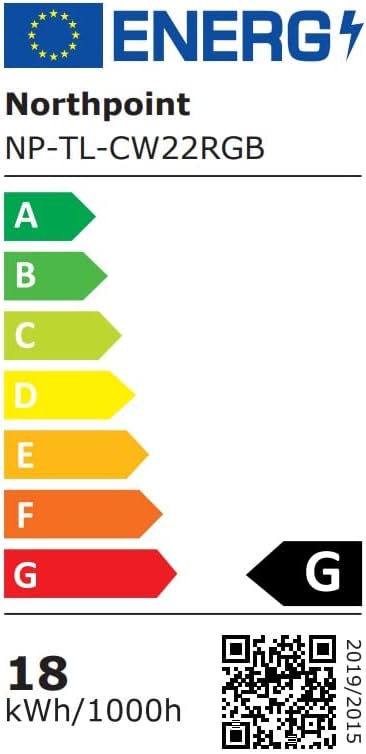
Image 4: Energy efficiency label for the Northpoint NP-TL LED Desk Lamp, indicating energy class G and 18 kWh/1000h consumption.
تضمین او ملاتړ
Northpoint products are manufactured to high-quality standards. For warranty information or technical support, please refer to the contact details provided with your purchase documentation or visit the official Northpoint webسایټ. مهرباني وکړئ د هر ډول تضمین ادعا لپاره د پیرود ثبوت وساتئ.
Note: Information regarding spare parts availability and software updates is not available at the time of printing.


