1. محصول ختم شوview
د ورکپرو ۷.۵AMP 850W Corded Electric Jig Saw is a versatile power tool designed for precise cutting of various materials, including wood, metal, and plastic. It features a powerful motor, variable speed control, orbital settings, and a tool-free blade change system for enhanced efficiency and user convenience.

Figure 1: WORKPRO 6.5AMP 850W Corded Electric Jig Saw and included accessories.
2. د خوندیتوب معلومات
Always prioritize safety when operating power tools. Read and understand all safety warnings, instructions, illustrations, and specifications provided with this power tool. Failure to follow all instructions listed below may result in electric shock, fire, and/or serious injury.
- د کاري ساحې خوندیتوب: خپل کاري ساحه پاکه او ښه روښانه وساتئ. تیاره یا تیاره سیمې حادثې ته بلنه ورکوي.
- بریښنایی خوندیتوب: د بریښنا وسیلو پلګونه باید د ساکټ سره سمون ولري. هیڅکله پلګ په هیڅ ډول مه بدلوئ. د خاورې یا ځمکې لاندې سطحو سره د بدن له تماس څخه ډډه وکړئ.
- شخصي خوندیتوب: Always wear eye protection, dust mask, non-skid safety shoes, hard hat, or hearing protection as appropriate for the conditions.
- د وسایلو کارول او ساتنه: د برېښنا وسیله مه مجبوروئ. د خپل کارونې لپاره سم برېښنا وسیله وکاروئ. د هر ډول سمونونو کولو، لوازمو بدلولو، یا د برېښنا وسایلو ذخیره کولو دمخه د برېښنا سرچینې څخه پلګ جلا کړئ.
- ساتنه: د بریښنا وسایل او لوازم ساتل. د حرکت کولو برخو غلط تنظیم یا پابند کول ، د برخو ماتول ، او کوم بل حالت چې ممکن د بریښنا وسیلې فعالیت اغیزه وکړي چیک کړئ.
For detailed safety guidelines, refer to the complete user manual provided in the product packaging.
3. د بسته محتويات
Upon opening the package, ensure all items are present and in good condition. The WORKPRO 6.5AMP 850W Corded Electric Jig Saw kit includes:
- 1 × WORKPRO Jigsaw
- 7 × Replaceable T-shank blades (1 for metal, 6 for wood)
- 1 × Scale Ruler
- 1 × Dust Exhaust Pipe
- 1 × د کارن لارښود
- 1 × Allen Wrench
ویډیو ۱: د بکس خلاصول او پورته کولview of the WORKPRO 6.5AMP 850W Corded Electric Jig Saw and its included components.
4. د محصول ب Featuresې
4.1 High-Performance Motor
The jigsaw is equipped with a powerful 6.5 amp motor, delivering a top speed of 3000 Strokes Per Minute (SPM). This high power allows for faster cutting and helps prevent material burn. The 4/5-inch stroke length ensures efficient material removal with each cut. It can cut iron plate up to 10mm and wood board up to 100mm.
4.2 Bevel Cutting & Orbital Settings
The adjustable bottom plate allows for bevel cuts up to ±45 degrees, providing flexibility for various cutting angles. Four orbital settings enable adjustment of cut aggressiveness, suitable for different materials and cutting speeds. Higher orbital settings are ideal for softer materials and faster cuts, while lower settings are for harder materials and slower, more precise cuts.

Figure 2: The adjustable base plate allows for precise ±45° bevel cutting.

Figure 3: Four-position orbital action for varied cutting needs across different materials.
4.3 Tool-less Blade Change & LED Light
Blade changes are quick and easy with the tool-less system; simply press the replacement button. The integrated LED light illuminates the cutting area, ensuring improved visibility and precise cuts, especially in dimly lit environments.

Figure 4: Easy and quick saw blade installation without the need for additional tools.

Figure 5: Built-in LED light provides enhanced visibility for precise cutting.
4.4 User-Friendly Design
The jigsaw includes a dust blower function to keep the cut line clear of debris, improving visibility. The blower switch allows for both blowing and vacuuming functions. A lock-on button is also provided to reduce user fatigue during extended cutting tasks.

Figure 6: Labeled components of the WORKPRO Jig Saw for easy identification.
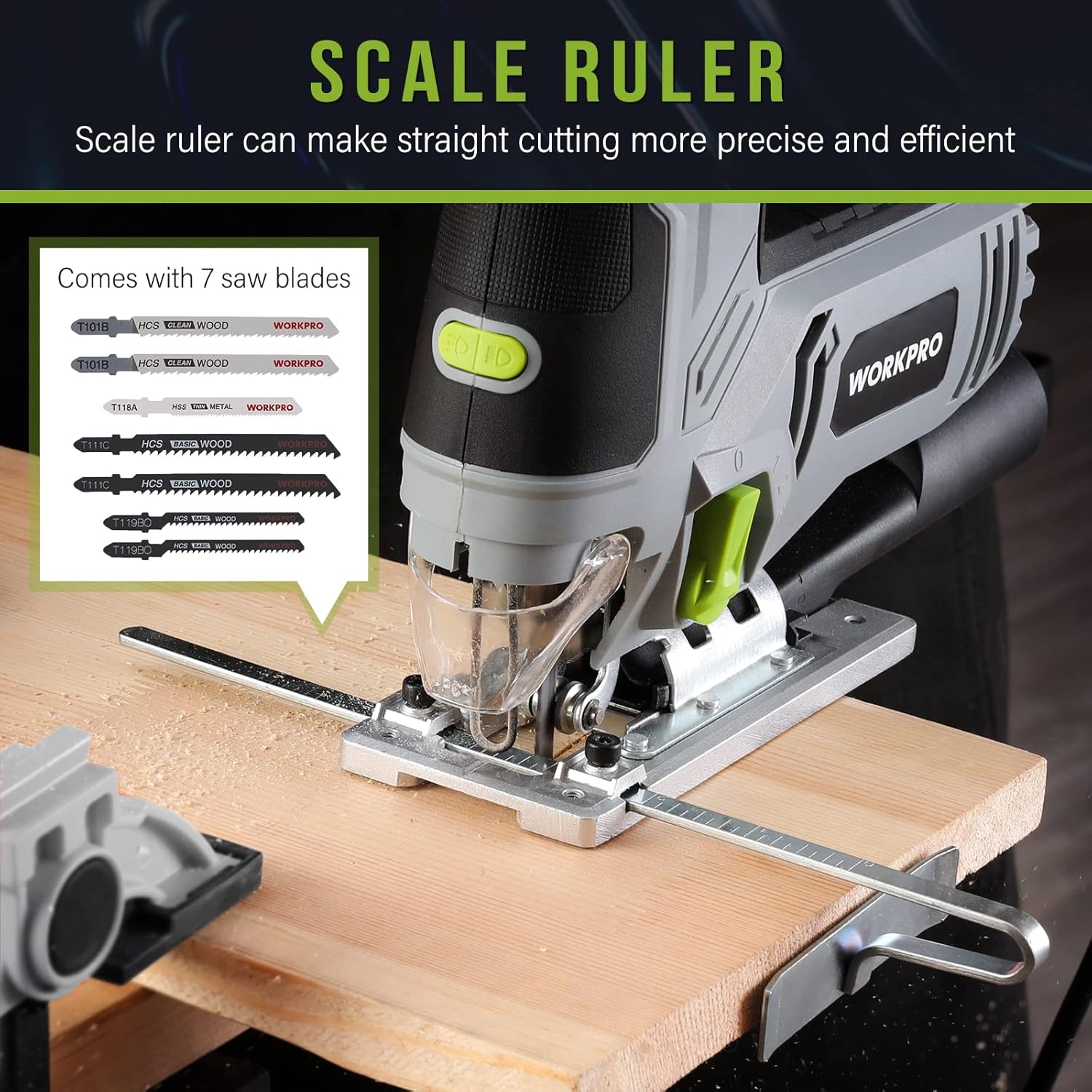
Figure 7: The included scale ruler assists in making straight and precise cuts.
5. ترتیب کول
5.1 د تیغ نصب کول
- ډاډ ترلاسه کړئ چې جیګ آر د بریښنا سرچینې څخه خلاص شوی دی.
- Locate the tool-less blade change lever on the front of the saw.
- Push the lever to release the blade clamp.
- Insert the T-shank blade into the blade holder until it clicks securely into place.
- Release the lever to lock the blade. Gently pull on the blade to ensure it is firmly seated.
5.2 Attaching Dust Exhaust Pipe
For dust collection, attach the dust exhaust pipe to the designated port at the rear of the saw. This allows connection to a vacuum system to keep your work area clean.
5.3 Adjusting Base for Bevel Cuts
- Using the included Allen wrench, loosen the screws on the base plate.
- Tilt the base plate to the desired angle (up to ±45 degrees). Use the angle markings on the base for accuracy.
- Tighten the screws firmly to secure the base plate in position.
5.4 Using the Scale Ruler (Edge Guide)
The scale ruler can be inserted into the slot on the base plate to guide straight cuts parallel to an edge. Adjust the ruler to the desired distance from the blade and tighten its locking mechanism.
6. عملیاتي لارښوونې
6.1 بریښنا کول / بندول
To turn the jig saw on, press the trigger switch. To turn it off, release the trigger. For continuous operation, press the lock-on button while the trigger is depressed. To release the lock, press the trigger again.
۴.۲ د متغیر سرعت کنټرول
Adjust the variable speed dial located on top of the tool to select the appropriate speed for your material. Speeds range from 1 (lowest) to 6 (highest). Use lower speeds for harder materials or intricate cuts, and higher speeds for softer materials or faster cuts.
۴.۲ د مدار د عمل انتخاب
The orbital action lever allows you to choose from four settings (0-3). Setting 0 provides no orbital action for fine, splinter-free cuts. Higher settings increase the orbital action for faster, more aggressive cuts in softer materials.
6.4 د LED څراغ کارول
The LED light can be turned on or off using the dedicated switch near the front of the tool. This feature is useful for illuminating the cutting line in low-light conditions.
۵.۱ د دوړو مدیریت
Utilize the dust blower switch to direct air away from the cutting line, keeping it clear of sawdust. For more comprehensive dust collection, attach the dust exhaust pipe to a vacuum cleaner.
6.6 General Cutting Tips
- تل خپل کاري ټوټه د cl سره خوندي کړئamps to prevent movement during cutting.
- Allow the saw to reach full speed before engaging the material.
- Apply steady, even pressure. Do not force the saw, as this can damage the blade or motor.
- For plunge cuts, tilt the saw forward on its base plate, start the cut, and slowly lower the blade into the material.
7. ساتنه
Regular maintenance ensures the longevity and optimal performance of your WORKPRO Jig Saw.
- د تیغ بدلول: Replace blades when they become dull or damaged to ensure clean and efficient cuts. Always use appropriate T-shank blades for the material being cut.
- پاکول: After each use, unplug the tool and clean any sawdust or debris from the ventilation slots and the blade area. Use a soft brush or compressed air.
- د تار معاینه: د بریښنا تار په منظم ډول د زیان نښې نښانې وګورئ. که زیانمن شوی وي، نو د یو وړ مسلکي لخوا یې ترمیم کړئ.
- ذخیره کول: Store the jig saw in a dry, secure location out of reach of children.
8. ستونزه حل کول
If you encounter issues with your jig saw, refer to the following common problems and solutions:
| ستونزه | احتمالي لامل | د حل لاره |
|---|---|---|
| سور پیل نه کوي | د برېښنا رسولو نشته؛ خراب سویچ. | Check power outlet and cord. If issue persists, contact service. |
| تیغ مستقیم نه پرې کوي | Dull or bent blade; incorrect orbital setting; forcing the tool. | Replace blade. Adjust orbital setting. Apply less pressure. |
| ډیر وایبریشن | خلاص تیغ؛ زیانمن شوی تیغ؛ زړې داخلي برخې. | Ensure blade is securely installed. Replace blade. Contact service if vibration continues. |
| د موټرو ډیر ګرم کول | د هوا د بهېدو بندې شوې لارې؛ دوامداره دروند استعمال. | د هوا د بهېدو ځایونه پاک کړئ. وسیله ته اجازه ورکړئ چې سړه شي. بار کم کړئ. |
که چیرې د دې حلونو له هڅه کولو وروسته هم ستونزه دوام ومومي، مهرباني وکړئ د WORKPRO پیرودونکي ملاتړ سره اړیکه ونیسئ.
9. مشخصات
| فیچر | تفصیل |
|---|---|
| برانډ | د کار پرو |
| د ماډل شمیره | W124748A |
| د بریښنا سرچینه | د بریښنا تار شوی |
| اوسنۍ درجه بندي | 6.5 Amps |
| واټtage | ۴۵ واټه |
| والیtage | 120 ولټه |
| سرعت | 3000 SPM (په یوه دقیقه کې سټروک) |
| د بیول پرې کولو زاویه | ±45 درجې |
| Orbital ترتیبات | د 4 موقعیتونه |
| د تیغ مواد | فلزي |
| د سطحې سپارښتنه | لرګي |
| د توکي وزن | 5.44 پونډه |
| د محصول ابعاد | ۷۱"لیتر x ۲۳.۶"واټه x ۲۴.۴"هوا |
| ځانګړی ځانګړنه | Tool-less Blade Change, LED Light, Dust Blower |
| UPC | 820909772569 |
10. تضمین او ملاتړ
د ورکپرو ۷.۵AMP 850W Corded Electric Jig Saw comes with a limited warranty. For specific warranty terms and conditions, please refer to the warranty card included in your product packaging or visit the official WORKPRO webسایټ
For technical support, replacement parts, or any inquiries regarding your product, please contact WORKPRO customer service. Contact information can typically be found in your user manual or on the WORKPRO brand webسایټ


