1. پیژندنه
Thank you for choosing the Jadfezy WiFi Action Camera. This camera is designed to capture high-quality videos and photos of your adventures, whether on land or underwater. With its compact design, 1080P video recording, 12MP photo capabilities, and built-in WiFi, it is an ideal companion for sports enthusiasts and travelers. Please read this manual carefully before use to ensure proper operation and to maximize the camera's performance.
2. د خوندیتوب معلومات
- د اوږدې مودې لپاره کیمره د لوړې تودوخې یا مستقیم لمر وړانګو ته مه ښکاره کوئ.
- مخکې له دې چې کیمره په اوبو کې ډوب کړئ، ډاډ ترلاسه کړئ چې د اوبو ضد پوښ په سمه توګه مهر شوی دی.
- Use only specified batteries and chargers. Improper use may lead to fire, explosion, or other hazards.
- کیمره او لوازمات د ماشومانو له لاسرسي لرې وساتئ.
- د کیمرې د غورځولو یا قوي تاثیراتو سره مخ کیدو څخه ډډه وکړئ.
- د کیمرې د جلا کولو یا بدلولو هڅه مه کوئ.
3. د بسته محتويات
په معیاري بسته کې لاندې توکي شامل دي:
- Jadfezy 1080P Action Camera
- د پنروک قضیه
- 2 x 1050mAh Rechargeable Lithium-Ion Batteries
- Helmet Mounting Kit
- Bicycle Mounting Kit
- د USB چارج کیبل
- Various Mounting Accessories and Straps

Image: Contents of the Jadfezy Action Camera accessories kit, including the camera, waterproof housing, two batteries, various mounts, and a USB cable.
4. محصول ختم شوview
The Jadfezy Action Camera features a compact design with a 2-inch LCD screen for easy viewing and navigation. It is capable of recording Ultra HD 1080P video at 30 frames per second and capturing 12-megapixel still photos. The camera comes with a durable waterproof case, allowing for underwater use up to 30 meters (98 feet).

Image: The Jadfezy WiFi Action Camera shown with its transparent waterproof case, two rechargeable batteries, and a display screen illustrating a skydiving scene.

انځور: یو اوورview of the Jadfezy Action Camera highlighting its key features: FHD 1080P/30FPS video, Wi-Fi connectivity, Time-lapse/Loop video modes, 2x 1050mAh batteries, 30m/98ft waterproof capability, and a wide-angle lens.
5. ترتیب کول
۱. د بیټرۍ نصب او چارج کول
The camera uses 1050mAh rechargeable Lithium-Ion batteries. Ensure batteries are fully charged before first use.
- د کیمرې په ښکته برخه کې د بیټرۍ د برخې پوښ خلاص کړئ.
- بیټرۍ د قطبي شاخصونو سره سم دننه کړئ.
- د بیټرۍ کمپارټ پوښ په خوندي ډول وتړئ.
- Connect the camera to a USB power source using the provided USB cable to charge. The charging indicator will show the charging status.

Image: Two Jadfezy rechargeable Lithium-Ion batteries, highlighting their compact size and design.
۴.۲. د مایکرو ایس ډی کارت داخلول
A Micro SD card (not included) is required for storing videos and photos. The camera supports Micro SD cards up to 32GB (though some users report success with 64GB cards, 32GB is officially supported).
- د کیمرې په اړخ کې د مایکرو ایس ډی کارت سلاټ ومومئ.
- مایکرو ایس ډی کارت د سرو زرو تماسونو سره د کیمرې شاته دننه کړئ تر هغه چې دا په خپل ځای کې کلیک وکړي.
- د لرې کولو لپاره، کارت په نرمۍ سره دننه کړئ تر هغه چې راووځي.
۳. د واټر پروف کیس کارول
The waterproof case allows the camera to be used underwater up to 30 meters (98 feet).
- ډاډ ترلاسه کړئ چې کیمره وچه ده مخکې له دې چې د اوبو ضد بکس کې یې واچوئ.
- Place the camera firmly into the case.
- Close the latch securely to ensure a watertight seal.
- Before first use in water, it is recommended to test the waterproof case without the camera inside to ensure no leaks are present.

Image: The Jadfezy Action Camera enclosed in its waterproof case, submerged in clear blue water with colorful fish and coral, demonstrating its 30m/98ft waterproof capability.
5.4. Attaching Mounting Accessories
The camera comes with various mounts for different activities, including helmet and bicycle mounting kits.
- Identify the appropriate mount for your intended use (e.g., helmet mount, bicycle mount).
- Attach the camera (with or without the waterproof case, depending on the activity) to the chosen mount using the provided screws and adapters.
- Securely fasten the mount to your helmet, bicycle, or other desired surface. Ensure all connections are tight to prevent the camera from falling during activity.
۳. د کیمرې چلول
6.1. بریښنا فعال/بند
- د بریښنا د فعالولو لپاره: د څو ثانیو لپاره د بریښنا/حالت تڼۍ فشار ورکړئ او ونیسئ.
- د بریښنا بندولو لپاره: د بریښنا/حالت تڼۍ بیا فشار ورکړئ او ونیسئ تر هغه چې سکرین بند نشي.
6.2. حالت انتخاب
Press the Power/Mode button repeatedly to cycle through different modes: Video Recording, Photo Mode, Playback Mode, and Settings.
6.3. د ویډیو ثبت کول
- In Video Recording mode, press the OK button to start recording. A red indicator light will flash, and a timer will appear on the screen.
- د ثبت کولو بندولو لپاره بیا د OK تڼۍ فشار ورکړئ.
۴. د عکس اخیستل
- In Photo Mode, press the OK button to take a photo.
6.5. پلې بیک
- In Playback Mode, use the Up/Down buttons to navigate through your recorded videos and photos.
- د ویډیو غږولو لپاره د OK تڼۍ فشار ورکړئ یا view په بشپړ سکرین کې یو عکس.
۷. د وای فای اتصال او د اپلیکیشن کنټرول
The built-in WiFi allows you to connect the camera to your smartphone for remote control, live view، او file لیږدول.
- Download the designated app (refer to the camera's screen or packaging for the app name) from your smartphone's app store.
- On the camera, enter WiFi mode (usually by pressing a dedicated WiFi button or cycling through modes). The WiFi icon will appear on the screen.
- On your smartphone, go to WiFi settings and connect to the camera's WiFi network (SSID and password will be displayed on the camera screen).
- Open the app on your smartphone. You can now control the camera, view ژوندی اوسیtage، او ډاونلوډ کړئ files. The WiFi signal range is up to 33 feet.

Image: A smartphone displaying a live view from the Jadfezy Action Camera, with a skier in the background, illustrating the camera's WiFi connectivity feature for remote control and sharing.
6.7. Special Features: Time-Lapse, Dash Cam, Burst Photo
The camera supports various shooting modes to enhance your recording experience.
- د وخت تېرېدنه: د وخت تېرېدو ویډیو جوړولو لپاره په ټاکل شویو وقفو کې د عکسونو لړۍ ونیسئ.
- ډیش کیم: Functions as a car dashboard camera, often with loop recording.
- برسټ عکس: Take multiple photos in quick succession, ideal for fast-moving action.
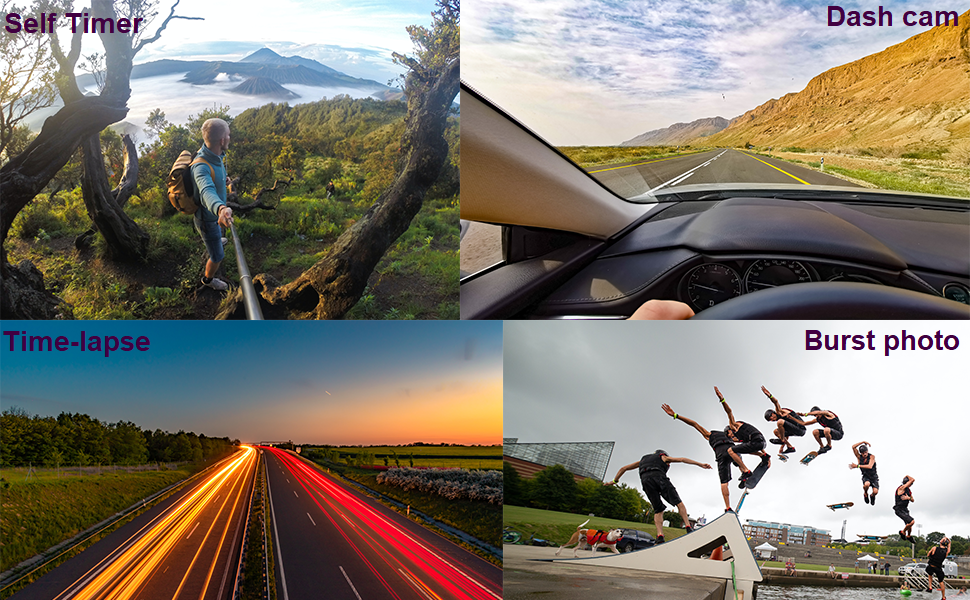
Image: Four panels demonstrating the camera's versatile features: a self-timer shot of a person on a mountain, a dash cam view from inside a car, a time-lapse image of city lights at night, and a burst photo sequence of a skateboarder.
7. ساتنه
- پاکول: د کیمرې لینز او سکرین پاکولو لپاره له نرم، لینټ نه پاک ټوکر څخه کار واخلئ. د اوبو ضد کیس لپاره، د مالګې اوبو کارولو وروسته په تازه اوبو سره ومینځئ او اجازه ورکړئ چې په هوا کې وچ شي.
- د بیټرۍ پاملرنه: Store batteries in a cool, dry place. If not using the camera for an extended period, remove the batteries.
- ذخیره کول: کیمره په وچ، دوړو او دوړو څخه پاک چاپیریال کې وساتئ چې د مستقیم لمر وړانګو او سختې تودوخې څخه لرې وي.
8. ستونزه حل کول
If you encounter issues with your Jadfezy Action Camera, please refer to the following common solutions:
| ستونزه | احتمالي حل |
|---|---|
| کیمره نه چالانیږي. | ډاډ ترلاسه کړئ چې بیټرۍ په بشپړه توګه چارج شوې او په سمه توګه داخل شوې ده. د بلې چارج شوې بیټرۍ کارولو هڅه وکړئ. |
| ویډیو ثبت یا عکسونه نشي اخیستلی. | Check if a Micro SD card is inserted and has sufficient free space. Ensure the card is formatted correctly (FAT32 recommended). The camera may stop recording after 15-minute segments; ensure loop recording is enabled if continuous recording is desired. |
| د ویډیو/عکس خراب کیفیت. | Ensure the lens is clean. Check the selected resolution settings in the camera menu. Ensure adequate lighting conditions. |
| د وای فای اتصال ستونزې. | Ensure the camera's WiFi is enabled. Restart both the camera and your smartphone. Ensure you are within the 33-foot WiFi range. Check that the correct app is installed and updated. |
| Water leakage in waterproof case. | Ensure the case is properly sealed and the latch is fully closed. Check the rubber gasket for any debris or damage. Replace the gasket if necessary. |
9. مشخصات
| فیچر | تفصیل |
|---|---|
| برانډ | جادفزي |
| د ماډل شمیره | J-03series |
| د ویډیو حل | Up to 1080P / 30fps |
| د عکس حل | 12MP |
| د سکرین اندازه | 2 انچه |
| د پنروک ژوروالی | Up to 30m (98ft) with waterproof case |
| د بیټرۍ ډول | ۱ x ۳۰۰mAh لیتیم آیون (شامل دی) |
| ذخیره کول | Micro SD (up to 32GB recommended) |
| ارتباط | وای فای، USB |
| ابعاد | 2.35 x 1.55 x 1.2 انچه |
| د توکي وزن | 12.3 اونس |
10. تضمین او ملاتړ
د تضمین معلوماتو او تخنیکي ملاتړ لپاره، مهرباني وکړئ د خپل پیرود سره چمتو شوي اسنادو ته مراجعه وکړئ یا مستقیم له پلورونکي سره اړیکه ونیسئ. د تضمین ادعاوو لپاره د پیرود ثبوت وساتئ.