1. پیژندنه
This manual provides detailed instructions for the installation, configuration, and operation of your Hikvision DS-7104HGHI-K1 4-Channel Digital Video Recorder (DVR). Please read this manual thoroughly before using the product to ensure correct and safe operation. Keep this manual for future reference.
2. محصول ختم شوview او ځانګړتیاوې
The Hikvision DS-7104HGHI-K1 is a 4-channel 1080p Lite DVR designed for reliable surveillance recording. It supports various camera types and features advanced video compression technology.

شکل 2.1: پورته view of the Hikvision DS-7104HGHI-K1 DVR, showing its compact design and branding.
کلیدي ځانګړتیاوې:
- د څلور چینل ویډیو ان پټ: Supports up to 4 analog cameras.
- 1080p Lite Recording: Provides high-definition recording at 1080p Lite resolution.
- H.265+ کمپریشن: Advanced video compression technology for efficient storage and reduced bandwidth usage.
- Multi-format Input: Compatible with HDTVI, AHD, CVI, CVBS, and up to 5 IP camera inputs (up to 2MP).
- د HDMI/VGA محصول: For local monitoring.
- لرې لاسرسی: ریموټ ملاتړ کوي viewing via Hik-Connect app.

شکل 2.2: مخکی او شاته views of the Hikvision DVR, highlighting various ports and connectivity options, along with icons representing H.265 Pro, Mobile access, 5-in-1 compatibility, and IP/Analog XVR capabilities.
H.265+ Compression Benefits:
H.265+ compression significantly reduces the required storage space and bandwidth compared to older compression standards like H.264, without compromising video quality.

شکل 2.3: A bar graph illustrating the reduction in 24-hour recording file size (GB) when using H.265+ compression compared to H.264 and H.265, showing up to an 83% gap in storage requirements.
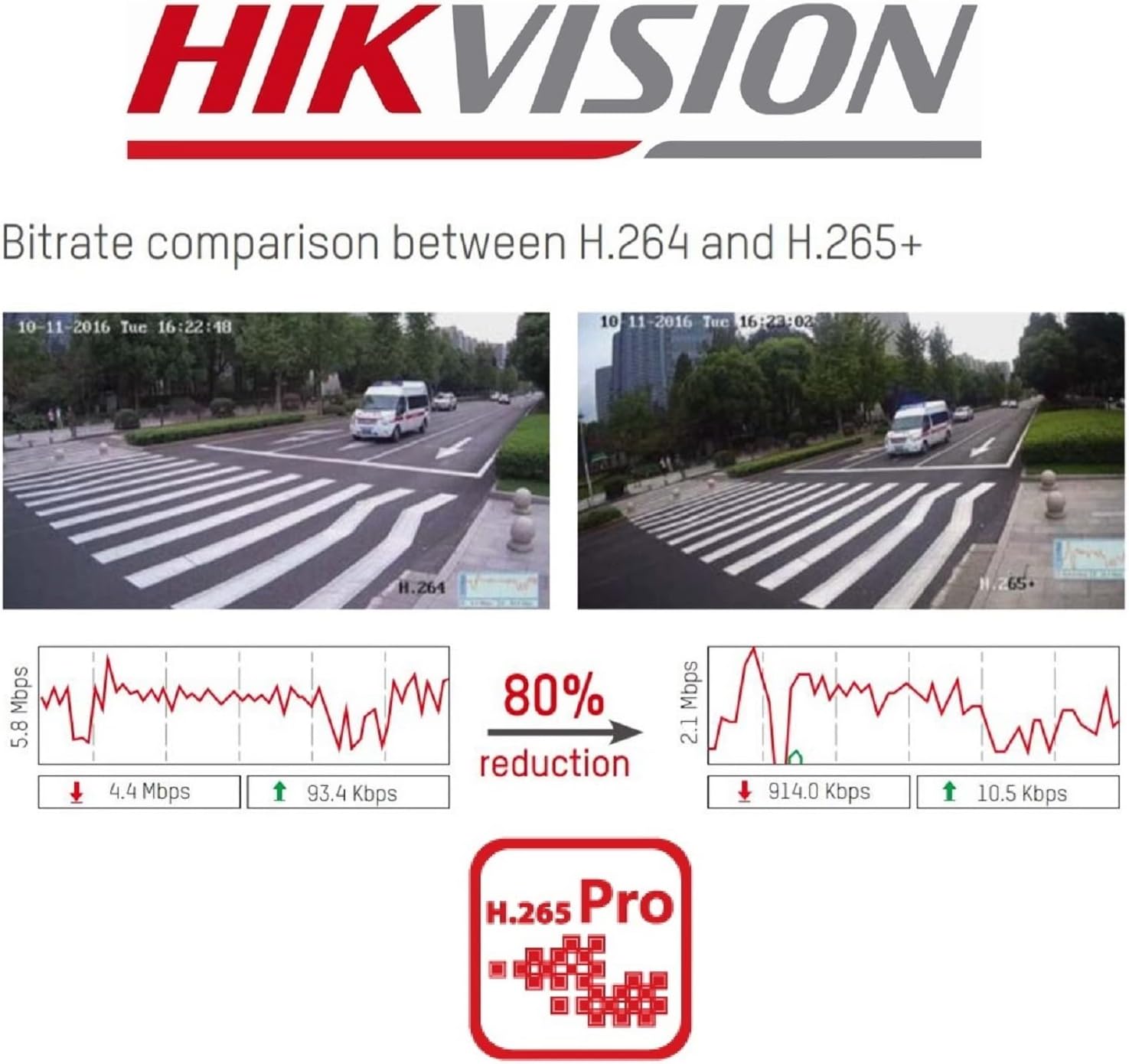
شکل 2.4: A visual comparison of bitrate usage between H.264 and H.265+ compression, demonstrating an 80% reduction in bitrate with H.265+ while maintaining similar video quality in sample surveillance footage.
3. د بسته محتويات
ډاډ ترلاسه کړئ چې ټول توکي ستاسو په کڅوړه کې شتون لري:
- Hikvision DS-7104HGHI-K1 DVR Unit
- د بریښنا اډاپټر
- USB ماؤس
- د SATA کیبلونه (د HDD اتصال لپاره)
- د چټک پیل لارښود
- Note: Hard drive is not included and must be purchased separately.
4. د خوندیتوب معلومات
- ډاډ ترلاسه کړئ چې د بریښنا رسولو د DVR اړتیاو سره سمون لري.
- DVR د اوبو یا رطوبت سره مه مخ کوئ.
- د DVR د مستقیم لمر وړانګو یا د تودوخې سرچینو ته نږدې کېښودلو څخه ډډه وکړئ.
- د ډیر تودوخې مخنیوي لپاره مناسب هوا ورکول ډاډمن کړئ.
- یوازې د تولید کونکي لخوا مشخص شوي لوازمات وکاروئ.
5. ترتیب کول
5.1 د هارډویر نصب کول
- Hard Drive Installation (HDD not included):
- Unscrew and remove the top cover of the DVR.
- Connect the SATA power and data cables from the DVR to the hard drive.
- Secure the hard drive inside the DVR using the provided screws.
- پورتنی پوښ بدل کړئ او د پیچونو سره یې خوندي کړئ.
- کیمرې وصل کړئ: Connect your analog cameras to the BNC video input ports on the rear panel of the DVR.
- مانیټر وصل کړئ: یو مانیټر د HDMI یا VGA آوټ پټ پورټ سره وصل کړئ.
- د نښلولو شبکه: Connect an Ethernet cable from the DVR's LAN port to your router or network switch.
- د USB موږک سره وصل کړئ: د USB موږک په DVR کې په USB پورټ کې ولګوئ.
- پاور آن: د بریښنا اډاپټر د DVR سره او بیا د بریښنا آوټ لیټ سره وصل کړئ. DVR به په اتوماتيک ډول فعال شي.
5.2 ابتدايي ترتیب
- First-Time Startup: Upon first boot, the DVR will guide you through a setup wizard.
- پټنوم ترتیب کړئ: Create a strong password for the admin user. This is crucial for security.
- د شبکې ترتیبات: د شبکې ترتیبات تنظیم کړئ (DHCP معمولا د ډیری کورني شبکو لپاره کافي وي).
- HDD Initialization: The DVR will prompt you to initialize the newly installed hard drive. This step is necessary for recording.
- نېټه او وخت: سمه نیټه او وخت وټاکئ.
6. عملیات
6.1 ژوندی View
د لومړني تنظیم وروسته، DVR به ژوندۍ ښکاره کړي view from connected cameras on the monitor. You can switch between single-camera view او څو کیمرې گرډ view using the on-screen controls or mouse.
6.2 ثبتول
The DVR is typically configured to record continuously by default once the HDD is initialized. You can customize recording schedules, motion detection recording, and alarm recording settings through the DVR's menu:
- ورتګ Menu > Record > Schedule to adjust recording times.
- ورتګ Menu > Alarm > Motion Detection to configure motion-triggered recording.
6.3 پلې بیک
ته view ثبت شوی footage:
- ورتګ مینو > پلې بیک.
- هغه کیمره او نیټه/وخت چې تاسو یې بیا پیل کول غواړئ غوره کړئview.
- د فو له لارې نیویګیټ کولو لپاره د پلے بیک کنټرولونه (لوبه کول، وقفه کول، ګړندی مخ په وړاندې کول، بیرته راګرځول) وکاروئtage.
6.4 Remote Access (Hik-Connect)
The Hik-Connect app allows you to view ژوندی اوسیtage, play back recordings, and receive alerts on your smartphone or tablet from anywhere with an internet connection.

شکل 6.1: The Hik-Connect application icon alongside a smartphone displaying a multi-camera live view, illustrating the remote monitoring capabilities of the DVR system.
- Download the Hik-Connect app from your device's app store.
- Create a Hik-Connect account.
- خپل DVR په DVR کې د QR کوډ سکین کولو یا په لاسي ډول د هغې سریال نمبر دننه کولو سره اپلیکیشن ته اضافه کړئ.
- Ensure your DVR is connected to the internet and Hik-Connect service is enabled in the DVR's network settings.
7. ساتنه
- منظم پاکول: Keep the DVR free from dust. Use a soft, dry cloth for cleaning.
- د فرم ویئر تازه معلومات: په دوره یي ډول د هایک ویژن چارواکي وګورئ webد غوره فعالیت او امنیت ډاډمن کولو لپاره د فرم ویئر تازه معلوماتو لپاره سایټ.
- د معلوماتو بیک اپ: Regularly back up important recordings to an external storage device.
- د پټنوم امنیت: Change your DVR password periodically to enhance security.
8. ستونزه حل کول
- د ویډیو محصول نشته:
- د HDMI/VGA کیبل اتصالونه وګورئ.
- ډاډ ترلاسه کړئ چې مانیټر فعال دی او سم ان پټ ته تنظیم شوی دی.
- نه ثبتول:
- Verify that a hard drive is installed and initialized.
- د ثبت مهالویشونه وګورئ او ډاډ ترلاسه کړئ چې فعال دي.
- Ensure cameras are properly connected and functioning.
- له لرې لارې لاسرسی نشي کېدای:
- Ensure the DVR is connected to the internet.
- Check network settings and Hik-Connect status on the DVR.
- Verify your Hik-Connect account and device binding in the app.
- DVR Unresponsive:
- Restart the DVR by disconnecting and reconnecting the power.
- If issues persist, consider a factory reset (note: this will erase configurations).
9. مشخصات
| فیچر | تفصیل |
|---|---|
| د ماډل شمیره | DS-7104HGHI-K1 |
| د ویډیو داخلول | 4-channel BNC (HDTVI/AHD/CVI/CVBS) + up to 5 IP channels (up to 2MP) |
| د ویډیو کمپریشن | H.265 Pro+/H.265+/H.265/H.264+/H.264 |
| د کوډونې حل | 1080p Lite @ 25/30 fps |
| د ویډیو تولید | 1 HDMI, 1 VGA (simultaneous output) |
| آډیو ان پټ | 1-چینل RCA |
| د آډیو تولید | 1-چینل RCA |
| د هارډ ډیسک ملاتړ | 1 SATA interface, up to 4 TB capacity |
| جال برسیر | 1 RJ45 10M/100M self-adaptive Ethernet interface |
| د USB انٹرفیس | 2 USB 2.0 انٹرفیس |
| ابعاد (L x W x H) | 20 x 20 x 4.5 سانتي متره |
| وزن | 1.01 کیلوګرام (پرته له HDD) |
10. تضمین او ملاتړ
د تضمین معلوماتو او تخنیکي ملاتړ لپاره، مهرباني وکړئ رسمي هایک ویژن ته مراجعه وکړئ website or contact your authorized Hikvision dealer. Keep your purchase receipt as proof of purchase.


