1. پیژندنه
د پیرودلو لپاره مننهasing the Muse MT-106 BT Stereo Turntable. This manual provides essential information for the safe and efficient operation of your new device. Please read it thoroughly before use and retain it for future reference.
The Muse MT-106 BT is a versatile 3-speed (33/45/78 RPM) stereo turntable featuring a Bluetooth receiver, a USB port for playback and encoding, and two integrated speakers. It is designed to play vinyl records and can also stream music from any Bluetooth-compatible device such as a tablet, smartphone, or laptop.
2. د خوندیتوب لارښوونې
- د بریښنا سرچینه: د بریښنا رسولو حجم ډاډمن کړئtage matches the rating indicated on the unit.
- اوبه او رطوبت: Do not expose the unit to rain, moisture, or dripping water. Do not place objects filled with liquids, such as vases, on the unit.
- وینټیلیشن: د هوا مناسبه هوا ورکول ډاډمن کړئ. د هوا د بهېدو لارې مه بندوئ.
- تودوخه: واحد د تودوخې سرچینو لکه ریډیټرونو، د تودوخې راجسترونو، بخاریو، یا نورو تودوخې تولیدونکو وسایلو څخه لرې وساتئ.
- پاکول: د پاکولو دمخه د دیوال له ساکټ څخه واحد خلاص کړئ. نرم، وچ ټوکر وکاروئ. د مایع پاکوونکو یا ایروسول پاکوونکو څخه کار مه اخلئ.
- خدمت کول: د دې محصول پخپله خدمت کولو هڅه مه کوئ. ټول خدمتونه وړ خدماتي پرسونل ته راجع کړئ.
- ځای په ځای کول: Place the unit on a stable, flat surface to prevent damage from falling.
3. د بسته محتويات
مهرباني وکړئ وګورئ چې لاندې توکي ستاسو په بسته کې شامل دي:
- Muse MT-106 BT Stereo Turntable
- د کارن لارښود
- د بریښنا اډاپټر
- د RPM اډیپټر
4. محصول ختم شوview
Familiarize yourself with the components and controls of your Muse MT-106 BT Turntable.

شکل 4.1: په ټولیز ډول view of the Muse MT-106 BT Stereo Turntable. This image displays the turntable from an angled perspective, with its transparent dust cover lifted. The wooden base and integrated speakers are visible, along with the black platter, tonearm, and control knobs on the right side.
4.1 Front and Top Components
- د دوړو پوښ: Protects the platter and tonearm from dust.
- تخته: هغه څرخیدونکی پلیټ فارم چیرې چې ریکارډونه ځای پر ځای کیږي.
- سپندل: Holds the record in place on the platter.
- 45 RPM اډاپټر: د لویو مرکزي سوریو سره د 7 انچه ریکارډونو لوبولو لپاره کارول کیږي.
- ټونارم: سټایلس نیسي او د ریکارډ ګرووز تعقیبوي.
- سټایلس (ستنه): The part that reads the record grooves.
- کیو لیور: Lifts and lowers the tonearm.
- سرعت ټاکونکی: Switch to select 33, 45, or 78 RPM.
- مدغم ویناوال: د آډیو تولید لپاره جوړ شوي سپیکرې.

شکل ۷: د کنټرول پینل. دا انځور تفصیل وړاندې کوي view of the control panel located on the right side of the turntable. It shows three rotary knobs for volume and function selection, along with several buttons for playback control and mode switching.
4.2 د کنټرول پینل
- ځواک/حجم نوب: واحد چالان/بندوي او حجم تنظیموي.
- د فعالیت انتخاب کوونکی نوب: Switches between Phono, Bluetooth, USB, and Aux-in modes.
- د پلې بیک کنټرول بټن: Play/Pause, Skip Forward, Skip Backward (for USB mode).
- د اتوماتیک بندولو سویچ: Enables or disables the automatic stop function for vinyl playback.
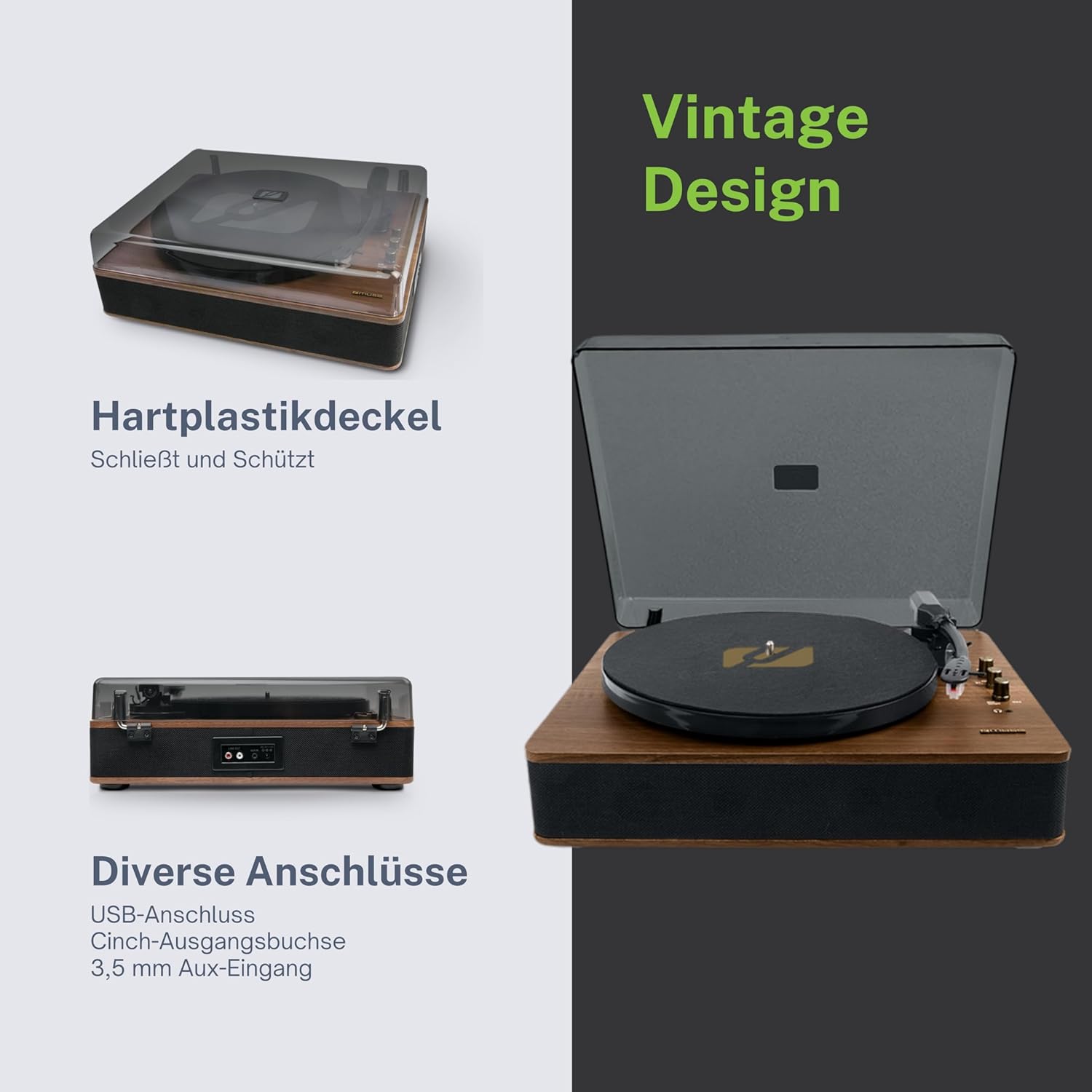
Figure 4.3: Rear Connections. The rear panel of the turntable is shown, featuring various connection ports including RCA audio outputs, a USB port, and an auxiliary input jack, allowing connection to external audio systems or devices.
۴.۲ د شا او غاړې اړیکې
- د RCA آوټ پټ جیکونه (L/R): یو بهرنی سره وصل کړئ ampلایفیر یا ځواک لرونکي سپیکرې.
- USB پورټ: د MP3 غږولو لپاره files from a USB drive or encoding vinyl to USB.
- په جیک کې آکس (۳.۵ ملي متره): بهرني آډیو وسایل وصل کړئ.
- په جیک کې DC: د بریښنا اډاپټر سره وصل کړئ.
- د هیډفون جیک (3.5mm): د شخصي اوریدلو لپاره.

Figure 4.4: Key Functions Overview. An illustrative graphic highlighting the key functions and connectivity options of the turntable. Icons represent features such as USB encoding, MP3 playback via USB, RCA output, auto-stop, integrated speakers, headphone jack, auxiliary input, and AC power input.
5. ترتیب کول
5.1 پیک کول
- واحد په احتیاط سره له بسته بندۍ څخه لرې کړئ.
- ټول بسته بندي توکي او محافظتي فلمونه لرې کړئ.
- Keep the packaging for future transport or storage.
5.2 ځای پرځای کول
- د ګرځولو میز په یوه فلیټ، مستحکم او سطحه کې کیږدئ.
- Avoid placing it near strong magnetic fields, direct sunlight, or heat sources.
- ډاډ ترلاسه کړئ چې د واحد په شاوخوا کې د مناسب هوا کولو لپاره کافي ځای شتون لري.
5.3 د بریښنا نښلول
- Connect the supplied power adapter to the DC IN jack on the rear of the turntable.
- د بریښنا اډاپټر په مناسب دیوال آوټ لیټ کې ولګوئ.
5.4 Dust Cover Installation
- Carefully attach the dust cover to the hinges on the back of the turntable.
- The dust cover protects the unit when not in use. Remove it or lift it fully when playing records.
6. عملیاتي لارښوونې
۶.۱ د وینیل ریکارډونو غږول
- د دوړو پوښ پورته کړئ.
- Rotate the Power/Volume knob clockwise to turn on the unit.
- Set the Function Selector knob to 'Phono'.
- Place a record on the platter. If playing a 45 RPM single, place the 45 RPM adapter on the spindle first.
- Select the correct speed (33, 45, or 78 RPM) using the Speed Selector switch.
- د سټایلس محافظت له سټیلس څخه لرې کړئ.
- Lift the tonearm using the cue lever.
- ټونرمام د ریکارډ د مطلوب پیل ټکي باندې حرکت وکړئ.
- Gently lower the tonearm onto the record using the cue lever. The music will begin to play.
- د پاور/حجم نوب په کارولو سره حجم تنظیم کړئ.
- At the end of the record, if the Auto Stop switch is ON, the platter will stop rotating. If OFF, the platter will continue to rotate. Manually lift the tonearm and return it to its rest.
6.2 بلوتوث حالت
- Rotate the Power/Volume knob clockwise to turn on the unit.
- Set the Function Selector knob to 'BT' (Bluetooth). The Bluetooth indicator will flash, indicating pairing mode.
- په خپل بهرني وسیله (سمارټ فون، ټابلیټ، او نور) کې بلوتوث فعال کړئ او د شته وسایلو لټون وکړئ.
- Select 'MUSE MT-106 BT' from the list of devices. Once connected, the Bluetooth indicator will stop flashing and remain solid.
- You can now play music from your external device through the turntable's speakers. Adjust volume using both the turntable's knob and your external device.
6.3 USB Playback and Encoding
۱۴ USB پلے بیک
- Rotate the Power/Volume knob clockwise to turn on the unit.
- Set the Function Selector knob to 'USB'.
- Insert a USB flash drive into the USB port. The unit will automatically detect and begin playing MP3 files.
- Use the Playback Control Buttons (Play/Pause, Skip Forward, Skip Backward) to navigate tracks.
6.3.2 USB Encoding (Recording Vinyl to USB)
The MT-106 BT allows you to convert your vinyl records into digital MP3 files on a USB drive.
- ډاډ ترلاسه کړئ چې یو USB فلش ډرایو په USB پورټ کې داخل شوی دی.
- Set the Function Selector knob to 'Phono'.
- Start playing your vinyl record as described in section 6.1.
- Press the 'Record' button (refer to Figure 4.2 for button location, typically indicated by a circle or 'REC' label). The recording indicator will illuminate.
- To stop recording, press the 'Record' button again. The recording indicator will turn off.
- The recorded audio will be saved as an MP3 file on your USB drive.
۴.۴ مرستندویه ان پټ (AUX IN)
- Rotate the Power/Volume knob clockwise to turn on the unit.
- Set the Function Selector knob to 'AUX'.
- Connect an external audio device (e.g., MP3 player, CD player) to the AUX IN jack (3.5mm) on the rear of the turntable using an audio cable (not supplied).
- Play audio from your external device. The sound will be output through the turntable's speakers.
6.5 د RCA محصول
To connect your turntable to an external amplifier or powered speakers:
- Ensure the turntable and the external audio system are turned off.
- Connect an RCA audio cable (not supplied) from the RCA Output Jacks (L/R) on the rear of the turntable to the corresponding audio input jacks on your ampلایفیر یا ځواک لرونکي سپیکرې.
- Turn on both the turntable and your external audio system.
- په خپل بهرني آډیو سیسټم کې مناسب ان پټ غوره کړئ.
7. ساتنه
۷.۱ د سټایلس پاکول
- د سټایلس پاکولو لپاره په ځانګړي ډول ډیزاین شوی نرم برش وکاروئ، ترڅو په نرمۍ سره سټایلس له شا څخه مخ ته برش کړئ.
- له یوې خوا څخه بلې خوا ته ډیر زور یا برش مه کاروئ، ځکه چې دا کولی شي سټایلس ته زیان ورسوي.
- Replace the stylus approximately every 300-500 hours of playback, or if you notice a degradation in sound quality.
7.2 د واحد پاکول
- Wipe the exterior of the turntable with a soft, dry, lint-free cloth.
- د کثافاتو پاکوونکي، موم یا محلول مه کاروئ ځکه چې دوی کولی شي پای ته زیان ورسوي.
- For the dust cover, use a soft cloth and a mild, non-abrasive cleaner if necessary.
8. ستونزه حل کول
If you experience issues with your turntable, please consult the following table before contacting support.
| ستونزه | احتمالي لامل | د حل لاره |
|---|---|---|
| هیڅ ځواک نشته | د بریښنا اډاپټر وصل شوی نه دی یا خراب آوټ لیټ دی. | ډاډ ترلاسه کړئ چې د بریښنا اډاپټر په خوندي ډول وصل دی او آوټ لیټ فعال دی. |
| غږ نشته | Volume too low; incorrect function mode; external speakers not connected/powered. | Increase volume; select correct function (Phono, BT, USB, AUX); check external speaker connections and power. |
| Poor sound quality (vinyl) | Dirty or worn stylus; dirty record; incorrect speed selected. | Clean or replace stylus; clean record; select correct RPM. |
| بلوتوث نه نښلي | Turntable not in pairing mode; device too far; already connected to another device. | Ensure turntable is in BT mode and flashing; move device closer; disconnect from other devices. |
| د USB پلے بیک کار نه کوي | USB ډرایو په سمه توګه نه دی داخل شوی؛ نه ملاتړ کیږي file بڼه؛ د USB ډرایو خرابوالی. | USB ډرایو بیا دننه کړئ؛ ډاډ ترلاسه کړئ files are MP3 format; try a different USB drive. |
9. مشخصات
| برانډ | میوز |
| د ماډل نوم | MT-106 BT |
| رنګ | لرګي |
| مواد | لرګي |
| د توکي وزن | 4.3 کیلوګرامه |
| د گردش سرعت | 33، 45، 78 RPM |
| ارتباط | Bluetooth, USB, RCA Output, 3.5mm AUX Input, 3.5mm Headphone Jack |
| ځانګړي ځانګړتیاوې | Integrated Speaker, Dust Protection, Adjustable Speed, USB Encoding |
| مطابقت لرونکې وسیلې | سمارټ فون، ټابلیټ |
| د بریښنا سرچینه | AC Adapter (1 AAAA battery required for unspecified function, likely remote or internal clock) |
| د اصلي هیواد | چین |
10. تضمین او ملاتړ
This product is covered by a manufacturer's warranty. Please refer to the warranty card included with your purchase or visit the official MUSE webد تضمین د تفصيلي شرایطو او مقرراتو لپاره سایټ.
For technical support, troubleshooting assistance, or inquiries regarding spare parts, please contact MUSE customer service through their official channels. Information regarding spare parts availability is currently not available.


