1. پیژندنه
This manual provides detailed instructions for the installation, configuration, and operation of your MoesGo WiFi Smart Wall Light Switch. This device allows you to control your lighting remotely via a smartphone application, voice commands, or directly through its touch panel. It supports multi-control functionality and integrates with popular smart home platforms.
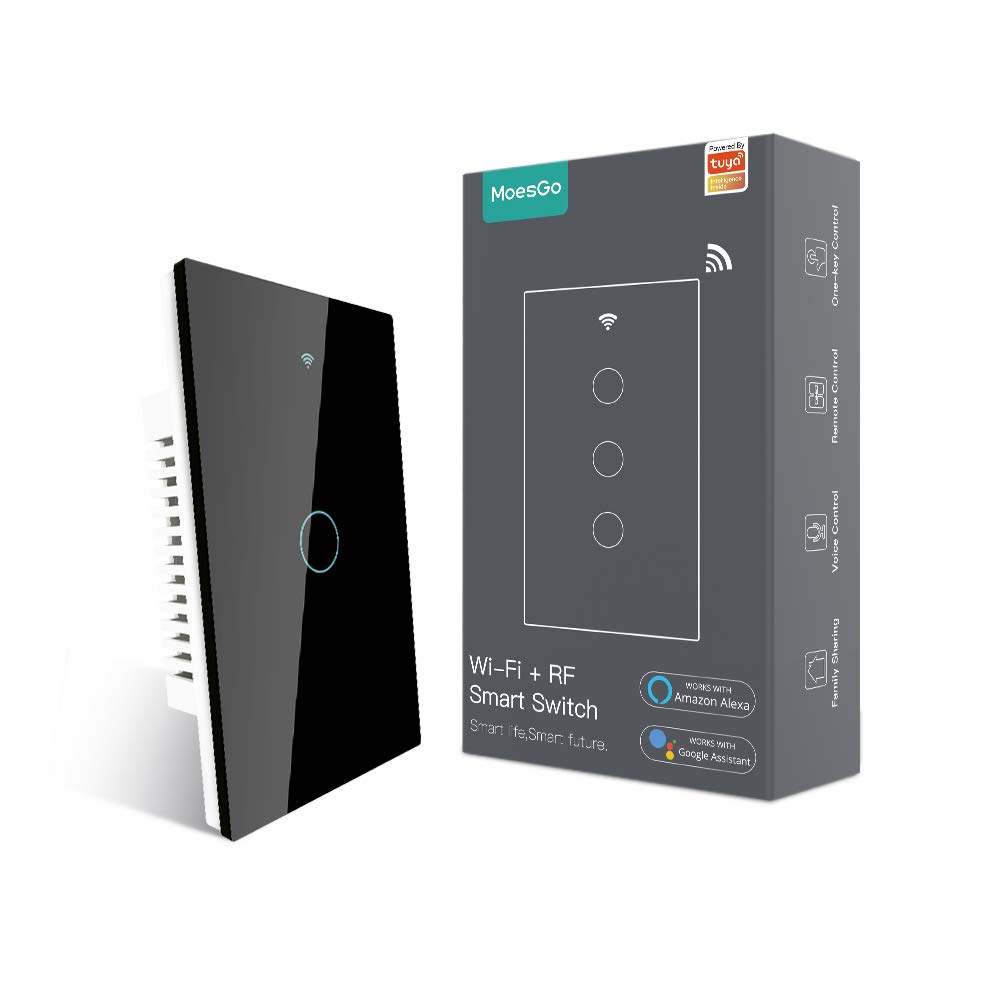
Image 1.1: MoesGo WiFi Smart Wall Light Switch and its retail packaging.
۲. د خوندیتوب معلومات او مهم ملاحظات
Before proceeding with installation, please read and understand the following safety guidelines. Improper installation can lead to electrical shock or damage to the device and your electrical system.
- بې طرفه تار ته اړتیا ده: This smart switch requires a neutral wire for operation. Verify that your electrical box has a neutral wire (typically white) before purchasing یا د نصبولو هڅه کول.
- یوازې 2.4GHz وای فای: The switch operates exclusively on a 2.4GHz Wi-Fi network. It is not compatible with 5GHz Wi-Fi networks. Ensure your router supports 2.4GHz and that your device is connected to this frequency during pairing.
- د بریښنا قطع کول: Always turn off power at the circuit breaker before installing, removing, or servicing the switch. Failure to do so can result in serious injury or death.
- مسلکي نصب کول: که تاسو د بریښنایی تارونو سره بلد نه یاست، نو د وړ بریښنایی متخصص سره مشوره وکړئ.
- د ډیمر سویچ نه دی: This device is an ON/OFF switch and does not support dimming functionality.
- Not for Traditional 3-Way Wiring: This switch uses a multi-control association via the app for 3-way functionality, not traditional 3-way wiring.

Image 2.1: Visual summary of critical installation requirements and limitations.
3. مشخصات
| فیچر | تفصیل |
|---|---|
| برانډ | MoesGo |
| د ماډل شمیره | AUB088K9T82Z |
| د محصول ابعاد | 4.7 x 2.9 x 1.5 انچه |
| وزن | 7.83 اونس |
| د عملیاتو حالت | ON-OFF-ON |
| اوسنۍ درجه بندي | 10 Amps |
| د عملیاتو Voltage | 240 ولټه |
| د اړیکو ډول | په نورمال ډول خلاص |
| د نښلونکي ډول | بېسیم (۲.۴GHz وای فای) |
| ترمینل | سکرو |
| د سرکټ ډول | 3-way (via app multi-control) |
| د فعالیت ډول | سمارټ ټچ |
4. د نصب لارښود
4.1 د نصب څخه دمخه چیک لیست
- Confirm presence of a neutral wire in your electrical box.
- ډاډ ترلاسه کړئ چې ستاسو د وای فای شبکه 2.4GHz ده.
- د پیل کولو دمخه د سرکټ بریکر کې بریښنا بنده کړئ.
- اړین وسایل راټول کړئ: سکریو ډرایور، د تار سټریپرونه، والیومtage ټیسټر.
4.2 د تار لګولو لارښوونې
- بریښنا بند کړئ: هغه سرکټ بریکر ومومئ چې د رڼا سویچ کنټرولوي چې تاسو یې بدلول غواړئ او بند یې کړئ. د حجم په کارولو سره تایید کړئ چې بریښنا بنده دهtage ټیسټر.
- زوړ سویچ لرې کړئ: Carefully remove the existing wall plate and unscrew the old switch from the electrical box. Disconnect the wires.
- د تارونو پیژندنه: Identify the Live (Load), Neutral, and Ground wires. The Live wire typically carries power from the breaker, the Neutral wire completes the circuit, and the Ground wire provides safety.
- نوی سویچ وصل کړئ: Connect the wires from your electrical box to the MoesGo Smart Switch according to the diagram below. Ensure all connections are secure.
- Connect the Live wire (L) from the electrical box to the 'L IN' terminal on the switch.
- Connect the Neutral wire (N) from the electrical box to the 'N IN' terminal on the switch.
- Connect the Load wire(s) (to the light fixture) to the 'L1 OUT', 'L2 OUT', 'L3 OUT', 'L4 OUT' terminals as appropriate for your switch gang configuration.
- Connect the Ground wire (if present) to the ground screw in the electrical box.
- د ماونټ سویچ: Gently push the wired switch into the electrical box, ensuring wires are not pinched. Screw the switch into place.
- وال پلیټ نصب کړئ: Attach the new glass wall plate.
- د بریښنا بیرته راګرځول: Turn the power back ON at the circuit breaker. The switch indicator light should illuminate.

Image 4.1: Detailed wiring diagram for the MoesGo Smart Wall Light Switch.
5. App Pairing and Configuration
5.1 Download the Smart Life/Tuya App
لټون "Smart Life" or "Tuya Smart" in your smartphone's app store (iOS or Android) and download the application. Register for an account or log in if you already have one.
5.2 Pairing the Switch
- د جوړه کولو حالت دننه کړئ: After restoring power, the Wi-Fi indicator on the switch should blink rapidly. If not, press and hold any button on the switch for 5-10 seconds until it blinks rapidly.
- په اپلیکیشن کې وسیله اضافه کړئ: Open the Smart Life/Tuya app. The app may automatically detect the new device. If not, tap the "+" icon in the top right corner, then select "Add Device" or "Auto Scan".
- Confirm Wi-Fi Network: Ensure your phone is connected to a 2.4GHz Wi-Fi network. Enter your Wi-Fi password when prompted.
- بشپړه جوړه کول: Follow the on-screen instructions in the app to complete the pairing process. Once successfully paired, you can rename the switch and assign it to a room.

Image 5.1: Simplified pairing process using the Smart Life app.
6. عملیاتي لارښوونې
۵.۱ لاسي لمس کنټرول
Simply touch the corresponding button on the glass panel to turn the connected light ON or OFF.
6.2 Remote Control via Smart Life/Tuya App
Once paired, you can control your lights from anywhere using the Smart Life/Tuya app on your smartphone. Open the app, select your switch, and tap the ON/OFF button.
۵.۴ د غږ کنټرول (الیکسا او ګوګل کور)
Integrate your MoesGo Smart Switch with Amazon Alexa or Google Home for hands-free voice control. Follow the instructions within the Alexa or Google Home app to link your Smart Life/Tuya account.
- د الیکسا لپاره: Say, "Alexa, turn on [Switch Name]" or "Alexa, turn off [Switch Name]".
- د ګوګل کور لپاره: Say, "Hey Google, turn on [Switch Name]" or "Hey Google, turn off [Switch Name]".

انځور 6.1: اوورview of various control methods for the smart switch.
6.4 Multi-Control (3-Way) Association
The MoesGo Smart Switch supports multi-control functionality, allowing multiple switches to control a single light without traditional 3-way wiring. This is achieved through an association feature within the Smart Life/Tuya app.
- Ensure both smart switches are installed and paired to the app.
- In the app, select one of the switches.
- Navigate to its settings or options, and look for "Multi-Control Association."
- Follow the app's prompts to link the two switches to control the same light.

Image 6.2: App interface for setting up multi-control association.
۴.۴ مهالویش او ټایمرونه
Use the Smart Life/Tuya app to set schedules or countdown timers for your lights. This allows you to automate when lights turn ON or OFF, enhancing convenience and energy efficiency.
6.6 Relay Status and Backlight Settings
The app provides options to customize the switch's behavior:
- د ریل حالت: Configure the switch to remember its last ON/OFF state after a power outage, or to default to ON or OFF.
- د شاته څراغ سویچ: Turn the switch's backlight ON or OFF. This can be useful for bedrooms to avoid light disturbance during sleep.

Image 6.3: App settings for customizing relay status.

Image 6.4: App settings for controlling the switch backlight.
7. ستونزه حل کول
If you encounter issues with your MoesGo Smart Wall Light Switch, refer to the following common problems and solutions:
- Switch Not Responding / No Power:
- د سرکټ بریکر وګورئ ترڅو ډاډ ترلاسه کړئ چې بریښنا فعاله ده.
- Verify all wiring connections are secure and correct, especially the neutral wire.
- ډاډ ترلاسه کړئ چې د رڼا بلب فعال دی.
- د اپلیکیشن سره جوړه کولو توان نلري:
- Confirm your Wi-Fi network is 2.4GHz. The switch does not support 5GHz.
- Ensure your smartphone is connected to the 2.4GHz Wi-Fi network during pairing.
- Make sure the switch is in rapid blinking pairing mode. If not, press and hold any button for 5-10 seconds.
- Move the switch closer to your Wi-Fi router if signal strength is weak.
- د جوړې کولو پرمهال په خپل تلیفون کې د موبایل ډیټا په لنډمهاله توګه غیر فعال کړئ.
- خپل وای فای روټر بیا پیل کړئ او بیا هڅه وکړئ.
- د غږ کنټرول کار نه کوي:
- Ensure your Smart Life/Tuya account is correctly linked to Alexa or Google Home.
- Verify the switch name in the Smart Life/Tuya app matches the name used in voice commands.
- خپل انټرنیټ پیوستون چیک کړئ.
- Switch Turns ON/OFF Randomly:
- Check for any active schedules or automation rules in the Smart Life/Tuya app that might be causing this behavior.
- Ensure no other smart home devices or users are inadvertently controlling the switch.
- If the issue persists, consider resetting the switch and re-pairing it.
8. ساتنه
To ensure optimal performance and longevity of your MoesGo Smart Wall Light Switch, follow these maintenance guidelines:
- پاکول: Use a soft, dry cloth to clean the glass panel. Avoid abrasive cleaners, solvents, or excessive moisture, which can damage the surface or internal components.
- د فرم ویئر تازه معلومات: Periodically check the Smart Life/Tuya app for available firmware updates for your switch. Updates can improve performance, add features, and enhance security.
- د چاپیریال شرایط: Ensure the switch is installed in an indoor environment within recommended temperature and humidity ranges. Avoid exposure to direct sunlight, extreme temperatures, or high humidity.


