1. د خوندیتوب معلومات
This Genmitsu CFL55P Laser Module is a Class 4 laser product. Improper use can result in serious injury. Always adhere to the following safety precautions:
- د سترګو د ساتنې جامې: Always wear appropriate laser safety goggles (OD 6+) when operating the laser module. The laser shield included with the module provides some protection but is not a substitute for proper safety goggles.
- د مستقیم تماس څخه مخنیوی وکړئ: هیڅکله په مستقیم ډول د لیزر بیم یا انعکاس ته مه ګورئ.
- په هوا لرونکي ځای کې کار وکړئ: Laser engraving and cutting can produce smoke and fumes. Ensure adequate ventilation or use a fume extractor.
- د اور وژنې خوندیتوب: Keep a fire extinguisher or water nearby. Do not leave the laser unattended during operation.
- ماشومان او څاروي: ماشومان او څاروي د کاري ساحې څخه لرې وساتئ.
- مناسب ترتیب: Ensure the laser module is securely mounted and all connections are correct before operation.
2. محصول ختم شوview
The Genmitsu CFL55P is a 5.5W compressed spot laser module designed for precision engraving and cutting. It features a fine 0.1mm x 0.1mm laser spot, an integrated air assist nozzle, and a fixed focus design for consistent performance. The module is equipped with an integrated laser shield for enhanced safety.

Figure 2.1: Genmitsu CFL55P Laser Module with Air Assist Nozzle and control board.
کلیدي ځانګړتیاوې:
- Compressed Spot: 0.1mm x 0.1mm focal spot for improved power and accuracy.
- Air Assist Nozzle: Light-weight aluminum nozzle for enhanced engraving speed, quality, and optics protection.
- Fixed Focus Design: Simplifies operation and ensures consistent results.
- UV Laser Shield: Filters laser radiation to prevent accidental exposure.
- تمدید شوی عمر: Upgraded heat dissipation for prolonged operation.
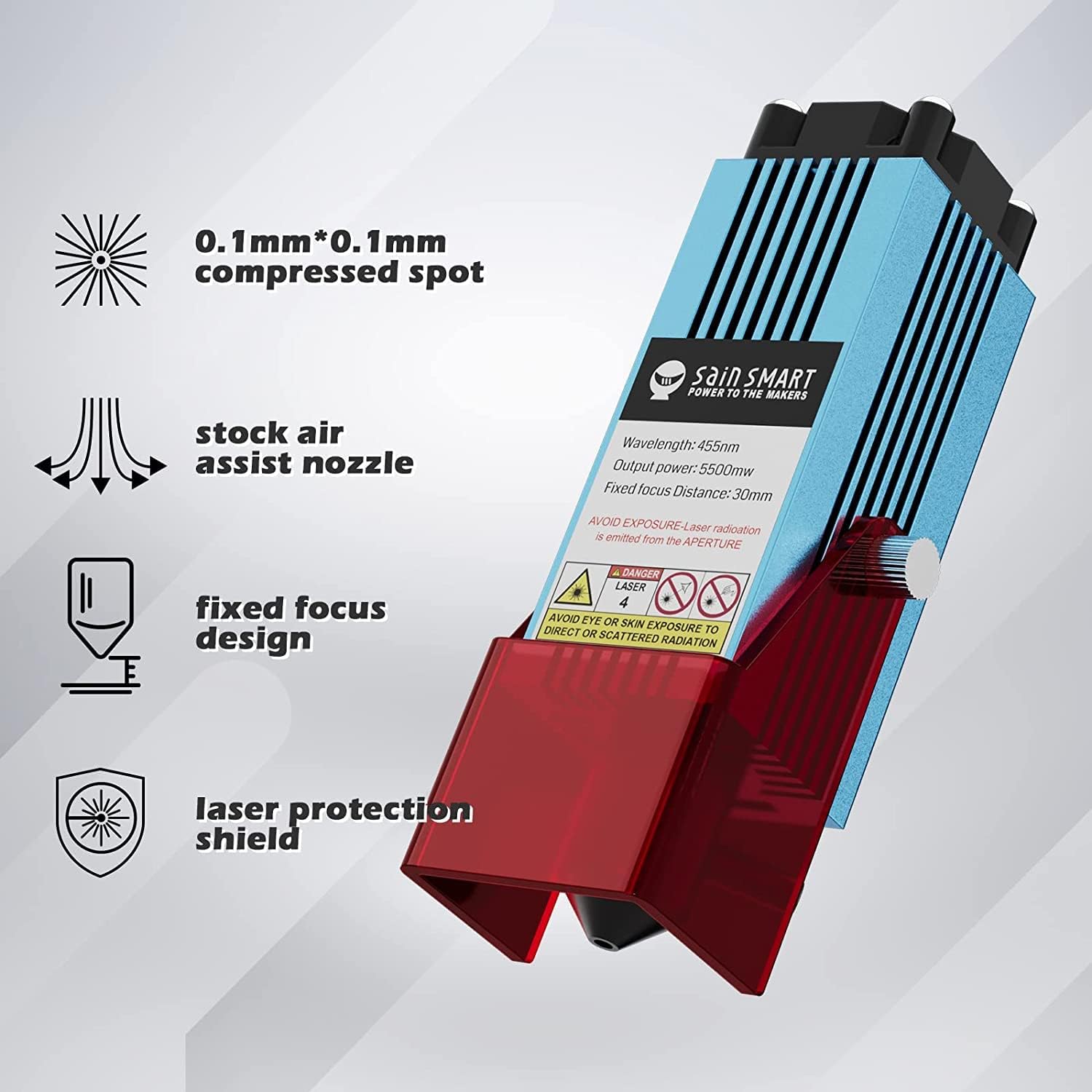
Figure 2.2: Diagram highlighting the key features of the CFL55P laser module.
3. مطابقت
The Genmitsu CFL55P Laser Module is compatible with the following Genmitsu CNC milling machines:
- Genmitsu 3018-PRO
- Genmitsu 3018-PROVer
- Genmitsu 3018-PROVer V2
- Genmitsu 3020-PRO MAX
- Genmitsu PROVerXL 6050 Plus
- Genmitsu PROVerXL 4x4
- Genmitsu PROVerXL 2x2

Figure 3.1: Compatible Genmitsu CNC machines.
4. ترتیب او نصب کول
Follow these steps to install your Genmitsu CFL55P Laser Module onto a compatible CNC machine. Specific steps may vary slightly depending on your CNC model.
4.1 پیک کول او تفتیش کول
- په احتیاط سره ټولې برخې خلاص کړئ.
- Verify that all parts are present and undamaged. Refer to the packing list for your specific kit.

Figure 4.1: Typical contents of a Genmitsu laser module kit.
4.2 Removing the Original Spindle/Router
Before installing the laser module, the existing spindle or router on your CNC machine must be removed.
- Disconnect power from the CNC machine.
- Carefully unmount and remove the spindle/router from its bracket. Store it safely.
4.3 Installing the Laser Module
- Attach the laser module to the designated mounting bracket on your CNC machine. Ensure it is securely fastened with the provided screws.
- Connect the laser module's wiring to the control board according to your CNC machine's specific instructions. Typically, this involves connecting the laser power cable and signal cable.
Video 4.1: Installation guide for adding a laser module to a Genmitsu PROVerXL 6050 Plus CNC machine. This video demonstrates the general process of mounting and wiring a laser module.
Video 4.2: Guide on how to add a laser module to a Genmitsu 4040-PRO. While this video features a 10W laser, the mechanical and wiring steps are largely applicable to the 5.5W CFL55P module.
4.4 د فوکل اوږدوالی تنظیمول
The CFL55P features a fixed focus distance of 30mm. To achieve optimal results, ensure the distance between the laser module's lens and the material surface is approximately 30mm. Use a focal length gauge or a small block of material of known height to set this distance.

Figure 4.2: Illustration of the precise 0.1mm x 0.1mm laser spot.
5. عملیاتي لارښوونې
Once installed, the Genmitsu CFL55P laser module can be used for various engraving and cutting tasks on compatible materials.
5.1 Software and Settings
The laser module is typically controlled using CNC software such as LightBurn or LaserGRBL. Refer to your CNC machine's documentation and the software's user manual for detailed instructions on creating and executing laser jobs.
- د موادو ازموینه: Always perform small test cuts or engravings on scrap material to determine optimal power and speed settings for your specific material.
- هوايي مرسته: Ensure the air assist system is connected and operational during cutting and engraving to improve cut quality, reduce charring, and protect the laser lens from debris.

Figure 5.1: The integrated air assist nozzle.
ویډیو ۱: پایview of the Genmitsu Compressed Spot Laser Module with Air Assist Nozzle, demonstrating its features and capabilities.
5.2 پخوانیample غوښتنلیکونه
The CFL55P is capable of cutting 4mm plywood in a single pass and can engrave various materials with high detail.
Video 5.2: Demonstration of engraving with a Genmitsu Kortek Laser Engraver, showcasing the detail achievable with laser modules.
6. ساتنه
Regular maintenance ensures optimal performance and extends the lifespan of your laser module.
- د لینز پاکول: Periodically inspect and clean the laser lens using a lint-free cloth and lens cleaning solution. The air assist nozzle helps keep the lens clean during operation.
- اړیکې چیک کړئ: ډاډ ترلاسه کړئ چې ټول بریښنایی اړیکې خوندي او له زیان څخه پاکې دي.
- د تودوخې ضایع کول: The module's upgraded heat dissipation system is designed for long operation. Ensure the cooling fins are free from dust and debris to maintain efficient cooling.
7. ستونزه حل کول
دا برخه هغه عامې ستونزې په ګوته کوي چې تاسو ورسره مخ کیدی شئ.
۶.۳ د نصبولو مسلې
- Difficulty Mounting: Ensure you have the correct mounting bracket for your specific CNC model. Refer to the installation videos and your CNC manual.
- Wiring Problems: Double-check all wiring connections against the provided diagrams for your CNC machine. Incorrect wiring can prevent the laser from functioning.
7.2 Operation Issues
- لیزر نه سوځي/کمزوري محصول:
- Verify power supply and connections.
- Check software settings (power, speed).
- Ensure the focal length is correctly set to 30mm.
- Inspect the laser lens for dirt or damage.
- د نقاشۍ/ پرې کولو ضعیف کیفیت:
- Adjust power, speed, and passes in your software.
- Ensure the air assist is active and providing sufficient airflow.
- Verify material type and consistency.
- Check for proper focal length.
- Software Communication Errors (e.g., M4/M5 commands): Ensure your CNC firmware and control software are correctly configured for laser operation. Consult the software documentation or Genmitsu support.
8. مشخصات
| فیچر | مشخصات |
|---|---|
| برانډ | جینمیتسو |
| د ماډل شمیره | CFL55P |
| د لیزر تولید بریښنا | 5.5W |
| د لیزر ځای اندازه | 0.1mm x 0.1mm |
| طول موج | 455nm (Blue Laser) |
| Fixed Focus Distance | 30mm |
| مواد | المونیم |
| رنګ | آبي |
| د توکي وزن | 1.06 کیلو ګرامه |
| د محصول ابعاد | 27.79 x 21.79 x 0.25 سانتي متره |
| د عملیاتو حالت | اتوماتیک |
9. تضمین او ملاتړ
For warranty information, technical support, or to report missing parts, please contact Genmitsu customer service or visit the official Genmitsu website. Ensure you have your product model number (CFL55P) and purchase details available when contacting support.
رسمي Webسایټ: www.sainsmart.com


