1. پیژندنه
Thank you for choosing the Logitech G435 Lightspeed and Bluetooth Wireless Gaming Headset. This lightweight headset is designed to provide high-fidelity audio and clear communication across multiple gaming platforms and devices. This manual will guide you through the setup, operation, maintenance, and troubleshooting of your new headset.
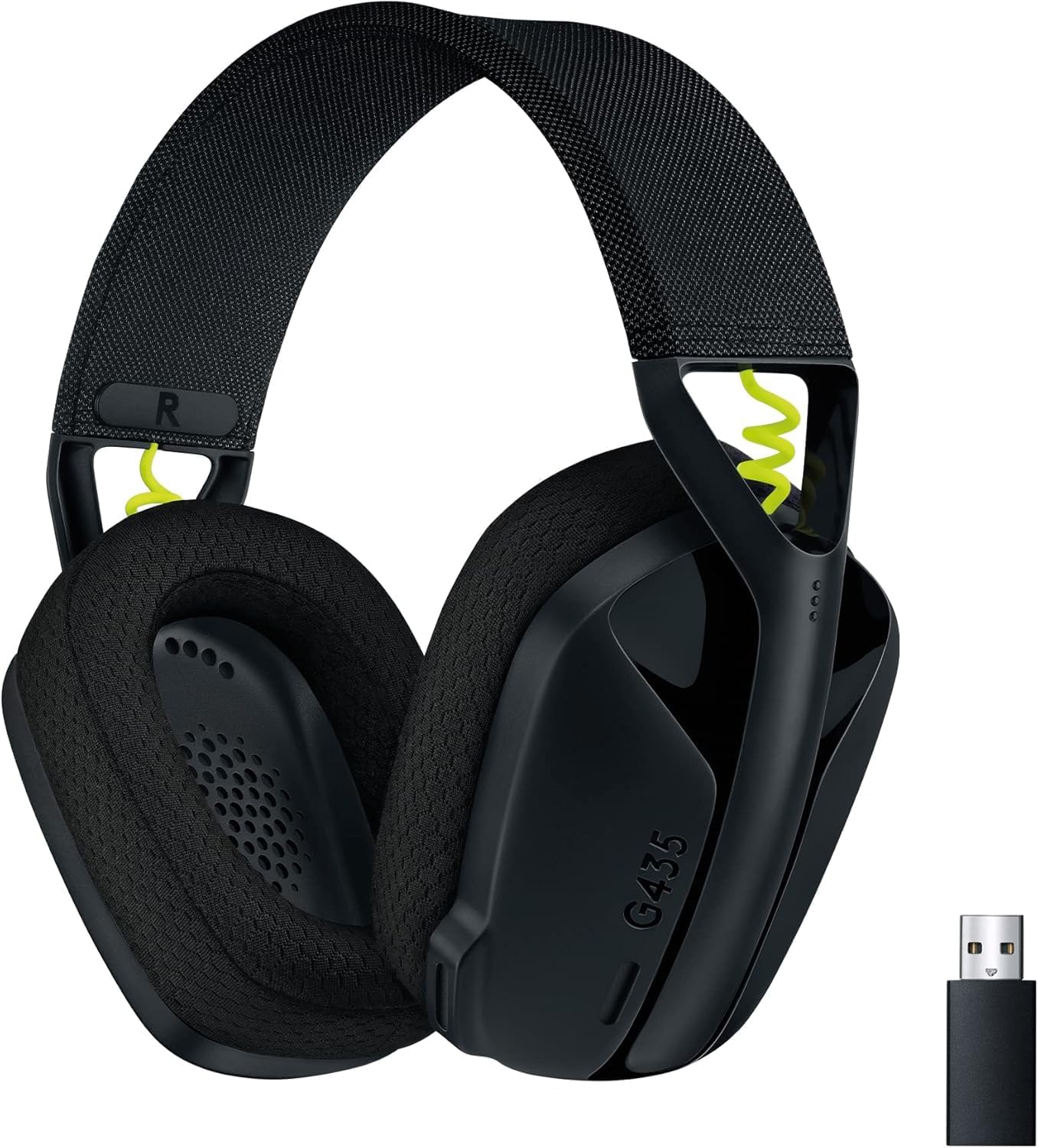
Figure 1: Logitech G435 Headset and USB Lightspeed Receiver
2. کلیدي ځانګړتیاوې
- دوه ګونی بېسیم اتصال: Connects via Lightspeed USB-A receiver for low-latency gaming or Bluetooth for mobile devices.
- د لوړ وفادار غږ: Features 40 mm audio drivers for balanced, immersive sound. Compatible with Dolby Atmos, Tempest 3D AudioTech, and Windows Sonic for surround sound experiences.
- Clear Voice Communication: Integrated dual beamforming microphones eliminate the need for a mic arm, reducing background noise for clear communication.
- د لږ وزن ډیزاین: Weighs only 165 grams (5.8 oz) for extended comfort during long gaming sessions.
- د بیټرۍ اوږد ژوند: په یوه چارج کې تر 18 ساعتونو پورې دوامداره کارونې څخه خوند واخلئ.
- د غوږونو آرامۍ بالښتونه: Designed with memory foam ear cushions for total comfort.
3. ترتیب کول
3.1 Lightspeed Wireless Connection (PC, PlayStation)
- Insert the Lightspeed USB-A receiver into a USB port on your PC or PlayStation console.
- Power on your G435 headset by pressing and holding the Power button for 3 seconds.
- The headset will automatically connect to the Lightspeed receiver. The status indicator light on the headset will turn cyan.

Figure 2: Lightspeed Wireless for Pro-Grade Connection
3.2 Bluetooth Connection (Smartphones, Nintendo Switch)
- With the headset powered on, press and hold the Power button and the Mute button simultaneously for 3 seconds to enter Bluetooth pairing mode. The status indicator light will blink blue.
- On your device (smartphone, Nintendo Switch), go to Bluetooth settings and select "G435" from the list of available devices.
- Once connected, the status indicator light on the headset will turn solid blue.
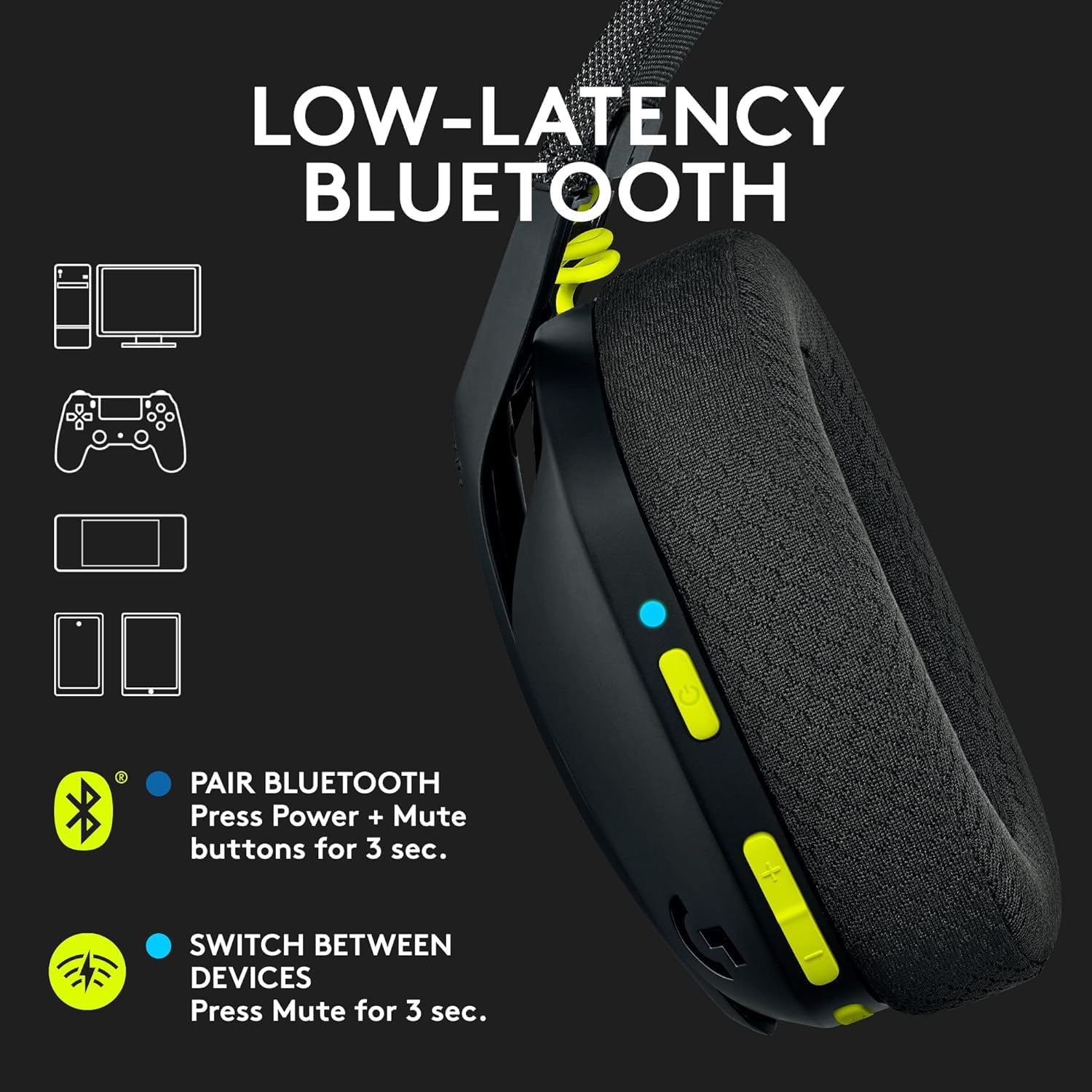
Figure 3: Low-Latency Bluetooth Connectivity
3.3 Switching Between Lightspeed and Bluetooth
To switch between Lightspeed and Bluetooth connections, press and hold the Mute button for 3 seconds. The status indicator light will change to reflect the active connection (cyan for Lightspeed, blue for Bluetooth).
4. عملیاتي لارښوونې
۸ پاور آن/بند
- پاور آن: د 3 ثانیو لپاره د بریښنا تڼۍ فشار او ونیسئ.
- بندول: د 3 ثانیو لپاره د بریښنا تڼۍ فشار او ونیسئ.
4.2 د حجم کنټرول
Use the volume rocker buttons located on the left earcup to adjust the audio output level.
۵.۳ مایکروفون خاموش
Press the dedicated Mute button on the left earcup to mute or unmute the microphone. The status indicator light will change to indicate the microphone status.

Figure 4: Dual Beamforming Microphones
5. ساتنه
5.1 پاکول
- هیډسیټ په نرم، وچ ټوکر سره پاک کړئ.
- مایع پاکوونکي یا خړوبونکي مواد مه کاروئ.
- The memory foam ear cushions can be gently cleaned with a damp cloth and mild soap, then allowed to air dry completely.
5.2 د بیټرۍ چارج کول
To charge the headset, connect the included USB-C cable to the charging port on the headset and to a USB power source. The status indicator light will show charging status (red while charging, green when fully charged). A full charge provides up to 18 hours of battery life.
6. ستونزه حل کول
۸.۱ د آډیو/اتصال ستونزې نشته
- ډاډ ترلاسه کړئ چې هیډسیټ فعال دی او په بشپړ ډول چارج شوی دی.
- For Lightspeed connection, verify the USB-A receiver is securely plugged into the device and the headset's status indicator is cyan.
- For Bluetooth connection, ensure Bluetooth is enabled on your device and the headset is paired (status indicator blue). Try re-pairing if necessary.
- په هیډسیټ او ستاسو وصل شوي وسیله دواړو کې د حجم کچه وګورئ.
- ډاډ ترلاسه کړئ چې هیډسیټ ستاسو د سیسټم ترتیباتو کې د آډیو آوټ پټ وسیلې په توګه غوره شوی.
۷.۲ مایکروفون کار نه کوي
- Ensure the microphone is not muted (check the Mute button and status indicator).
- Verify the headset is selected as the input device in your system's audio settings.
- Check for any software updates for your device or headset drivers.
7. مشخصات
| د ماډل نوم | لوجیټیک G435 |
| د توکي ماډل شمیره | 097855168252 |
| ارتباط | Lightspeed Wireless (USB-A), Bluetooth 5.0 |
| د بیسیم رینج | تر 10 مترو پورې |
| آډیو چلوونکي | 40 mm متحرک چلوونکي |
| د تعدد ځواب | ۲۰ هرټز - ۲۰ کلو هرټز |
| خنډ | 45 Ohms (passive) |
| مایکروفون | Dual embedded beamforming microphones |
| د بیټرۍ ژوند | تر 18 ساعتونو پورې |
| د چارج کولو بندر | USB-C |
| وزن | 165 ګرامه (5.8 اونس) |
| ابعاد | 6 x 3 x 7 انچه |
| مطابقت لرونکې وسیلې | PC, Smartphones, PlayStation, Nintendo Switch |
۸. د محصول رسمي ویډیوګانې
ویډیو ۳.۱: یو اوورview of the Logitech G435 Wireless Gaming Headset, highlighting its features and design.
9. تضمین او ملاتړ
9.1 د راستنیدو پالیسي
This product is eligible for a 90-day refund/replacement return policy. Please refer to your purchase documentation for specific terms and conditions.
۷.۳ د تولیدونکي ملاتړ
د تخنیکي ملاتړ، تضمین ادعاوو، یا د محصول اضافي معلوماتو لپاره، مهرباني وکړئ د لوجیټیک رسمي ملاتړ ته مراجعه وکړئ. website or contact their customer service. Specific warranty details are typically provided with your product packaging.


