پیژندنه
Welcome to the user manual for your new CERAGEM M2 Arc Massage Chair. This chair is designed to provide optimal relaxation and a personalized massage experience within the comfort of your home. Featuring a premium SL frame, 6 automatic massage modes, thermal heating, a built-in Bluetooth speaker, and a convenient USB port, the M2 is crafted for both therapeutic benefits and modern convenience.

Image: The CERAGEM M2 Massage Chair in a stylish brown and beige finish, accompanied by its matching ottoman, showcasinد هغې ښکلی ډیزاین.
د خوندیتوب مهم معلومات
Please read all instructions carefully before using the CERAGEM M2 Massage Chair. Retain this manual for future reference. Improper use can lead to injury or damage to the product.
- Always ensure the chair is placed on a stable, level surface.
- Do not use the chair if the power cord is damaged or if the plug is loose.
- د عملیاتو پرمهال ماشومان او څاروي له څوکۍ څخه لرې وساتئ.
- Consult a physician before use if you have pre-existing medical conditions, are pregnant, or have a pacemaker.
- Do not attempt to disassemble or repair the chair yourself. Contact authorized service personnel.
- کله چې په کار نه وي یا د پاکولو دمخه څوکۍ د بریښنا له ساکټ څخه خلاص کړئ.
تنظیم او مجلس
The CERAGEM M2 Massage Chair requires minimal assembly. Follow these steps to set up your chair:
- بسته بندي کول: Carefully remove all components from the packaging. Ensure all parts are present: main chair unit, ottoman, power cord, and remote control.
- ځای په ځای کول: Position the chair in a desired indoor location, ensuring sufficient space around it for reclining. The chair dimensions are 44.1"D x 25.6"W x 39.7"H.
- د بریښنا پیوستون: Connect the power cord to the chair's power input port, then plug it into a standard electrical outlet.
- Ottoman Assembly (if separate): If the ottoman base is separate, attach it securely according to the included quick-start guide.
عملیاتي لارښوونې
Familiarize yourself with the chair's functions using the remote control.
پاور آن/بند
فشار ورکړئ ځواک button on the remote control to turn the chair on or off.
د اتومات مساج طریقې
The M2 offers 6 automatic modes, each designed for specific relaxation needs. Select your desired mode using the corresponding buttons on the remote:
- Whole-body concentration mode
- Neck and shoulder concentration mode
- Hip and pelvis concentration mode
- Back and hip concentration mode
- Upper body concentration mode
- Deep massage mode
د تکیه کولو فعالیت
Adjust the chair's recline angle up to 120° for optimal comfort. Use the recline buttons on the remote control to find your perfect position.

Image: A woman comfortably reclined in the CERAGEM M2 Massage Chair, demonstrating the chair's ability to adjust to an optimal angle for relaxation.
Thermal Heating
Activate the thermal heating function to enhance your massage experience. The heat helps loosen tight muscles and promote blood circulation, particularly around the waist and hips. The temperature can be controlled up to 140°F (60°C).

انځور: نږدې انځور view of the lumbar area of the CERAGEM M2 chair, highlighting the integrated warming function for enhanced relaxation.
Bluetooth Speaker & USB Port
Enhance your relaxation with integrated multimedia features:
- بلوتوث Pair your device with the chair's built-in Bluetooth speaker to enjoy music or guided meditations during your massage.
- USB پورټ: Use the convenient USB port to charge your mobile devices while you relax.

Image: A composite image illustrating the CERAGEM M2's convenience features: a Bluetooth speaker, a USB charging port, and the intuitive remote control.
ساتنه او پالنه
Proper maintenance ensures the longevity and optimal performance of your CERAGEM M2 Massage Chair.
- پاکول:
- د څوکۍ سطحه د نرم، ډamp ټوکر
- د کثافاتو پاکوونکي، محلولونه، یا سخت کیمیاوي مواد مه کاروئ.
- For leather parts, use a specialized leather cleaner if necessary, following the product instructions.
- ذخیره کول: When not in use for extended periods, unplug the chair and store it in a cool, dry place away from direct sunlight and extreme temperatures.
- معاینه: په دوره توګه د بریښنا کنډک او د زیان د نښو لپاره پلګ وګورئ.
د ستونزو حل کول
If you encounter any issues with your CERAGEM M2 Massage Chair, refer to the following common problems and solutions:
| ستونزه | احتمالي لامل | د حل لاره |
|---|---|---|
| څوکۍ نه چالانېږي. | Power cord not properly connected; power outlet issue. | Ensure power cord is securely plugged into both the chair and a working electrical outlet. Check circuit breaker. |
| د مساج فعالیت کار نه کوي. | Chair is not powered on; mode not selected. | Turn on the chair and select an automatic massage mode or manual setting. |
| بلوتوث سپیکر نه وصل کیږي. | Bluetooth on device is off; chair not in pairing mode. | Ensure Bluetooth is enabled on your device. Refer to your device's manual for pairing instructions. Restart the chair. |
| Thermal heating not felt. | د تودوخې فعالیت فعال شوی نه دی. | Activate the thermal heating function via the remote control. Allow a few minutes for the heat to build up. |
که چیرې د دې حل لارو هڅه کولو وروسته هم ستونزه دوام ومومي، مهرباني وکړئ د پیرودونکو ملاتړ سره اړیکه ونیسئ.
مشخصات
Detailed specifications for the CERAGEM M2 Massage Chair:
| برانډ | CERAGEM |
| د ماډل شمیره | M2 |
| د محصول ابعاد | ۱۶"د x ۲۶"وچ x ۴۷"ح |
| د توکي وزن | ۲.۴۵ پونډه |
| شاملې برخې | Premium SL Frame, Thermal Heating, Bluetooth Speaker, USB Port |
| د موادو ډکول | فوم |
| د تکیه کولو موقعیت شمیره | 2 (up to 120°) |
| وړاندیز شوي استعمالونه | آرام کول |
| د کور دننه / بهر کارول | دننه |
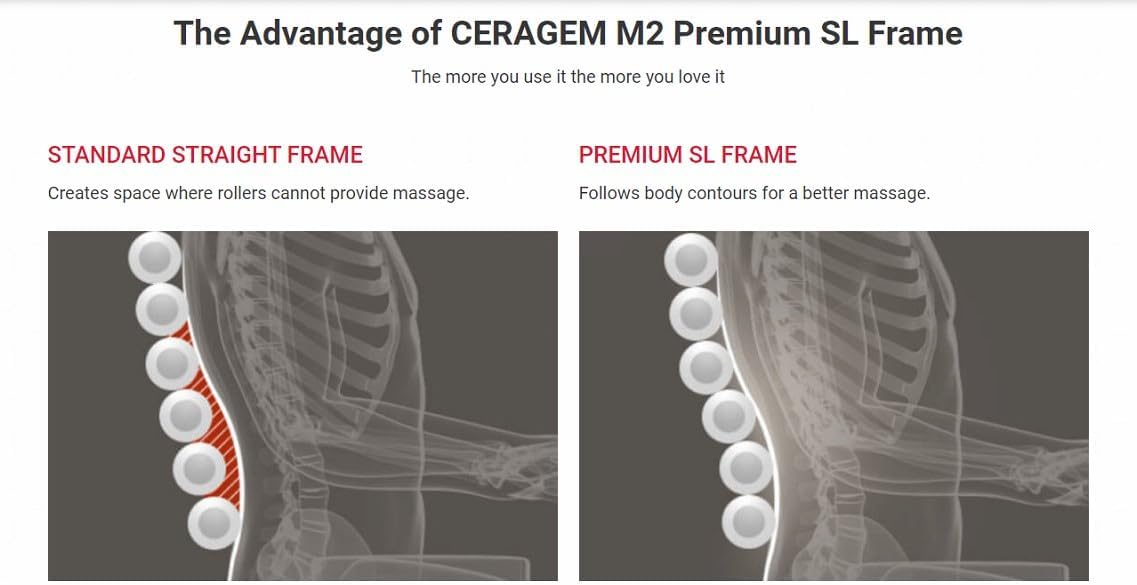
انځور: یو ډیاګرام چې د اډوان انځورويtage of the CERAGEM M2's Premium SL Frame, showing how it follows body contours more effectively than a standard straight frame for a better massage.
تضمین او ملاتړ
CERAGEM stands behind the quality of its products. Your CERAGEM M2 Massage Chair is covered by a limited warranty against defects in materials and workmanship from the date of purchase. Please refer to the warranty card included with your product for specific terms and conditions.
For technical support, warranty claims, or service inquiries, please contact CERAGEM customer service:
- Webسایټ: Visit the official CERAGEM webد ملاتړ سرچینو او اړیکو معلوماتو لپاره سایټ.
- بریښنالیک: [Insert Customer Service Email Here, if available]
- تلیفون: [Insert Customer Service Phone Number Here, if available]
When contacting support, please have your model number (M2) and proof of purchase readily available.


