1. پیژندنه
This manual provides comprehensive instructions for the Naxa NDS-6501 Portable Dual 6.5-inch Bluetooth Speaker. Please read this manual thoroughly before operating the device to ensure proper use and to maximize your experience. Keep this manual for future reference.
2. د بسته محتويات
ډاډ ترلاسه کړئ چې لاندې ټول توکي ستاسو په بسته کې شامل دي:
- Naxa NDS-6501 Portable Bluetooth Speaker
- واړه مایکروفون
- د USB چارج کیبل
- د کارونکي لارښود (دا لاسوند)
3. د محصول ب Featuresې
The Naxa NDS-6501 speaker offers a range of functionalities designed for portable audio entertainment:
- Dual 6.5-inch full-frequency speakers for clear audio output.
- Bluetooth connectivity for wireless audio streaming from compatible devices.
- Integrated multi-color flame lights with various lighting effects.
- True Wireless Stereo (TWS) function for connecting two NDS-6501 speakers wirelessly.
- Wired microphone input for vocal use.
- Built-in FM radio tuner for local station access.
- USB port and MicroSD/TF card slot for playing audio files from external storage.
- Auxiliary (3.5mm) input for wired audio connections.
- Rechargeable battery providing up to 2 hours of playback time.
۵. کنټرولونه او بندرونه
The speaker features various controls and input/output ports. A typical layout includes a power button, volume controls, mode selection, playback controls (play/pause, skip tracks), microphone input, USB port, MicroSD card slot, auxiliary input, and a charging port. Refer to the diagram below for specific locations.
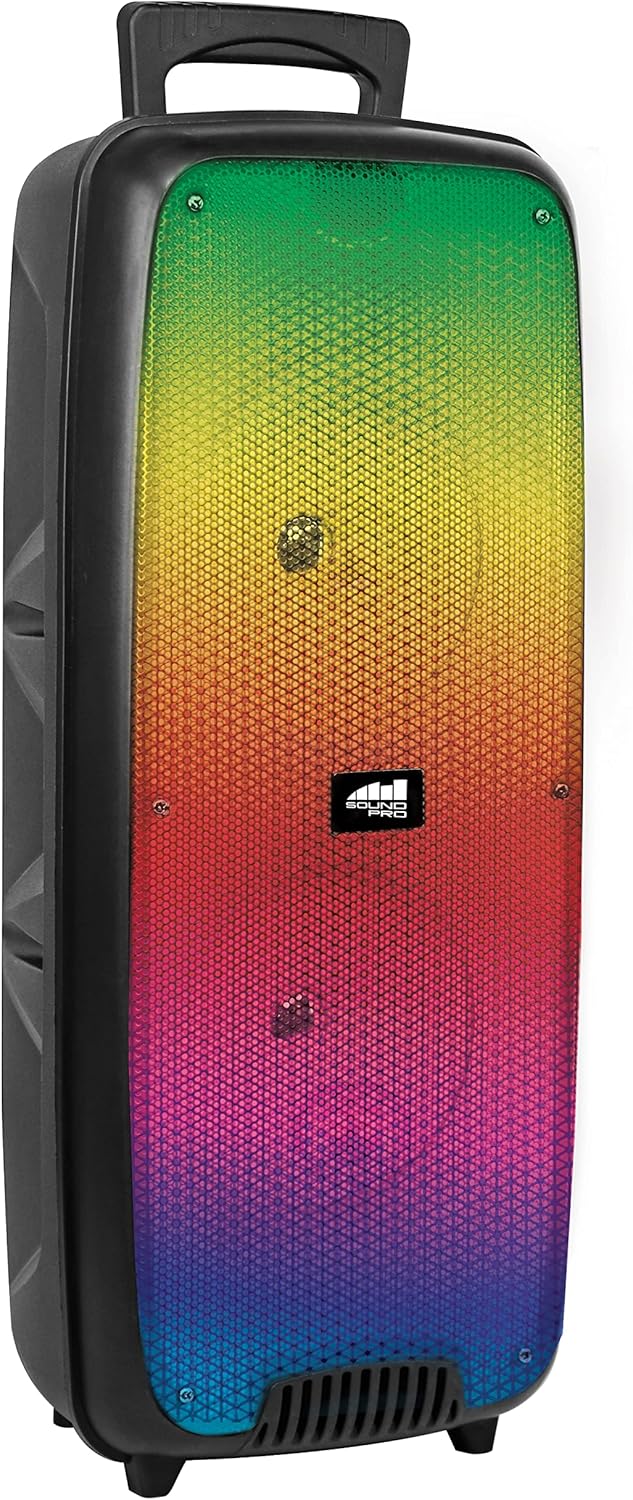
شکل 4.1: مخکی view of the Naxa NDS-6501 speaker, showcasing the dual 6.5-inch drivers and multi-color flame lights.

شکل 4.2: اړخ view of the Naxa NDS-6501 speaker, illustrating its portable design with an integrated handle.
5. ترتیب کول
۳.۱ د سپیکر چارج کول
- ورکړل شوی USB چارجینګ کیبل د سپیکر د چارج کولو پورټ سره وصل کړئ.
- د USB کیبل بل پای د یو مناسب USB بریښنا اډاپټر (شامل نه دی) یا د کمپیوټر USB پورټ سره وصل کړئ.
- The charging indicator light will illuminate, typically red, during charging.
- Once fully charged, the indicator light will change color or turn off (refer to specific LED behavior in your product). A full charge provides approximately 2 hours of playback.
5.2 بریښنا کول / بندول
- To power on: Press and hold the Power button for a few seconds until the speaker activates.
- To power off: Press and hold the Power button again until the speaker shuts down.
6. عملیاتي لارښوونې
6.1 د بلوتوټ جوړه کول
- Ensure the speaker is powered on and in Bluetooth mode. If not, press the Mode button to switch to Bluetooth. The speaker will indicate it is ready for pairing (e.g., a flashing LED or an audible prompt).
- ستاسو د بلوتوث فعال شوي وسیلې (سمارټ فون، ټابلیټ، او نور) کې، د بلوتوث ترتیباتو ته لاړ شئ.
- لټون available devices. You should see "NDS-6501" or a similar name in the list.
- Select "NDS-6501" to initiate pairing.
- Once successfully paired, the speaker will provide an audible confirmation, and the Bluetooth indicator light will become solid.
۶.۸ ریښتینی بې سیم سټیریو (TWS) جوړه کول
The TWS function allows you to connect two NDS-6501 speakers for a stereo sound experience.

شکل 6.1: Illustration of the True Wireless Stereo (TWS) function, enabling two speakers to connect wirelessly from a single Bluetooth source.
- Ensure both NDS-6501 speakers are powered on and in Bluetooth mode, but not yet paired to any device.
- On one of the speakers (this will be the primary speaker), press and hold the TWS button (or a designated pairing button) for a few seconds.
- The primary speaker will search for the secondary speaker. Once connected, both speakers will provide an audible confirmation.
- Now, pair your Bluetooth device to the primary speaker as described in Section 6.1. Audio will play through both speakers in stereo.
د ۶.۵ ایف ایم راډیو عملیات
- د ایف ایم راډیو حالت ته د بدلولو لپاره د موډ تڼۍ فشار ورکړئ.
- د شته ایف ایم سټیشنونو د اتوماتیک سکین کولو او خوندي کولو لپاره د پلی/پاز تڼۍ کېکاږئ.
- د خوندي شوي سټیشنونو ترمنځ د تګ راتګ لپاره د مخکیني/راتلونکي ټریک تڼۍ وکاروئ.
۴.۵ USB/مایکرو ایس ډی پلے بیک
- Insert a USB flash drive or a MicroSD/TF card (with audio files) into the corresponding port.
- The speaker should automatically switch to USB or MicroSD mode and begin playing audio. If not, press the Mode button to select the correct input.
- Use the playback controls (Play/Pause, Previous/Next) to manage your music.
۶.۶ د مایکروفون کارول
- Connect the wired microphone to the microphone input jack on the speaker.
- Adjust the microphone volume control (if available) on the speaker to your desired level.
- The microphone audio will be mixed with any music playing through the speaker.
۷ د رڼا اغیزې
- The speaker features integrated multi-color flame lights.
- Press the Light button (if available) to cycle through different lighting modes or to turn the lights on/off.
- The lights may synchronize with the music playback.
7. ساتنه
- پاکول: د سپیکر بهرنۍ برخه پاکولو لپاره نرم، وچ ټوکر وکاروئ. د کثافاتو پاکوونکو، مومونو یا محلولونو څخه کار مه اخلئ.
- ذخیره کول: کله چې د اوږدې مودې لپاره نه کارول کیږي، سپیکر په یخ او وچ ځای کې د مستقیم لمر وړانګو او سختې تودوخې څخه لرې وساتئ.
- د بیټرۍ پاملرنه: د بیټرۍ د ژوند اوږدولو لپاره، د بیټرۍ په مکرر ډول د بشپړ چارج کولو څخه ډډه وکړئ. سپیکر په منظم ډول چارج کړئ، حتی که په کارولو کې نه وي.
- د اوبو ښکاره کول: دا سپیکر د اوبو ضد نه دی. د اوبو یا ډیر رطوبت سره د مخ کیدو څخه ډډه وکړئ.
8. ستونزه حل کول
| ستونزه | احتمالي لامل | د حل لاره |
|---|---|---|
| سپیکر نه چالانېږي. | بیټرۍ ختمه شوې. | د ورکړل شوي USB کیبل په کارولو سره سپیکر چارج کړئ. |
| له سپیکر څخه غږ نه راځي. | حجم ډېر ټیټ دی؛ د ننوتلو ناسم حالت؛ وسیله جوړه شوې نه ده. | Increase volume; press Mode button to select correct input; re-pair Bluetooth device. |
| بلوتوث وسیله سپیکر نشي موندلی. | سپیکر د جوړې کولو په حالت کې نه دی؛ وسیله ډیره لرې ده؛ مداخله. | Ensure speaker is in Bluetooth pairing mode; move device closer; avoid obstacles. |
| د TWS جوړه ناکامه شوه. | Speakers already paired to a device; too far apart. | Ensure both speakers are unpaired from other devices; place speakers within 33 feet of each other. |
| مایکروفون کار نه کوي. | Microphone not fully plugged in; microphone volume low. | Ensure microphone is securely connected; adjust microphone volume. |
9. مشخصات
| فیچر | مشخصات |
|---|---|
| د ماډل شمیره | NDS-6501 |
| د سپیکر اندازه | Dual 6.5 inches |
| د ارتباط ټیکنالوژي | Bluetooth, USB, MicroSD, Aux (3.5mm) |
| آډیو ان پټ | واړه مایکروفون |
| د آډیو وتلې حالت | سټیریو |
| د اعظمي تولید بریښنا | 3 واټ |
| سپیکر Ampد بندولو ډول | فعاله |
| د بیټرۍ ډول | Lithium Ion (rechargeable, included) |
| د بیټرۍ اوسط ژوند | تر 2 ساعتونو پورې |
| د محصول ابعاد (L x W x H) | 24.13 x 19.05 x 57.91 سانتي متره (9.5 x 7.5 x 22.8 انچه) |
| د توکي وزن | ۷.۰ کیلو ګرامه (۱۵.۵ پونډه) |
| رنګ | تور |
| UPC | 840005017555 |
10. تضمین او ملاتړ
For warranty information or technical support, please refer to the warranty card included with your product or visit the official Naxa Electronics webسایټ. د هر ډول تضمین ادعا لپاره د پیرود ثبوت په توګه د پیرود رسید وساتئ.


