پیژندنه
This manual provides detailed instructions for the installation, operation, and maintenance of your GAMEMAX Master M905 Full Tower PC Chassis. Please read this manual thoroughly before beginning assembly or use to ensure proper functionality and longevity of your product.
The GAMEMAX Master M905 is a full tower chassis designed for high airflow and extensive hardware compatibility, supporting E-ATX, ATX, and M-ATX motherboards. It features ample storage options, efficient cooling with pre-installed LED fans, and a user-friendly design for system builders.
د بسته محتويات
د نصبولو دمخه ډاډ ترلاسه کړئ چې ټولې برخې شتون لري:
- GAMEMAX Master M905 Full Tower Chassis
- 3 x 12cm 32 LEDs Blue Cooling Fans (pre-installed)
- Accessory Kit (screws, standoffs, cable ties, etc.)
- د کارونکي لارښود (دا لاسوند)
تنظیم او نصب کول
د لومړني تنظیم او اجزاو نصبولو لپاره دا مرحلې تعقیب کړئ:
۳. د چیسس چمتو کول
Carefully remove the chassis from its packaging. Place it on a stable, flat surface. Remove the side panels by unscrewing the thumb screws at the rear of the chassis and sliding the panels backward.

انځور: داخلي view of the GAMEMAX Master M905 chassis with the side panel removed, illustrating the spacious interior and drive bays.
2. د مور بورډ نصب کول
Install the I/O shield into the rear opening of the chassis. Align your E-ATX, ATX, or M-ATX motherboard with the pre-installed standoffs. Secure the motherboard using the provided screws from the accessory kit.
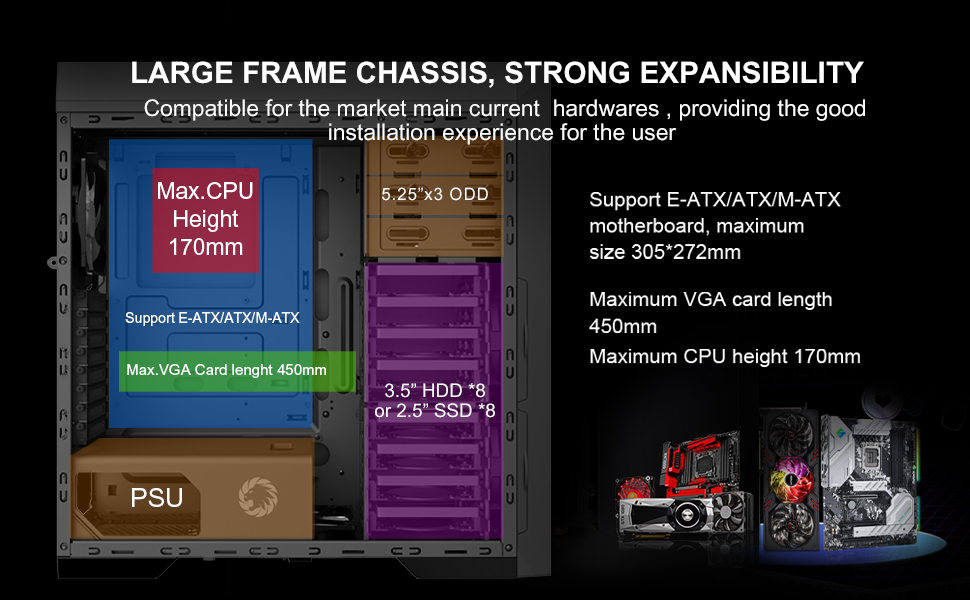
انځور: Diagram illustrating the internal layout and compatibility for E-ATX/ATX/M-ATX motherboards, maximum VGA card length, and CPU cooler height.
۳. د بریښنا رسولو واحد (PSU) نصب کول
The Master M905 features a bottom-mounted PSU design. Install your power supply into the designated compartment at the bottom rear of the chassis. Secure it with screws from the outside rear of the case.
انځور: Illustration of the bottom-mounted PSU design, highlighting the hidden compartment and cable management options for a cleaner build.
۴. د ذخیره کولو ډرایو نصب کول
The chassis supports multiple storage configurations:
- 5.25" ODDs: Install up to three 5.25" optical disk drives in the front bays.
- 3.5" HDDs / 2.5" SSDs: Utilize the eight 3.5" HDD bays or eight 2.5" SSD bays. Note: Installing longer VGA cards may require removing the middle HDD bracket.
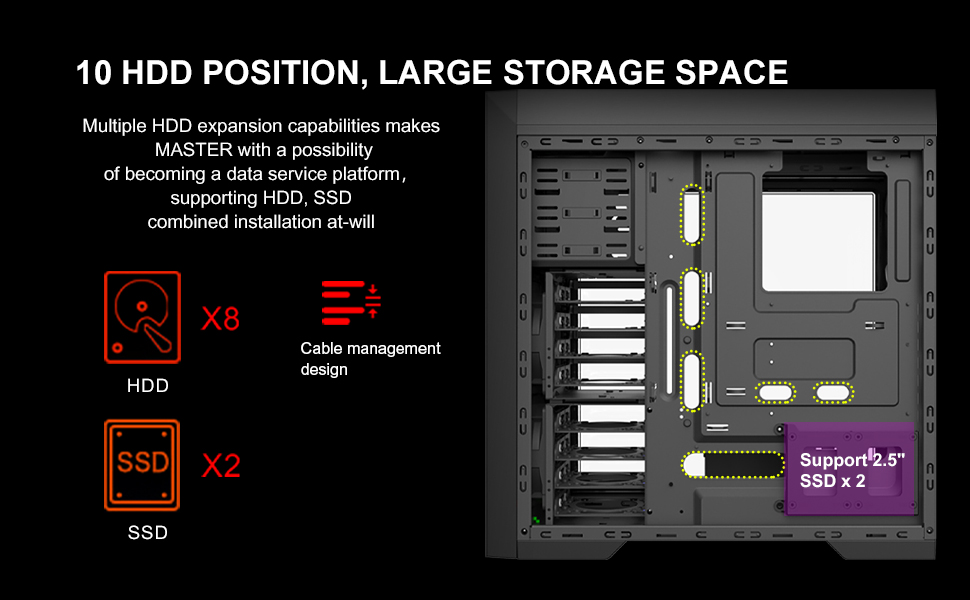
انځور: تفصيلي ډياګرام ښیېasing the extensive storage capabilities, including 8 HDD bays and 2 SSD positions, along with cable management features.
۶. د ګرافیک کارت او پراختیا کارتونه
Install your graphics card and other expansion cards into the appropriate PCIe slots on your motherboard. Ensure they are securely fastened. The chassis supports VGA cards up to 450mm in length.
6. د کیبل مدیریت
Utilize the cable routing options behind the motherboard tray to organize and hide cables. This improves airflow and aesthetics.
۸. د مخکینۍ پینل I/O سره نښلول
Connect the front panel cables (USB 3.0, USB 2.0, audio, power, reset, LED indicators) to the corresponding headers on your motherboard. Refer to your motherboard manual for specific header locations.

انځور: یو تړلی view of the top panel, showing the USB 3.0, USB 2.0, audio ports, power button, reset button, and fan controller switches.
عملیاتي لارښوونې
بریښنا کول / بند کول
Press the power button located on the top panel to turn your system on or off. A short press typically initiates power on, while a longer press (usually 4-5 seconds) will force a shutdown.
د فین کنټرول
The top panel includes a fan controller. Use the switches to adjust the speed of the connected fans, allowing you to balance cooling performance and noise levels according to your preference.
Front Panel Connectivity
Utilize the front panel USB 3.0 and USB 2.0 ports for connecting peripherals and external storage devices. The audio jacks provide convenient access for headphones and microphones.
ساتنه
Regular maintenance helps ensure optimal performance and extends the lifespan of your PC chassis.
د دوړو فلټر پاکول
The Master M905 features filtered front, top, and base air intakes with pull-out dust filters. Regularly remove and clean these filters to prevent dust buildup inside the chassis, which can impede airflow and component cooling.

انځور: شاته او ښکته view of the chassis, highlighting the easily accessible, pull-out dust filters for convenient cleaning.
داخلي پاکول
Periodically open the side panels and use compressed air to remove dust from internal components, especially fan blades and heatsinks. Ensure the system is powered off and unplugged before cleaning.
د ستونزو حل کول
If you encounter issues with your chassis, refer to the following common problems and solutions:
- سیسټم نه فعالیږي:
- ډاډ ترلاسه کړئ چې د بریښنا رسولو په سمه توګه د دیوال آوټ لیټ او مور بورډ سره وصل دی.
- Verify all front panel power switch cables are correctly connected to the motherboard headers.
- Check if the power supply unit (PSU) switch is in the "ON" position.
- Fans are not spinning or LEDs are off:
- ډاډ ترلاسه کړئ چې د فین بریښنا کیبلونه په خوندي ډول د مور بورډ یا فین کنټرولر سره وصل دي.
- Check the fan controller settings on the top panel.
- Ensure LED power cables are connected if applicable.
- Front panel USB/Audio ports not working:
- Verify that the front panel USB and audio cables are correctly connected to the corresponding headers on your motherboard.
- Check your motherboard's BIOS/UEFI settings to ensure USB/audio ports are enabled.
- Excessive dust buildup:
- Regularly clean the pull-out dust filters as described in the Maintenance section.
- Ensure proper airflow direction with intake and exhaust fans.
مشخصات
| فیچر | تفصیل |
|---|---|
| د ماډل نوم | ماسټر M905 |
| برانډ | GAMEMAX |
| د قضیې ډول | بشپړ برج |
| د مور بورډ مطابقت | E-ATX, ATX, M-ATX |
| ابعاد (LxWxH) | 20.16 x 8.26 x 20.75 انچه (512 x 210 x 527 mm) |
| د توکي وزن | ۶ پونډه (۳ کیلو ګرامه) |
| مواد | د الماس فولاد |
| رنګ | تور |
| ۵.۲۵ انچه ډرایو بېز | 3 |
| 3.5" HDD Bays | 8 |
| 2.5" SSD Bays | 8 |
| سامنے I / O بندرونه | 2 x USB 3.0, 2 x USB 2.0, HD Audio (Mic/Headphone), Fan Controller |
| مخکې نصب شوي فین | 3 x 12cm 32 LEDs Blue Fans (Front) |
| د اعظمي VGA کارت اوږدوالی | 450mm |
| د اعظمي CPU کولر لوړوالی | 170mm |
| د PSU د نصبولو ډول | شاته غره (لاندې) |
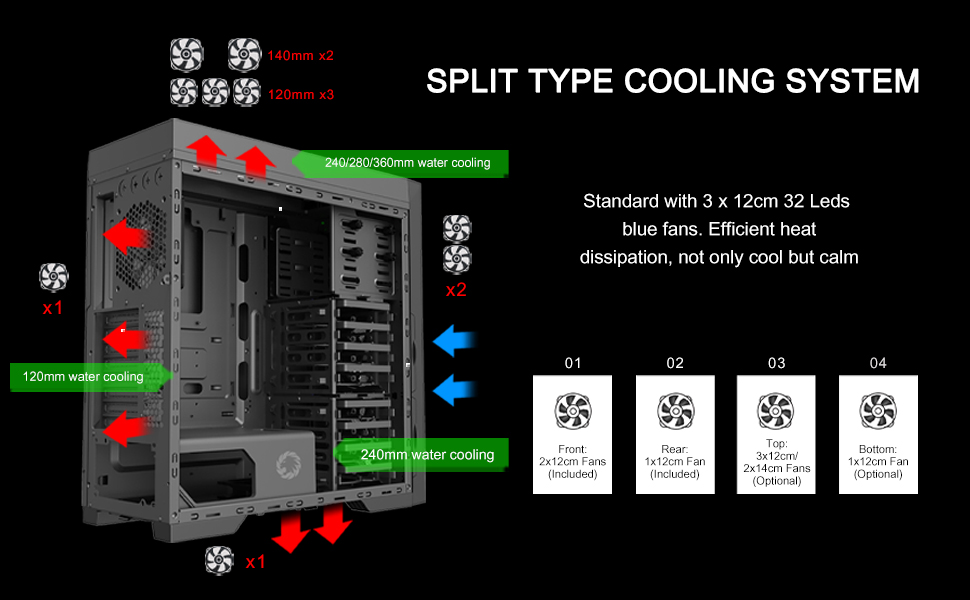
| د یخولو طریقه | Air, Water (supports 240/280/360mm radiators) |

انځور: A diagram illustrating the key dimensions of the GAMEMAX Master M905 chassis.
تضمین او ملاتړ
GAMEMAX products are manufactured to the highest quality standards. For warranty information and technical support, please refer to the official GAMEMAX webسایټ ته مراجعه وکړئ یا خپل محلي پرچون پلورونکي سره اړیکه ونیسئ.
د نورو مرستو لپاره، مهرباني وکړئ لیدنه وکړئ GAMEMAX Store on Amazon یا د جوړونکي رسمي ملاتړ چینلونو سره مشوره وکړئ.


