پیژندنه
Thank you for choosing the Varmilo MA Series V2 Summit R2 Mechanical Keyboard. This manual provides essential information for setting up, operating, maintaining, and troubleshooting your new keyboard. Please read this manual thoroughly to ensure optimal performance and longevity of your device.
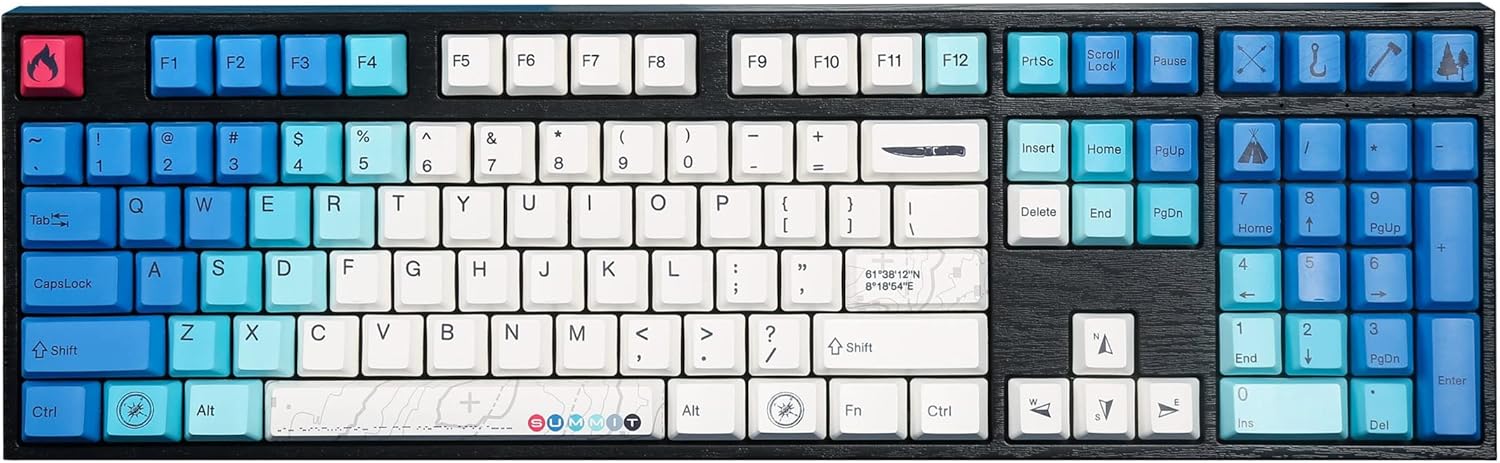
Image: The Varmilo MA Series V2 Summit R2 Mechanical Keyboard, showcasing its full layout and unique keycap design.
چمتو کول
1. ان باکس کول
Carefully remove the keyboard and all accessories from the packaging. Ensure the following items are present:
- Varmilo MA Series V2 Summit R2 Mechanical Keyboard
- USB-C کیبل
- د کیلي کیپ کشونکی (که شامل وي)
- د کارونکي لارښود (دا لاسوند)
2. د کیبورډ سره نښلول
- د کیبورډ په شا کې د USB-C پورټ ومومئ.
- د ورکړل شوي USB-C کیبل یوه پای د کیبورډ سره وصل کړئ.
- د USB-C کیبل بل پای ستاسو په کمپیوټر کې موجود USB پورټ سره وصل کړئ.
- کیبورډ پلګ او پلی دی او باید ستاسو د عملیاتي سیسټم لخوا په اتوماتيک ډول وپیژندل شي.
۲. د کیبورډ زاویه تنظیم کول
The Varmilo MA Series V2 features a double-section kickstand, allowing for two different typing angles. Gently flip out the desired sections of the kickstand located on the underside of the keyboard to adjust its height and angle for ergonomic comfort.

انځور: سایډ پروfile of the Varmilo keyboard, illustrating the adjustable kickstand in an extended position.
عملیاتي لارښوونې
۴.۱. اساسي کلیدي دندې
The keyboard features a standard full-size (104-key) layout. All alphanumeric and standard function keys operate as expected. The Varmilo EC Ivy V2 switches provide a smooth and responsive typing experience.
2. Function (Fn) Key Combinations
The Fn key (typically located near the right Alt key) allows access to secondary functions printed on certain keycaps. Hold down the Fn key and press the desired function key simultaneously.
- ایف این + ایف ۱-ایف ۱۲: Multimedia controls (e.g., volume, play/pause, stop).
- Fn + د تیر کیلي: LED brightness or effect control (refer to specific keycap legends).
- ایف این + وین: د وینډوز کیلي لاک/انلاک کړئ.

انځور: نږدې انځور view of the right side of the Varmilo keyboard, highlighting the special function keys and their legends.
3. LED Backlighting Control
The keyboard features White LED backlighting. Use the Fn key combinations to adjust the brightness and switch between various lighting effects. Specific key legends will indicate the corresponding functions for LED control.
ساتنه
۱. د کیبورډ پاکول
د کیبورډ بڼه او فعالیت ساتلو لپاره:
- د پاکولو دمخه کیبورډ له خپل کمپیوټر څخه جلا کړئ.
- د نرم، لینټ پاک ټوکر څخه لږ څه کار واخلئampد کیلي کیپونو د پاکولو لپاره د اوبو یا یو نرم پاکولو محلول سره مینځل شوي او casing.
- د کیلي کیپسونو ترمنځ د دوړو او کثافاتو لپاره، فشار شوي هوا وکاروئ.
- Avoid using harsh chemicals, abrasives, or solvents, as these can damage the PBT keycaps and finish.
۲. د کیلي کیپ لرې کول او بدلول
The keyboard features durable Dye Sub PBT keycaps. If you need to remove keycaps for deep cleaning or customization:
- Use the provided keycap puller (if applicable) or a similar tool.
- Gently attach the keycap puller to the keycap and pull straight up to remove it. Avoid twisting or excessive force.
- To replace, align the keycap with the switch stem and press down firmly until it clicks into place.

Image: A collection of individual Varmilo keycaps, including special design keycaps, demonstrating their PBT material and dye-sublimated legends.
د ستونزو حل کول
If you encounter issues with your Varmilo keyboard, please refer to the following common solutions:
- کیبورډ ځواب نه ورکوي:
- ډاډ ترلاسه کړئ چې د USB-C کیبل په خوندي ډول د کیبورډ او کمپیوټر دواړو سره وصل دی.
- هڅه وکړئ چې کیبورډ په خپل کمپیوټر کې بل USB پورټ سره وصل کړئ.
- د سیسټم پورې اړوند ستونزو د له منځه وړلو لپاره په بل کمپیوټر کې کیبورډ ازموینه وکړئ.
- خپل کمپیوټر بیا پیل کړئ.
- LEDs Not Working or Incorrect:
- Ensure the LED brightness is not set to the lowest level using Fn key combinations.
- Check if any specific lighting modes are active that might turn off certain LEDs.
- هغه کیلي چې راجستر نه کیږي:
- Remove the keycap and inspect the switch for any obstructions.
- Clean around the switch stem with compressed air.
د فابریکې ری سیٹ
If issues persist, a factory reset may resolve them. Consult the Varmilo official website or support for specific reset procedures for your model, as these can vary.
مشخصات
The following are the technical specifications for the Varmilo MA Series V2 Summit R2 Mechanical Keyboard:
| فیچر | تفصیل |
|---|---|
| برانډ | ورمیلو |
| ماډل | MA Series V2 Summit R2 |
| ترتیب | Full-size (104 + 4 keys) |
| د سویچ ډول | Varmilo EC Ivy V2 Mechanical Switches |
| د کیکیپ مواد | Dye Sub PBT |
| ارتباط | USB-C |
| شاته رڼا کول | سپینه LED |
| مواد | پولی بوتیلین ټیرفتهالیټ، سیلیکون |
| د بریښنا سرچینه | د USB ویډیو |
| مطابقت لرونکې وسیلې | کمپیوټر (د USB-C له لارې) |
تضمین او ملاتړ
Varmilo products are manufactured to high-quality standards. For information regarding warranty coverage, technical support, or service inquiries, please visit the official Varmilo webسایټ ته لاړ شئ یا مستقیم د دوی د پیرودونکي ملاتړ سره اړیکه ونیسئ. د تضمین ادعاوو لپاره د پیرود ثبوت په توګه د پیرود رسید وساتئ.
Official Varmilo Store: په ایمیزون کې د ورمیلو پلورنځی


