1. پیژندنه
The Anyeast AT005 Barcode Scanner is a versatile, wearable mini/ring 2D 1D QR code reader designed for various applications including POS systems, inventory management, libraries, and more. It offers multiple connection options and advanced decoding capabilities to enhance work efficiency.

Figure 1.1: Anyeast AT005 Barcode Scanner in use, worn on a finger.
2. د تنظیم کولو لارښود
2.1 د بسته محتويات
مهرباني وکړئ تصدیق کړئ چې ټول توکي ستاسو په کڅوړه کې شتون لري:
- Anyeast AT005 Barcode Scanner
- د USB چارج کیبل
- 2.4G بې سیم رسیور
- د کارن لارښود
۴.۲ د سکینر چارج کول
Before first use, fully charge the scanner. Connect the USB charging cable to the scanner's charging port and a power source. A full charge takes approximately 1 hour and provides up to 8 hours of continuous scanning time.

Figure 2.1: The scanner features a 360mAh battery, offering 8 hours of scanning time and 4 weeks of standby time with a 1-hour charge.
د پیوستون لارې
The Anyeast AT005 scanner supports three connection modes: 2.4G Wireless, Bluetooth, and USB Wired. It is compatible with Windows XP/7/8/10, Mac OS, iOS, Linux, Unix, and Android systems.
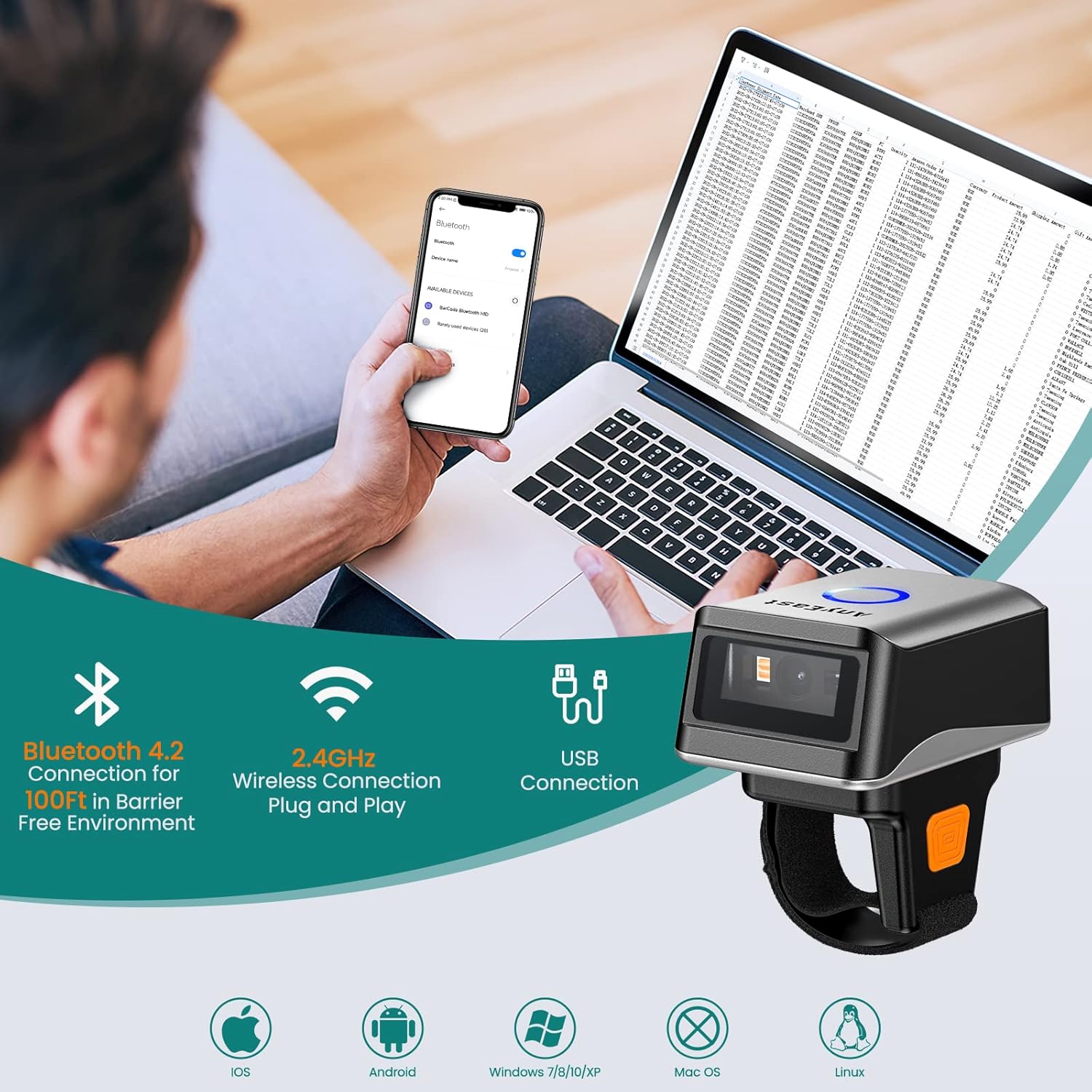
Figure 2.2: The scanner offers versatile connectivity options for various devices.
۴.۲.۱ ۲.۴G بېسیم حالت
Plug the 2.4G wireless receiver into your device's USB port. The scanner will automatically pair. This mode offers a stable connection up to 100 feet in a barrier-free environment.
2.3.2 بلوتوث حالت
To connect via Bluetooth, ensure Bluetooth is enabled on your device. Scan the Bluetooth pairing barcode in the user manual. Then, search for 'BarCode scanner HID' in your device's Bluetooth settings and pair. This mode is ideal for mobile devices like smartphones and tablets.
2.3.3 USB وائرډ حالت
Connect the scanner directly to your device using the provided USB cable. This mode offers a plug-and-play experience, ideal for stable, direct connections to PCs or POS systems.
Video 2.1: Demonstrates the three connection methods (2.4G Wireless, Bluetooth, USB Wired) for the Anyeast Barcode Scanner.
3. عملیاتي لارښوونې
۳.۶.۳ د سکین کولو طریقې
سکینر د مختلفو عملیاتي اړتیاوو سره سم د سکین کولو درې جلا طریقې وړاندې کوي:
- Key Trigger Scanning: د لیزر فعالولو او بارکوډ سکین کولو لپاره د سکین تڼۍ فشار ورکړئ.
- Auto-Sensing Scanning: سکینر په اتوماتيک ډول په خپل ساحه کې بارکوډ کشفوي view and scans it without requiring a button press.
- دوامداره سکین کول: The scanner continuously emits the laser, scanning any barcode that passes through its beam.

Figure 3.1: Visual representation of the three available scanning modes.
۴.۳ د پورته کولو طریقې
Choose between instant data upload or storage for later transfer:
- د فوري اپلوډ حالت: Barcodes are transmitted to your connected device immediately after scanning.
- د ذخیره کولو حالت: The scanner can store up to 20,000 barcode data entries internally. Data can be uploaded to your device at a later time by scanning a specific command barcode in the manual.

Figure 3.2: The two data upload modes: instant transfer or internal storage.
Video 3.1: Demonstrates the three scanning modes and the storage mode functionality of the AT005 scanner.
۴.۴ د کوډ کولو وړتیاوې
The Anyeast AT005 features an advanced CMOS sensor capable of accurately decoding a wide range of 1D and 2D barcodes, even those that are colorful, fuzzy, damaged, reflective, or smudged. Supported barcode types include:
- 1D بارکوډونه: Code 128, Code39, EAN, UPC, ISBN, etc.
- 2D بارکوډونه: QR Code, Micro QR Code, Data Matrix, PDF417.

Figure 3.3: The scanner's super decoding ability for various barcode types.
3.4 Custom Prefix/Suffix
You can customize the scanner's output by adding or hiding custom prefixes or suffixes to the scanned data. Refer to the specific barcodes in your user manual to configure these settings.
Video 3.2: Guide on how to add or hide custom prefixes and suffixes to scanned barcode data.
۴.۳ د غږ او وایبریشن ترتیبات
The scanner offers selectable feedback options including mute, vibrate, and adjustable volume levels (low, medium, high) to suit your working environment. These settings can be configured by scanning specific barcodes found in the user manual.
Video 3.3: Demonstrates the vibration setting and wide applicability of the AT005 scanner.
4. ساتنه
To ensure the longevity and optimal performance of your Anyeast AT005 Barcode Scanner, follow these maintenance guidelines:
- پاکول: د سکینر بهرنۍ برخه پاکولو لپاره نرم، وچ ټوکر وکاروئ. د سکین کولو کړکۍ لپاره، په نرمۍ سره د لینټ څخه پاک ټوکر وکاروئampد نرم، غیر خارښونکي پاکوونکي سره پاک کړئ. د سخت کیمیاوي موادو یا خارښونکي موادو څخه ډډه وکړئ.
- ذخیره کول: سکینر په یخ او وچ ځای کې د مستقیم لمر وړانګو، سختې تودوخې او زنګ وهونکو موادو څخه لرې وساتئ.
- د بیټرۍ پاملرنه: If storing for an extended period, ensure the battery is partially charged (around 50%) to prevent deep discharge. Recharge periodically if not in use.
- له څاڅکو ډډه وکړئ: While durable, avoid dropping the scanner to prevent internal damage.
5. ستونزه حل کول
If you encounter issues with your Anyeast AT005 Barcode Scanner, refer to the following common problems and solutions:
| ستونزه | احتمالي لامل | د حل لاره |
|---|---|---|
| سکینر نه چالانېږي | د بیټرۍ ټیټوالی؛ د بریښنا بندول | Charge the scanner; Ensure power switch is in the ON position. |
| د معلوماتو لیږد نشته | Not paired; Out of range; Incorrect mode | Re-pair the scanner; Move closer to the device; Ensure correct connection mode (2.4G, Bluetooth, or USB) is selected. |
| بارکوډونه نشي سکین کولی | Barcode damaged/unreadable; Incorrect barcode type; Scanning window dirty | Try scanning a different barcode; Verify barcode type is supported; Clean the scanning window. |
| Data not appearing correctly | Incorrect prefix/suffix settings; Keyboard language mismatch | Reset prefix/suffix settings using manual barcodes; Ensure host device keyboard language matches scanner settings. |
For further assistance, please refer to the detailed troubleshooting section in your physical user manual or contact Anyeast customer support.
6. مشخصات
| فیچر | تفصیل |
|---|---|
| د ماډل شمیره | AT005 |
| د محصول ابعاد | 4.96 x 4.33 x 1.81 انچه |
| د توکي وزن | 4.6 اونس |
| بیټرۍ | 1 AAA بیټرۍ ته اړتیا ده. (شامل) |
| د ارتباط ټیکنالوژي | بلوتوټ، 2.4G بې سیم، USB وائرډ |
| مطابقت لرونکې وسیلې | Smartphone, Tablet, Laptop, PC, POS |
| د بریښنا سرچینه | Battery-Power or Plug and Play |
| جوړونکی | Anyeast |
| د کوډکولو وړتیا | 1D (Code 128, Code39, EAN, UPC, ISBN), 2D (QR Code, Micro QR Code, Data Matrix, PDF417) |
| د ذخیره کولو ظرفیت | Up to 20,000 barcode data entries |
7. تضمین او ملاتړ
Anyeast provides a د 30 ورځو پیسو بیرته تضمین او a ۱-کلن تضمین for the AT005 Barcode Scanner. For warranty claims, technical support, or any inquiries, please contact Anyeast customer service through the contact information provided in your product packaging or on the official Anyeast webسایټ


