1. پیژندنه
The AeroCool Blade is an ATX semi-tower PC case designed for optimal airflow and aesthetic appeal. It features an RGB front panel with preset lighting modes, a full tempered glass side window, and ample space for component installation. This manual provides essential information for the proper setup, operation, and maintenance of your PC case.
د خوندیتوب معلومات: Always disconnect power from your system before performing any installation or maintenance. Handle components with care to avoid damage. Refer to individual component manuals for specific installation instructions.
2. د بسته محتويات
- AeroCool Blade ATX Semi-Tower PC Case
- 1 x 120mm RGB Rear Fan (pre-installed)
- 3 x 120mm Front Fans (pre-installed)
- د لوازمو کټ (پیچونه، سټینډ آفونه، کیبل اړیکې)
3. ترتیب او نصب کول
۳.۱ د قضیې چمتو کول
Carefully remove the case from its packaging. Place it on a stable, flat surface. Remove the tempered glass side panel by unscrewing the thumb screws at the rear of the case and gently pulling the panel away.

شکل 3.1: داخلي view of the AeroCool Blade PC case, illustrating the layout for component installation.
3.2 د مادر بورډ نصب کول
- Install the necessary motherboard standoffs into the motherboard tray according to your motherboard's form factor (ATX, Micro-ATX, Mini-ITX).
- د I/O شیلډ د قضیې په شا خلاصیدو کې نصب کړئ.
- خپل مور بورډ په احتیاط سره په سټینډ آفونو کې ځای په ځای کړئ، د سکرو سوري په سمه توګه تنظیم کړئ.
- د چمتو شوي پیچونو سره مور بورډ خوندي کړئ.
3.3 د بریښنا رسولو واحد (PSU) نصب کول
The AeroCool Blade supports bottom-mounted PSUs. Slide your PSU into the dedicated compartment at the bottom rear of the case. Secure it with screws from the rear of the case.
۴.۴ د ذخیره کولو ډرایو نصب کول
- ۳.۵ انچه هارډ ډرایوونه: Install 3.5" hard drives into the drive cage located beneath the PSU shroud.
- 2.5" SSDs/HDDs: Install 2.5" drives onto the dedicated mounting points on the motherboard tray or behind it.

شکل ۳.۱: د شا داخلي برخه view, highlighting cable management routes and 2.5-inch drive mounting locations.
3.5 Expansion Card (GPU) Installation
Remove the necessary expansion slot covers from the rear of the case. Insert your graphics card or other expansion cards into the PCIe slots on your motherboard and secure them with screws.
۵.۶ د فین او یخولو نصبول
The case comes with one 120mm RGB fan pre-installed at the rear and three 120mm fans pre-installed at the front. Ensure all fan cables are connected to appropriate headers on your motherboard or fan controller.

Figure 3.3: A 120mm RGB fan, similar to those pre-installed in the AeroCool Blade case.
۳.۷ د مخکینۍ پینل I/O اتصالونه
Connect the front panel cables (USB 3.0, USB 2.0, HD Audio, Power Switch, Reset Switch, LED Switch, Power LED, HDD LED) to the corresponding headers on your motherboard. Refer to your motherboard manual for exact pin configurations.
4. عملیاتي لارښوونې
4.1 فعالول
Once all components are installed and connected, replace the side panel. Connect your monitor, keyboard, mouse, and power cable to the PSU. Press the Power button located on the top panel of the case to turn on your system.

شکل ۱: پورته مخ view of the case, indicating the location of the power button and front I/O ports.
۵.۴ د RGB رڼا کنټرول
The AeroCool Blade features an RGB front panel. Use the dedicated LED button on the top panel to cycle through various preset lighting modes and effects. Pressing the button will change the lighting pattern or color.

شکل 4.2: مخکی view of the AeroCool Blade case with its distinctive RGB lighting.
۲.۱ د مخکینۍ پینل بندرونه
The top panel provides convenient access to:
- 1 x USB 3.0 بندر
- 2 x USB 2.0 بندرونه
- HD Audio output
- د مایکروفون داخلول
Connect your USB devices, headphones, and microphone to these ports as needed.
5. ساتنه
۵.۱ د دوړو فلټر پاکول
Regularly check and clean the dust filters to maintain optimal airflow and prevent dust buildup inside the case. Dust filters are typically located at the top, front, and bottom (under the PSU). Gently remove them and clean with compressed air or rinse with water (ensure they are completely dry before re-installation).
5.2 بهرنۍ پاکول
د کیس بهرنۍ سطحې د نرم، d سره پاک کړئamp cloth. Avoid using harsh chemicals or abrasive materials that could damage the finish or tempered glass.
6. ستونزه حل کول
- سیسټم نه فعالیږي:
Ensure the PSU is switched on and properly connected to the wall outlet. Verify all power cables from the PSU are correctly connected to the motherboard and components. Check the front panel power switch connection to the motherboard. - د RGB رڼا کار نه کوي:
Ensure the RGB controller (if applicable) and fan RGB cables are securely connected. Press the LED button on the top panel to cycle through modes. If connected to a motherboard header, check motherboard software settings. - مينه وال چې نه ګرځېږي:
Verify that all fan power cables are securely connected to the motherboard fan headers or a fan controller. Check BIOS/UEFI settings for fan speed control. - د مخکینۍ پینل USB/آډیو کار نه کوي:
Ensure the USB and HD Audio cables from the front panel are correctly connected to the corresponding headers on your motherboard.
7. مشخصات
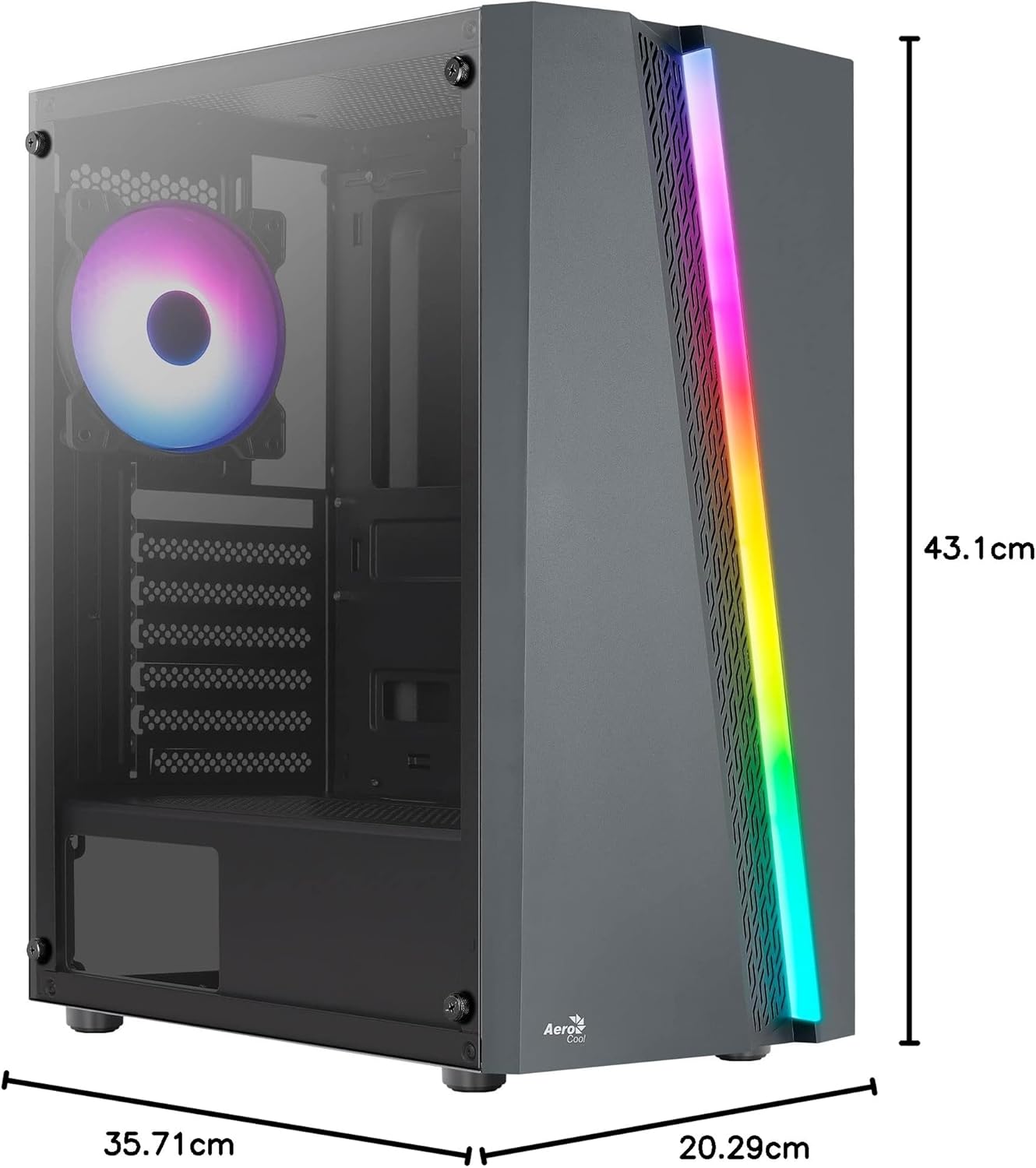
Figure 7.1: Dimensions of the AeroCool Blade PC Case.
| فیچر | مشخصات |
|---|---|
| برانډ | AeroCool |
| د ماډل نوم | BLADEBK |
| د قضیې ډول | Semi-Tower |
| د مور بورډ مطابقت | ATX، Micro-ATX، Mini-ITX |
| مواد | د تودوخې شیشه (اړخیزه پینل) |
| د محصول ابعاد (L x W x H) | 43.1 x 20.3 x 35.7 سانتي متره |
| د توکي وزن | 4 کیلو ګرامه |
| د ډرایو خلیج | ۲ x ۳.۵"، ۲ x ۲.۵" |
| د GPU پاکول | تر 307mm پورې |
| د CPU کولر لوړوالی | تر 155mm پورې |
| سامنے I / O بندرونه | 1 x USB 3.0, 2 x USB 2.0, HD Audio, Mic, LED Control, Power |
| مخکې نصب شوي فین | 1 x 120mm RGB Rear, 3 x 120mm Front |
| د یخولو طریقه | هوا |
8. تضمین او ملاتړ
د تضمین معلوماتو او تخنیکي ملاتړ لپاره، مهرباني وکړئ رسمي ایروکول ته مراجعه وکړئ webسایټ یا خپل محلي پرچون پلورونکي سره اړیکه ونیسئ. د تضمین ادعاوو لپاره د پیرود ثبوت وساتئ.
د اړیکو معلومات: د نورو مرستو لپاره، مهرباني وکړئ لیدنه وکړئ www.aerocool.io.


