پیژندنه
This manual provides detailed instructions for the installation, operation, and maintenance of your Blaupunkt MEMPHIS440BT 6.2" In-Dash Touch Screen DVD Receiver. Please read this manual thoroughly before using the product to ensure proper functionality and to prevent damage.
محصول پای ته ورسیدview
The Blaupunkt MEMPHIS440BT is a versatile in-dash multimedia receiver featuring a 6.2-inch touch screen display. It supports DVD/CD playback, Bluetooth connectivity for hands-free calling and audio streaming, USB and SD card media playback, and AM/FM radio. The unit is designed to be the central entertainment system in your vehicle.

انځور: مخکینۍ برخه view of the Blaupunkt MEMPHIS440BT in-dash receiver with its remote control. The receiver features a 6.2-inch touch screen displaying various function icons like Radio, Disc, USB, SD, and Bluetooth. The remote control has numerous buttons for navigation and media control.
د خوندیتوب معلومات
- Always operate the vehicle safely. Do not operate the unit's functions that distract you from safe driving.
- د لنډ سرکټونو او بریښنایی خطرونو مخنیوي لپاره د تارونو مناسب اتصال ډاډمن کړئ.
- که تاسو د کوم ګام په اړه ډاډه نه یاست، د نصبولو لپاره مسلکي سره مشوره وکړئ.
- واحد د رطوبت یا سختې تودوخې سره مه مخ کوئ.
تنظیم او نصب کول
د بسته محتويات
- Blaupunkt MEMPHIS440BT DVD Receiver
- ریموټ کنټرول
- د بریښنا مزي
- د نصبولو هارډویر
- د کارونکي لارښود (دا لاسوند)
د تارونو ډیاګرام
Refer to the detailed wiring diagram provided in the separate installation guide for specific connections. Ensure all connections are secure and correctly matched to your vehicle's electrical system.
انځور: اړخ view of the Blaupunkt MEMPHIS440BT receiver, illustrating the various ports and connections on the rear and side panels, including the USB and Mini SD slots on the front left side.
د واحد نصب کول
- د موټر موجوده سټیریو له ډشبورډ څخه لرې کړئ.
- Connect the wiring harness to the vehicle's wiring and the MEMPHIS440BT.
- Slide the MEMPHIS440BT into the dashboard opening until it clicks into place.
- د چمتو شوي نصب شوي پیچونو په کارولو سره واحد خوندي کړئ.
عملیاتي لارښوونې
پاور آن/بند
فشار ورکړئ پاور button (usually a knob on the left side) to turn the unit on or off. Hold for 2 seconds to power off.
د ټچ سکرین انٹرفیس
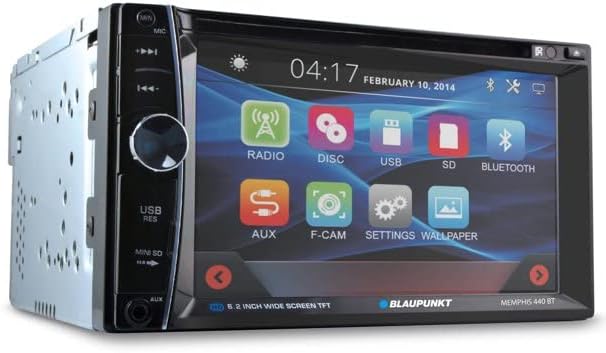
The 6.2-inch touch screen allows for intuitive control of all functions. Tap icons to select modes (Radio, Disc, USB, SD, Bluetooth, AUX, F-CAM, Settings, Wallpaper).

انځور: زاویه لرونکی مخ view of the Blaupunkt MEMPHIS440BT receiver, highlighting the touch screen interface with its main menu icons and the physical control knob on the left side.
د بلوتوث جوړې کول
- په اصلي مینو کې ، ټایپ کړئ بلوتوث icon
- په خپل ګرځنده وسیله کې بلوتوټ فعال کړئ او د شته وسایلو لټون وکړئ.
- Select "MEMPHIS440BT" from the list.
- Enter the default PIN "0000" if prompted.
- یوځل چې جوړه شي، تاسو کولی شئ زنګونه وکړئ/ترلاسه کړئ او آډیو واورئ.
Media Playback (DVD/CD/USB/SD)
- ډي وي ډي/سي ډي: Insert a disc into the slot. The unit will automatically switch to Disc mode.
- USB: Insert a USB drive into the USB port. Tap the USB icon to access files.
- SD: Insert a miniSD card into the SD card slot. Tap the SD icon to access files.

انځور: نږدې انځور view of the USB port and Mini SD card slot located on the front left side of the Blaupunkt MEMPHIS440BT receiver, beneath a protective flap.
د راډیو عملیات
- ټایپ کړئ راډیو icon to enter radio mode.
- Use the touch screen controls to scan for stations, tune manually, or select preset stations.
- To save a station, tune to the desired frequency, then press and hold a preset button on the screen.
ساتنه
- پاکول: Use a soft, dry cloth to clean the touch screen and unit exterior. Do not use abrasive cleaners or solvents.
- د ډیسک پاملرنه: ډیسکونه د هغوی د څنډو سره ونیسئ. پاک او له سکریچونو څخه پاک وساتئ.
- د فرم ویئر تازه معلومات: رسمي بلوپنکټ وګورئ webد هر ډول شته فرم ویئر تازه معلوماتو لپاره په دوره یي ډول سایټ وګورئ.
د ستونزو حل کول
| ستونزه | احتمالي لامل | د حل لاره |
|---|---|---|
| هیڅ ځواک نشته | ناسم تارونه؛ فلج شوی فیوز | د برېښنا او ځمکې اړیکې وګورئ؛ که اړتیا وي نو فیوز بدل کړئ. |
| غږ نشته | غږ ډېر ټیټ دی؛ خاموش فعال شوی دی؛ د سپیکر د تارونو ستونزه ده | غږ زیات کړئ؛ خاموشي غیر فعاله کړئ؛ د سپیکر اتصالونه وګورئ. |
| بلوتوث نه نښلي | Device not in pairing mode; Incorrect PIN | Ensure device is discoverable; Re-enter PIN "0000". |
| د ډیسک تېروتنه | چټل یا سکریچ شوی ډیسک؛ د ډیسک ناسمه بڼه | ډیسک پاک کړئ؛ یو بل ډیسک هڅه وکړئ؛ ډاډ ترلاسه کړئ چې ډیسک مطابقت لري. |
مشخصات
- د سکرین اندازه: ۷۸۷ انچه
- د ښودلو ډول: د LCD ټچ سکرین
- د رسنیو ډول: ډي وي ډي، سي ډي، يو ايس بي، ايس ډي
- ارتباط: بلوتوث
- د توکي ماډل شمېره: MEMPHIS440BT
- د توکي وزن: ۲.۴۵ پونډه
- د بسته ابعاد: 9.69 x 9.17 x 6.85 انچه
- جوړونکی: BLAUPUNKT
تضمین او ملاتړ
د تضمین معلوماتو او تخنیکي ملاتړ لپاره، مهرباني وکړئ د خپل محصول سره شامل شوي تضمین کارت ته مراجعه وکړئ یا رسمي بلوپنکټ ته مراجعه وکړئ. webسایټ. د تضمین ادعاوو لپاره د پیرود ثبوت په توګه د پیرود رسید وساتئ.
د بلوپنکټ رسمي Webسایټ: www.blaupunkt.com


