1. پیژندنه
This manual provides detailed instructions for the operation and maintenance of your Soundmaster DAB280SW Portable DAB+ and FM RDS Digital Radio. The DAB280SW is a versatile portable radio featuring DAB+ and FM RDS reception, a headphone jack, and a practical carrying handle. It offers excellent sound quality and user-friendly controls, including preset station memory and alarm functions.
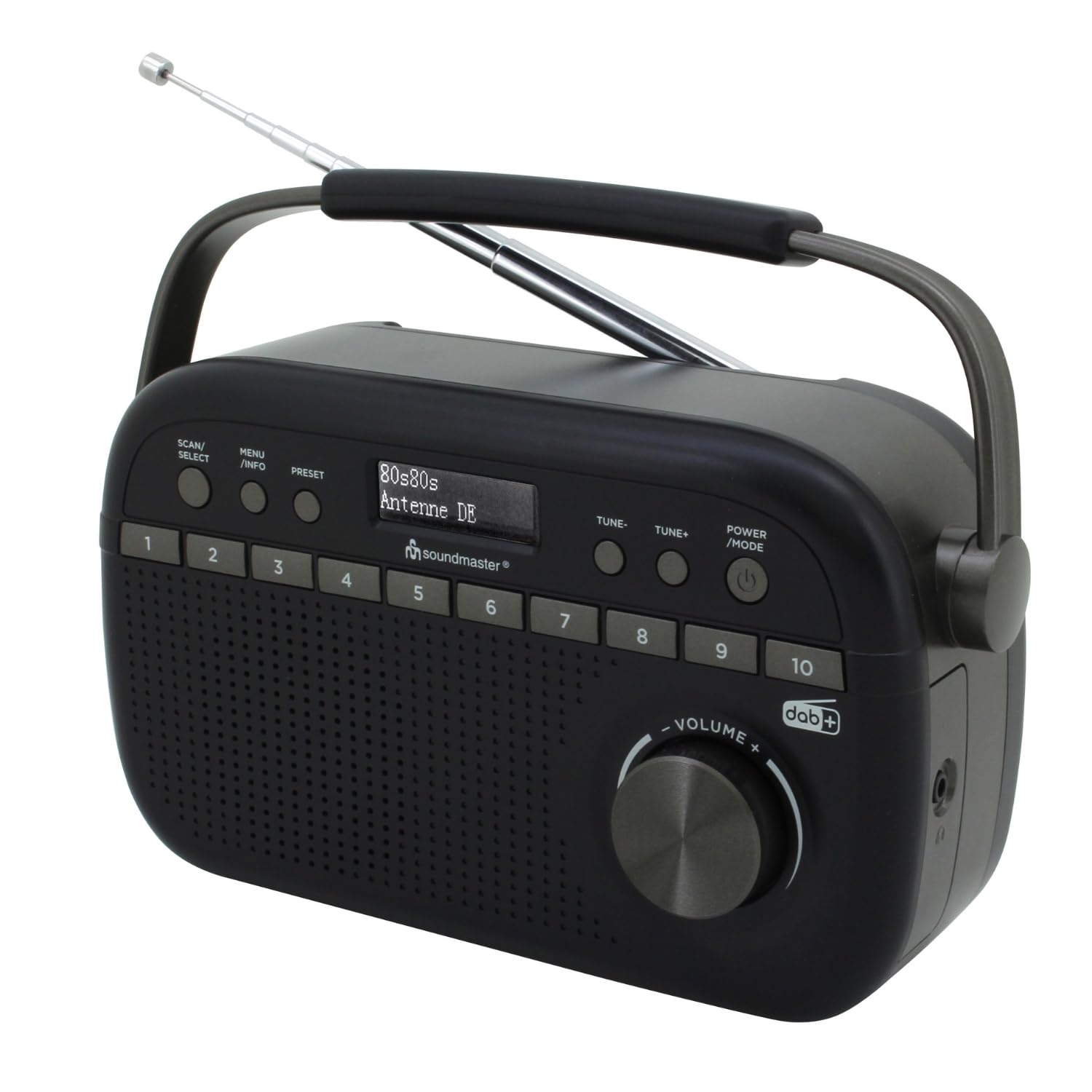
Image 1.1: The Soundmaster DAB280SW Portable DAB+ and FM RDS Digital Radio, showcasing its compact design and carrying handle.
2. د خوندیتوب معلومات
- د وسیلې کارولو دمخه ټولې لارښوونې په دقت سره ولولئ.
- د اور یا بریښنا شاک څخه د مخنیوي لپاره واحد باران یا رطوبت ته مه ښکاره کوئ.
- د واحد شاوخوا مناسب هوا ورکول ډاډمن کړئ. د هوا د بهېدو لارې مه بندوئ.
- یوازې ټاکل شوی بریښنا اډاپټر یا بیټرۍ وکاروئ.
- سي مه خلاصوهasinج. ټول خدمات وړ پرسونل ته راجع کړئ.
- واحد د مستقیم لمر وړانګو، د تودوخې سرچینو او قوي مقناطیسي ساحو څخه لرې وساتئ.
- د بیټرۍ د ځایی مقرراتو سره سم په مسؤلیت سره تصفیه کړئ.
3. د بسته محتويات
مهرباني وکړئ وګورئ چې ټول توکي شتون لري:
- Soundmaster DAB280SW Portable Radio
- AC Power Adapter (if included)
- د کارن لارښود
4. د محصول ب Featuresې
- د DAB+ ډیجیټل راډیو تونر
- FM - RDS Radio Tuner
- 10 preset station memory buttons for quick access
- Total of 40 presets available (20 DAB+, 20 FM)
- Dual alarm times
- د خوب او سنوز دندې
- د 3.5mm هیډفون جیک
- Portable design with carrying handle
- Battery or AC powered operation
۲. کنټرولونه او ښودنه
Familiarize yourself with the controls on your radio:
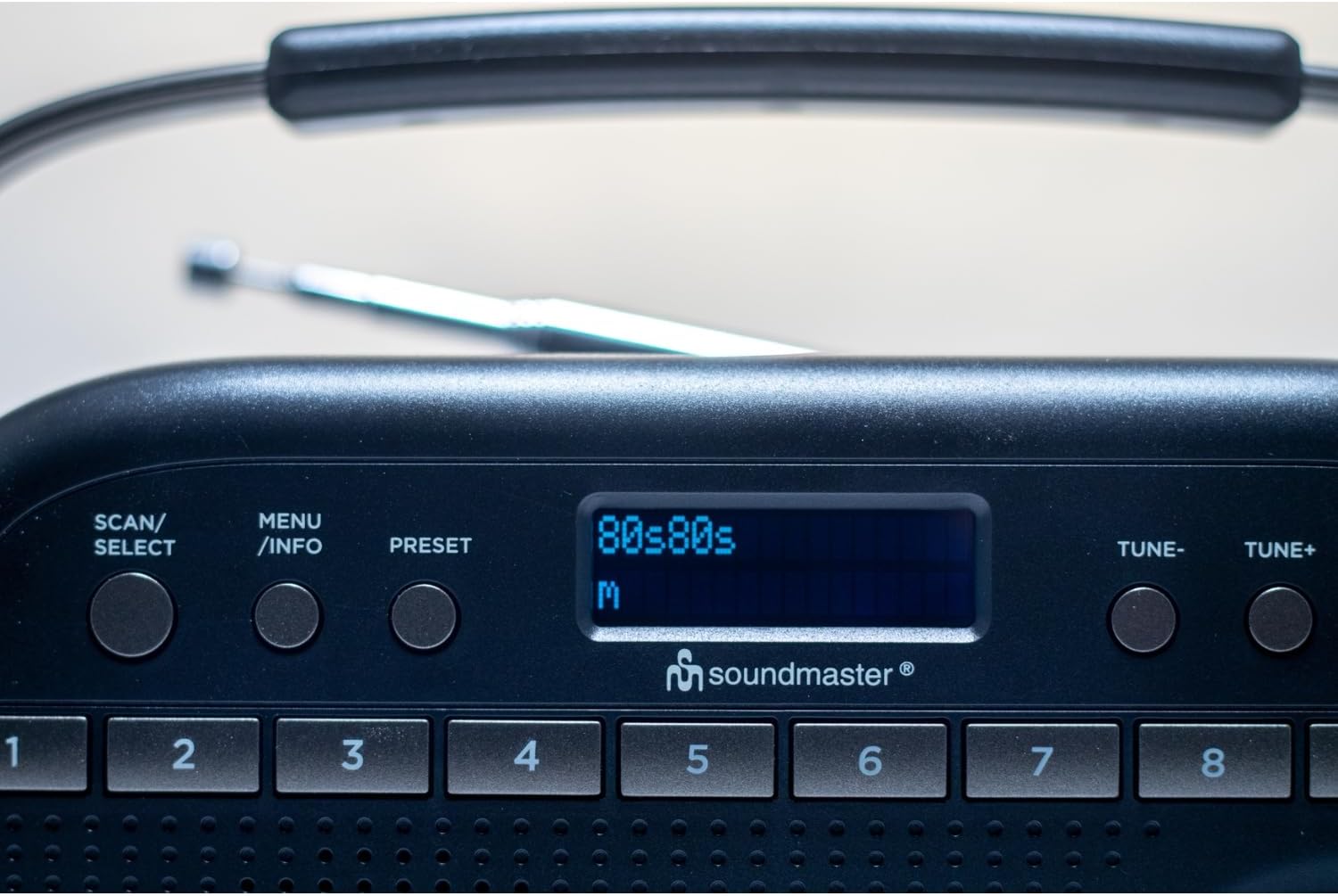
انځور ۴.۱: پورته view of the radio showing the display, SCAN/SELECT, MENU/INFO, PRESET buttons, and preset buttons 1-8.
- POWER/MODE Button: Press to turn the unit on or off. Press repeatedly to switch between DAB+ and FM modes.
- ټون- / ټون+ تڼۍ: Used to manually tune frequencies in FM mode or navigate through DAB+ stations/menu options.
- د سکین/انتخاب تڼۍ: Initiates a scan for stations in DAB+ or FM mode. Also confirms selections in menu.
- د مینو/معلوماتو تڼۍ: Accesses the menu settings. Press repeatedly to cycle through information display (e.g., program type, signal strength).
- د پریس بټن: Used to save and recall favorite stations.
- مخکې ټاکل شوي تڼۍ (۱-۶): Direct access buttons for your stored favorite stations.
- د حجم نوب: د آډیو تولید کچه تنظیمولو لپاره وګرځوئ.
- ښکاره کول: Shows station information, time, menu options, and other relevant data.
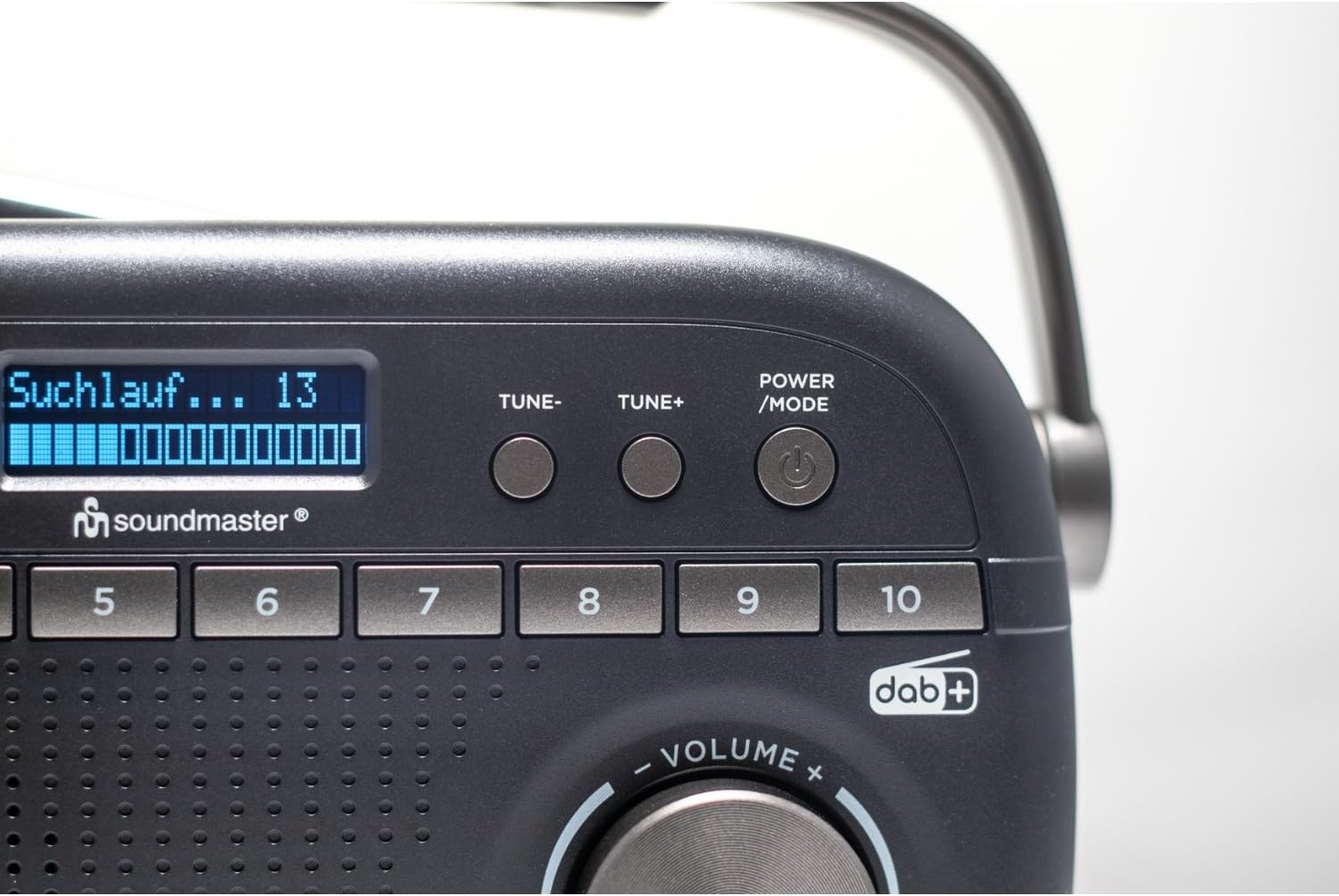
Image 5.2: Close-up of the radio display showing a 'Suchlauf...' (scanning) message, indicating station search in progress.
6. ترتیب کول
۲.۱ د واحد ځواک ورکول
The DAB280SW can be powered by either the included AC power adapter or batteries.
- د AC بریښنا: Connect the AC power adapter to the DC IN jack on the rear of the unit and plug the other end into a standard wall outlet.
- د بیټرۍ ځواک: Open the battery compartment on the rear of the unit. Insert the required number of batteries (type not specified, typically C or AA) ensuring correct polarity (+/-). Close the battery compartment securely.

انځور 6.1: شاته view of the radio, illustrating the battery compartment cover and the AC power input socket.
۵.۲ د انتن تنظیم کول
For optimal reception, fully extend the telescopic antenna located on the rear of the unit. Adjust its position and angle to achieve the best signal quality for both DAB+ and FM broadcasts.
7. عملیاتي لارښوونې
۸ پاور آن/بند
فشار ورکړئ ځواک / موډ button to turn the radio on. Press and hold the ځواک / موډ د راډیو بندولو لپاره تڼۍ.
7.2 Selecting DAB+ or FM Mode
د راډیو په فعالیدو سره، فشار ورکړئ ځواک / موډ button repeatedly to cycle between DAB+ and FM radio modes. The current mode will be displayed on the screen.
۶.۲ د DAB+ راډیو عملیات
- د لومړي ځل ترتیب: When you first power on the radio in DAB+ mode, it will automatically perform a full scan for available stations. This may take a few minutes.
- لاسي سکین: To initiate a full scan at any time, press the سکین / انتخاب تڼۍ
- د سټیشنونو غوره کول: After a scan, use the TUNE- or TUNE+ buttons to scroll through the list of available DAB+ stations. Press سکین / انتخاب ستاسو انتخاب تاییدولو لپاره.

Image 7.1: The official DAB+ digital radio logo, indicating support for digital audio broadcasting.
د ۶.۵ ایف ایم راډیو عملیات
- اتومات سکین: په FM حالت کې، فشار ورکړئ سکین / انتخاب button to automatically scan for and stop at the next available strong station.
- لاسي لارښود: د کارولو TUNE- or TUNE+ buttons to manually adjust the frequency in small increments. Press and hold these buttons for faster tuning.
۶.۴.۲ د پریسیټونو خوندي کول او یادول
The radio allows you to store up to 20 DAB+ and 20 FM stations as presets.
- د مخکینۍ سیټ خوندي کولو لپاره: د مطلوب سټیشن سره سم غږ وکړئ. فشار ورکړئ او ونیسئ PRESET button until 'Preset Store' appears on the display. Use the TUNE- or TUNE+ buttons to select a preset number (1-10 for direct access, or 11-20 via menu). Press سکین / انتخاب to confirm. Alternatively, for direct access presets (1-10), press and hold the desired numbered preset button.
- د پریزیټ یادولو لپاره: په لنډه توګه فشار ورکړئ PRESET تڼۍ، بیا وکاروئ TUNE- or TUNE+ to select the desired preset number and press سکین / انتخاب. For direct access presets (1-10), simply press the corresponding numbered preset button.
۴.۸ د الارم، خوب، او سنوز فعالیتونه
The DAB280SW includes dual alarm times, a sleep timer, and a snooze function. Refer to the detailed menu options for setting these features:
- د الارم ترتیب کول: فشار ورکړئ MENU / INFO button to enter the menu. Navigate to the 'Alarm' option using TUNE- or TUNE+ او فشار ورکړئ سکین / انتخاب. Follow the on-screen prompts to set Alarm 1 and Alarm 2, including time, source (DAB/FM/Buzzer), and duration.
- د خوب وخت In the menu, select 'Sleep'. Choose a duration (e.g., 15, 30, 60 minutes) after which the radio will automatically turn off.
- سنوز: When an alarm sounds, press any button (except POWER/MODE) to activate the snooze function, which will temporarily silence the alarm for a short period.
۶.۳ د هیډفون کارول
To listen privately, plug 3.5mm stereo headphones into the headphone jack located on the side of the unit. The internal speaker will automatically mute.
8. ساتنه
- پاکول: واحد د نرم او وچ ټوکر سره پاک کړئ. د کثافاتو پاکوونکو یا محلولونو څخه کار مه اخلئ.
- د بیټرۍ بدلول: If using batteries, replace them when the low battery indicator appears on the display or when performance degrades. Ensure to use fresh batteries of the correct type and dispose of old batteries properly.
- ذخیره کول: که چیرې راډیو د اوږدې مودې لپاره ذخیره کوئ، نو د لیکیدو مخنیوي لپاره بیټرۍ لرې کړئ.
9. ستونزه حل کول
- ځواک نشته: Check if the AC adapter is securely connected or if batteries are inserted correctly and are not depleted.
- کمزوری استقبال: Fully extend and adjust the telescopic antenna. Try moving the radio to a different location, away from other electronic devices that may cause interference. Perform a full scan for stations.
- غږ نشته: Check the volume level. Ensure headphones are not plugged in if you intend to use the speaker.
- DAB+ Stations Missing: Perform a full DAB+ scan. DAB+ coverage may vary by location; check local availability.
- ښودنه کار نه کوي: Try turning the unit off and on again. If the issue persists, contact customer support.
10. مشخصات
| فیچر | مشخصات |
|---|---|
| ماډل | DAB280SW |
| د تونر ټیکنالوژي | DAB+، FM RDS |
| د راډیو بینډونو ملاتړ شوی | FM (up to 108 MHz) |
| مخکې ټاکل شوي سټیشنونه | 40 (20 DAB+، 20 FM) |
| د آډیو تولید | د 3.5mm هیډفون جیک |
| د بریښنا سرچینه | AC Power Adapter, Battery Powered |
| د محصول ابعاد (L x W x H) | 25 x 6 x 12 سانتي متره |
| د توکي وزن | 0.6 کیلوګرامه |
| ځانګړي ځانګړتیاوې | Portable, Dual Alarm, Sleep/Snooze |

Image 10.1: The Soundmaster DAB280SW radio with its approximate dimensions (25cm length, 6cm width, 12cm height) indicated.
11. تضمین او ملاتړ
Your Soundmaster DAB280SW radio comes with a standard manufacturer's warranty. Please refer to the warranty card included in your package for specific terms and conditions. For technical support, troubleshooting assistance, or warranty claims, please contact your retailer or the Soundmaster customer service department. Contact information can typically be found on the manufacturer's webپه سایټ یا د محصول په بسته بندۍ کې.


