1. پیژندنه
Thank you for choosing the Beafon SL605 Silverline Flip Phone. This manual provides essential information for setting up, operating, and maintaining your device. The SL605 is designed with ease of use in mind, featuring large buttons, a clear display, and an SOS emergency call function, making it ideal for seniors.

Figure 1.1: Beafon SL605 Silverline Flip Phone (Closed)
This image shows the Beafon SL605 flip phone in its closed state, displaying the external screen with the current time and date. The phone has a sleek black and silver design.
2. د بسته محتويات
مهرباني وکړئ د بکس خلاصولو پر مهال د کڅوړې محتويات وګورئ. که کوم توکي ورک یا خراب وي، نو خپل پرچون پلورونکي سره اړیکه ونیسئ.
- Beafon SL605 Flip Phone
- د چارج وړ لیتیم آئن بیټرۍ
- د چارج کیبل
- Charging Cradle (if included with your model)
- د کارونکي لارښود (دا لاسوند)
3. وسیله ختمه شوهview
Familiarize yourself with the key components of your Beafon SL605.

Figure 3.1: Beafon SL605 Silverline Flip Phone (Open)
This image displays the Beafon SL605 flip phone in its open position, revealing the internal color display and the large, illuminated keypad. The keypad features clearly marked buttons for easy dialing and navigation.
3.1 مخ View (بند)
- بهرنۍ ښودنه: Shows time, date, battery status, and incoming call information.
- د خبرتیا LED: Indicates new messages or missed calls.
3.2 مخ View (پرانستل)
- Internal Display: 2.4-inch color screen for menus, contacts, and messages.
- کیپیډ: Large, illuminated buttons for dialing and navigation. Includes dedicated call, end call, and SOS buttons.
- د نیویګیشن کیلي: Up, Down, Left, Right, and OK/Confirm buttons.
- Photo Contact Indicator: Feature to display contact photos.
3.3 شاته View

شکل 3.2: شاته View of Beafon SL605
This image shows the back of the Beafon SL605 flip phone, highlighting the prominent SOS emergency call button and the speaker grille at the bottom.
- د SOS بیړنۍ تڼۍ: Press and hold to activate the emergency call sequence.
- سپیکر: For loud ringtones and hands-free calls.
3.4 اړخ View
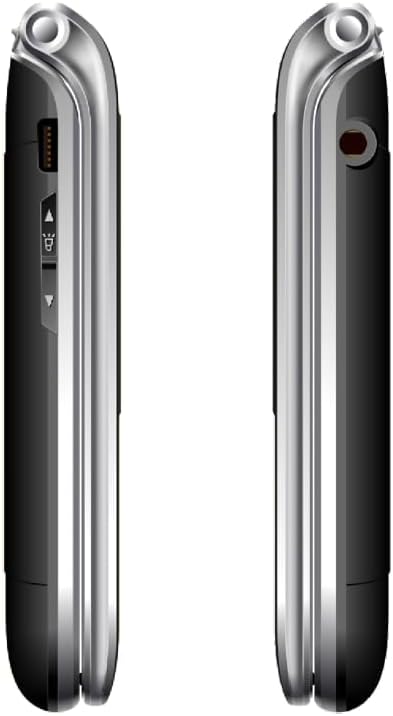
شکل 3.3: اړخ View of Beafon SL605
دا انځور یو اړخ وړاندې کوي view of the Beafon SL605 flip phone, illustrating the charging port and volume control buttons located on the side of the device.
- د چارج کولو بندر: For connecting the charging cable or placing in the charging cradle.
- د حجم تڼۍ: Adjust call volume and ringtone volume.
- د سر غوږ جیک: 3.5 mm port for headphones.
4. ترتیب کول
4.1 Installing the Battery and SIM Card
- د تلیفون شاته پوښ په نرمۍ سره د نوچ څخه خلاصولو سره لرې کړئ.
- Insert your SIM card into the designated slot. Ensure the gold contacts face downwards and the cut corner aligns with the slot.
- Insert the Lithium-ion battery, aligning the contacts with those in the phone.
- د شا پوښ بدل کړئ، په ټینګه سره فشار ورکړئ تر هغه چې دا په خپل ځای کې راشي.
4.2 د بیټرۍ چارج کول
د لومړي ځل کارولو دمخه، د تلیفون بیټرۍ په بشپړه توګه چارج کړئ.
- Connect the charging cable to the phone's charging port or place the phone in its charging cradle.
- د کیبل بل پای د بریښنا په پای کې ولګوه.
- The battery icon on the display will indicate charging status. A full charge typically takes 2-3 hours.
4.3 بریښنا کول / بندول
- د فعالولو لپاره: فشار ورکړئ او ونیسئ زنګ وهل/بریښنا پای ته ورسوئ تڼۍ تر هغه چې سکرین روښانه شي.
- د بریښنا بندولو لپاره: فشار ورکړئ او ونیسئ زنګ وهل/بریښنا پای ته ورسوئ button until a power-off prompt appears, then confirm.
5. عملیاتي لارښوونې
5.1 تلیفونونه کول او ترلاسه کول
- د ډایل کولو لپاره: Open the phone, enter the phone number using the keypad, and press the زنګ ووهئ تڼۍ
- د اړیکو څخه: Navigate to the "Contacts" menu, select a contact, and press the زنګ ووهئ تڼۍ
- ځواب ورکول: کله چې تلیفون زنګ ووهي، فلپ خلاص کړئ یا فشار ورکړئ زنګ ووهئ تڼۍ
- د زنګ ختمولو لپاره: فشار ورکړئ پای کال button or close the flip.
5.2 SOS Emergency Call Function
The SOS button is located on the back of the phone. It allows you to quickly contact pre-set emergency numbers.
- د SOS شمېرو تنظیم کول: ورتګ Menu > SOS Settings to add up to 5 emergency contacts.
- د SOS فعالول: فشار ورکړئ او ونیسئ د SOS تڼۍ on the back of the phone for 3 seconds.
- The phone will automatically call the first number in the SOS list. If unanswered, it will call the next number, and so on, cycling through the list up to 3 times.
- An emergency SMS message will also be sent to all SOS contacts.
۳.۵ پیغام رسونه (SMS)
- To Send: ورتګ Menu > Messages > Write Message. Enter your message and select a recipient from contacts or enter a number.
- To Read: New messages will be indicated by a notification. Go to مینو > پیغامونه > ان باکس لوستل
5.4 د تلیفون تنظیمات
Access various settings via the مینو تڼۍ
- د زنګ وهلو حجم: Adjust using the side volume buttons or in مینو> تنظیمات> پروfiles.
- Number Announcement: Enable or disable the feature that announces dialed numbers by button press in Menu > Settings > Call Settings.
- ژبه: The device supports multiple languages. Change the interface language in Menu > Settings > Phone Settings > Language. (Note: Some models may have limited language options, such as German as a primary language.)

Figure 5.1: Beafon SL605 Photo Contact Feature
This image shows two open Beafon SL605 phones side-by-side. The phone on the right demonstrates the photo contact feature, where a contact's picture is displayed on the screen, making it easier to identify callers.
6. ساتنه او پالنه
- تلیفون وچ وساتئ. مایعات کولی شي بریښنایی سرکټونه خراب کړي.
- د تلیفون پاکولو لپاره سخت کیمیاوي مواد، د پاکولو محلولونه، یا قوي صابون مه کاروئ. د نرم، داغ لرونکي سره یې پاک کړئ.amp ټوکر
- Do not store the phone in high temperatures, as this can shorten the life of electronic devices, damage batteries, and warp or melt certain plastics.
- Do not store the phone in cold temperatures, as moisture can form inside the phone when it returns to normal temperature, which could damage the electronic circuit boards.
- تلیفون مه غورځوئ، مه یې وهئ او مه یې ولړزوئ. د تلیفون سخت کنټرول کولی شي داخلي سرکټ بورډونه او ښه میکانیزمونه مات کړي.
- The phone has IP54 protection against dust and splashes. While it offers some protection, it is not waterproof and should not be submerged in water.
7. ستونزه حل کول
| ستونزه | احتمالي لامل | د حل لاره |
|---|---|---|
| تلیفون نه چالانیږي. | بیټرۍ ختمه شوې یا په سمه توګه نه ده نصب شوې. | بیټرۍ چارج کړئ. ډاډ ترلاسه کړئ چې بیټرۍ په سمه توګه داخل شوې ده. |
| زنګونه نشي وهلی یا یې ترلاسه کولی نشي. | No SIM card, SIM card not inserted correctly, or no network signal. | Ensure SIM card is properly inserted. Check network signal strength. Contact your service provider if issues persist. |
| Sound is too low/high. | Volume settings are incorrect. | Adjust volume using the side buttons during a call or in the phone's settings. |
| د SOS تڼۍ کار نه کوي. | SOS numbers not set or incorrect. | Verify that SOS emergency numbers are correctly configured in the settings. |
| External display is blank or white. | Possible software glitch or hardware issue. | Try restarting the phone. If the problem persists, contact customer support. |
8. مشخصات
- ماډل: بیفون SL605
- د محصول ډول: د فولډ ایبل موبایل تلیفون
- رنګ: تور
- عملیاتي سیسټم: Beafon OS
- Internal Display: 2.4 inches (6.09 cm) Color LCD
- بهرنۍ ښودنه: 1.44 inches (3.65 cm) Color LCD
- ګرځنده ټیکنالوژي: 2G
- ارتباط: بلوتوث، ۳.۵ ملي میتره جک
- ځانګړي ځانګړتیاوې: IP54 Dust and Splash Protection, Rubberized Surface, Ergonomic Design, Extra Large Illuminated Buttons, Extra Loud Ringtone, Photo Contact Indicator, Number Announcement (optional)
- بیټرۍ: لیتیم آیون (شامل دی)
- د حافظې د ذخیره کولو ظرفیت: 32 جي بي
- جوړونکی: بیفون
- د اصلي هیواد: چین
9. تضمین او ملاتړ
For warranty information, please refer to the warranty card included in your product packaging or contact your point of purchase. Beafon provides customer support for product inquiries and technical assistance.
آنلاین ملاتړ: رسمي بیفون ته مراجعه وکړئ webد FAQs، سافټویر تازه معلوماتو، او د اړیکو معلوماتو لپاره سایټ.
د پیرودونکو خدمت: Contact details for customer service can typically be found on the manufacturer's webسایټ یا ستاسو د پیرود اسنادو کې.
۱.۱. د خوندیتوب مهم معلومات
- Do not attempt to disassemble or modify the phone. This can void the warranty and cause damage.
- یوازې منظور شوي بیټرۍ، چارجرونه او لوازم وکاروئ.
- Dispose of the phone and battery responsibly according to local regulations. Do not dispose of them in household waste.
- Avoid using the phone in extreme temperatures or highly humid environments.
- Keep the phone away from pacemakers and other medical devices.
- د موټر چلولو یا درنو ماشینونو چلولو پرمهال تلیفون مه کاروئ.
۸. د محصول رسمي ویډیوګانې
په ورکړل شویو معلوماتو کې د دې ماډل لپاره د پلورونکي لخوا د محصول رسمي ویډیوګانې ونه موندل شوې.


