پیژندنه
This manual provides comprehensive instructions for the ENDORFY Omnis Pudding Onyx White Red mechanical keyboard (Model EY5A036). This full-size keyboard features Kailh Red mechanical switches, durable PBT Pudding keycaps, and customizable ARGB backlighting. It is designed for various applications, including gaming, creative work, and general office use, offering a responsive and comfortable typing experience. Key features include a reinforced chassis, a detachable magnetic wrist rest, and a metal volume wheel for convenient audio control.
د بسته محتويات
- ENDORFY Omnis Pudding Onyx White Red Mechanical Keyboard
- Detachable USB-A Cable
- د مقناطیسي لاس آرام
- د کارونکي لارښود (دا لاسوند)
چمتو کول
1. د کیبورډ سره نښلول
Connect the detachable USB-A cable to the USB-C port on the keyboard and then to an available USB-A port on your computer. The keyboard is plug-and-play and should be recognized automatically by your operating system.
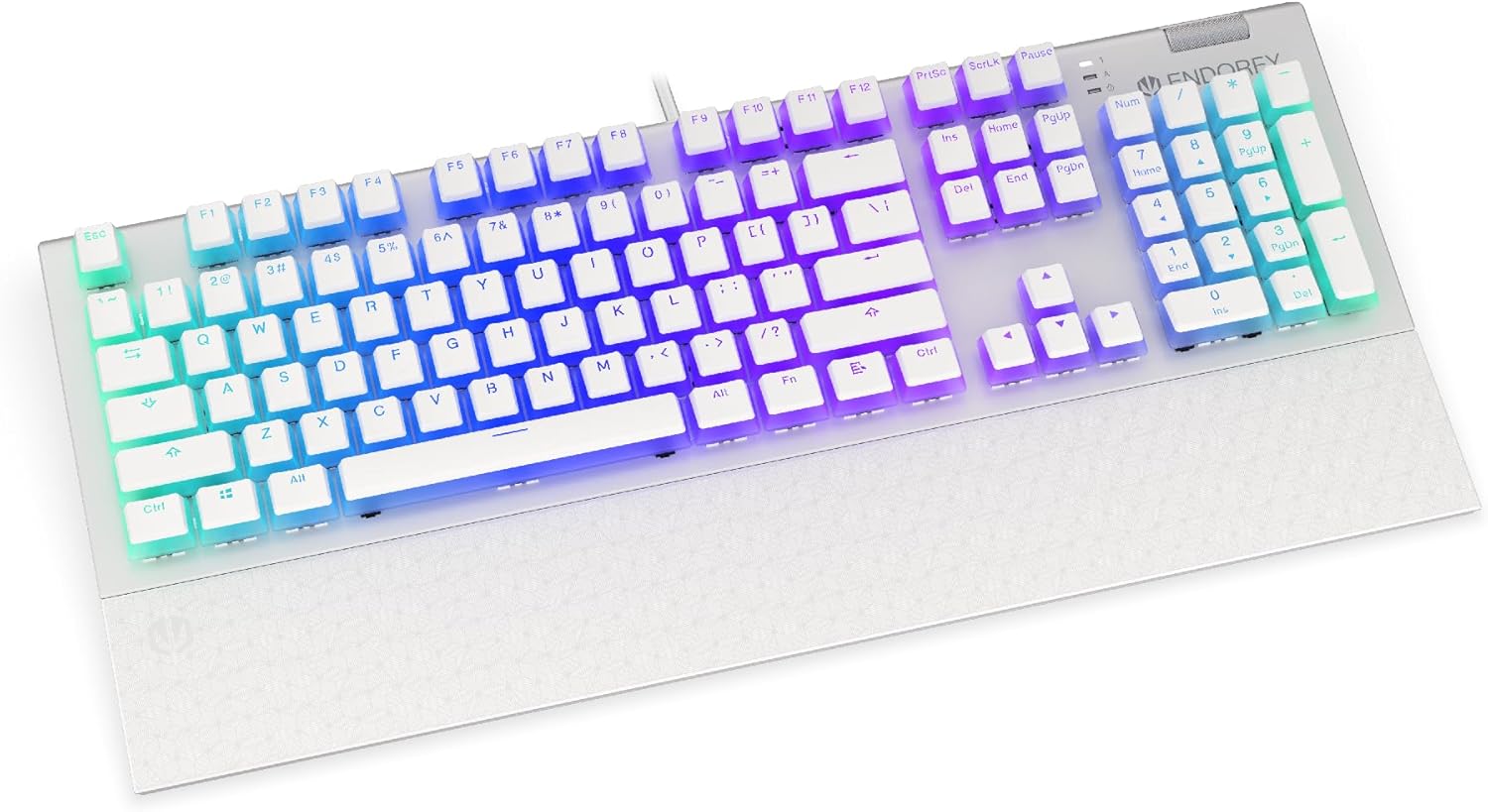
انځور: مخکینۍ برخه view of the ENDORFY Omnis Pudding Onyx White Red mechanical keyboard, showcasing its full layout and connected cable.
۲. د مړوند د آرامۍ نښلول
Align the magnetic wrist rest with the front edge of the keyboard. The magnets will automatically secure it in place, providing ergonomic support during use.

انځور: زاویه لرونکی view of the ENDORFY Omnis Pudding Onyx White Red mechanical keyboard with the magnetic wrist rest attached, highlighting the seamless integration.
۳. د سافټویر نصبول (اختیاري)
For advanced customization of lighting effects, key assignments, and macros, download the official ENDORFY software from the manufacturer's webسایټ. د نصبولو لپاره په سکرین کې لارښوونې تعقیب کړئ.
عملیاتي لارښوونې
د کیبورډ اساسي دندې
The keyboard features a standard full-size layout with a dedicated numpad, function keys (F1-F12), and navigation keys. All keys operate as standard input devices for your computer.
Volume Wheel Operation
The metal volume wheel located on the top right of the keyboard allows for quick audio adjustments:
- Rotate Up: حجم زیات کړئ.
- Rotate Down: حجم کم کړئ.
- لاندې فشار ورکړئ: غږ خاموش/غیر خاموش کړئ.
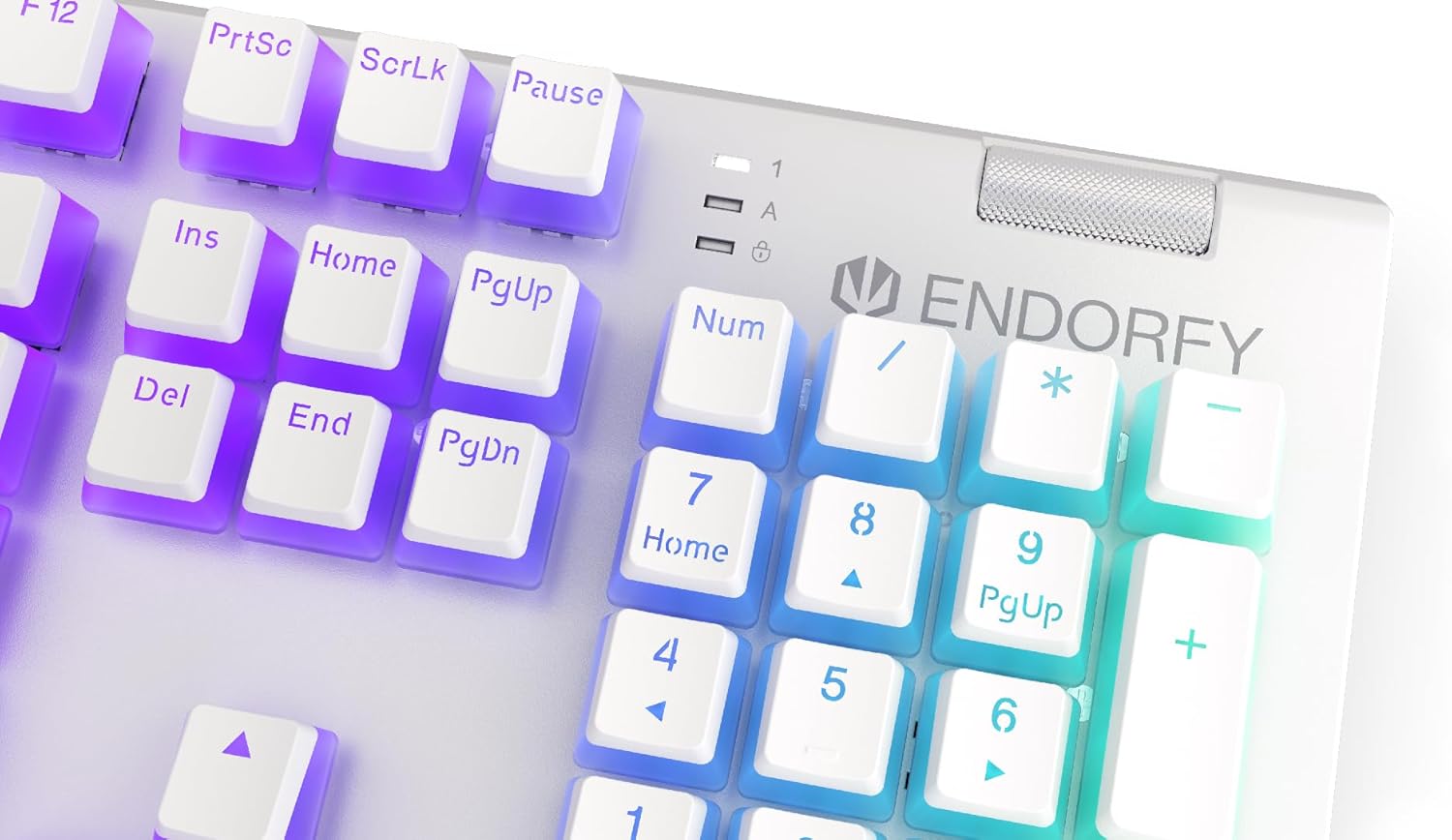
انځور: نږدې انځور view of the keyboard's numpad and the prominent metal volume wheel, indicating its position for easy access.
د RGB بیک لایټینګ کنټرول
The keyboard features customizable ARGB backlighting. Lighting effects and brightness can be adjusted using the dedicated ENDORFY software. Some basic lighting modes and brightness levels may also be accessible via keyboard shortcuts (e.g., Fn + arrow keys or specific function keys), though advanced customization is recommended through the software.

Image: The ENDORFY Omnis Pudding Onyx White Red mechanical keyboard illuminated with vibrant RGB backlighting, showcasing the Pudding keycaps.
N-Key رول اوور (NKRO)
The keyboard supports N-Key Rollover, which means every key press is registered independently, regardless of how many other keys are being pressed simultaneously. This feature is particularly beneficial for fast typists and gamers, preventing ghosting or missed inputs.
د سافټویر فعالیت
The ENDORFY software allows users to:
- Customize ARGB lighting effects and colors.
- Remap individual keys.
- Create and assign macros for complex command sequences.
- ګڼ شمېر مسلکي اداره کړئfileد مختلفو غوښتنلیکونو یا لوبو لپاره.
ساتنه
د کیبورډ پاکول
د غوره فعالیت او ظاهري ساتلو لپاره:
- د پاکولو دمخه کیبورډ له خپل کمپیوټر څخه جلا کړئ.
- د نرم، لینټ پاک ټوکر څخه لږ څه کار واخلئampد کیلي کیپس او چیسس پاکولو لپاره د اوبو یا نرم پاکولو محلول سره مینځل شوی.
- د کیلي کیپسونو ترمنځ د دوړو او کثافاتو لپاره، فشار شوي هوا وکاروئ.
- د سختو کیمیاوي موادو یا خړوبولو موادو کارولو څخه ډډه وکړئ.
د کیلي کیپ لرې کول او بدلول
The PBT Pudding keycaps can be removed for thorough cleaning or replacement. Use a keycap puller (not included) to gently lift keycaps straight up. When replacing, align the keycap with the switch stem and press down firmly until it clicks into place.

انځور: نږدې انځور view of the Kailh Red mechanical switches, visible when keycaps are removed, illustrating the switch mechanism.
د ستونزو حل کول
- کیبورډ ځواب نه ورکوي:
Ensure the USB cable is securely connected to both the keyboard and the computer. Try connecting the keyboard to a different USB port or a different computer to rule out port or system issues. Restart your computer. - د شا رڼا کار نه کوي یا غلطه ده:
Check the brightness settings via the ENDORFY software or any onboard shortcuts. Ensure the software is up to date. If specific keys have incorrect lighting, reset the lighting profile په سافټویر کې. - هغه کیلي چې راجستر نه کیږي:
Clean under the affected keycaps to remove any debris that might be obstructing the switch. If the issue persists, it may indicate a hardware fault; refer to the Warranty and Support section. - Wrist Rest Not Attaching Securely:
Ensure there is no debris between the keyboard and the wrist rest that might interfere with the magnetic connection.
مشخصات
| فیچر | تفصیل |
|---|---|
| برانډ | پای ته ورسوئ |
| د ماډل شمیره | EY5A036 |
| رنګ | سپین |
| کلیدي سویچونه | Kailh Red Mechanical |
| کیکیپس | PBT Pudding |
| ترتیب | Full-size (US Layout) |
| شاته رڼا کول | ARGB (Configurable RGB) |
| ارتباط | USB-A (Detachable Cable) |
| د لاس استراحت | Magnetic, Detachable |
| د حجم کنټرول | Metal Volume Wheel |
| N-کیلي رول اوور | هو |
| مطابقت لرونکي عملیاتي سیسټمونه | Linux, Mac OS X 10.12 Sierra, Windows 7, Windows 8, Windows 10 |
| وړاندیز شوی کارول | ګیمینګ، ملټي میډیا |
| مواد | پولی بوتیلین ټیرفتهالیټ (PBT) |
تضمین او ملاتړ
ENDORFY products are covered by a manufacturer's warranty. For detailed warranty terms, technical support, or service inquiries, please refer to the official ENDORFY webسایټ یا خپل محلي پرچون پلورونکي سره اړیکه ونیسئ. د تضمین ادعاوو لپاره د پیرود ثبوت وساتئ.


