پیژندنه
د پیرودلو لپاره مننهasing the Nedis Alarm Clock with Wireless Charger. This device combines a digital alarm clock with a Qi-certified wireless charging pad, a USB-A charging port, a dimmable display, dual alarm settings, and a color-changing night light. This manual provides essential information for safe and efficient use of your new device.
د خوندیتوب معلومات
- د کارولو دمخه ټول لارښوونې په دقت سره ولولئ.
- وسیله له اوبو، رطوبت او سخت حرارت څخه لرې وساتئ.
- هڅه مه کوئ چې وسیله پخپله جلا کړئ یا ترمیم کړئ. ټولې خدمتونه وړ پرسونل ته راجع کړئ.
- Ensure the power adapter used is compatible with the device's power requirements. For fast charging, a QC3.0 power adapter (not included) is recommended.
- Avoid placing metal objects on the wireless charging pad, as this may interfere with charging or cause overheating.
د بسته محتويات
- Nedis Alarm Clock with Wireless Charger (Model WCACQ30WT)
- Power Adapter (if included, otherwise sold separately)
- د کارن لارښود
محصول پای ته ورسیدview
Familiarize yourself with the various components of your alarm clock:

انځور 1: مخکی View. This image displays the front of the alarm clock, featuring the large digital time display and the touch-sensitive control buttons located above it. The buttons include controls for display brightness, time setting, and alarm adjustments.
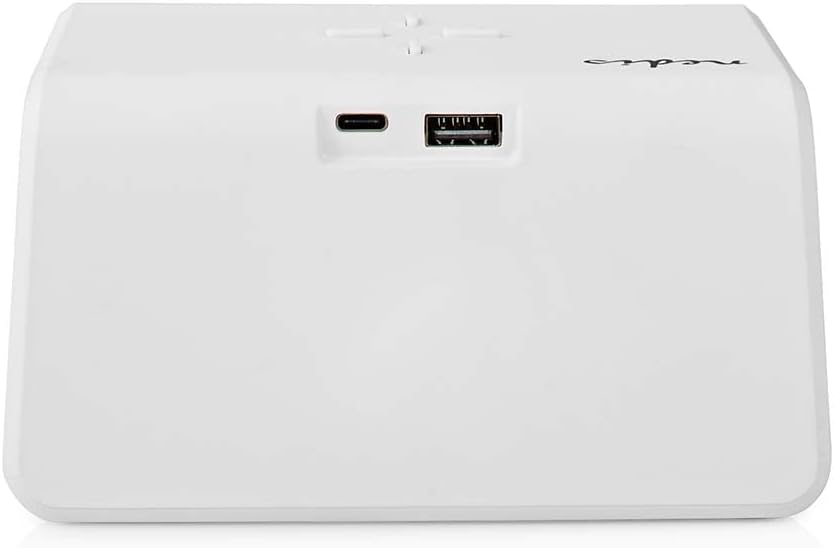
انځور 2: شاته View. The back of the alarm clock is shown, highlighting the USB-C port for power input and a standard USB-A port for charging external devices.
- ډیجیټل ډیزاین: وخت، د الارم حالت، او نور شاخصونه ښیې.
- د کنټرول تڼۍ: (Located on top)
- Light Button: Controls night light.
- Time/Alarm Set Button: For setting time and alarms.
- +/- Buttons: Adjust values.
- د بې سیم چارج کولو پیډ: (Top surface) For Qi-compatible devices.
- د USB-C داخلول: (Rear) For connecting the power adapter.
- د USB-A محصول: (Rear) For charging other devices via cable.
- Night Light Panel: (Side/Rear) Emits ambient light.
چمتو کول
- بریښنا وصل کړئ: Plug the provided power adapter into the USB-C input port on the back of the alarm clock. Connect the other end to a wall outlet. The display will light up.
- د لومړني وخت تنظیم: The clock may display a default time. Proceed to the 'Operating Instructions' section to set the correct time.
عملیاتي لارښوونې
1. د وخت ټاکل
- فشار ورکړئ او ونیسئ Time/Alarm Set button (usually marked with a clock icon) until the hour digits start flashing.
- د کارولو + or - د ساعت تنظیم کولو لپاره تڼۍ.
- فشار ورکړئ Time/Alarm Set button again to switch to minute adjustment. The minute digits will flash.
- د کارولو + or - د دقیقو تنظیم کولو لپاره تڼۍ.
- فشار ورکړئ Time/Alarm Set د وخت تنظیم کولو حالت تاییدولو او وتلو لپاره یو ځل بیا تڼۍ.
۲. د الارمونو تنظیم کول (الارم ۱ او الارم ۲)
This device supports two independent alarm times.
- فشار ورکړئ Time/Alarm Set button once to enter Alarm 1 setting mode. The alarm icon and hour digits for Alarm 1 will flash.
- د کارولو + or - buttons to adjust the hour for Alarm 1.
- فشار ورکړئ Time/Alarm Set button again to switch to minute adjustment for Alarm 1.
- د کارولو + or - buttons to adjust the minutes for Alarm 1.
- فشار ورکړئ Time/Alarm Set button again to confirm Alarm 1 and move to Alarm 2 setting mode (if applicable). Repeat steps 2-4 for Alarm 2.
- After setting Alarm 2, press the Time/Alarm Set د الارم ترتیب حالت تایید او وتلو لپاره تڼۍ.
- د الارم فعال/غیر فعالولو لپاره، لنډ فشار ورکړئ Time/Alarm Set button until the desired alarm icon (e.g., 'AL1' or 'AL2') appears or disappears on the display.
۴. د سنوز فعالیت
When an alarm sounds, press any button (except the alarm off button, if present) to activate the snooze function. The alarm will temporarily stop and sound again after a few minutes (typically 5-10 minutes, refer to specific model details if available). To turn off the alarm completely, press the designated alarm off button or follow the instructions for deactivating the alarm.
4. Wireless Charging (Qi)
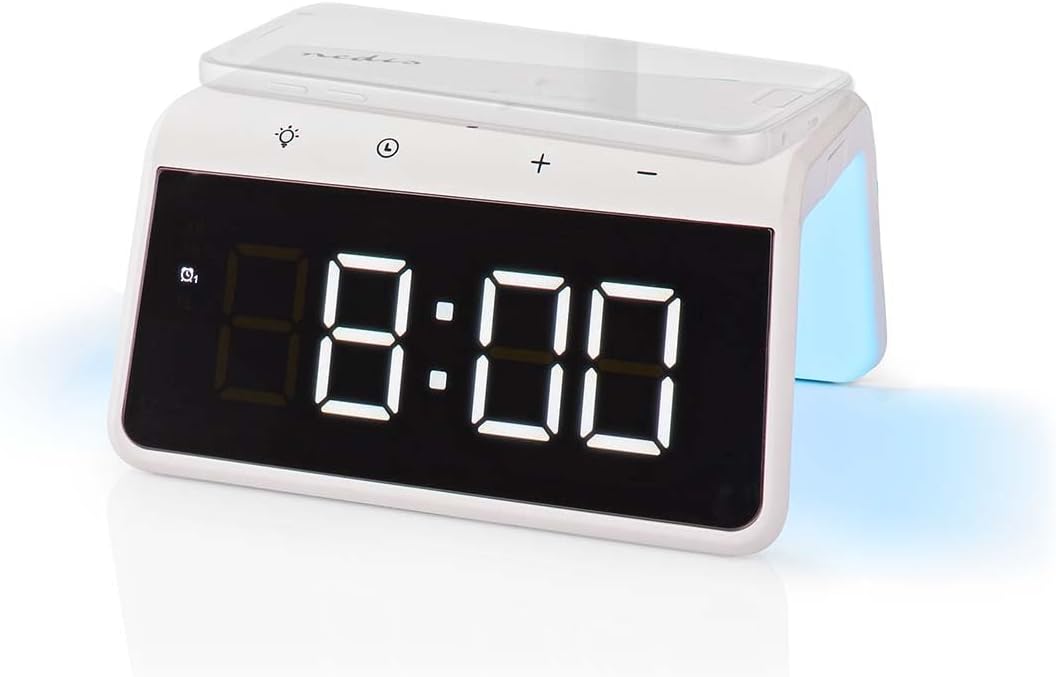
Image 3: Wireless Charging. A smartphone is shown resting on the top surface of the alarm clock, which functions as a Qi wireless charging pad.
- Place your Qi-compatible smartphone or device directly onto the wireless charging pad located on the top surface of the alarm clock.
- Ensure the device is centered on the charging pad for optimal performance.
- A charging indicator (e.g., an icon on the display or an LED light) will typically illuminate to confirm that charging has begun.
- The charger supports 5W, 7.5W, 10W, and 15W output, automatically adjusting to your device's requirements. For 15W fast charging, a QC3.0 power adapter (not included) is required.
5. USB-A Charging Output
The alarm clock features an additional USB-A port for charging devices that are not Qi-compatible or for simultaneous charging.
- Connect your device's USB charging cable to the USB-A output port on the back of the alarm clock.
- د کیبل بل پای خپل آله سره وصل کړئ.
- چارج کول به په اوتومات ډول پیل شي.
6. د شپې رڼا فعالیت

Image 4: Night Light. This image shows the side of the alarm clock with its integrated night light emitting a soft glow.
- فشار ورکړئ رڼا button (usually marked with a light bulb icon) to turn the night light on or off.
- په مکرر ډول فشار ورکړئ رڼا button to cycle through different color modes or to set a specific color. The night light can display a diverse changing color palette.
- The night light can be set to remain on or to be manually activated as needed.
7. د روښانتیا تنظیم کول
The digital display features dimmable backlighting for comfortable viewد روښنايي په مختلفو شرایطو کې.
- Look for a dedicated brightness button or a combination of buttons (e.g., a short press of the Light button or +/- buttons when not in setting mode) to adjust the display brightness.
- Cycle through available brightness levels (e.g., high, medium, low, off).
ساتنه
- پاکول: وسیله د نرم، وچ یا لږ څه وچو اوبو سره پاک کړئ.amp ټوکر د کثافاتو پاکوونکي یا محلول مه کاروئ.
- ذخیره کول: کله چې د اوږدې مودې لپاره نه کارول کیږي، وسیله بې ځایه کړئ او په یخ، وچ ځای کې یې وساتئ.
د ستونزو حل کول
- وسیله نه چلیږي: Ensure the power adapter is securely connected to both the alarm clock and a working power outlet.
- بېسیم چارج کول کار نه کوي:
- ډاډ ترلاسه کړئ چې ستاسو وسیله د Qi سره مطابقت لري.
- ډاډ ترلاسه کړئ چې ستاسو وسیله د چارج کولو پیډ په مرکز کې ده.
- Remove any thick phone cases or metal objects between the phone and the charging pad.
- USB-A charging not working: Check the USB cable for damage and ensure it is properly connected to both the alarm clock and your device.
- الارم نه غږیږي: Ensure the alarm is activated (check for the alarm icon on the display) and the volume is not set to zero (if adjustable).
- ډېر کم/روښانه ښودنه: Adjust the display brightness using the dedicated controls.
مشخصات
| فیچر | مشخصات |
|---|---|
| د ماډل شمیره | د WCACQ30WT معرفي کول |
| برانډ | نیډیس |
| د محصول ابعاد | 14 x 3.81 x 7 سانتي متره |
| د توکي وزن | 242 ګرامه |
| د بې سیم چارج کولو محصول | 5W / 7.5W / 10W / 15W (Qi Certified) |
| د USB-A وتنه | هو |
| د ښودلو ډول | ډیجیټل |
| ځانګړي ځانګړتیاوې | Alarm, Charging Port, Dimmable Display, Night Light (Color Changing) |
| د بریښنا سرچینه | د بریښنا تار شوی |
| رنګ | سپین |
تضمین او ملاتړ
Nedis products are manufactured to high quality standards. In the unlikely event of a defect during the warranty period, please contact your retailer for support. The warranty period is subject to the terms and conditions of the retailer and local consumer laws.
For further assistance or technical support, please refer to the official Nedis webسایټ ته مراجعه وکړئ یا مستقیم د دوی د پیرودونکو خدماتو سره اړیکه ونیسئ. د پیرود ثبوت په توګه د پیرود رسید وساتئ.


