1. پیژندنه
The TACTACAM 6.0 Action Camera is designed to capture high-quality video and photos in various outdoor environments. Featuring 4K 60 FPS video recording, 8X zoom, integrated image stabilization, and a waterproof design, this camera offers a robust solution for documenting your activities. Its one-touch operation ensures ease of use, allowing you to focus on the moment while capturing clear footage.
2. د خوندیتوب معلومات
- د پنروک درجه: The camera is waterproof up to 30 feet (9 meters). Ensure all ports and covers are securely closed before exposing the camera to water.
- د بیټرۍ پاملرنه: Use only TACTACAM approved batteries and chargers. Do not expose batteries to extreme temperatures or dispose of them in fire.
- پورته کول: Always ensure the camera is securely mounted to prevent accidental detachment during use. Regularly check the tightness of all mounting components.
- د حرارت درجه: Avoid operating the camera in temperatures outside its specified range to prevent damage.
3. د بسته محتويات
ډاډ ترلاسه کړئ چې لاندې ټول توکي ستاسو په بسته کې شامل دي:
- TACTACAM 6.0 Action Camera
- TACTACAM Replacement Battery
- TACTACAM Clamp غره
- د USB چارج کیبل
- د لارښوونې لارښود
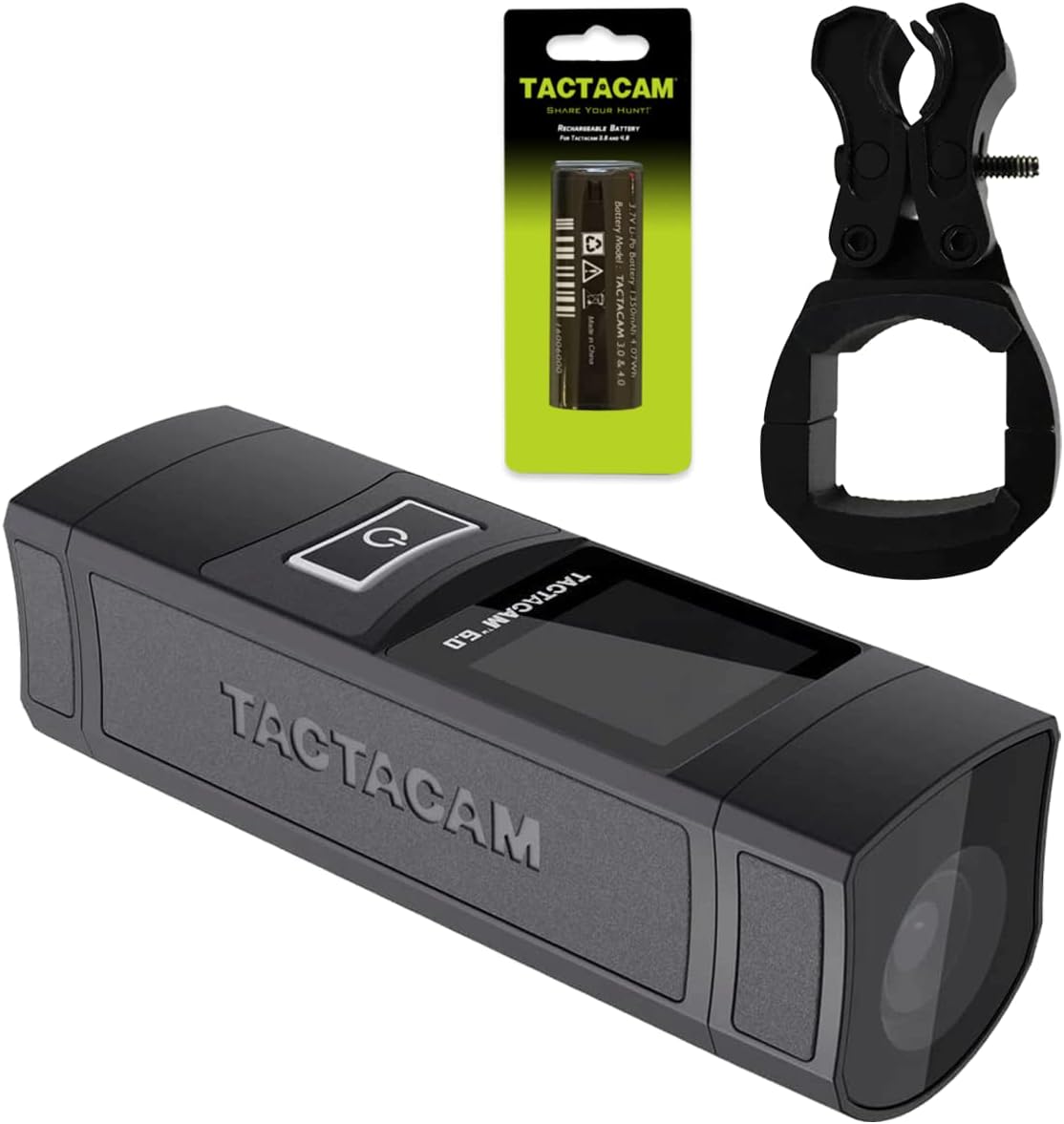
Figure 3.1: TACTACAM 6.0 Action Camera package contents including the camera, replacement battery, and clamp ختل
4. محصول ختم شوview
Familiarize yourself with the main components and controls of your TACTACAM 6.0 Action Camera.

شکل 4.1: مخکی view of the TACTACAM 6.0 Action Camera, highlighting the lens and compact design.

شکل 4.2: اړخ view of the TACTACAM 6.0 Action Camera, showing the integrated display screen and one-touch operation button.
The camera features an integrated display screen for easy menu navigation and shot preview. The main power/record button is prominently located for quick access.
5. ترتیب کول
5.1. د بیټرۍ چارج کول
Before first use, fully charge the camera battery. Connect the camera to a USB power source using the provided USB charging cable. The charging indicator light will show the charging status.

Figure 5.1: The TACTACAM 6.0 camera connected to a USB power source for charging.
۵.۲. د مایکرو ایس ډی کارت داخلول
A Micro SD card (not included) is required for recording. The camera supports high-speed Micro SD cards. To insert the card:
- Unscrew the rear cover of the camera.
- Gently insert the Micro SD card into the designated slot until it clicks into place.
- Securely re-attach the rear cover.

Figure 5.2: Proper insertion of a Micro SD card into the camera's slot.
5.3. د کیمرې نصب کول
The TACTACAM 6.0 comes with a clamp mount for versatile attachment to various equipment such as rifles or bows. Follow these general steps for mounting:
- cl ضمیمه کړئamp mount to your desired equipment (e.g., rifle barrel, bow stabilizer). Ensure it is tightened securely.
- Slide the camera onto the mount until it locks into place.
- Adjust the camera angle as needed and tighten any adjustment screws to fix its position.

Figure 5.3: The TACTACAM 6.0 camera securely attached to a rifle using the clamp ختل
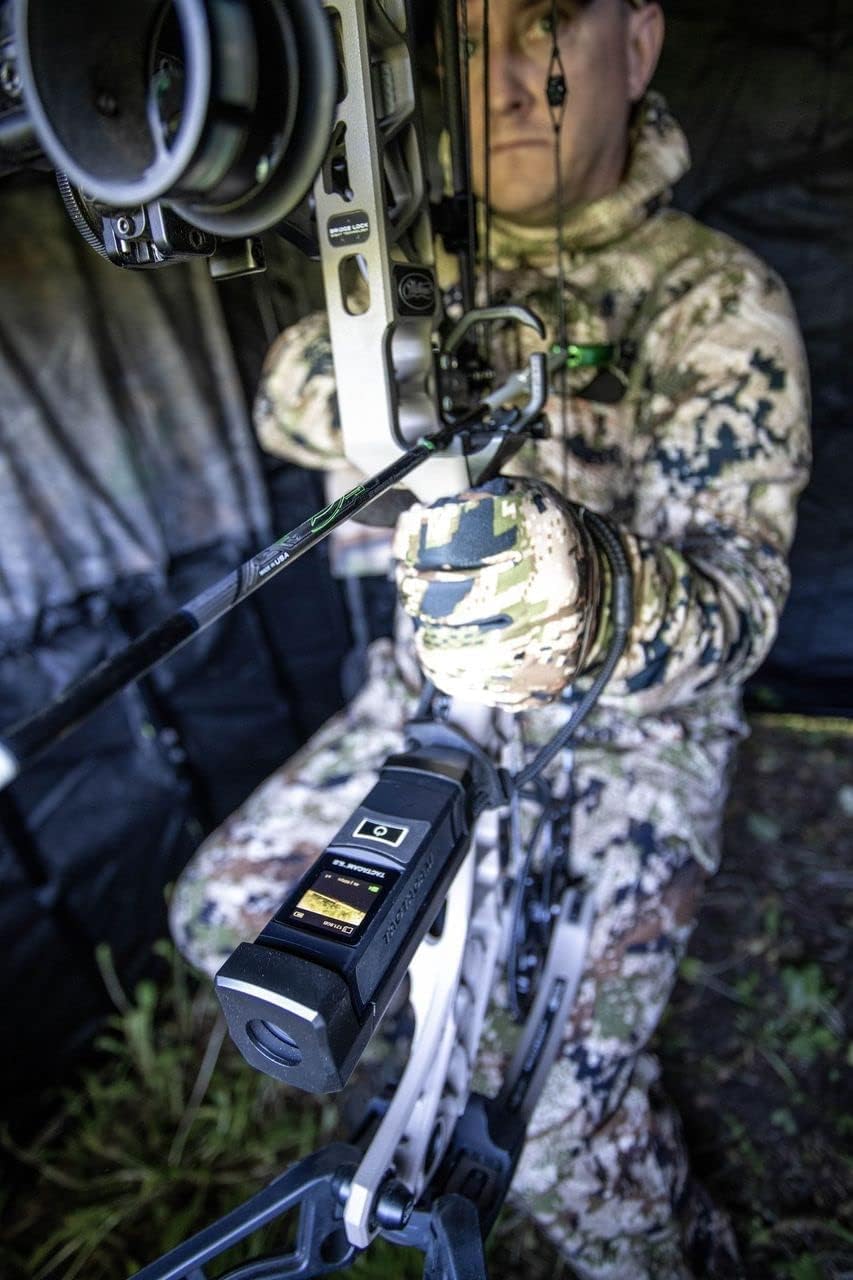
Figure 5.4: The TACTACAM 6.0 camera attached to a bow, ready for action.
For a visual guide on general camera installation, you may refer to the video below. Note that this video demonstrates bike mounts, but the principles of securing the camera to a mount are similar.
Video 5.1: General product installation guide. This video illustrates mounting principles, though it features bike mounts rather than the included clamp ختل
6. عملیاتي لارښوونې
6.1. بریښنا فعال/بند
To power on the camera, press and hold the main power button for approximately 3 seconds until the display screen illuminates. To power off, press and hold the same button for 3 seconds until the screen turns off.
۲. د ویډیو ثبتول
The TACTACAM 6.0 features one-touch operation for video recording:
- ډاډ ترلاسه کړئ چې کیمره فعاله ده.
- Press the main power/record button once to start recording. The camera will vibrate and an indicator light will confirm recording has begun.
- Press the main power/record button again to stop recording. The camera will vibrate and the indicator light will change.
6.3. عکسونه اخیستل
To capture still photos, you may need to switch the camera mode via the Tactacam App (see section 6.4) or through on-device controls if available. Once in photo mode, press the designated capture button (often the same as the record button) to take a picture.
6.4. Connecting to the TACTACAM App (Wi-Fi)
The TACTACAM App allows you to control your camera remotely, view ژوندی اوسیtage, and manage settings. To connect:
- Download the TACTACAM App from your smartphone's app store.
- Power on your TACTACAM 6.0 camera.
- Activate the Wi-Fi feature on your camera (refer to the camera's display or specific button if available). The Wi-Fi indicator light will flash.
- On your smartphone, go to Wi-Fi settings and connect to the TACTACAM camera's Wi-Fi network (e.g., "ActionCam_XXXX").
- Open the TACTACAM App. The app should automatically detect and connect to your camera, allowing you to access its features.

Figure 6.1: The TACTACAM app interface on a smartphone, showing connection to the camera.
For a detailed walkthrough of camera operation and app connection, please watch the video below:
Video 6.1: Product operation and settings guide, including Micro SD card insertion, power on, Wi-Fi connection, and app usage.
6.5. ښه شوي ځانګړتیاوې
The TACTACAM 6.0 includes several advanced features:
- اتومات تمرکز: Automatically adjusts focus for clear images.
- لوپ ثبتول: Continuously records, overwriting the oldest fileکله چې د حافظې کارت ډک وي.
- د وخت تېرېدنه: Captures a series of photos at set intervals to create a time-lapse video.
- Moveable Red Dot Option: Provides an on-screen red dot for aiming assistance, configurable via the app.
7. ساتنه
- پاکول: Use a soft, dry cloth to clean the camera body. For the lens, use a specialized lens cleaning cloth and solution. Do not use abrasive materials.
- ذخیره کول: کیمره په یو سړه او وچ ځای کې وساتئ چې د مستقیم لمر وړانګو او سختو تودوخې څخه لرې وي. که تاسو د اوږدې مودې لپاره بیټرۍ ذخیره کوئ نو بیټرۍ لرې کړئ.
- د فرم ویئر تازه معلومات: Periodically check the TACTACAM website or app for firmware updates to ensure optimal performance and access to new features.
8. ستونزه حل کول
| ستونزه | احتمالي حل |
|---|---|
| کیمره نه چالانیږي. | Ensure the battery is fully charged. Try charging the battery for at least 2 hours. |
| Cannot connect to the TACTACAM App. | Verify camera Wi-Fi is enabled. Ensure your smartphone is connected to the camera's Wi-Fi network. Restart both the camera and the app. |
| د ویډیو ثبت کول په ناڅاپي ډول ودریږي. | Check if the Micro SD card is full or corrupted. Use a high-speed Micro SD card (Class 10 or higher). Ensure the battery has sufficient charge. |
| د ویډیو خراب کیفیت. | Clean the camera lens. Ensure sufficient lighting. Check camera settings in the app for resolution and frame rate. |
9. مشخصات
| فیچر | تفصیل |
|---|---|
| د برانډ نوم | ښوونه |
| د توکي وزن | ۲.۴۵ پونډه |
| د کڅوړې ابعاد | 11.2 x 8.27 x 4.84 انچه |
| د توکي ماډل شمیره | TA-C-FB-6 |
| رنګ | تور |
| ځانګړي ځانګړتیاوې | ټیټ رڼا |
| د عکس سینسر ټیکنالوژي | CMOS |
| د ویډیو نیول حل | 4K |
| اعظمي اپرچر | 1.8 f |
| د فلش حافظې ډول | مایکرو ایس ډی |
| د ویډیو نیول بڼه | MP4 |
| د سکرین اندازه | ۷۸۷ انچه |
| د ارتباط ټیکنالوژي | وای فای |
10. تضمین او ملاتړ
10.1. د تضمین معلومات
The TACTACAM 6.0 Action Camera comes with a one-year warranty when purchased from an official TACTACAM Dealer. Please retain your proof of purchase for warranty claims.
10.2. د پیرودونکي ملاتړ
For technical assistance, troubleshooting, or warranty inquiries, please visit the official TACTACAM webسایټ یا مستقیم د دوی د پیرودونکو ملاتړ سره اړیکه ونیسئ. د اړیکو معلومات معمولا د تولید کونکي په ویب پاڼه کې موندل کیدی شي webسایټ یا د محصول بسته بندي.


