پیژندنه
The mophie powerstation Go is a versatile portable device designed to provide power in various emergency situations. It functions as a car jump starter, a portable power bank for mobile devices, and a bright LED work light. This manual provides essential instructions for safe and effective use, maintenance, and troubleshooting of your powerstation Go.
د خوندیتوب معلومات
Read all safety warnings and instructions before using this product. Failure to follow these instructions may result in electric shock, fire, or serious injury.
- Do not expose the powerstation Go to moisture or extreme temperatures.
- د وسیلې د جلا کولو یا ترمیم کولو هڅه مه کوئ.
- د ماشومانو د لاسرسي څخه لرې وساتئ.
- Ensure proper polarity when connecting jumper cables to a vehicle battery. Incorrect connection can cause damage or injury.
- Use only the provided jumper cables and charging accessories.
- د مستقیم لمر وړانګو ته د اوږدې مودې تماس څخه مخنیوی وکړئ.
- If the device becomes excessively hot, discontinue use immediately.
د بسته محتويات
- mophie powerstation Go
- Mini Jumper Cables
- د چارج کولو کیبل (له USB-C څخه USB-A)
- د کارن لارښود
محصول پای ته ورسیدview
Familiarize yourself with the components of your mophie powerstation Go.


- LED فلش لائټ: Located at one end, provides bright illumination.
- د کار رڼا: Integrated into the body, offers broad area lighting.
- د بریښنا تڼۍ: Activates the device and checks battery status.
- د LED بیټرۍ شاخص: Displays the remaining charge level.
- د USB-A محصول پورټ: د موبایل وسیلو د چارجولو لپاره.
- Jumper Cable Port: Dedicated port for connecting the mini jumper cables.
- د USB-C ان پټ پورټ: For recharging the powerstation Go.
تنظیم: لومړنی چارج کول
Before first use, fully charge your mophie powerstation Go.
- Connect the provided USB-C charging cable to the USB-C input port on the powerstation Go.
- Connect the other end of the charging cable to a compatible USB wall adapter (not included) or a powered USB port.
- The LED battery indicator lights will illuminate and flash, indicating the charging status. All four lights will be solid when fully charged.
- د چارج کولو وخت ممکن د بریښنا سرچینې پورې اړه ولري.
عملیاتي لارښوونې
1. د موټر پیل کول
Ensure the powerstation Go is at least 50% charged before attempting to jump start a vehicle.
- Connect the mini jumper cables to the jumper cable port on the powerstation Go. Ensure a secure connection.
- سره وصل کړئ سور clamp to the positive (+) terminal of the vehicle's dead battery.
- سره وصل کړئ تور clamp to a metal part of the vehicle's chassis (unpainted, non-moving part) or the negative (-) terminal of the battery, if accessible and safe.
- Once connected, the powerstation Go will automatically perform safety checks. Wait for the indicator light on the jumper cable connector to turn solid green.
- Start your vehicle. If it doesn't start immediately, wait 30 seconds and try again. Do not attempt more than three consecutive jump starts.
- کله چې موټر پیل شي، سمدلاسه تور کلپ قطع کړئamp، بیا سره رنګamp, and finally disconnect the jumper cables from the powerstation Go.
۴. د موبایل وسایلو چارج کول
Use the USB-A output port to charge your smartphone, tablet, or other USB-powered devices.

- Connect your device's USB charging cable to the USB-A output port on the powerstation Go.
- The powerstation Go will automatically begin charging your device. The LED battery indicator lights will show the remaining charge.
- کله چې چارج بشپړ شي، خپل وسیله منقطع کړئ.
3. Using the LED Flashlight and Work Light
The powerstation Go features both a focused LED flashlight and a broad work light.
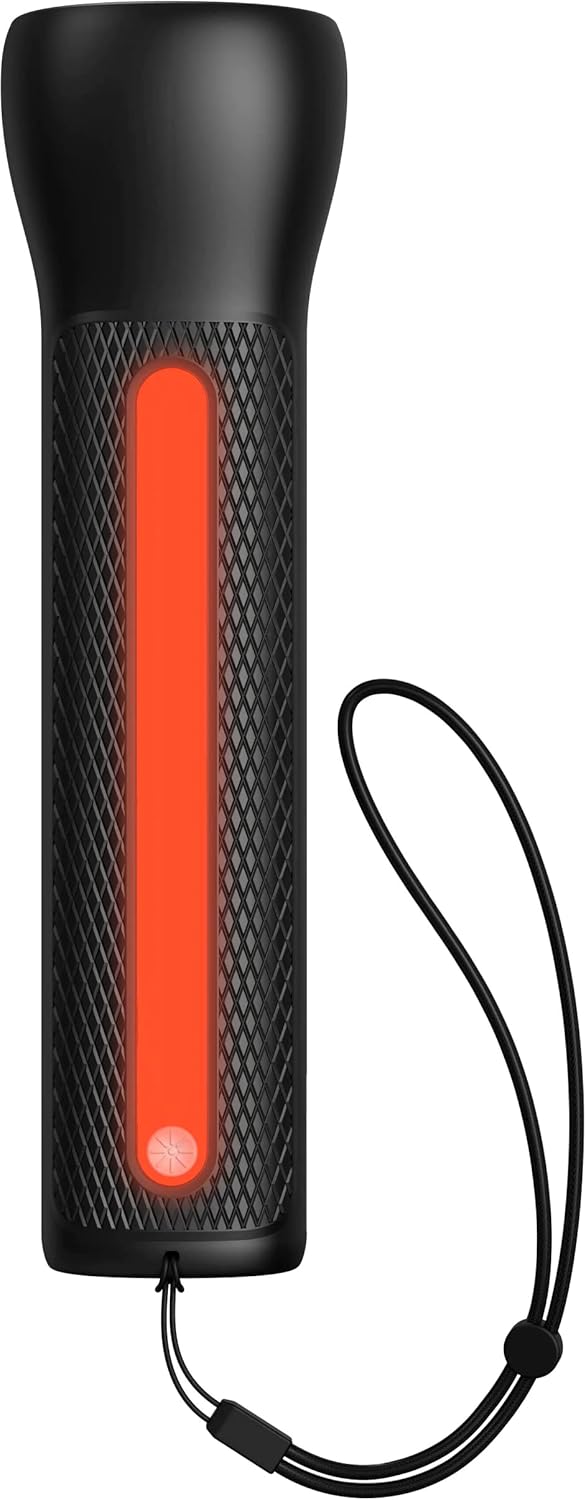

- To activate the LED Flashlight: Press and hold the power button for 2 seconds. Press again to cycle through modes (high, low, strobe, off).
- To activate the Work Light: Double-press the power button. Double-press again to cycle through modes (white, red, flashing red, off).
ساتنه
- پاکول: وسیله په نرم، وچ ټوکر سره پاک کړئ. سخت کیمیاوي مواد یا د کثافاتو مواد مه کاروئ.
- ذخیره کول: Store the powerstation Go in a cool, dry place away from direct sunlight. For optimal battery life, recharge the device every 3 months if not in regular use.
- د بیټرۍ پاملرنه: The internal battery is not user-replaceable. Do not attempt to open the device.
د ستونزو حل کول
| ستونزه | احتمالي لامل | د حل لاره |
|---|---|---|
| وسیله چارج نه کوي | Charging cable or adapter faulty; port obstruction. | Try a different USB-C cable and wall adapter. Ensure ports are clean and free of debris. |
| موټر نه جمپ سټارټ کېږي | Low powerstation Go charge; incorrect cable connection; severely dead battery. | Ensure powerstation Go is fully charged. Verify correct clamp polarity. Check vehicle battery for severe damage. Consult vehicle manual. |
| Mobile device not charging | Powerstation Go battery low; faulty USB cable; device incompatibility. | Recharge powerstation Go. Try a different USB cable. Ensure your device is compatible with standard USB charging. |
| څراغونه کار نه کوي | Powerstation Go battery low; incorrect button press. | Recharge powerstation Go. Refer to "Using the LED Flashlight and Work Light" section for correct operation. |
مشخصات
- نښه: موفي
- د ماډل شمیره: mpsgrgd-FL36630
- د تولید کونکي برخې شمیره: 401107454
- د بیټرۍ ظرفیت: 9900 mAh (36.6 Wh)
- والیtage: 12 Volts (for jump starting)
- د محصول وزن: 1.07 کیلوګرامه
- ابعاد: ۲۸.۷ x ۴۰ x ۴۹.۹ سانتي متره (پیکج)
- ځانګړي ځانګړتیاوې: LED Indicator Lights, 450-lumen LED Flashlight, Spark-proof Jumper Cables
- Automotive Service Type: Truck, Car
تضمین او ملاتړ
For warranty information and customer support, please visit the official mophie webسایټ ته مراجعه وکړئ یا د دوی د پیرودونکو خدماتو څانګې سره اړیکه ونیسئ. د تضمین ادعاوو لپاره د پیرود ثبوت وساتئ.
آنلاین ملاتړ: www.mophie.com/support


