پیژندنه
The Nanlite Forza 300 II is a powerful and versatile LED spotlight designed for professional photography and videography. It features a 5600K daylight-balanced output, advanced control options including Bluetooth app control and DMX, and built-in special effects. Its compact design and AC/battery power capabilities make it suitable for various production environments.
د خوندیتوب معلومات
Please read this manual carefully before using the product to ensure proper operation and to prevent damage or injury. Keep this manual for future reference.
- Do not look directly into the light source when the fixture is powered on.
- Do not operate the fixture in wet or damp شرایط
- د ډیر تودوخې مخنیوي لپاره مناسب هوا ورکول ډاډمن کړئ.
- یوازې منظور شوي بریښنا اډاپټرونه او لوازم وکاروئ.
- د ماشومانو د لاسرسي څخه لرې وساتئ.
- د پاکولو یا ساتنې څخه دمخه بریښنا قطع کړئ.
د بسته محتويات
ډاډ ترلاسه کړئ چې ټول توکي ستاسو په بسته کې شامل دي:
- Forza 300 II LED Spotlight Fixture
- د کنټرول واحد
- نښلول کیبل
- د بریښنا کیبل
- انعکاس کوونکی
- د بار وړلو کڅوړه
- د کارن لارښود
محصول پای ته ورسیدview
Familiarize yourself with the main components of the Nanlite Forza 300 II.
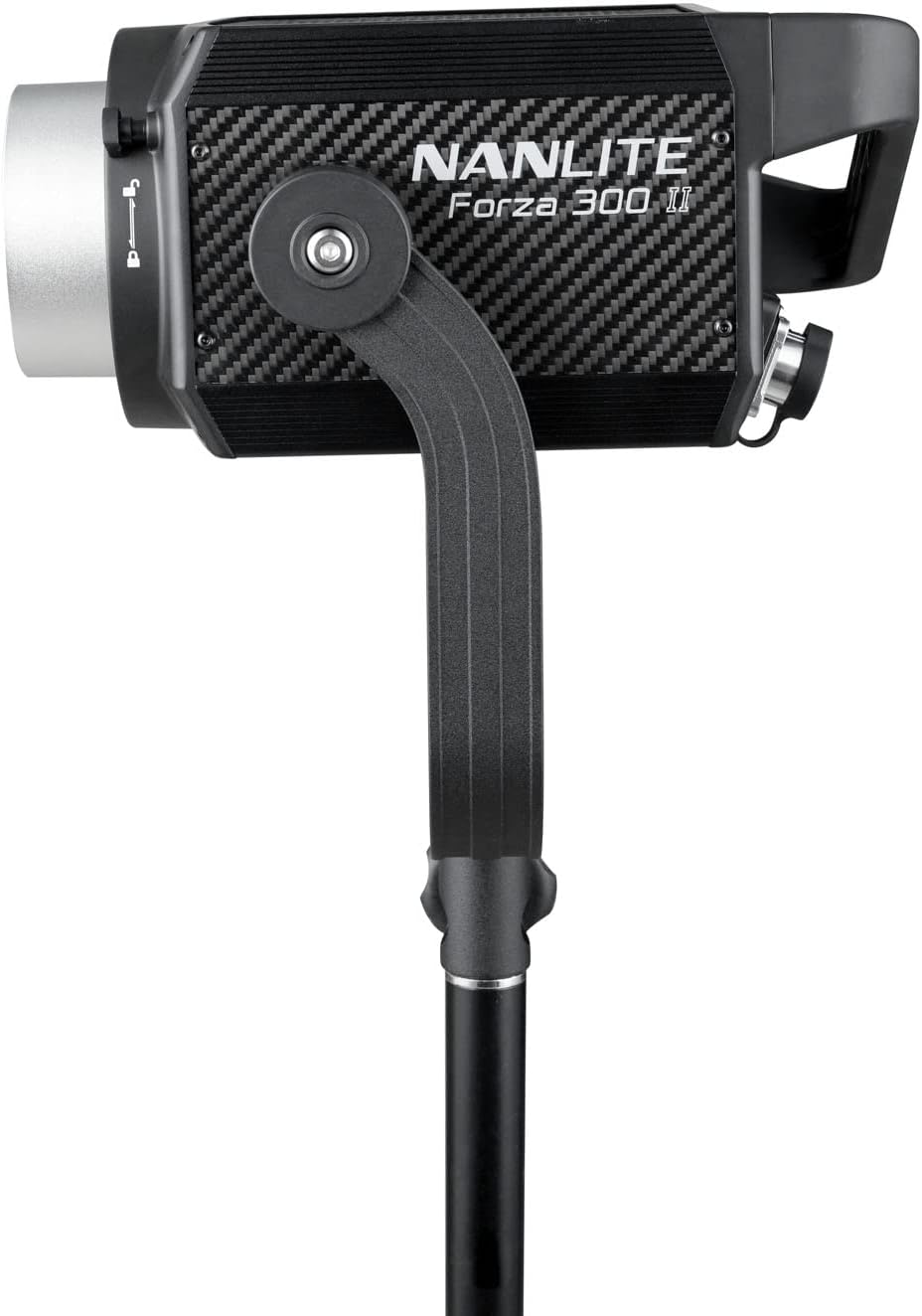
شکل 1: مخکی view of the Forza 300 II LED Spotlight, showing the light head with its yoke and stand mounting bracket.

Figure 2: The Forza 300 II Control Unit, featuring a display screen, control knobs for brightness and effects, and function buttons.

شکل 3: شاته view of the Forza 300 II Control Unit, highlighting the DMX input/output ports, power input, and output connections to the light fixture.
مهمې برخې:
- د رڼا جوړښت: The main LED light source with Bowens mount for accessories.
- د کنټرول واحد: External unit housing the power supply, display, and control interface.
- یوک: Adjustable bracket for mounting the light fixture onto a light stand.
- د چټک خوشې کولو کلورamp: Durable and versatile clamp د خوندي نصبولو لپاره.
چمتو کول
Follow these steps for initial setup of your Forza 300 II.
- د رڼا فکسچر نصب کړئ: Attach the Forza 300 II light fixture to a sturdy light stand using the integrated yoke and quick-release clamp. Ensure it is securely tightened.
- د کنټرول واحد سره وصل کړئ: Connect the light fixture to the control unit using the provided connecting cable. Align the connectors and twist to lock them securely.
- د بریښنا پیوستون:
- د AC بریښنا: Connect the power cable to the control unit's AC input and then to a suitable power outlet (100-240V AC).
- د بیټرۍ ځواک: For portable operation, insert compatible V-mount batteries into the battery plates on the control unit. The unit can run on one battery for extended life.
- انعکاس کوونکی ضمیمه کړئ: Align the reflector with the Bowens mount on the front of the light fixture and twist clockwise until it locks into place.

Figure 4: The Forza 300 II light fixture connected to its control unit, demonstrating the power and data cable connections.
عملیاتي لارښوونې
Learn how to operate your Forza 300 II for optimal performance.
1. بریښنا فعال/بند
Locate the power switch on the control unit and flip it to the "ON" position to power on the light. Flip to "OFF" to power down.
2. بنسټیز عملیات
- د روښانتیا سمون: Use the dedicated knob on the control unit to adjust the light intensity from 0% to 100%.
- G/M Adjustment: The W(RG) LED light source allows for Green-to-Magenta shift adjustment by +/- 80. Access this setting via the menu.
3. د کنټرول طریقې
- On-Board Control: Use the display and knobs on the control unit for direct adjustments.
- د بلوتوث اپلیکیشن کنټرول: Download the free NANLINK app for iOS & Android. Pair your device via Bluetooth for comprehensive control over settings, effects, and firmware updates.
- DMX/RDM: Connect to a DMX console using the locking DMX ports for professional studio integration. Refer to the DMX chart in the appendix (not included in this manual) for channel assignments.
- 2.4G بې سیم کنټرول: Compatible with the optional WS-RC-C2 Remote Control and WS-TB-1 Transmitter Box (sold separately).
4. Special Effects
The Forza 300 II includes built-in practical effects. Press the "EFFECT" button on the control unit to cycle through or select effects such as:
- فلش
- نبض
- طوفان
- TV
- پاپرازي
- ناکام بلب
- شمعې
- اور
- چاودنه
- ویلډینګ
Adjust parameters for each effect using the control knobs.
ساتنه
Proper maintenance ensures the longevity and optimal performance of your Forza 300 II.
- پاکول: Use a soft, dry cloth to clean the exterior of the light fixture and control unit. Do not use harsh chemicals or abrasive materials.
- وینټیلیشن: Ensure the fan vents are clear of dust and obstructions to maintain efficient cooling. The Forza 300 II features a quieter fan design.
- ذخیره کول: When not in use, store the light in its carrying bag in a cool, dry place, away from direct sunlight and excessive humidity.
- د کیبل پاملرنه: Avoid sharp bends or kinks in the power and connecting cables. The included cables are substantially longer and designed for durability.
د ستونزو حل کول
If you encounter issues with your Forza 300 II, refer to the following common problems and solutions.
| ستونزه | احتمالي لامل | د حل لاره |
|---|---|---|
| ر Lightا نه ځي. | برېښنا نشته، کیبل خلاص دی، د برېښنا خرابوالی. | Check power cable connection. Ensure AC outlet is working. If using batteries, check battery charge level and ensure they are properly seated. |
| رڼا ځلیږي یا بې ثباته وي. | Loose cable connection, power fluctuations, DMX signal issue. | Secure all cable connections. Try a different power outlet. If using DMX, check DMX cable and console settings. |
| د بلوتوټ پیوستون ناکام شو. | Bluetooth not enabled, app issue, interference. | Ensure Bluetooth is enabled on the control unit and your mobile device. Restart the NANLINK app. Move closer to the light fixture. |
| د ډیر تودوخې خبرداری. | Blocked vents, high ambient temperature. | Ensure fan vents are clear. Operate in a well-ventilated area. Allow the unit to cool down. |
مشخصات
| فیچر | تفصیل |
|---|---|
| د محصول ابعاد | 13 x 9 x 4.84 انچه |
| د توکي وزن | ۲.۴۵ پونډه |
| د توکي ماډل شمیره | FORZA300II |
| برانډ | NANLITE |
| د ارتباط ټیکنالوژي | بلوتوث |
| د فلش حالت توضیحات | دوامداره روښانتیا، د تنظیم وړ روښانتیا، د تنظیم وړ رنګ تودوخه |
| هډوتري برسیر | بلوتوث |
| جوړونکی | نانلایټ |
| د رنګ د حرارت درجه | 5600K (د ورځې رڼا) |
| CRI | 96 |
| TLCI | 97 |
| SSI | 73 |
| Output (1 meter) | 69400 Lux, 6447.4 fc |
تضمین او ملاتړ
Nanlite products typically come with a limited warranty. Please refer to the warranty card included with your product or visit the official Nanlite webد تضمین د تفصيلي شرایطو او مقرراتو لپاره سایټ.
For technical support, service, or inquiries, please contact Nanlite customer service through their official webسایټ یا مجاز توزیع کونکي. د تضمین ادعاوو لپاره د پیرود ثبوت په توګه د پیرود رسید وساتئ.
Official Nanlite Webسایټ: www.nanlite.com


