1. پیژندنه
Thank you for choosing the WOOX R4260 Smart Wireless Outdoor Camera. This manual provides comprehensive instructions for the installation, operation, and maintenance of your device. Please read this manual carefully before use to ensure proper functionality and safety. Keep this manual for future reference.
2. محصول ختم شوview
2.1 د بسته محتويات
- WOOX R4260 Smart Wireless Outdoor Camera
- د خولو لگول
- د نصبولو پیچونه او دیوال پلګونه
- د USB چارج کیبل
- د کارن لارښود
۳.۱ د کیمرې اجزا
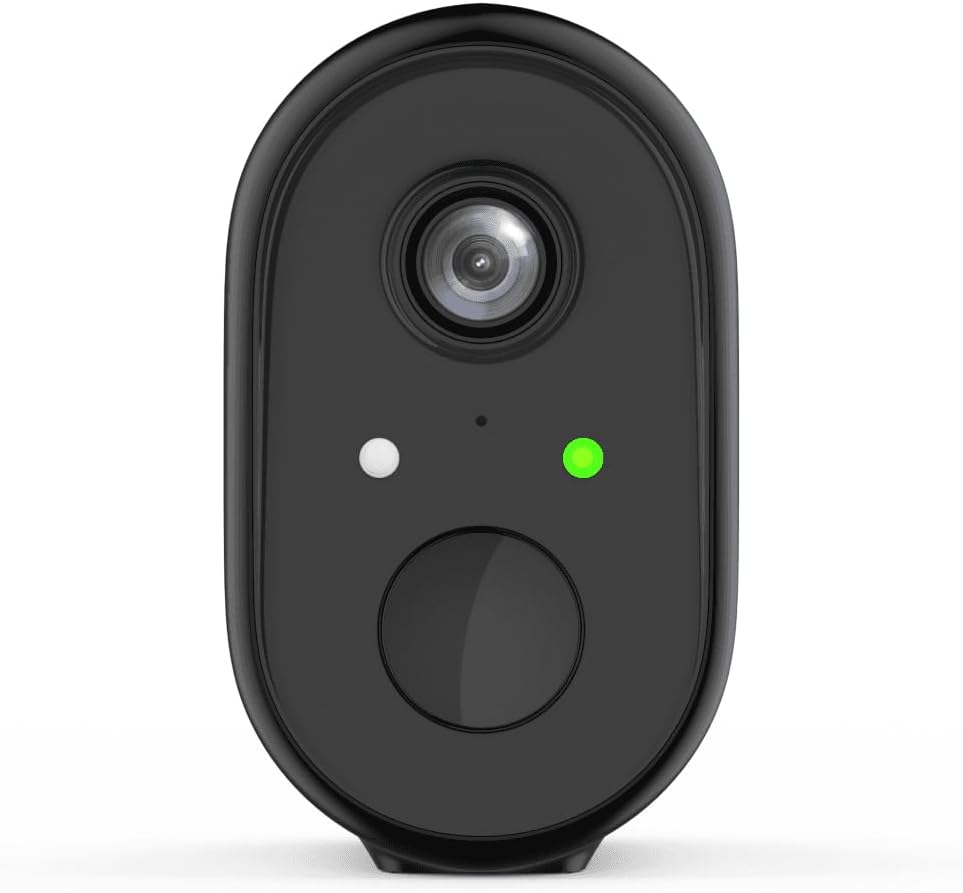
شکل 1: مخکی view of the WOOX R4260 camera, highlighting the camera lens, status indicator LED, and the main button/microphone area.

شکل 2: The WOOX R4260 camera attached to its adjustable wall mounting bracket, showing the overall design and mounting mechanism.
- د کیمرې لینز: د foo ویډیو نیولtage.
- د حالت LED Indicates camera status (e.g., pairing mode, connected, charging).
- مایکروفون/سپیکر: د دوه اړخیز آډیو اړیکو لپاره.
- د پورته کولو نقطه: Connects to the mounting bracket.
- د USB چارج بندر: For battery charging (usually located on the back or bottom, covered by a rubber flap).
- د بیا تنظیم تڼۍ: Used to reset the camera to factory settings (often near the charging port or under a cover).
3. ترتیب او نصب کول
3.1 د بیټرۍ چارج کول
Before initial use, fully charge the camera's built-in lithium-ion battery. Connect the provided USB charging cable to the camera's charging port and a standard 5V USB power adapter (not included). The status LED will indicate charging status (e.g., red for charging, green for fully charged).
۳.۲ د اپلیکیشن ډاونلوډ او د حساب جوړول
Download the "WOOX Home" app from the Apple App Store or Google Play Store. Register for a new account or log in with an existing one.
۳.۳ د اپلیکیشن سره د کیمرې جوړه کول
- Ensure your smartphone is connected to a 2.4GHz Wi-Fi network. The WOOX R4260 camera supports 2.4GHz Wi-Fi only.
- Open the WOOX Home app and tap the "+" icon to add a new device.
- Select "Security Camera" or the specific camera model (R4260) from the device list.
- Follow the on-screen instructions in the app. This typically involves powering on the camera, pressing the reset button until the status LED blinks rapidly (indicating pairing mode), and scanning a QR code generated by the app with the camera's lens.
- Once connected, the status LED will turn solid green, and the camera will appear in your app.
Note: If pairing fails, ensure your Wi-Fi password is correct and does not exceed 20 characters, as some users have reported issues with longer passwords. Ensure the camera is within range of your Wi-Fi router.
3.4 فزیکي نصب کول
The WOOX R4260 can be mounted on a wall, ceiling, or tree. Choose a location that provides the desired viewد اننګ زاویه او د وای فای حد کې دی.
- د نصب کولو بریکٹ لپاره د برمه کولو نقطې په نښه کړئ.
- که چیرې په معمارۍ کې نصب شوي وي، سوري وکړئ او دیوال پلګونه دننه کړئ.
- د چمتو شوي پیچونو په کارولو سره د نصب کولو بریکٹ سطحې ته خوندي کړئ.
- کیمره د نصب کولو بریکٹ سره وصل کړئ او د اړتیا سره سم زاویه تنظیم کړئ.
- Ensure the camera is securely fastened and has a clear line of sight.
۳. د کیمرې چلول
4.1 ژوندی View
Open the WOOX Home app and tap on your R4260 camera to access the live video feed. From here, you can monitor your property in real-time.
۴.۴ دوه اړخیزه آډیو
The camera features two-way audio. In the live view, tap the microphone icon to speak through the camera's speaker, and listen to audio from the camera's microphone.
۵.۳ د حرکت کشف او خبرتیاوې
Configure motion detection settings within the WOOX Home app. You can adjust sensitivity, set detection zones, and schedule alert times. When motion is detected, the camera will record a clip and send a notification to your smartphone.
۴.۵ د ویډیو ثبت او ذخیره کول
The camera supports local storage via a microSD card (not included) and cloud storage (subscription may be required). You can review ثبت شوی footage د اپلیکیشن د پلې بیک ځانګړتیا له لارې.
5. ساتنه
5.1 د بیټرۍ مدیریت
The R4260 is powered by a rechargeable Lithium-ion battery. Monitor the battery level in the WOOX Home app and recharge the camera when the battery is low. Battery life can vary based on usage, temperature, and Wi-Fi signal strength.
5.2 پاکول
د کیمرې لینز په دوره یي ډول د نرم او وچ ټوکر سره پاک کړئ ترڅو د عکس کیفیت روښانه شي. سخت کیمیاوي مواد یا د کثافاتو مواد مه کاروئ.
5.3 د فرم ویئر تازه معلومات
The WOOX Home app will notify you of available firmware updates. It is recommended to keep your camera's firmware updated to ensure optimal performance and security.
6. ستونزه حل کول
| ستونزه | احتمالي حل |
|---|---|
| کیمره د وای فای سره وصل کیدو کې پاتې راغلې. |
|
| د ویډیو خراب کیفیت. |
|
| بیټرۍ په چټکۍ سره وچیږي. |
|
| د حرکت کشف خبرتیاوې نشته. |
|
7. مشخصات
- ماډل: R4260
- د ویډیو ثبتولو پریکړه: 1080p
- Effective Video Resolution: 1080
- اغېزمن اوس هم حل: ۲ میګاپکسله
- د ارتباط ټیکنالوژي: IEEE 802.11b/g/n, 2.4GHz Wi-Fi / WLAN
- بې سیم مخابراتي ټیکنالوژي: WLAN
- ځانګړي ځانګړتیاوې: Two-way audio, Motion detector
- کارول: بهر
- د بریښنا سرچینه: Battery powered (2 Lithium-ion batteries included)
- والیtage: 5 ولټه
- ځواک: 5 واټ
- Viewزاویه: 110 درجې
- مواد: پلاستیک
- رنګ: تور
- ابعاد (L x W x H): 11.5 x 6 x 9.5 سانتي متره
- د نصب کولو ډول: Wall mount, Ceiling mount, Tree mount
- د نصب ډول: په سکرو کې
- مطابقت لرونکي وسایل: سمارټ فون
- د کنټرول ډول: Amazon Alexa (via WOOX Home app integration)
8. تضمین او ملاتړ
WOOX products are designed and manufactured to the highest quality standards. For detailed warranty information and technical support, please refer to the official WOOX webسایټ ته مراجعه وکړئ یا مستقیم د دوی د پیرودونکو خدماتو سره اړیکه ونیسئ. د پیرود ثبوت په توګه د پیرود رسید وساتئ.
جوړونکی: ووکس


