محصول پای ته ورسیدview
The iGear Duo Charging Cable is a versatile 2-in-1 solution designed for efficient charging and data synchronization across a wide range of devices. It features both a Type-C to Type-C connection and a Type-C to iPhone-pin connection, making it compatible with various smartphones, laptops, power banks, and other USB-C and Lightning-enabled devices.
کلیدي ځانګړتیاوې عبارت دي له:
- دوه اړخیز ارتباط: Offers both Type-C to Type-C and Type-C to iPhone-pin connections in a single cable.
- چټک چارج کول: Supports 65W Power Delivery (PD) for Type-C to Type-C connections and 20W fast charging for Type-C to iPhone-pin connections.
- لوړ پایښت: Constructed with a durable nylon braided exterior designed to resist breakage and withstand over 50,000 bends.
- پراخه مطابقت: Compatible with a broad range of devices including Android phones, iPhones, laptops, power banks, and speakers.
- Data Sync Capability: Enables high-speed data transfer up to 480Mbps.

Image: The iGear Duo Charging Cable showcasing its Type-C and detachable Lightning connectors, highlighting its dual functionality.
د تنظیم کولو لارښود
The iGear Duo Charging Cable is designed for plug-and-play simplicity. No complex setup or software installation is required.
- د وسیلې پورټ وپیژنئ: Determine whether your device requires a Type-C connection or an iPhone-pin (Lightning) connection.
- نښلونکی غوره کړئ:
- For Type-C devices: Use the integrated Type-C connector.
- For iPhone-pin (Lightning) devices: Attach the Lightning adapter to the Type-C connector. The Lightning adapter is designed to securely fit onto the Type-C end of the cable.
- Connect to Power Source/Device: Plug the appropriate connector into your device (phone, laptop, etc.) and the other Type-C end into a compatible power adapter (wall charger, power bank) or another device for data transfer.
عملیاتي لارښوونې
د چارج کولو وسایل
The iGear Duo Charging Cable supports fast charging for both Type-C and iPhone-pin devices. Ensure your power adapter supports Power Delivery (PD) for optimal charging speeds.
- د ډول-سي وسیلو لپاره: Connect the Type-C end of the cable to your device and the other Type-C end to a 65W PD compatible power adapter.
- For iPhone-pin Devices: Attach the Lightning adapter to the cable's Type-C end, then connect it to your iPhone-pin device. Plug the other Type-C end into a 20W PD compatible power adapter.
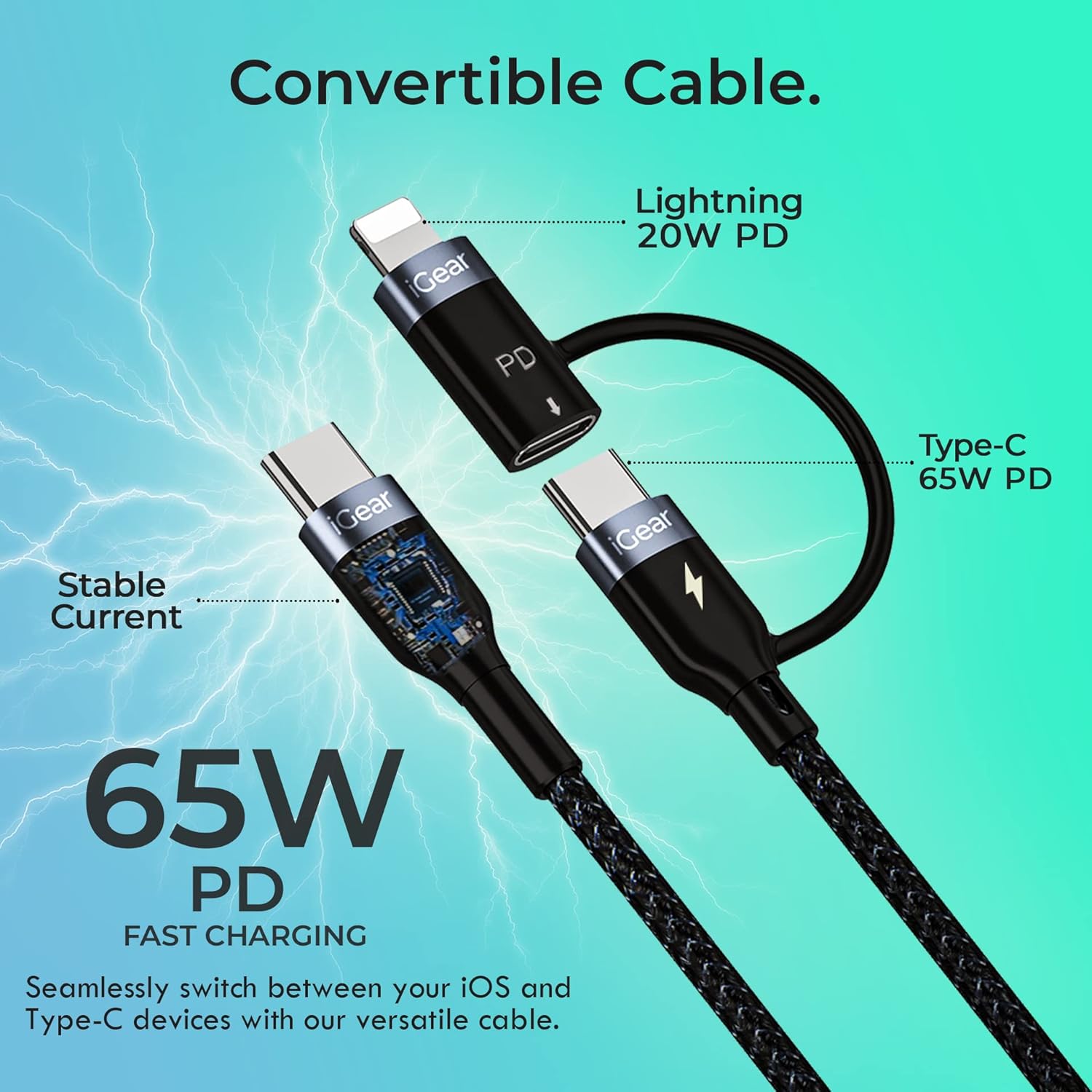
Image: A visual representation of the cable's convertible design, illustrating how the Lightning adapter connects to the Type-C end, and specifying 20W PD for Lightning and 65W PD for Type-C.
د معلوماتو لیږد
The cable facilitates high-speed data transfer between compatible devices, such as a smartphone and a laptop.
- د وسیلو نښلول: Plug one end of the cable into your device (e.g., smartphone) and the other end into the data port of another device (e.g., laptop).
- لیږد پیل کړئ: Follow the prompts on your devices to allow data access and begin transferring files. The cable supports data transfer speeds of up to 480Mbps.

Image: A hand holding a smartphone connected via the iGear Duo Cable, with text overlays indicating "65W Fast Charging" and "Upto 480Mbps Data Transfer," demonstrating its dual capabilities.
پاملرنه او ساتنه
Proper care will extend the life of your iGear Duo Charging Cable and ensure optimal performance.
- د ډیر زنګون څخه ډډه وکړئ: While the cable is designed to be durable and withstand many bends, avoid sharp or excessive bending, especially near the connectors, to prevent internal wire damage.
- په سمه توګه ذخیره کول: When not in use, coil the cable loosely. Avoid tightly wrapping or knotting the cable, which can stress the internal wires and outer braiding.
- پاک ساتل: Use a soft, dry cloth to wipe down the cable and connectors. Avoid using harsh chemicals or abrasive materials.
- د عناصرو څخه ساتنه: کیبل د سختې تودوخې، مستقیم لمر وړانګو او رطوبت څخه لرې وساتئ.
- نښلونکي په احتیاط سره سمبال کړئ: کله چې د وسیلې یا بریښنا سرچینې څخه پلګ انپلګ کوئ، تل د نښلونکي سر څخه راوباسئ، نه د کیبل څخه.

انځور: یوه مفصله کراس برخه view of the cable's construction, highlighting its protective layers: rubber coating for insulation, copper wire for power, aluminum shield for protection, and a nylon braided jacket for durability.
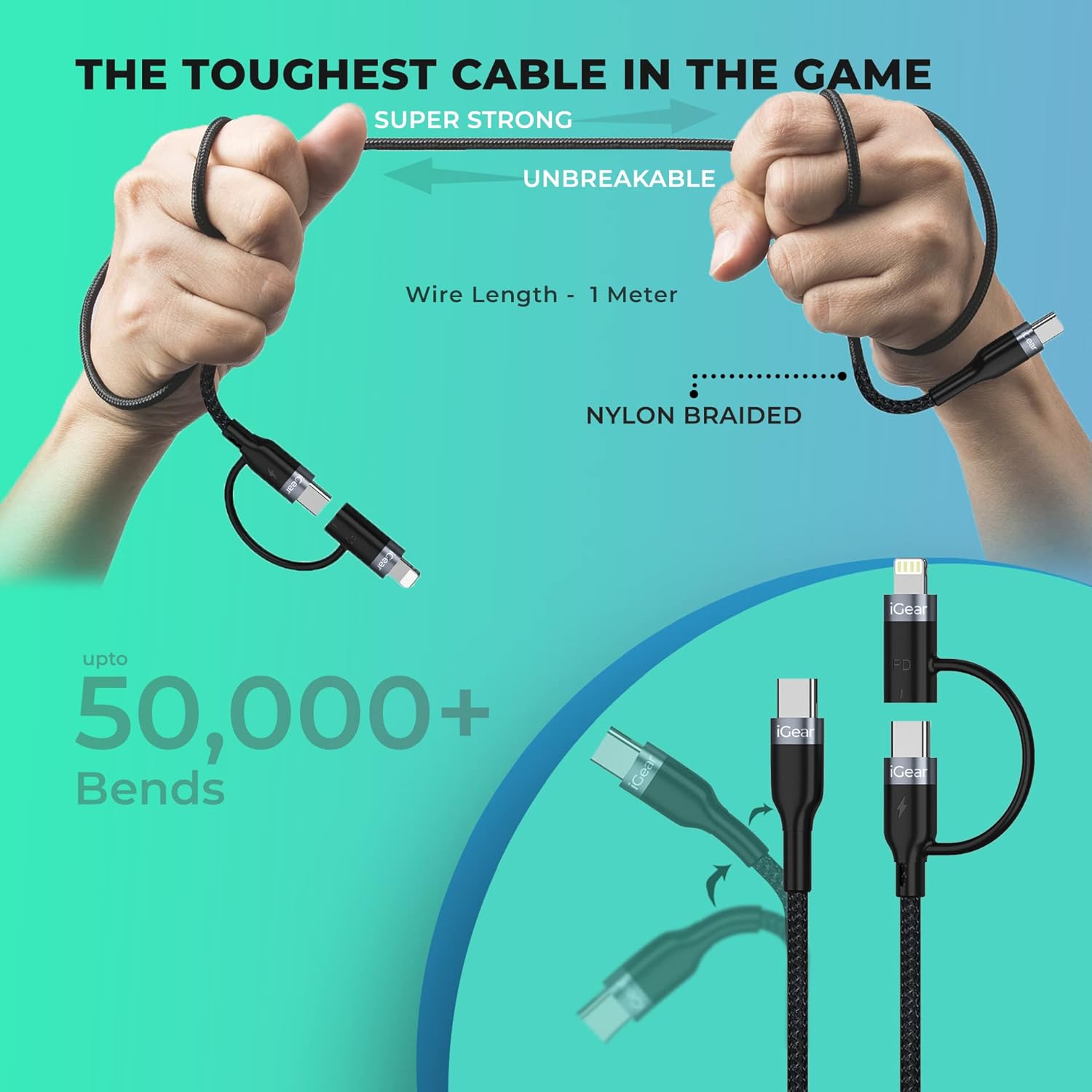
Image: A visual representation of the cable's robust design, showing it being bent and twisted, emphasizing its "Super Strong" and "Unbreakable" nylon braided construction, capable of withstanding over 50,000 bends.
د ستونزو حل کول
If you encounter issues with your iGear Duo Charging Cable, refer to the following common problems and solutions:
| ستونزه | احتمالي لامل | د حل لاره |
|---|---|---|
| وسیله چارج نه کوي. | Loose connection, incompatible power adapter, dirty port, or damaged cable. |
|
| ورو چارج سرعت. | Power adapter not supporting PD, device drawing less power, or background apps consuming power. |
|
| د معلوماتو لیږد کار نه کوي. | Incorrect connection, device settings, or driver issues. |
|
تخنیکي مشخصات
| فیچر | مشخصات |
|---|---|
| برانډ | iGear |
| د ماډل شمیره | iG-1012 |
| د نښلونکي ډول | USB Type C, Lightning (via adapter) |
| د کیبل ډول | USB |
| Power Delivery (Type-C to Type-C) | تر ۱۰۰ واټ پورې PD |
| Power Delivery (Type-C to iPhone-pin) | تر ۱۰۰ واټ پورې PD |
| د ډیټا لیږد سرعت | تر 480Mbps پورې |
| مطابقت لرونکې وسیلې | Headphone, Laptop, Power Bank, Smartphone, Speaker (Android & iPhone) |
| ځانګړي ځانګړتیاوې | Braided, Data Transfer, Durable |
| رنګ | تور |
| بهرنی مواد | نایلان |
| د توکي وزن | 40 ګرامه |
| د کڅوړې ابعاد | 16.2 x 8.3 x 2.3 سانتي متره |
| شاملې برخې | 1 چارج کیبل |
تضمین او ملاتړ
د تضمین معلومات
The iGear Duo Charging Cable comes with a 1 کلن تضمین د پیرود نیټې څخه. دا تضمین د تولید نیمګړتیاوې او د عادي استعمال څخه رامینځته شوي مسلې پوښي. دا د ناوړه ګټې اخیستنې، پیښو، غیر مجاز بدلونونو، یا طبیعي پیښو له امله رامینځته شوي زیانونه نه پوښي.
مهرباني وکړئ د تضمین ادعاوو لپاره د پیرود ثبوت په توګه خپل د پیرود رسید وساتئ.
د پیرودونکي ملاتړ
For any product-related inquiries, technical assistance, or warranty claims, please contact iGear customer support:
- جوړونکی: IGEAR TECH PRIVATE LIMITED
- پته: ګورګاون ختیځ، ممبۍ ۴۰۰۰۶۳
- د اړيکې شمېره: 9327667193
You may also visit the official iGear store on Amazon for more information and product updates: iGear Amazon Store


