1. پیژندنه
Thank you for choosing the HDWR wagPRO-P500 Platform Scale. This manual provides essential information for the safe and efficient operation, setup, and maintenance of your new scale. Please read this manual thoroughly before use and keep it for future reference.
The HDWR wagPRO-P500 is a robust platform scale designed for precise weighing of larger items in industrial, warehouse, agricultural, and logistics environments. It features a high capacity, accurate measurements, and a user-friendly interface.
2. د محصول ب Featuresې
- پلیټ فارم: The scale features a spacious 60 x 45 cm platform for easy placement of goods, equipped with special tabs to prevent accidental slipping.
- دقیق اندازه کول: Offers precise measurement for items weighing from 200 grams up to a maximum capacity of 500 kg, with an accuracy of 0.2 kg.
- د کاروونکي دوستانه انٹرفیس: Features three easy-to-read, green backlit LCD digital displays showing product weight and unit price.
- اضافي دندې: Includes useful functions such as Tare, unit price input, and totalization.
- د بریښنا عملیات: An integrated 4 Ah battery provides wireless operation for approximately 150 hours.

Image: Key features of the HDWR wagPRO-P500 scale, including display, hold function, unit conversion, accuracy, tare, and battery power.

Image: Details on measurement accuracy, charging process, the robust platform, and the clear display of the scale.
۴. د تنظیم لارښوونې
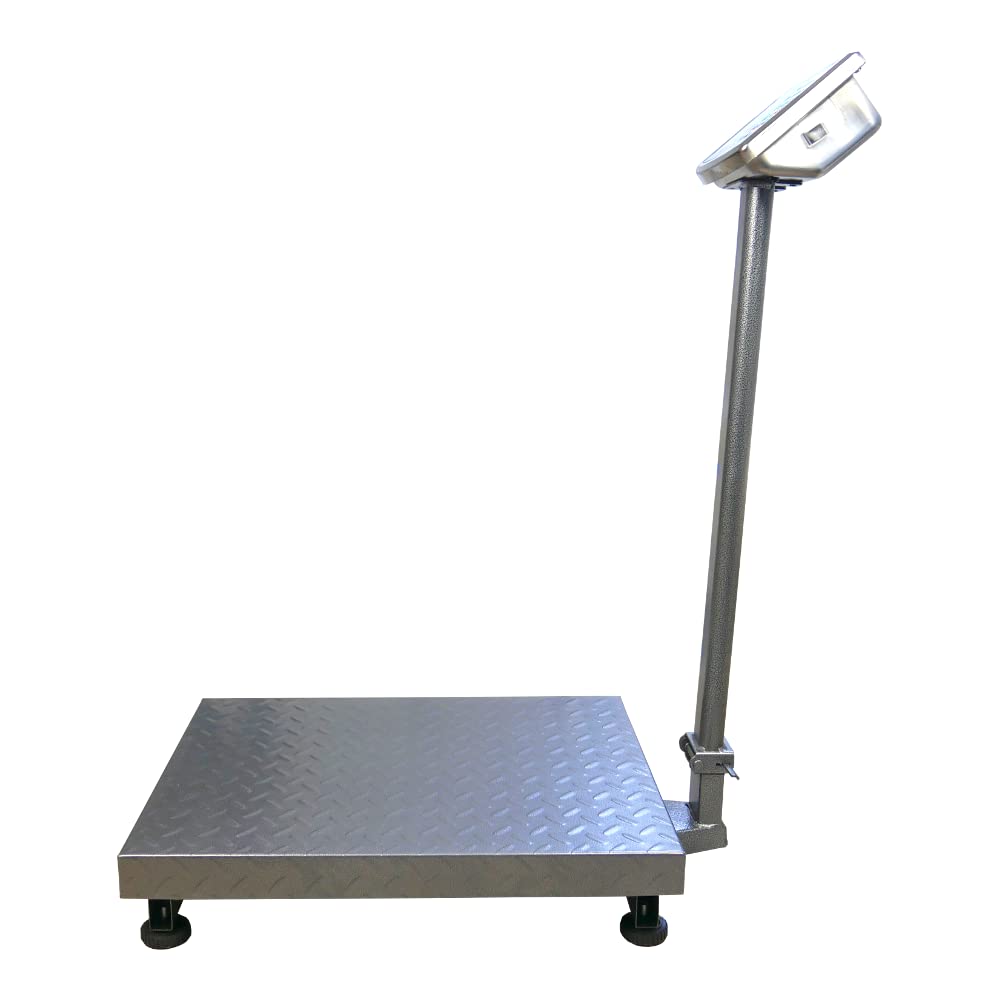
- بسته بندي کول: Carefully remove all components from the packaging. Verify that all parts are present: platform, display unit, support column, power adapter, and user manual.
- Assemble the Support Column: Attach the display support column to the platform base. Ensure it is securely fastened using the provided hardware.
- Attach the Display Unit: Mount the display unit onto the top of the support column. Connect the cable from the platform to the display unit.
- ځای په ځای کول: Place the scale on a firm, level, and stable surface to ensure accurate readings. Avoid areas with excessive vibration, drafts, or extreme temperature changes.
- ابتدايي چارج کول: Connect the scale to a power outlet using the supplied mains adapter. Allow the internal battery to fully charge before the first wireless use. The charging indicator on the display will show the charging status.

Image: An assembled HDWR wagPRO-P500 platform scale, ready for use.
4. عملیاتي لارښوونې
۸ پاور آن/بند
- په پیمانه د بریښنا کولو لپاره، فشار ورکړئ [چاپ/بند] تڼۍ
- To power off the scale, press and hold the [چاپ/بند] تڼۍ تر هغه وخته پورې چې نندارې بند نشي.
۶.۱ اساسي وزن کول
- Ensure the scale is powered on and the display shows '0.00'.
- Carefully place the item to be weighed onto the center of the platform.
- په سکرین کې ښودل شوي وزن ولولئ.
4.3 د توری فعالیت
The Tare function allows you to subtract the weight of a container or packaging, so only the net weight of the contents is measured.
- Place the empty container onto the platform. The display will show its weight.
- فشار ورکړئ [تاری] button. The display will reset to '0.00'.
- Place the items to be weighed into the container. The display will now show only the weight of the items.
- To clear the tare, remove the container and items, then press [تاری] بیا
4.4 د واحد بدلول
The scale supports measurement in kilograms (kg) and pounds (lb).
- د واحدونو ترمنځ د بدلولو لپاره، فشار ورکړئ [یونټ] button (or similar button as indicated on your display). The active unit will be shown on the display.
4.5 Price Calculation (if applicable)
If your model supports price calculation, follow these steps:
- توکي په پلیټ فارم کې ځای په ځای کړئ.
- Using the numeric keypad, enter the unit price.
- The total price will be displayed automatically.
انځور: یو مفصل view of the scale's green backlit LCD display and control keypad, showing weight, unit price, and total price fields.
5. ساتنه
5.1 پاکول
- Always disconnect the scale from the power supply before cleaning.
- Wipe the platform and display unit with a soft, damp ټوکر د اړتیا په صورت کې یو نرم صابون وکاروئ.
- Do not use abrasive cleaners, solvents, or immerse any part of the scale in water.
- Ensure no liquid enters the display unit or internal components.
5.2 د بیټرۍ پاملرنه
- کله چې د ټیټ بیټرۍ شاخص په ډسپلې کې څرګند شي نو بیټرۍ چارج کړئ.
- د بیټرۍ د غوره ژوند لپاره، د بیټرۍ په مکرر ډول په بشپړه توګه وچولو څخه ډډه وکړئ.
- If the scale is not used for an extended period, charge the battery every 3 months to prevent deep discharge.
5.3 ذخیره کول
- Store the scale in a dry, clean environment, away from direct sunlight and extreme temperatures.
- Avoid placing heavy objects on the platform during storage.

انځور: نږدې انځور view of the durable, textured metal platform, designed for secure placement of items.
6. ستونزه حل کول
| ستونزه | احتمالي لامل | د حل لاره |
|---|---|---|
| پیمانه نه فعالیږي. | Battery is discharged or power adapter is not connected. | د بریښنا اډاپټر وصل کړئ او بیټرۍ چارج کړئ. ډاډ ترلاسه کړئ چې د بریښنا آوټ لیټ فعال دی. |
| ناسم لوستل. | Scale not on a level surface, external vibrations, or overload. | Place the scale on a stable, level surface. Remove any sources of vibration. Do not exceed the maximum weight capacity. |
| Display shows 'Err' or similar error. | Overload, internal error, or unstable reading. | Remove the load from the platform. Power off and restart the scale. If the error persists, contact customer support. |
| ښودنه تیاره یا ځلیدونکی ده. | ټیټ بیټرۍ. | Recharge the battery using the provided power adapter. |
7. مشخصات
- ماډل: wagPRO-P500
- نښه: HDWR
- ابعاد (L x W x H): 75 x 45 x 88 سانتي متره
- د پلیټ فارم ابعاد: 60 x 45 سانتي متره
- وزن: 11.6 کیلو ګرامه
- د اعظمي وزن ظرفیت: 500 کیلو ګرامه
- Reading Precision: ۳۱۵ ګرامه (۰.۳۳ کیلوګرامه)
- د اندازه کولو دقت: +/- 0.2%
- مواد: فلزي
- د ښودلو ډول: LCD د شنه backlight سره
- بیټرۍ: Integrated 4 Ah (approx. 150 hours wireless operation)
- ځانګړي ځانګړتیاوې: Backlit display, high load capacity, tare function, large display, portable.
- وړاندیز شوي استعمالونه: Industry, agriculture, logistics, wholesale.

Image: Dimensions of the wagPRO-P500 platform scale, illustrating its robust design and size.
8. تضمین او ملاتړ
This product is supplied with a user manual. For information regarding warranty coverage, please refer to the documentation provided at the time of purchase or contact your retailer.
For technical support, service, or inquiries about spare parts, please contact HDWR customer service through their official website or the contact information provided with your purchase. Please have your model number (wagPRO-P500) and purchase date ready when contacting support.