1. پیژندنه
This manual provides detailed instructions for the ENDORFY Thock Wireless Mechanical Keyboard, model EY5A078. It covers setup, operation, maintenance, and troubleshooting to ensure optimal performance and longevity of your device. Please read this manual thoroughly before using the keyboard.

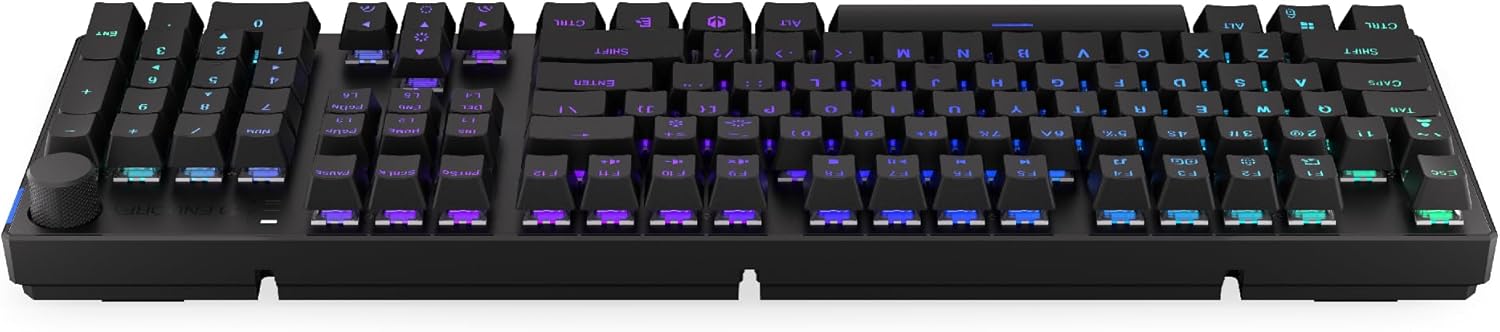
Image 1.1: The ENDORFY Thock Wireless Mechanical Keyboard EY5A078. This image displays the full QWERTY layout with illuminated keys, showcasing the keyboard's design and RGB capabilities.
2. د بسته محتويات
ډاډ ترلاسه کړئ چې ټول توکي په کڅوړه کې شتون لري:
- ENDORFY Thock Wireless Mechanical Keyboard EY5A078
- USB-C to USB-A Cable (detachable)
- 2.4 GHz USB رسیدونکی
- کیکیپ پلر
- سویچ پلر
- د کارونکي لارښود (دا لاسوند)
3. تنظیم او پیوستون
The ENDORFY Thock Wireless Mechanical Keyboard offers three connection modes: wired, 2.4 GHz wireless, and Bluetooth.
3.1. د تار نښلول
- Locate the USB-C port on the keyboard (typically on the back or top edge).
- ورکړل شوی USB-C د USB-A کیبل سره کیبورډ ته وصل کړئ.
- د کیبل USB-A پای په خپل کمپیوټر کې موجود USB پورټ سره وصل کړئ.
- کیبورډ به په اتوماتيک ډول کشف شي او د کارولو لپاره چمتو شي.
انځور ۵.۱: اړخ view د کیبورډ، د تار سره د اتصال او چارج کولو لپاره د USB-C پورټ روښانه کول.
۲.۱. ۲.۴ GHz بېسیم اتصال
- Locate the 2.4 GHz USB receiver. It may be stored in a compartment on the underside of the keyboard.
- Plug the 2.4 GHz USB receiver into an available USB port on your computer.
- On the keyboard, locate the mode switch (usually on the back or side) and set it to the 2.4 GHz wireless mode (often indicated by a specific icon or "2.4G").
- The keyboard should automatically connect. An indicator light may confirm the connection.

Image 3.2: Underside of the keyboard, showing the compartment for storing the 2.4 GHz USB receiver and adjustable feet.
3.3. د بلوتوث پیوستون
- On the keyboard, set the mode switch to Bluetooth mode (often indicated by a Bluetooth icon or "BT").
- The keyboard may have multiple Bluetooth profiles (e.g., BT1, BT2, BT3). Select one by pressing Fn + 1, Fn + 2, or Fn + 3. The corresponding indicator light will flash.
- په خپل کمپیوټر یا وسیله کې، د بلوتوټ ترتیبات خلاص کړئ او د نویو وسایلو لټون وکړئ.
- Select "ENDORFY Thock Wireless" (or similar name) from the list of available devices.
- د جوړه کولو پروسې بشپړولو لپاره هر ډول د پردې پرامپټس تعقیب کړئ.
- یوځل چې جوړه شي، په کیبورډ کې د شاخص رڼا به ځلیدل ودروي او ټینګ پاتې شي.
4. عملیات
4.1. Key Functions and Shortcuts
The keyboard features various function key combinations (Fn + Key) for multimedia control, lighting adjustments, and other settings.
- ایف این + ایف ۱-ایف ۱۲: Multimedia and system functions (e.g., volume control, media playback, calculator). Refer to the keycap legends for specific functions.
- Fn + د تیر کیلي: Adjust RGB lighting effects (e.g., brightness, speed, direction).
- Fn + 1/2/3: د بلوتوث پرو ترمنځ بدل کړئfiles.
- Fn + 4: Switch to 2.4 GHz wireless mode.
- Fn + 5: تار لرونکي حالت ته واړوئ.
۱. د RGB رڼا کنټرول
The ENDORFY Thock keyboard features programmable RGB backlighting. Use the following combinations to customize the lighting:
- Fn + ښي غشی: Change lighting effect.
- Fn + کیڼ غشی: Change lighting effect direction.
- Fn + پورته غشی: روښانتیا زیاته کړئ.
- Fn + ښکته غشی: روښانتیا کمه کړئ.
- Fn + Ins: رنګ بدل کړئ.
- Fn + Del: Adjust effect speed.
4.3. د حجم نوب
The dedicated volume knob located on the top right of the keyboard allows for quick audio adjustments.
- د ساعت په لور وګرځئ: حجم زیات کړئ.
- د ساعت په مخالف لوري وګرځوئ: حجم کم کړئ.
- لاندې فشار ورکړئ: غږ خاموش/غیر خاموش کړئ.

Image 4.1: Detail of the volume knob and status indicator lights, located on the upper right side of the keyboard.
۵.۲. ګرم بدلیدونکي سویچونه
The ENDORFY Thock keyboard features hot-swappable switches, allowing you to change mechanical switches without soldering. This enables customization of typing feel.
- د کیلي کیپ لرې کول: د مطلوب کیلي کیپ لرې کولو لپاره چمتو شوي کیلي کیپ پلر وکاروئ.
- سویچ لرې کړئ: د ورکړل شوي سویچ پلر څخه کار واخلئ ترڅو د سویچ پورتنۍ او ښکته کلپونه په احتیاط سره ونیسئ او مستقیم یې پورته کش کړئ.
- نوی سویچ داخل کړئ: Align the pins of the new switch with the holes on the PCB. Press the switch firmly until it clicks into place. Ensure pins are not bent.
- د کیلي کیپ بدلول: د کیلي کیپ بیرته د نوي سویچ سټیم باندې کیږدئ.

انځور ۲: یوه نږدې انځور view of the Kailh Box Brown mechanical switches, demonstrating the hot-swappable design.
5. ساتنه
۱. د کیبورډ پاکول
منظم پاکول د کیبورډ فعالیت او بڼه ساتلو کې مرسته کوي.
- د پاکولو دمخه کیبورډ له خپل کمپیوټر څخه جلا کړئ.
- د بشپړ پاکولو لپاره د کیلي کیپونو لرې کولو لپاره د کیلي کیپ کشونکي څخه کار واخلئ.
- د کیلي ګانو ترمنځ د دوړو او کثافاتو د لرې کولو لپاره د فشار شوي هوا څخه کار واخلئ.
- Wipe keycaps and the keyboard surface with a soft, damp ټوکر د سختو کیمیاوي موادو څخه ډډه وکړئ.
- Ensure the keyboard is completely dry before reconnecting.
۲. د کی کیپ او سویچ بدلول
Refer to Section 4.4 for detailed instructions on replacing keycaps and switches. Use only compatible keycaps and switches to avoid damage.
6. ستونزه حل کول
| ستونزه | احتمالي لامل | د حل لاره |
|---|---|---|
| کیبورډ ځواب نه ورکوي (وایر شوی) | د کیبل اتصال خلاص دی، د USB پورټ خراب دی. | ډاډ ترلاسه کړئ چې د USB-C کیبل په خوندي ډول وصل دی. یو بل USB پورټ یا کیبل هڅه وکړئ. |
| کیبورډ ځواب نه ورکوي (بې سیم) | Low battery, incorrect mode, receiver not plugged in, pairing issue. | Charge the keyboard. Ensure mode switch is set correctly (2.4G or BT). Re-pair Bluetooth or re-insert 2.4 GHz receiver. |
| د RGB څراغ کار نه کوي | Lighting turned off, low battery, software issue. | Check lighting controls (Fn + Arrow keys). Charge the keyboard. Restart computer. |
| د کیلي دوه ځله ټایپ کول یا نه راجستر کول | د سویچ لاندې دوړې/کثافات، خراب سویچ. | Clean under keycaps with compressed air. If issue persists, replace the switch (refer to Section 4.4). |
7. مشخصات
- ماډل: EY5A078
- نښه: پای ته ورسوئ
- ارتباط: Wired (USB-C), 2.4 GHz Wireless, Bluetooth
- د بدلولو ډول: Kailh Box Brown (Hot-swappable)
- کلیدونه: د PBT ډبل شاټ
- ترتیب: بشپړ اندازه QWERTY
- شاته رڼا کول: د پروګرام وړ RGB
- عملیاتي سیسټمونه: Linux, Mac OS X 10.12 Sierra, Windows 10
- رنګ: تور
- مواد: Polybutylene terephthalate (PBT)
- ځانګړي ځانګړتیاوې: Detachable cable, Volume knob with mute, Hot-swappable switches
- بیټرۍ: لیتیم آیون (شامل دی)
8. تضمین او ملاتړ
ENDORFY products are covered by a manufacturer's warranty. For detailed warranty information, please refer to the warranty card included with your product or visit the official ENDORFY website. For technical support, product inquiries, or service requests, please contact ENDORFY customer support through their official channels.
رسمي Webسایټ: www.endorfy.com
9. د خوندیتوب معلومات
- کیبورډ د مایعاتو او ډیر رطوبت څخه لرې وساتئ.
- د کیبورډ ډیر تودوخې ته د افشا کولو څخه ډډه وکړئ.
- Do not attempt to disassemble or modify the keyboard beyond hot-swapping switches and keycaps, as this may void the warranty and cause damage.
- یوازې چمتو شوی یا وړاندیز شوی چارج کیبل وکاروئ.
- د بیټرۍ او الکترونیکي اجزاو د ځایی مقرراتو سره سم په مسؤلیت سره تصفیه کړئ.


