1. پیژندنه
This manual provides essential information for the safe and effective use of your Laserliner 082.262A Inspection Camera. Please read these instructions carefully before operating the device and keep them for future reference. The Laserliner 082.262A is a robust inspection camera designed for visual inspection of inaccessible areas, featuring a 5mm diameter and 1m length probe.
2. د خوندیتوب معلومات
د وسیلې د ټپي کیدو او زیان څخه د مخنیوي لپاره تل لاندې خوندیتوب احتیاطي تدابیر په پام کې ونیسئ:
- Do not immerse the main unit in water. The camera probe is water-resistant, but the display unit is not.
- Do not use the device in explosive atmospheres or near flammable gases or liquids.
- وسیله د ماشومانو له لاسرسي لرې وساتئ.
- د وسیلې د بدلولو یا جلا کولو هڅه مه کوئ. ټولې خدمتونه وړ پرسونل ته راجع کړئ.
- ډاډ ترلاسه کړئ چې بیټرۍ په سمه قطبي حالت کې داخلې شوې دي. که چیرې وسیله د اوږدې مودې لپاره ونه کارول شي نو بیټرۍ لرې کړئ.
- Avoid direct eye exposure to the camera's LED lights.
3. د بسته محتويات
د خلاصولو پر مهال ډاډ ترلاسه کړئ چې ټول توکي شتون لري:
- Laserliner 082.262A Inspection Camera (main unit with display)
- Flexible camera probe (5mm diameter, 1m length)
- Batteries (Alkaline)
- د کارن لارښود
4. محصول ختم شوview
Familiarize yourself with the components of your inspection camera.
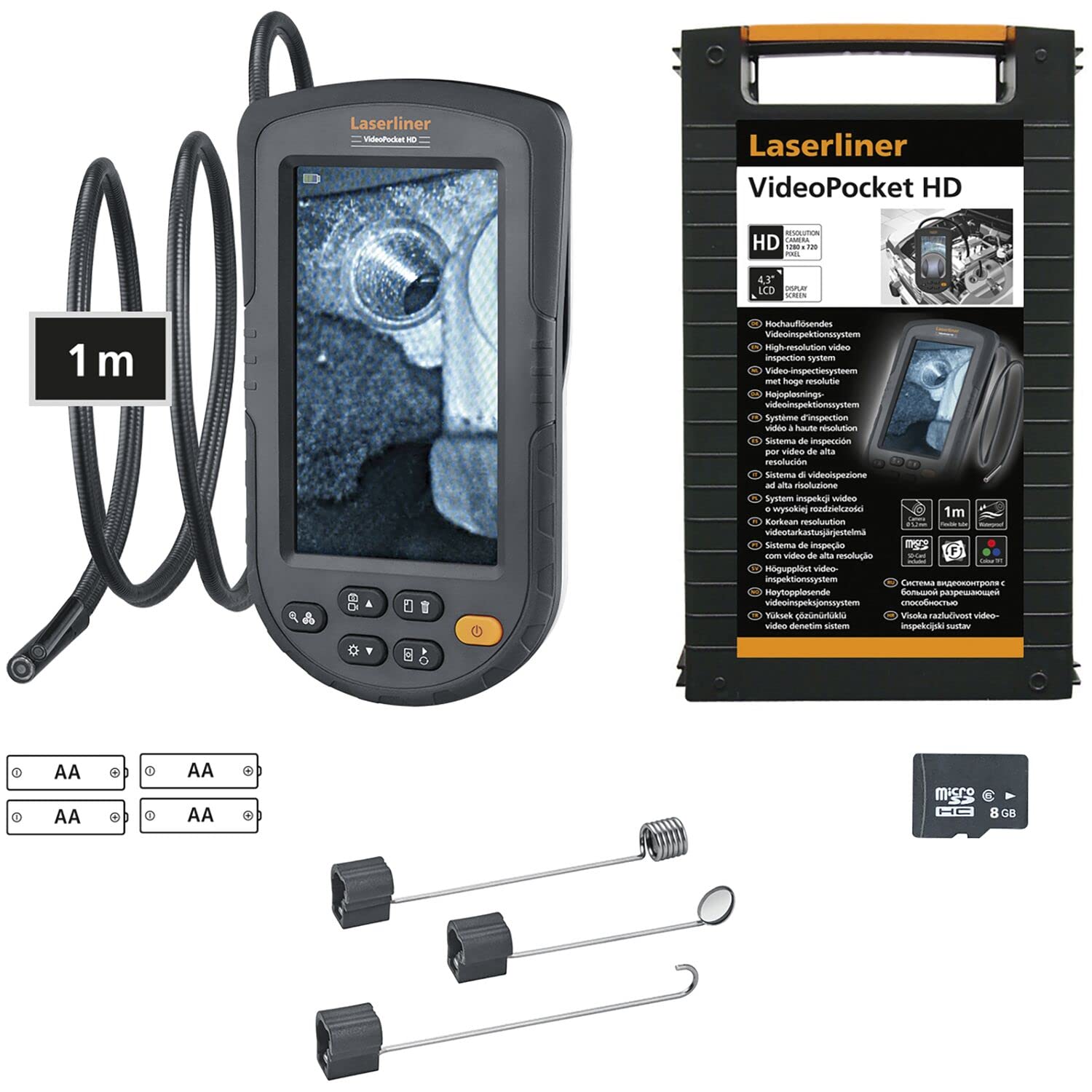
Figure 1: Laserliner 082.262A Inspection Camera. The image shows the handheld display unit connected to the flexible camera probe, ready for use.
The device consists of a main display unit with control buttons and a flexible probe with an integrated camera and LED lighting at its tip. The probe is designed to navigate tight spaces and transmit live video to the display.
5. ترتیب کول
Follow these steps to prepare your inspection camera for first use:
- د بیټرۍ نصب کول: Open the battery compartment on the rear of the main unit. Insert the provided alkaline batteries, ensuring correct polarity (+/-). Close the compartment securely.
- د پلټنې اړیکه: Connect the flexible camera probe to the designated port on the main unit. Ensure a firm connection.

شکل 2: شاته view of the inspection camera. This image illustrates the back of the device, including the product label and the area where the flexible probe connects.
6. عملیاتي لارښوونې
This section details how to operate your Laserliner 082.262A Inspection Camera.
6.1 بریښنا کول / بندول
- To power on: Press and hold the power button (usually orange) until the display illuminates.
- د بریښنا بندولو لپاره: د بریښنا تڼۍ بیا فشار ورکړئ او ونیسئ تر هغه چې ښودنه بنده نشي.
6.2 بنسټیز کنټرولونه
The main unit features several buttons for controlling the camera and display functions:
- د LED روښانتیا: Adjust the intensity of the camera's LED lights for optimal visibility in dark environments.
- د انځور گردش: Rotate the image on the display for correct orientation, especially when the probe is twisted.

Figure 3: Image Rotation. This diagram illustrates how the image can be rotated on the display, showing 0, 90, 180, and 270-degree orientations.
6.3 Optimal Focus Distance
The camera has a fixed focus. For clear images, position the camera tip within the optimal focus range, typically a few centimeters from the object.
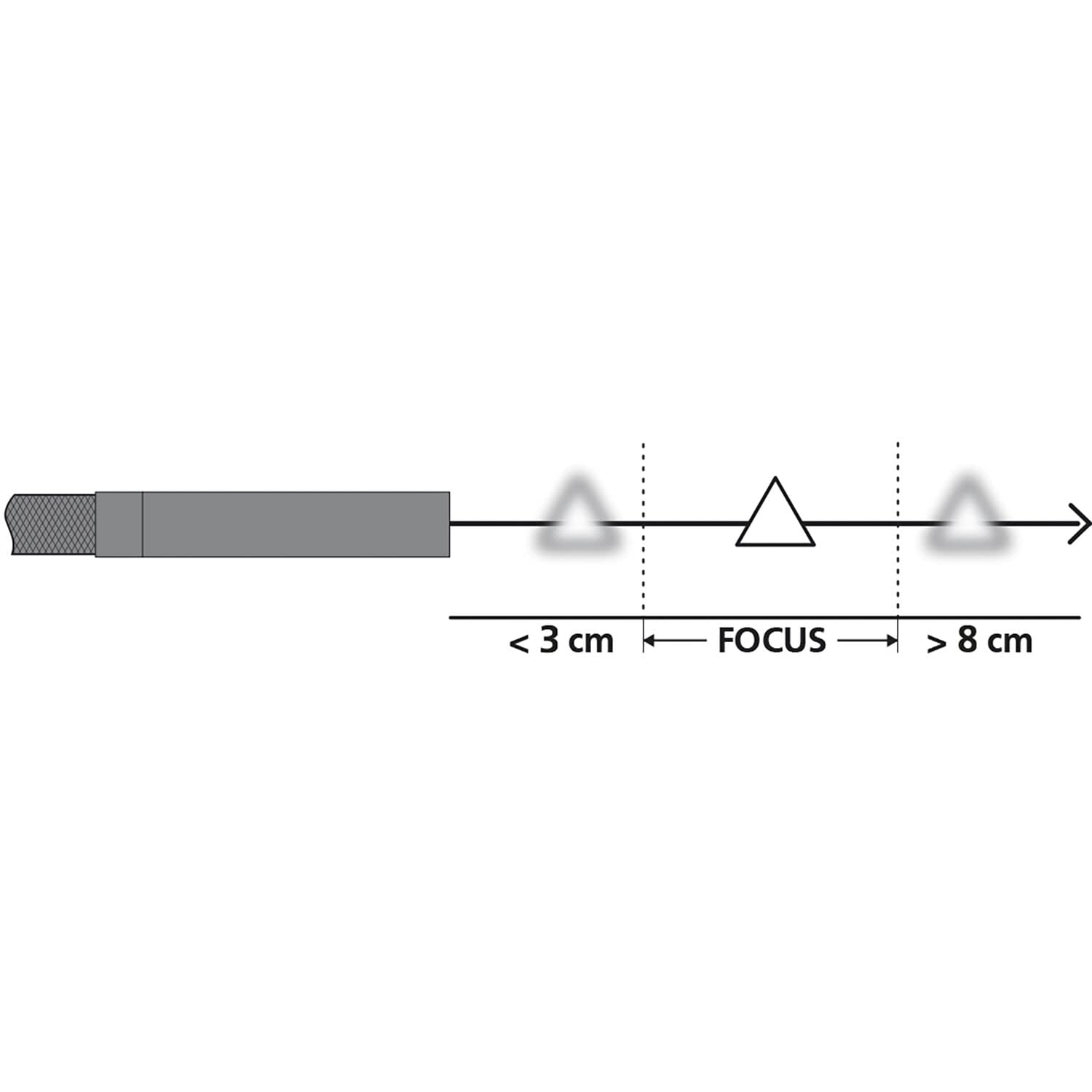
Figure 4: Focus Range. This diagram shows the recommended distance for clear imaging, indicating that objects too close (less than 3 cm) or too far (greater than 8 cm) may appear blurry, with an optimal focus zone in between.
۶.۳ عملي استعمالونه
The inspection camera is versatile for various tasks:
- د وسایلو معاینه: Examine internal components of dishwashers or other household appliances.
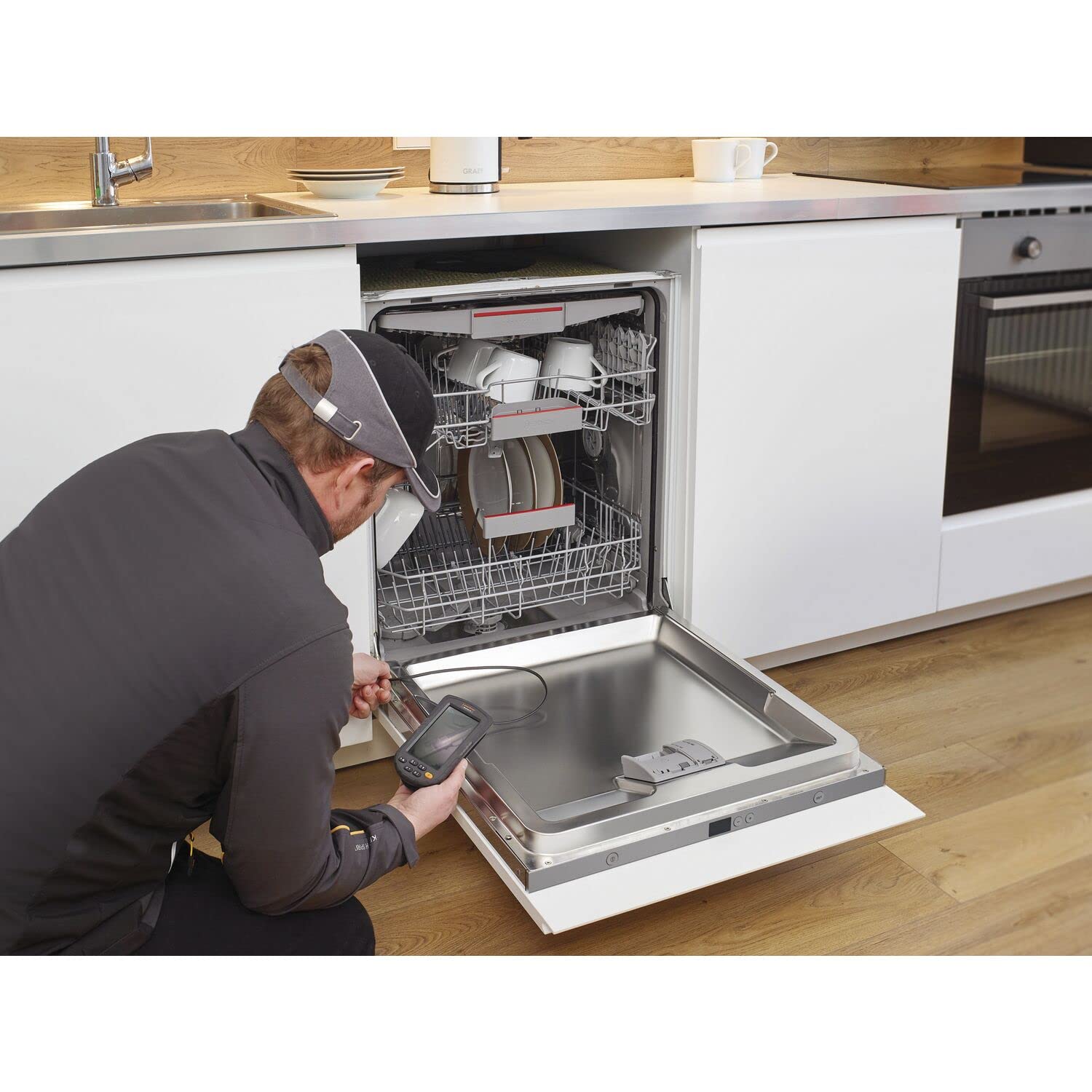
Figure 5: Dishwasher Inspection. A technician uses the inspection camera to view the internal workings of a dishwasher, checking for blockages or damage.
- د موټرو تشخیص: Inspect engine compartments, cylinders, or other vehicle parts.

Figure 6: Engine Inspection. The camera probe is inserted into an engine bay, allowing for visual inspection of internal components without extensive disassembly.
- Plumbing and Drainage: Check pipes, drains, and sewage systems for clogs or damage.

Figure 7: Drain Inspection. The camera is used to inspect a floor drain, providing a clear view of the pipe's interior.
- Cavity and Wall Inspections: Explore behind walls, ceilings, or other enclosed spaces.

Figure 8: Ceiling Cavity Inspection. The camera probe is inserted into a ceiling opening to inspect the hidden space above.
- Sink and Shower Drains: لاسرسی او view blockages or issues in bathroom plumbing.

Figure 9: Sink Drain Inspection. The camera is positioned to inspect the U-bend of a sink drain, revealing any obstructions.

Figure 10: Shower Drain Inspection. The camera probe is inserted into a shower drain to check for blockages or pipe conditions.
- Gutter and Downspout Inspection: Identify debris or damage in exterior drainage systems.
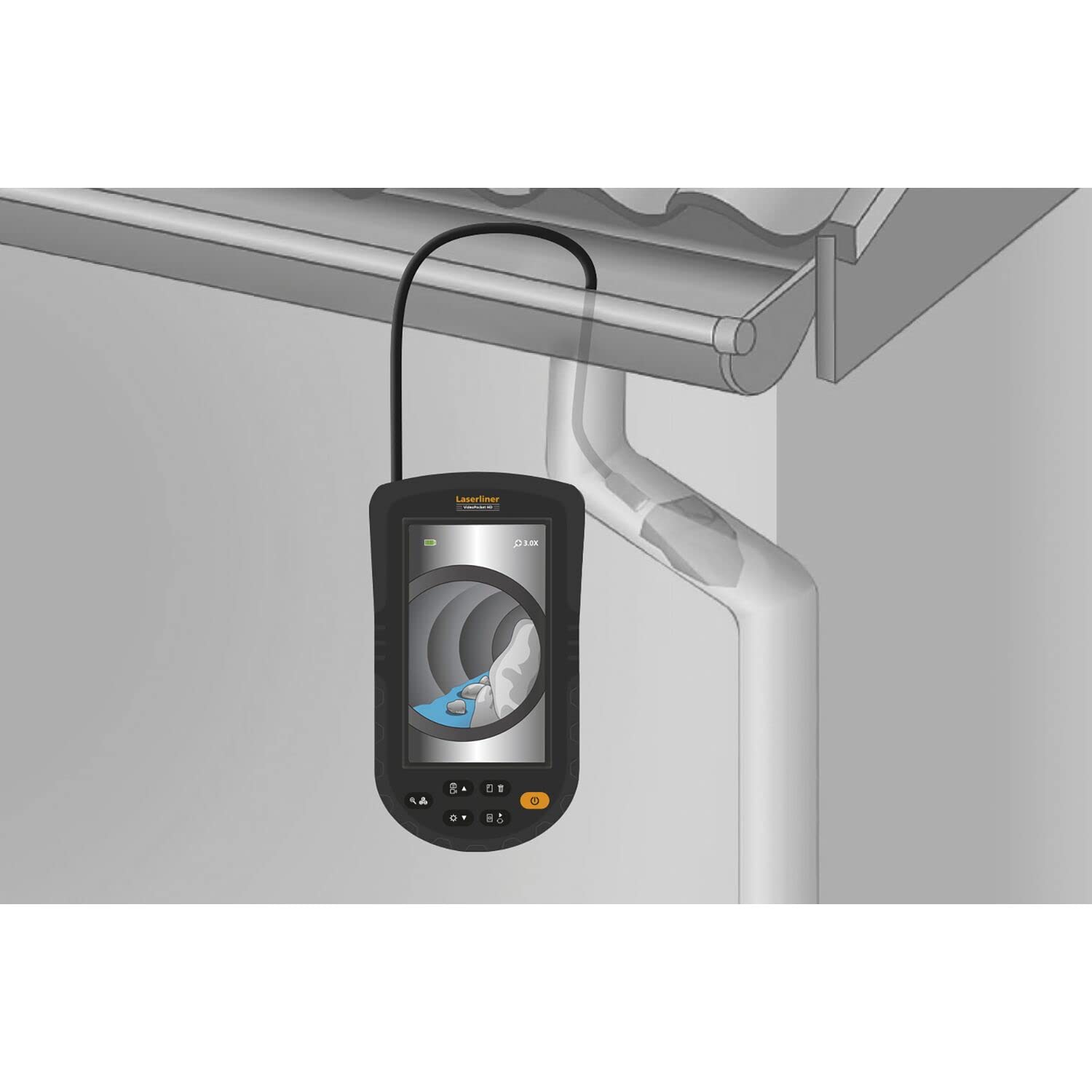
Figure 11: Gutter Inspection. The camera is used to inspect a gutter and downspout, showing the presence of leaves and debris.
7. ساتنه
مناسب ساتنه ستاسو د وسیلې اوږد عمر او فعالیت تضمینوي.
- پاکول: Wipe the main unit with a soft, dry cloth. The camera probe can be cleaned with a damp cloth and mild detergent. Ensure no liquid enters the main unit.
- د بیټرۍ پاملرنه: Replace batteries when the low battery indicator appears. Remove batteries if the device is not used for extended periods to prevent leakage.
- ذخیره کول: Store the device in a cool, dry place, away from direct sunlight and extreme temperatures. Coil the probe loosely to avoid kinking.
8. ستونزه حل کول
که تاسو له ستونزو سره مخ شئ، لاندې عامې ستونزې او حل لارې وګورئ:
| ستونزه | احتمالي لامل | د حل لاره |
|---|---|---|
| وسیله فعاله نه ده | ټیټ یا مړه بیټرۍ؛ د بیټرۍ ناسم نصب کول | بیټرۍ بدل کړئ؛ د بیټرۍ قطبیت وګورئ |
| په ښودنه کې هیڅ انځور نشته | پروب په سمه توګه نه دی وصل شوی؛ زیانمن شوی پروب | ډاډ ترلاسه کړئ چې پروب په خوندي ډول وصل دی؛ که پروب زیانمن شوی وي نو د ملاتړ سره اړیکه ونیسئ |
| انځور غلی دی | Object too close or too far from camera; Dirty camera lens | Adjust distance to object (refer to focus diagram); Clean camera lens gently |
| د LED څراغونه کار نه کوي | LED brightness set to minimum; Faulty LEDs | Increase LED brightness using controls; Contact support |
If the problem persists after trying these solutions, please contact Laserliner customer support.
9. مشخصات
Detailed technical specifications for the Laserliner 082.262A Inspection Camera:
| فیچر | مشخصات |
|---|---|
| جوړونکی | لیزر لاینر |
| د محصول ابعاد (L x W x H) | 12 x 19 x 14 سانتي متره |
| د توکي ماډل شمیره | 082.262A |
| مواد | پلاستیک |
| شکل | مربع |
| په بسته کې د توکو شمیر | 1 |
| د اندازه کولو سیسټم | شاخص |
| بیټرۍ پکې شاملې دي | هو |
| بیټرۍ ته اړتیا ده | هو |
| د بیټرۍ جوړښت | الکلین |
| د توکي وزن | 370 ګرامه |
| د اصلي هیواد | چین |
| ASIN | B0BYKBV8ZC |
10. تضمین او ملاتړ
For warranty information, please refer to the documentation provided with your purchase or visit the official Laserliner website. For technical support or service inquiries, contact Laserliner customer service directly.
Spare parts availability: Information unavailable.
11. د ضایع کولو معلومات
Electronic devices and batteries must not be disposed of with household waste. Please dispose of them according to local regulations at designated collection points for electronic waste and batteries. Proper disposal helps protect the environment and human health.


