1. پیژندنه
Thank you for choosing the HIKMICRO HEIMDAL H4D Digital Night Vision Monocular. This device is designed for observation in low light and complete darkness, featuring a high-resolution sensor and AMOLED display for clear imaging.
کلیدي ځانګړتیاوې:
- 1.39" AMOLED display with 454 x 454 resolution
- High-resolution 2560 x 1440 sensor
- Integrated 850 nm infrared illuminator with smart IR function
- Day/Night/Auto/Defog modes
- د بریښنایی عکس العمل ثبات (EIS)
- Detection range up to 200 meters
- Replaceable and rechargeable battery with over 4 hours of use
- Compact and portable design, waterproof and dustproof (IP67)
- Integrated 32 GB EMMC for storing recorded videos and photos
- Wireless connection via HIKMICRO Sight app, local album function
د بسته محتويات:
- HIKMICRO HEIMDAL H4D Digital Night Vision Monocular
- بیټرۍ
- دوړو ټوکر
- محافظتي کڅوړه
- د لاس پټه
- USB-C کیبل
- ګړندي لارښود
2. محصول ختم شوview
Familiarize yourself with the components and controls of your HIKMICRO HEIMDAL H4D monocular.
د وسیلې ترتیب
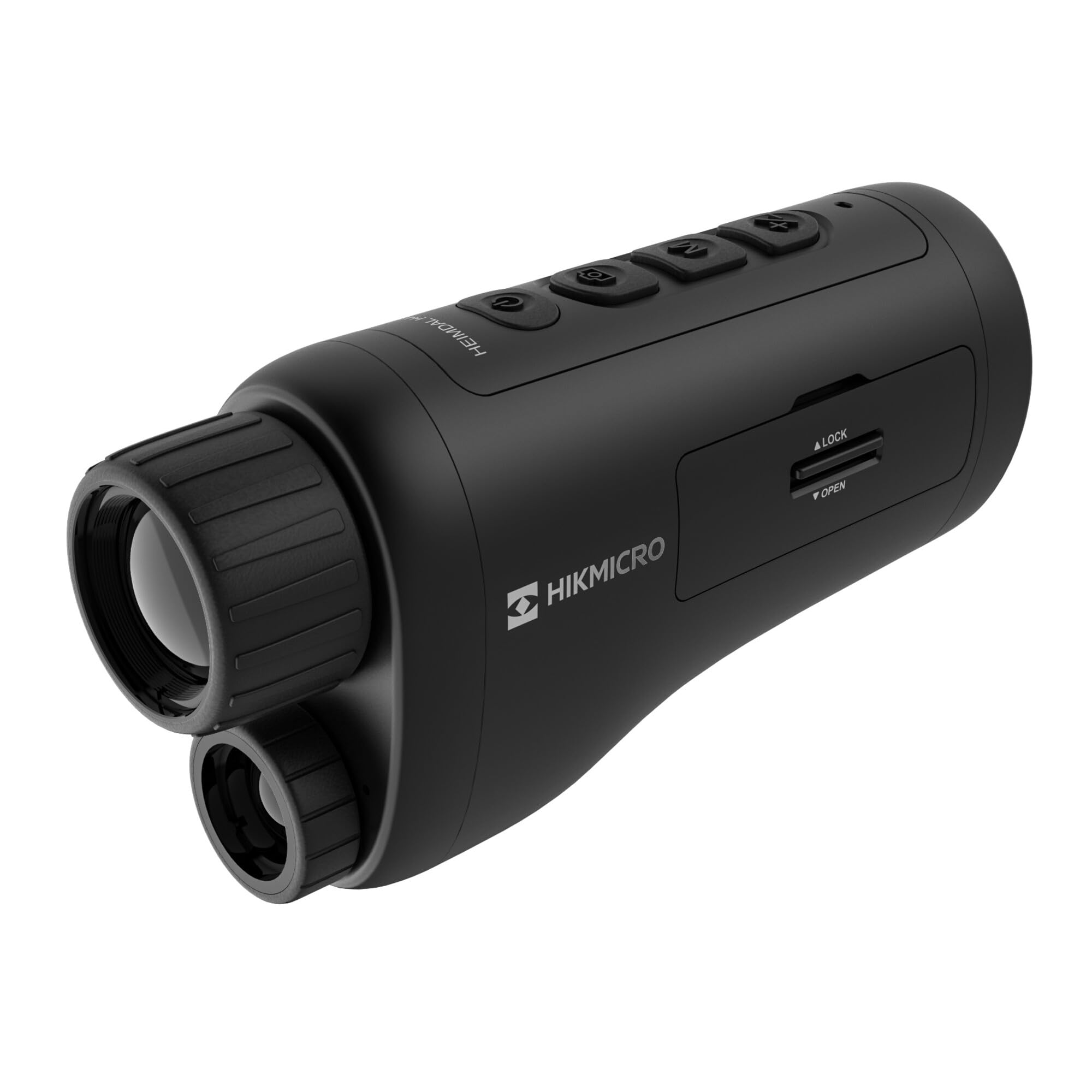
یو زاویه لرونکی view of the HIKMICRO HEIMDAL H4D monocular, showing its compact, ergonomic design and the main lens.
کنټرولونه او تڼۍ

پورته view of the monocular showing the power button, photo/video record button, mode button, and zoom/IR adjustment buttons.
Lenses and Focus

مخکی view displaying the objective lens and the integrated infrared illuminator.
د بیټرۍ کڅوړه

اړخ view showing the battery compartment with 'LOCK' and 'OPEN' indicators.
3. ترتیب کول
د بیټرۍ نصب کول
- Locate the battery compartment on the side of the device.
- Slide the lock mechanism to the 'OPEN' position.
- د چارج وړ بیټرۍ دننه کړئ، د سم قطبیت ډاډ ترلاسه کړئ.
- Close the compartment and slide the lock mechanism to the 'LOCK' position.
د بیټرۍ چارج کول
Connect the device to a power source using the provided USB-C cable. The charging indicator will show the charging status.
ابتدايي بریښنا فعاله ده
د بریښنا تڼۍ فشار ورکړئ او ونیسئ (معمولا د دې سره نښه شوی Ⓘ) until the HIKMICRO logo appears on the display.
4. عملیاتي لارښوونې
پاور آن/بند
- پاور آن: د نږدې 3 ثانیو لپاره د بریښنا تڼۍ فشار ورکړئ او ونیسئ.
- بندول: Press and hold the power button for approximately 3 seconds until the device shuts down.
د تمرکز تنظیم کول
Rotate the focus ring on the objective lens to achieve a clear image of your target.
د موډل انتخاب
Press the 'M' (Mode) button to cycle through observation modes: Day, Night, Auto, and Defog.
Zoom and IR Adjustment
Use the '+' and '-' buttons to adjust the digital zoom level. These buttons also control the intensity of the infrared illuminator in night mode.
د عکس او ویډیو ثبت کول
- عکس واخلئ: Press the photo/video button (usually marked with 📷) once to capture an image.
- ویډیو ثبت کړئ: Press and hold the photo/video button to start recording. Press again to stop.
Connecting to HIKMICRO Sight App
Download the HIKMICRO Sight app from your device's app store. Follow the in-app instructions to connect your monocular for live view, remote control, and media management.
5. ساتنه
پاکول
- Use the provided dust cloth or a soft, lint-free cloth to clean the lenses.
- For stubborn dirt, use a lens cleaning solution specifically designed for optics.
- د وسیلې بدن په نرم، d سره پاک کړئamp ټوکر د کثافاتو پاکوونکي یا محلول مه کاروئ.
ذخیره کول
- Store the monocular in its protective bag in a cool, dry place when not in use.
- بیټرۍ لرې کړئ که چیرې وسیله د اوږدې مودې لپاره ونه کارول شي.
د بیټرۍ پاملرنه
- Charge the battery regularly, even if not in frequent use, to maintain its lifespan.
- د چارج کولو او ذخیره کولو پرمهال د لوړې تودوخې څخه ډډه وکړئ.
6. ستونزه حل کول
عام مسایل او حل لارې
| ستونزه | احتمالي لامل | د حل لاره |
|---|---|---|
| وسیله فعاله نه ده. | بیټرۍ ختمه شوې یا په غلط ډول نصب شوې ده. | بیټرۍ چارج کړئ. ډاډ ترلاسه کړئ چې بیټرۍ په سمه قطبي حالت کې داخل شوې ده. |
| انځور تیاره دی. | تمرکز نه دی تنظیم شوی. | Rotate the focus ring on the objective lens until the image is clear. |
| Poor image quality in darkness. | IR illuminator is off or set to low intensity. | Activate the IR illuminator or increase its intensity using the '+' button. Ensure you are in Night mode. |
| Cannot connect to HIKMICRO Sight app. | Bluetooth/Wi-Fi is off on device or phone, or app is not updated. | Ensure Bluetooth/Wi-Fi is enabled on both devices. Restart the app and monocular. Check for app updates. |
| وسیله کنګل کیږي یا بې ځوابه کیږي. | د سافټویر لنډمهاله ستونزه. | Perform a soft reset by holding the power button until the device restarts. If issue persists, contact support. |
7. مشخصات
| فیچر | تفصیل |
|---|---|
| د سینسر پریکړه | 2560 x 1440 |
| د ښودلو ډول | AMOLED |
| د ښودلو ریزولوشن | 454 x 454 |
| د ښودلو اندازه | 1.39 انچه (3.5 سانتي متره) |
| د اور وژونکي روښانه کول | Integrated 850 nm |
| د کشف رینج | تر 200 مترو پورې |
| ذخیره کول | 32 GB EMMC (internal) |
| د بیټرۍ ژوند | More than 4 hours (replaceable, rechargeable) |
| د پنروک درجه | IP67 |
| ابعاد | ۱۶۷ ملي متره x ۱۱۶ ملي متره x ۸.۱۸ ملي متره (۶.۶" x ۴.۶" x ۰.۳۲") |
| وزن | ۶۰۰ ګرامه (۱.۳۲ پونډه) |
| مواد | پلاستیک |
| مطابقت لرونکې وسیلې | Rifle, Compound Bow |
| د نصب کولو ډول | Picatinny Mount |
| Sport Use | Camping، پیدل سفر |
| رنګ | سپین |
8. تضمین او ملاتړ
HIKMICRO products are covered by a limited warranty. For detailed warranty information, please refer to the official HIKMICRO webسایټ یا خپل محلي پلورونکي سره اړیکه ونیسئ.
For technical support, troubleshooting assistance, or service inquiries, please visit the official HIKMICRO support page or contact their customer service department.
رسمي Webسایټ: www.hikmicrotech.com


