1. پیژندنه
This manual provides detailed instructions for the ANCEL PB100 Car Circuit Tester and the ANCEL AD410 PRO OBD2 Scanner. These devices are designed to assist in diagnosing vehicle electrical systems and engine performance issues. The ANCEL AD410 PRO combines OBD2 diagnostic capabilities with comprehensive battery testing functions, while the ANCEL PB100 is a versatile tool for circuit testing.

Figure 1: ANCEL PB100 Car Circuit Tester and ANCEL AD410 PRO OBD2 Scanner Combo Kit
۳. څه پکې شامل دي
The ANCEL PB100 Car Circuit Tester with ANCEL AD410 PRO OBD2 Scanner combo includes the following items:
- 1x ANCEL PB100 Automotive Power Circuit Probe Tester
- 1x ANCEL AD410 PRO Vehicle Code Reader
- 1x OBD2 connection cable for AD410 PRO
- 1x Battery clamp cable for AD410 PRO
- 1x User's Manual for AD410 PRO
- 1x User's Manual for PB100
3. ترتیب کول
3.1 Connecting for OBD2 Diagnostics (ANCEL AD410 PRO)
- Locate your vehicle's 16-pin Data Link Connector (DLC). This is usually found under the dashboard on the driver's side.
- Connect the ANCEL AD410 PRO's OBD2 cable to the vehicle's DLC.
- Turn the vehicle's ignition to the 'ON' position (engine can be off or running). The AD410 PRO will power on automatically.
3.2 Connecting for Battery Testing (ANCEL AD410 PRO)
- Disconnect the OBD2 cable from the AD410 PRO.
- ورکړل شوی بیټرۍ کلپ سره وصل کړئamp cable to the AD410 PRO's main unit.
- سور cl ضمیمه کړئamp to the positive (+) terminal of the 6V or 12V vehicle battery.
- تور cl ضمیمه کړئamp to the negative (-) terminal of the 6V or 12V vehicle battery. The AD410 PRO will power on.

Figure 2: ANCEL AD410 PRO showing battery testing connections and menu options.
3.3 Connecting the Circuit Tester (ANCEL PB100)
The ANCEL PB100 is designed for 12V and 24V vehicle electrical systems. Connect the red clamp د موټر د بیټرۍ مثبت (+) ټرمینل او تور cl تهamp to the negative (-) terminal. The device will power on.
4. عملیاتي لارښوونې
4.1 ANCEL AD410 PRO OBD2 Scanner Functions
Once connected via the OBD2 port, navigate the menu using the directional buttons and 'ENTER' key.
۳.۲ د تشخیصي ستونزو کوډونو لوستل او پاکول (DTCs)
- From the main menu, select 'OBDII'.
- Choose 'Read Codes' to view اوسني، ځنډیدلي، او دایمي DTCs.
- To clear codes, select 'Erase Codes'. Confirm the action when prompted. This will turn off the Check Engine Light (MIL).

Figure 3: ANCEL AD410 PRO displaying various OBD2 diagnostic functions, including reading and clearing codes.
4.1.2 I/M Readiness Monitor Status
This function checks the readiness of the emission-related monitoring systems. It's useful for pre-smog checks.
- From the main menu, select 'I/M'.
- The scanner will display the status of various monitors (e.g., MIS, FUEL, CCM, CAT, EVAP, O2S).
- A green checkmark indicates the monitor is complete, a yellow 'X' indicates not complete, and a gray dash indicates not applicable.
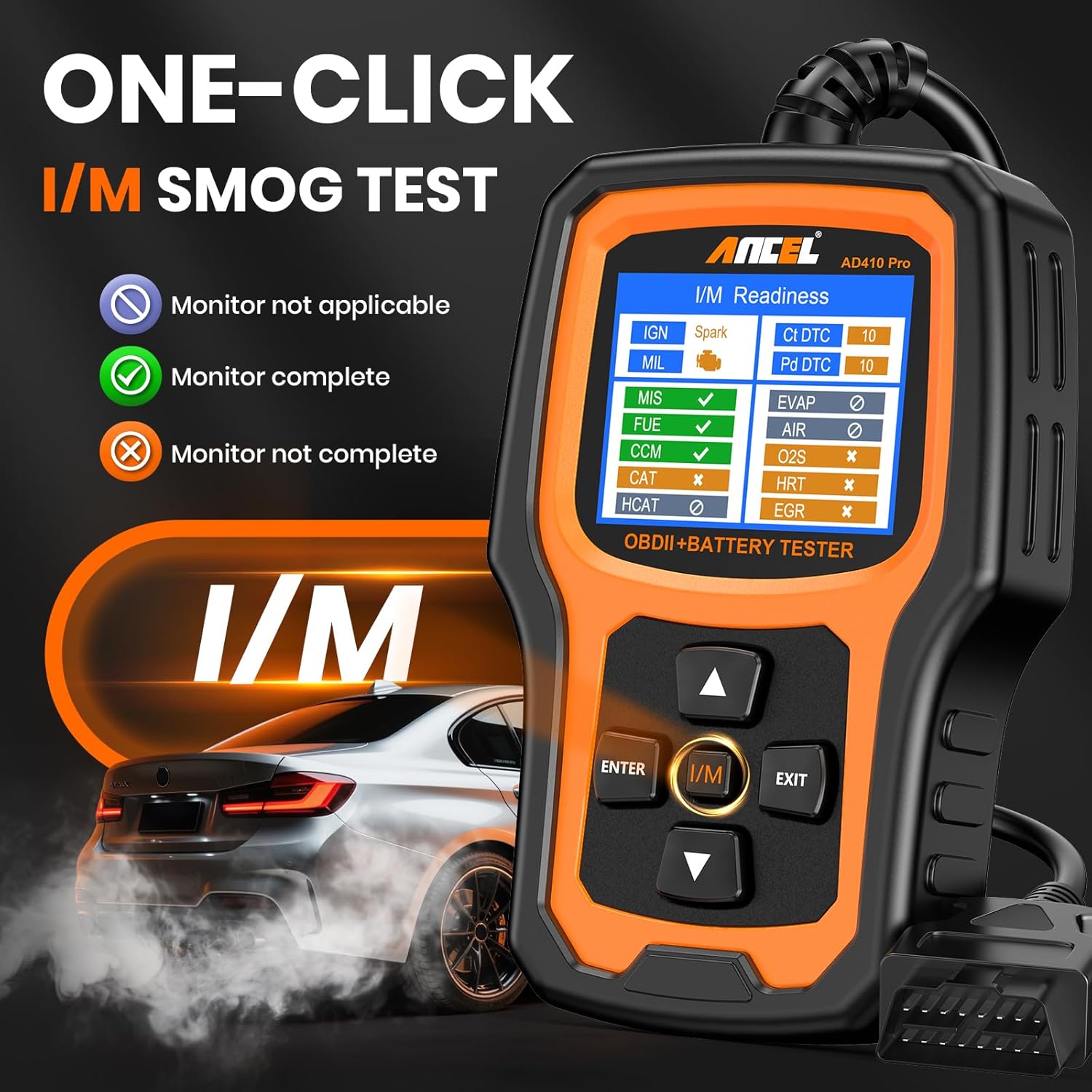
Figure 4: ANCEL AD410 PRO showing I/M Readiness status with color-coded indicators.
۳.۳ ژوندۍ معلوماتي جریان
View real-time data from the vehicle's sensors, which can be displayed as text or graphs.
- From the 'OBDII' menu, select 'Data Stream'.
- غوره کړئ 'View All Items' for a comprehensive list, or 'Select Items' to choose specific parameters.
- غوره کړئ 'View Graphic Items' to see selected data in graphical format.
4.1.4 د DTC کتنه
This feature allows you to input a DTC code and receive a description of the code and possible causes.
- د اصلي مینو څخه، 'DTC Lookup' غوره کړئ.
- Enter the 5-character DTC code using the directional buttons.
- Press 'ENTER' to view the code description and troubleshooting tips.

Figure 5: ANCEL AD410 PRO displaying a DTC code description and possible causes.
4.1.5 د وسایطو معلومات
Retrieve the vehicle's VIN (Vehicle Identification Number), CID (Calibration ID), and CVN (Calibration Verification Number).
4.2 ANCEL AD410 PRO Battery Tester Functions
Once connected to the battery via clamps, navigate the menu using the directional buttons and 'ENTER' key.
4.2.1 د بیټرۍ ازموینه
This test assesses the overall health and charge level of the battery.
- From the main menu, select 'BAT'.
- Choose 'Battery Test'.
- Input battery details: type (e.g., Regular Flooded, AGM Flat Plate, GEL, EFB) and CCA (Cold Cranking Amps) rating. This information is usually found on the battery label.
- The scanner will display battery health (%), charge (V and %), internal resistance, and a recommendation (e.g., Good-Recharge, Replace).
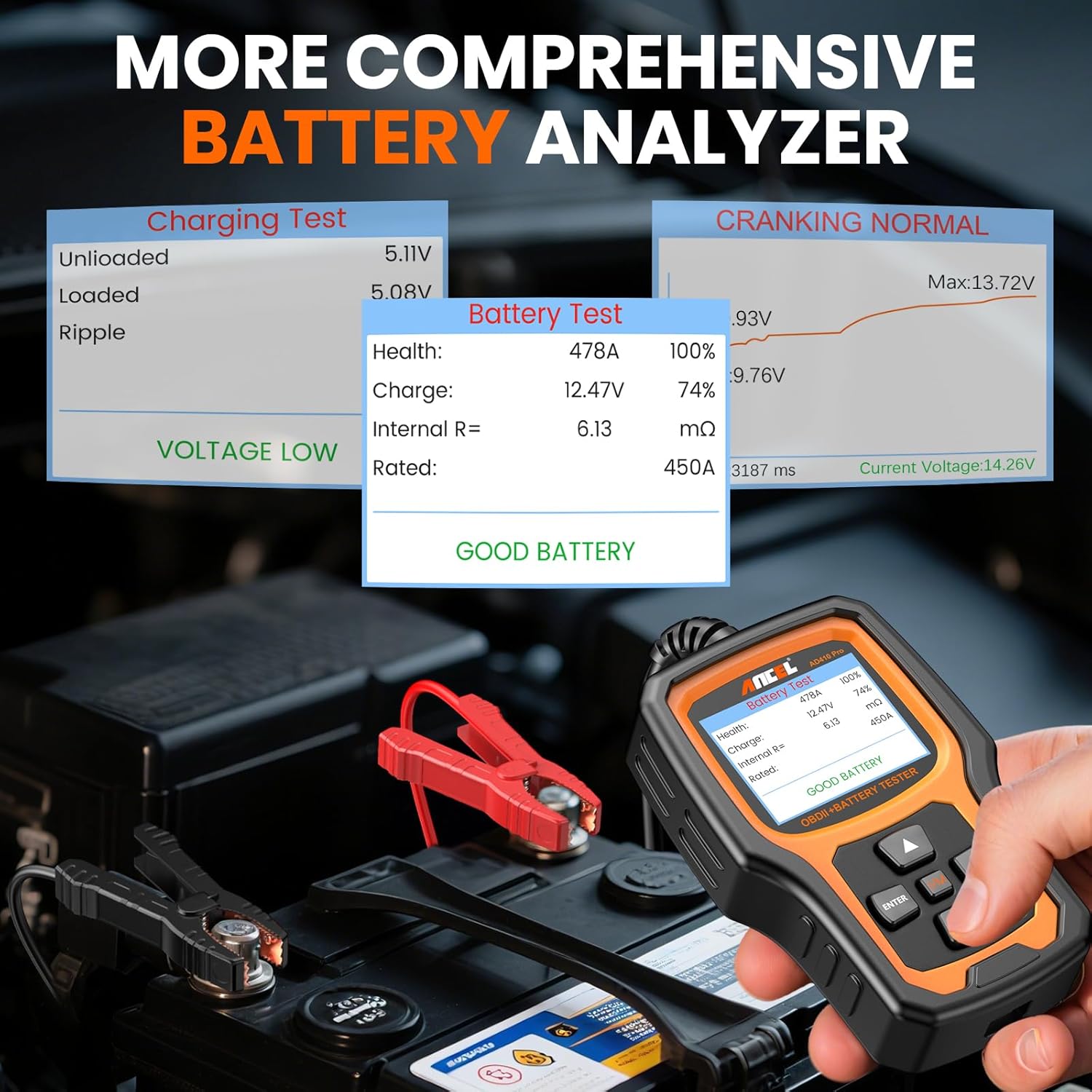
Figure 6: ANCEL AD410 PRO displaying detailed battery test results including health, charge, and internal resistance.
4.2.2 کرینکینګ ازموینه
This test evaluates the battery's ability to start the engine.
- From the 'BAT' menu, select 'Cranking Test'.
- Follow the on-screen prompts, which typically involve turning off the ignition and then starting the engine.
- The scanner will analyze the cranking voltage and provide a result.
4.2.3 د چارج کولو سیسټم ازموینه
دا ازموینه د موټر د چارج کولو سیسټم، په شمول د بدیل کونکي، معاینه کوي.
- From the 'BAT' menu, select 'Charging Test'.
- Follow the on-screen prompts, which may include turning on/off headlights and air conditioning, and maintaining specific RPMs.
- The scanner will display unloaded voltage، بار شوی حجمtage، او د څپو حجمtage, indicating if the charging system is normal or faulty.
4.3 ANCEL PB100 Car Circuit Tester Functions
The ANCEL PB100 is a versatile tool for quickly testing vehicle electrical circuits. It can perform functions such as power injection, ground testing, polarity checking, continuity testing, and component activation. Refer to the dedicated PB100 user manual for detailed operating instructions for each function.
5. ساتنه
- Keep the devices clean and dry. Use a soft, clean cloth to wipe the exterior.
- Store the devices in their protective cases when not in use to prevent damage.
- Ensure cables and clamps are free from damage before each use.
- Software updates for the ANCEL AD410 PRO may be available periodically. Visit the ANCEL official website to download the latest software and update your device via a computer.
6. ستونزه حل کول
- وسیله نه فعالیږي: Ensure proper connection to the vehicle's DLC or battery terminals. Check vehicle battery voltage.
-
اړوند اسناد - PB100, AD410 PRO

د ANCEL AD410 کارولو، لوړولو، او فیډبیک مسلو د حل لارښود
یو جامع لارښود چې د ANCEL AD410 د موټرو تشخیصي سکینر سره مخ شوي عام مسلو په اړه توضیحات ورکوي، چې کارول، سافټویر اپ گریڈونه، او د فیډبیک ډیټا اداره کول، د حل لارو او ستونزو حل کولو مرحلو سره پوښي.
د ANCEL PB100 د وسایطو سرکټ پروب کارونکي لارښود
د ANCEL PB100 د موټرو د بریښنا سرکټ پروب ټیسټر لپاره جامع لارښود. د دې 12V/24V موټر بریښنایی تشخیصي وسیلې لپاره د خوندیتوب، مشخصاتو، د وسیلې توضیحاتو، عملیاتي لارښوونو، د ازموینې پروسیجرونو، او تضمین معلوماتو په اړه زده کړه وکړئ.
د ANCEL AD410 Pro کارونکي لارښود - جامع لارښود
د ANCEL AD410 Pro OBD2 سکینر او د بیټرۍ ټیسټر لپاره د کارونکي مفصل لارښود. د هغې د ځانګړتیاوو، مشخصاتو، او د موټر تشخیص او د بیټرۍ ازموینې لپاره د کارولو څرنګوالي په اړه زده کړه وکړئ.
د ANCEL AD410 Pro+ OBDII او د بیټرۍ ټیسټر کارونکي لارښود
د ANCEL AD410 Pro+ 2-in-1 OBD2 سکینر او بیټرۍ ټیسټر لپاره جامع لارښود، چې د OBDII دندې، د بیټرۍ ازموینه، او مینو نیویګیشن پوښي.
د ANCEL PB100 د وسایطو سرکټ پروب کارونکي لارښود او تشخیصي لارښود
د ANCEL PB100 د وسایطو د سرکټ پروب لپاره جامع کارونکي لارښود او لارښود، چې د هغې ځانګړتیاوې، مشخصات، د خوندیتوب احتیاطي تدابیر، او د موټرو بریښنایی سیسټم تشخیص لپاره عملیاتي لارښوونې توضیح کوي.
د انسل AD410 OBD2 سکین وسیلې کارونکي لارښود
د انسل AD410 لپاره جامع کارن لارښود، د OBD2 سکین وسیله او کوډ لوستونکی. د موټر ستونزو تشخیص کولو، د ستونزو کوډونو لوستلو او پاکولو زده کړئ، view ژوندۍ معلومات، او د I/M د چمتووالي حالت درک کړئ.