پیژندنه
This manual provides essential instructions for the safe operation, maintenance, and troubleshooting of your Hisense RVCG144AB Robot Vacuum Mop. Please read this manual thoroughly before using the product and retain it for future reference.
د خوندیتوب لارښوونې
د ټپي کیدو یا زیان د خطر کمولو لپاره، لاندې خوندیتوب احتیاطي تدابیر په پام کې ونیسئ:
- ډاډ ترلاسه کړئ چې روبوټ د لومړي کارولو دمخه په بشپړ ډول چارج شوی.
- Do not operate the robot near open flames or flammable materials.
- ویښتان، لوڅې جامې، ګوتې او د بدن ټولې برخې د خلاصیدو او خوځنده برخو څخه لرې وساتئ.
- Do not allow children to operate the robot. Supervise children and pets when the robot is in operation.
- Use only the original charging adapter and dock provided by Hisense.
- Remove power cords, small objects, and fragile items from the floor before cleaning to prevent entanglement or damage.
- د لویو کثافاتو، مایعاتو، یا سوځیدونکو شیانو د راټولولو لپاره له روبوټ څخه کار مه اخلئ.
- د غوره فعالیت ساتلو لپاره په منظم ډول برشونه او فلټرونه پاک کړئ.
محصول پای ته ورسیدview
The Hisense RVCG144AB is a versatile robot vacuum mop designed for efficient floor cleaning. It features gyroscopic mapping for systematic navigation, adjustable power and water levels, and convenient control via a mobile application.
د بسته محتويات
د خلاصولو پر مهال، ډاډ ترلاسه کړئ چې ټولې برخې شتون لري:
- Hisense RVCG144AB Robot Vacuum Mop
- چارج سټیشن
- د چارج کیبل
- ریموټ کنټرول
- HEPA Filter (1 piece)
- Cleaning Pad (Mop Cloth)
- Side Brushes (2 pieces)
- د لارښوونې لارښود (دا لارښود)
د روبوټ اجزا
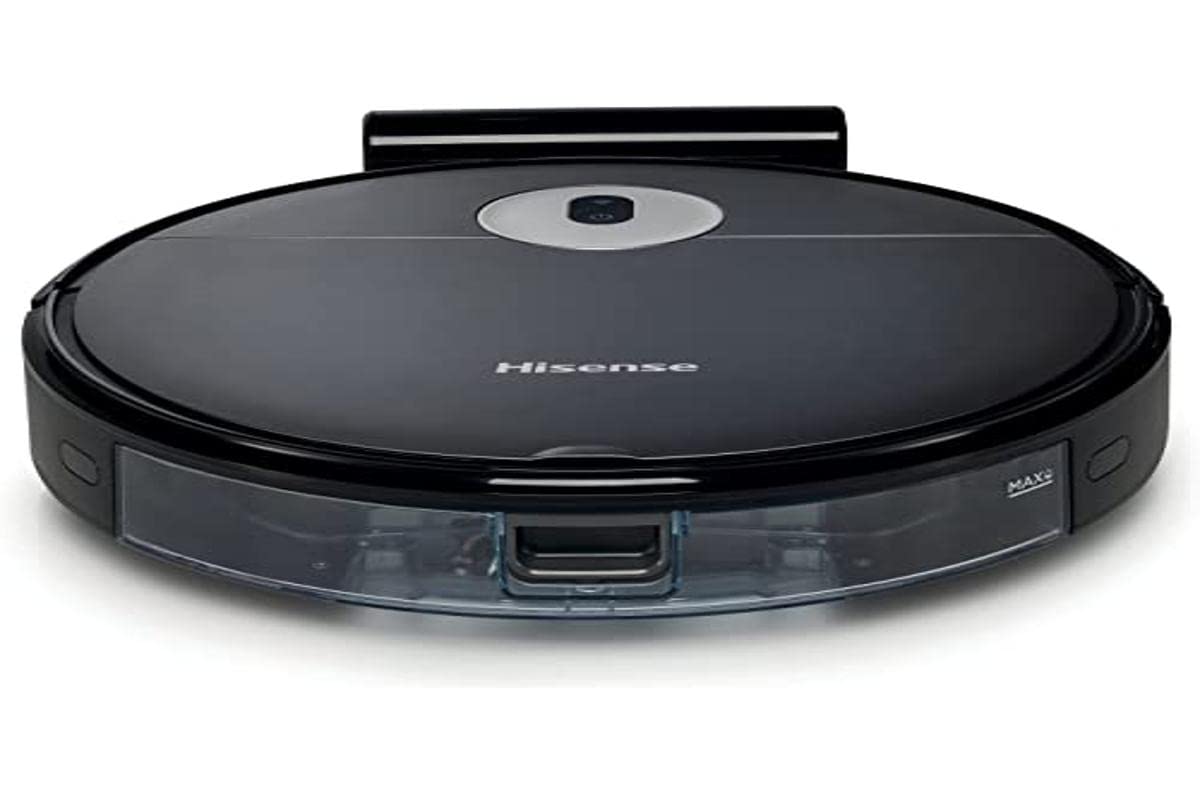
Image: The Hisense RVCG144AB Robot Vacuum Mop, showcasing د هغې ښکلی تور ډیزاین او کمپیکٹ فارم فاکتور.
The robot includes a floating roller brush for adapting to different floor conditions and dual-sided brushes for edge cleaning and preventing hair entanglement.
چمتو کول
۱. د چارج کولو سټیشن ځای پرځای کول
Place the charging station against a wall in an open area, ensuring there are no obstacles within 1 meter (3 feet) to the sides and 2 meters (6 feet) in front of the station. Connect the charging cable to the station and plug it into a power outlet.

Image: Illustration of the charging station, showing its power connection and recommended clear space around it.
۱. ابتدايي چارج کول
Place the robot onto the charging station. Ensure the charging contacts on the robot align with those on the station. The robot will begin charging automatically. For first use, allow the robot to charge completely, which typically takes several hours.
3. د غاړې برش نصب کړئ
د روبوټ په ښکته برخه کې د اړخ برشونه په پوستونو باندې فشار ورکړئ تر هغه چې دوی په خپل ځای کې کلیک وکړي.
۴.۶. د اپلیکیشن اتصال (وای فای)
- Download the Hisense ConnectLife app from your smartphone's app store.
- یو حساب راجستر کړئ او لاګ ان شئ.
- Follow the in-app instructions to add your RVCG144AB robot vacuum. This typically involves connecting the robot to your home Wi-Fi network.
- Ensure your Wi-Fi network is 2.4GHz for optimal connectivity.
عملیاتي لارښوونې
۱. د پاکولو پیل او بندول
- لاسي پیل: Press the power button on the robot once to start cleaning. Press again to pause.
- د اپلیکیشن کنټرول: Use the Hisense ConnectLife app to start, pause, or stop cleaning from anywhere.
- ریموټ کنټرول: Use the provided remote control to initiate or stop cleaning.
2. د پاکولو طریقې
روبوټ د مختلفو اړتیاوو سره سم د پاکولو مختلف طریقې وړاندې کوي:
- اتوماتیک پاکول: روبوټ په هوښیارۍ سره ټوله د لاسرسي وړ سیمه پاکوي او حرکت کوي.
- Selective Room/Zone Cleaning: Use the app to define specific rooms or areas for cleaning.
- ژوره پاکوالی: For thorough cleaning of a specific area.
- د زګزاګ پاکول: A systematic cleaning pattern to cover large areas efficiently.
- د څنډې پاکول: روبوټ د دیوالونو او فرنیچر څنډو سره پاکوي.
۳. د سکشن ځواک او د اوبو جریان تنظیم کول
The robot features 3 levels of suction power and water flow. These can be adjusted via the mobile app to match your cleaning requirements and floor type.
۲. د پاکولو مهالویش
Set up cleaning schedules through the Hisense ConnectLife app. This allows the robot to automatically clean at preferred times and days.
ساتنه
منظم ساتنه غوره فعالیت تضمینوي او ستاسو د روبوټ ویکیوم موپ عمر اوږدوي.
۴. د کثافاتو ډبې خالي کول
د روبوټ پورتنۍ پوښ پرانیزئ او کثافات وباسئ. د هغې محتويات په کثافاتو کې خالي کړئ. سپارښتنه کیږي چې د پاکولو هر دورې وروسته کثافات خالي کړئ.

انځور: نږدې انځور view of the robot's dustbin being removed for emptying, highlighting its capacity.
2. د HEPA فلټر پاکول
Remove the HEPA filter from the dustbin. Tap it gently to remove dust. Do not wash the HEPA filter with water; replace it every 3-6 months depending on usage.
۲. د اصلي برش پاکول
Remove the main brush cover and then the main brush. Use the cleaning tool to remove hair and debris tangled around the brush. Reinstall the brush and cover.
4. د غاړې برش پاکول
Periodically check the side brushes for tangled hair or debris. Remove them by pulling gently and clean as needed. Replace if damaged.
۴. د اوبو ټانک او د اوبو د پاکولو ماشین پاکول
Detach the water tank and empty any remaining water. Clean the mop pad by hand or machine wash. Allow all components to dry completely before reassembly.

Image: The water tank and mop pad assembly, illustrating how to detach and clean them.
۴. د سینسرونو او چارج کولو اړیکو پاکول
Wipe the cliff sensors, wall sensors, and charging contacts on both the robot and the charging station with a clean, dry cloth to ensure proper function.
د ستونزو حل کول
د عامو ستونزو او د هغوی د حل لارو لپاره دې برخې ته مراجعه وکړئ.
| ستونزه | احتمالي لامل | د حل لاره |
|---|---|---|
| روبوټ نه چالانېږي او نه چارج کېږي. | Battery depleted; charging contacts dirty; charging station not powered. | Ensure robot is on charging station; clean charging contacts; check power to charging station. |
| روبوټ ډېر ځله بندېږي. | Obstacles on floor; robot caught on wires or rugs. | Clear floor of obstacles, wires, and thick rugs before cleaning. |
| د پاکولو ضعیف فعالیت. | Dustbin full; brushes tangled; filter clogged. | Empty dustbin; clean main and side brushes; clean or replace HEPA filter. |
| اپلیکیشن نشي کولی روبوټ سره وصل شي. | Incorrect Wi-Fi password; robot out of Wi-Fi range; 5GHz Wi-Fi network. | Verify Wi-Fi password; move robot closer to router; ensure 2.4GHz Wi-Fi is used. |
مشخصات
Technical specifications for the Hisense RVCG144AB Robot Vacuum Mop:
| فیچر | تفصیل |
|---|---|
| برانډ | هیسینس |
| د ماډل شمیره | RVCG144AB |
| رنګ | تور |
| ځواک | 55 واټ |
| سکشن ځواک | 4000 Pa |
| Number of Speeds/Levels | 3 (Power and Wash) |
| د بیټرۍ ډول | لیتیم آیون |
| د بیټرۍ ظرفیت | 2600 mAh |
| د چلولو وخت | تر 90 دقیقو پورې |
| د کثافاتو ظرفیت | 500 ملی لیتر |
| د اوبو د ټانک ظرفیت | 250 ملی لیتر |
| د فلټر ډول | HEPA |
| نیویګیشن | Gyroscopic Mapping |
| د کنټرول ډول | App Control (Wi-Fi), Remote Control |
| د محصول ابعاد | 35L x 35W x 4H cm |
| د توکي وزن | 5.4 کیلوګرامه |
| وړاندیز شوی سطح | Marble, laminate, linoleum, carpet, wood |
تضمین او ملاتړ
For warranty information, please refer to the warranty card included with your product packaging or visit the official Hisense webسایټ. د تخنیکي ملاتړ یا خدماتو پوښتنو لپاره، مهرباني وکړئ د دوی د رسمي چینلونو له لارې د هی سینس پیرودونکي خدماتو سره اړیکه ونیسئ.
تاسو کولی شئ په دې اړه نور معلومات او ملاتړ سرچینې ومومئ Hisense official webسایټ.


