1. پیژندنه
This manual provides comprehensive instructions for the Maxcom Fit FW55 Aurum Pro Smartwatch. It covers essential information regarding product setup, operation, maintenance, and troubleshooting to ensure optimal performance and user experience. Please read this manual carefully before using your device.
2. د بسته محتويات
مهرباني وکړئ تصدیق کړئ چې لاندې لیست شوي ټول توکي ستاسو د محصول په کڅوړه کې شتون لري:
- Maxcom Fit FW55 Aurum Pro Smartwatch
- د چارج کیبل
- د کارونکي لارښود (دا لاسوند)
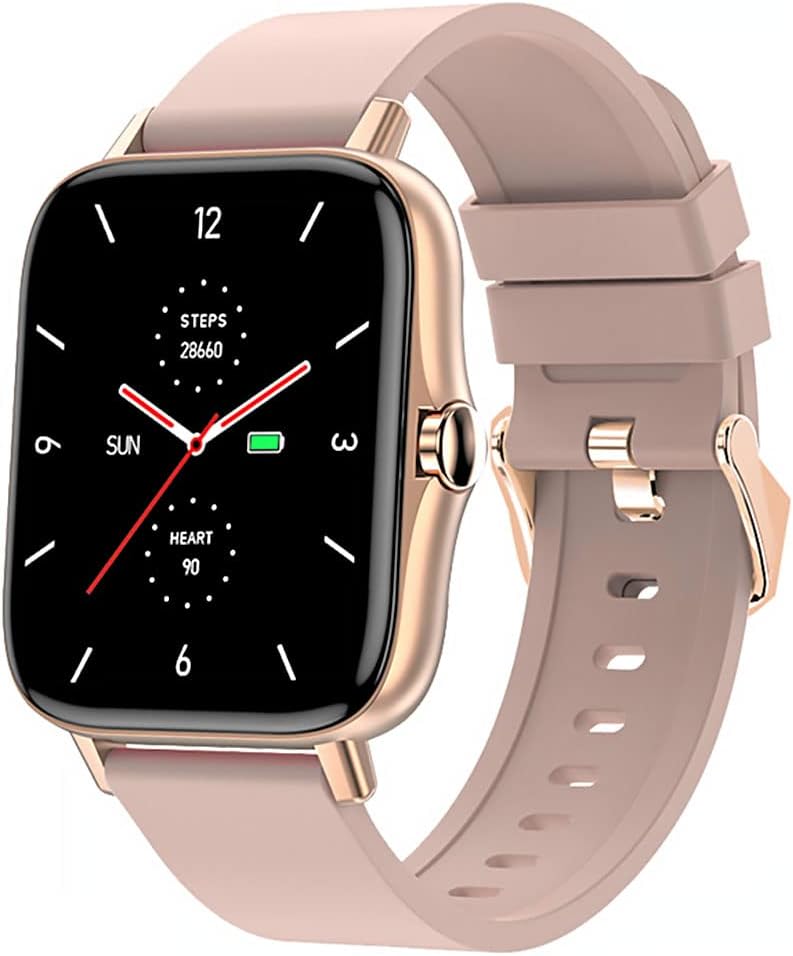
Image 1: Maxcom Fit FW55 Aurum Pro Smartwatch with a pink silicone band. The watch face displays steps, heart rate, and time.
3. ترتیب کول
۲.۱. د سمارټ واچ چارج کول
Before initial use, fully charge your Maxcom Fit FW55 Aurum Pro Smartwatch. Connect the provided charging cable to the charging port on the back of the smartwatch and plug the other end into a standard USB power adapter (not included) or a computer's USB port. The watch display will indicate charging status.
- ډاډ ترلاسه کړئ چې د چارج کولو پنونه پاک دي او د ساعت د چارج کولو اړیکو سره په سمه توګه سمون لري.
- بشپړ چارج معمولا شاوخوا ۱.۵ ساعته وخت نیسي.
۳.۳. ستاسو د سمارټ فون سره جوړه کول
To unlock the full functionality of your smartwatch, you need to pair it with your smartphone via Bluetooth.
- اپلیکیشن ډاونلوډ کړئ: لټون the official Maxcom Fit application in your smartphone's app store (iOS App Store or Google Play Store) and install it.
- بلوتوث فعال کړئ: ډاډ ترلاسه کړئ چې ستاسو په سمارټ فون کې بلوتوټ فعال دی.
- اپلیکیشن خلاص کړئ: Launch the Maxcom Fit application on your smartphone.
- وسیله اضافه کړئ: Follow the in-app instructions to add a new device. Select "FW55 Aurum Pro" from the list of available devices.
- جوړه کول تایید کړئ: A pairing request may appear on both your smartphone and the smartwatch. Confirm the pairing on both devices.
Once successfully paired, the smartwatch will synchronize data with your phone, and you can customize settings through the app.
۴. د سمارټ واچ چلول
4.1. بریښنا فعال/بند
- پاور آن: Press and hold the side button for a few seconds until the Maxcom logo appears.
- بندول: From the watch face, swipe down to access quick settings, or navigate to the 'Settings' menu. Select 'Power Off' and confirm. Alternatively, press and hold the side button and select 'Power Off'.
4.2. بنسټیز نیویګیشن
- ټچ سکرین: The FW55 Aurum Pro features a 1.7-inch touch screen for intuitive interaction.
- پورته / ښکته سوائپ: Scroll through notifications, menus, or quick settings.
- کیڼ/ښي خوا ته سوپ کړئ: Access different widgets or main functions (e.g., heart rate, activity data).
- ټایپ: یو توکي غوره کړئ یا یو عمل تایید کړئ.
- د غاړې تڼۍ: Press to return to the watch face or wake the screen. A long press may access power options.
4.3. کلیدي ځانګړتیاوې
The Maxcom Fit FW55 Aurum Pro Smartwatch offers a range of features to support your daily activities and health monitoring:
- د فعالیت تعقیب: اخیستل شوي ګامونه، پوښل شوي واټن، او سوځیدلي کالوري څاري.
- د زړه ضربان څارنه: د زړه د ضربان په اړه په ریښتیني وخت کې معلومات چمتو کوي.
- د خوب څارنه: د خوب نمونې او کیفیت تعقیبوي.
- خبرتیاوې: ستاسو د جوړې شوي سمارټ فون څخه د زنګونو، پیغامونو او اپلیکیشن خبرتیاو لپاره خبرتیاوې ترلاسه کوي.
- GPS: د بیروني فعالیتونو دقیق تعقیب لپاره مدغم GPS.
- د اصلاح وړ لید مخونه: Personalize your watch face through the companion app.

Image 2: Maxcom Fit FW55 Aurum Pro Smartwatch featuring a gold metal mesh band. The watch face displays digital time, steps, and heart rate.
5. ساتنه
Proper care and maintenance will extend the lifespan of your smartwatch.
- پاکول: Regularly wipe the watch screen and body with a soft, dry, lint-free cloth. For stubborn dirt, slightly dampټوکر د اوبو سره ومینځئ. د سختو کیمیاوي موادو یا خړوبونکو موادو کارولو څخه ډډه وکړئ.
- د پټو ساتنه: Clean the watch strap according to its material. Silicone straps can be washed with mild soap and water. Metal straps may require specific cleaning agents.
- د سختو شرایطو څخه ډډه وکړئ: Do not expose the smartwatch to extreme temperatures, direct sunlight for prolonged periods, or corrosive liquids.
- د اوبو مقاومت: While the watch may have some water resistance, it is not suitable for diving or high-pressure water activities. Refer to the product specifications for detailed water resistance ratings.
6. ستونزه حل کول
If you encounter issues with your Maxcom Fit FW55 Aurum Pro Smartwatch, try the following solutions:
- ساعت نه چالانېږي: ډاډ ترلاسه کړئ چې ساعت په بشپړه توګه چارج شوی دی. لږترلږه د 30 دقیقو لپاره یې چارجر سره وصل کړئ.
- د سمارټ فون سره جوړه نشي کیدی:
- ډاډ ترلاسه کړئ چې ستاسو په تلیفون او ساعت کې بلوتوټ فعال دی.
- ډاډ ترلاسه کړئ چې ساعت ستاسو د تلیفون د بلوتوث رینج دننه دی.
- خپل تلیفون او سمارټ واچ دواړه بیا پیل کړئ.
- د اپلیکیشن له لارې وسیله جلا او بیا جوړه کولو هڅه وکړئ.
- ناسم معلومات (ګامونه، د زړه ضربان):
- ډاډ ترلاسه کړئ چې ساعت ستاسو په لاس کې په کلکه اغوستل شوی وي، شاوخوا د یوې ګوتې په اندازه ستاسو د لاس د هډوکي څخه پورته.
- د ساعت په شا سینسر پاک کړئ.
- د ملګري اپلیکیشن وروستۍ نسخې ته تازه کړئ.
- خبرتیاوې نه دي ترلاسه شوي:
- Check notification settings in the Maxcom Fit app.
- ډاډ ترلاسه کړئ چې ستاسو د تلیفون د خبرتیا اجازه اپلیکیشن ته ورکړل شوې ده.
- Verify that the watch is successfully paired and connected to your phone.
If problems persist, consult the Maxcom support webسایټ یا د پیرودونکي خدمت سره اړیکه ونیسئ.
7. مشخصات
Below are the technical specifications for the Maxcom Fit FW55 Aurum Pro Smartwatch:
| فیچر | تفصیل |
|---|---|
| برانډ | Maxcom |
| د ماډل شمیره | FW55 Aurum Pro |
| د سکرین اندازه | ۷۸۷ انچه |
| د ارتباط ټیکنالوژي | بلوتوث |
| د بې سیمه مواصلاتو معیار | بلوتوث |
| مطابقت لرونکې وسیلې | سمارټ فون |
| GPS | مدغم شوی GPS |
| شکل | مربع |
| هدف لیدونکي | Adult Unisex |
| شاملې برخې | چارجر |

انځور 3: مخکی view of the Maxcom Fit FW55 Aurum Pro Smartwatch with a pink silicone band, highlighting the square display.
8. تضمین او ملاتړ
For warranty information and customer support, please refer to the documentation included with your purchase or visit the official Maxcom webسایټ. د تضمین ادعاوو لپاره د پیرود ثبوت وساتئ.
د تخنیکي مرستې یا نورو پوښتنو لپاره، مهرباني وکړئ د مکس کام پیرودونکي خدماتو سره د دوی د رسمي چینلونو له لارې اړیکه ونیسئ.


